
HOMCOM ES83A-068V81WT0731
HOMCOM ES83A-068V81WT0731 Kitchen Pantry Cabinet User Manual
Model: ES83A-068V81WT0731
1. Introduction
Thank you for purchasing the HOMCOM Kitchen Pantry Cabinet. This manual provides essential information for the safe assembly, operation, and maintenance of your new furniture. Please read these instructions carefully before beginning assembly and retain them for future reference.
Safety Information
WARNING: To prevent tipping, this furniture must be permanently fixed to the wall using the provided anti-tip device. Failure to do so can result in serious injury or death.
- Always follow assembly instructions precisely.
- Ensure all parts are present and undamaged before assembly.
- Do not allow children to climb on or play with the cabinet.
- Place the cabinet on a flat, stable surface.
- Distribute weight evenly across shelves and drawers.
2. Components and Parts List
Before assembly, verify that all components listed below are included in your package. If any parts are missing or damaged, please contact customer service.
The HOMCOM Kitchen Pantry Cabinet consists of:
- Upper cabinet section with three glass doors and adjustable shelves.
- Open countertop area suitable for appliances like microwaves, with a cable management hole.
- Two central drawers for smaller items.
- Lower cabinet section with three solid doors and adjustable shelves.
- Anti-tip safety hardware.
- Assembly hardware (screws, dowels, hinges, handles).

Figure 2.1: Front view of the assembled HOMCOM Kitchen Pantry Cabinet.
3. Setup and Assembly
Assembly is required for this product. It is recommended to have two people for assembly. Please follow the step-by-step instructions provided in the separate assembly manual included in your package. Ensure you have the necessary tools (e.g., screwdriver, hammer).
Key Assembly Steps:
- Unpack and Identify Parts: Lay out all components on a clean, soft surface to prevent scratches. Refer to the parts list to ensure everything is present.
- Assemble Base Frame: Construct the base of the cabinet first, ensuring all connections are secure.
- Install Lower Cabinet Sections: Attach side panels, shelves, and the back panel for the lower section.
- Assemble Drawers: Construct the two drawers and install their runners.
- Install Countertop: Secure the open countertop section, ensuring the cable management hole is correctly oriented.
- Install Upper Cabinet Sections: Attach side panels, shelves, and the back panel for the upper section.
- Attach Doors and Hinges: Install all six doors (three glass, three solid) using the provided hinges.
- Adjust Hinges: Use the adjustable hinges to ensure doors are aligned and close properly. Refer to Figure 3.1 for hinge adjustment details.
- Install Handles: Attach all door and drawer handles.
- Secure Anti-Tip Device: This is a critical safety step. Attach the anti-tip hardware to the top rear of the cabinet and secure it firmly to a wall stud or appropriate wall anchor. See Figure 3.2.

Figure 3.1: Diagram illustrating how to adjust cabinet hinges for proper door alignment (up/down, front/back, left/right).

Figure 3.2: Illustration of the anti-tip safety system installation, showing how to secure the cabinet to the wall.
4. Operation and Usage
This HOMCOM Kitchen Pantry Cabinet is designed to provide versatile storage for your kitchen or dining area.
Storage Capacity:
- Upper Glass Cabinets: Ideal for displaying dishes, glassware, or storing dry goods.
- Open Countertop: Perfect for placing small appliances such as a microwave, coffee maker, or toaster. The integrated cable management hole helps keep cords tidy.
- Drawers: Suitable for storing cutlery, napkins, or other small kitchen essentials.
- Lower Solid Cabinets: Provides ample space for pots, pans, larger dishes, or pantry items.
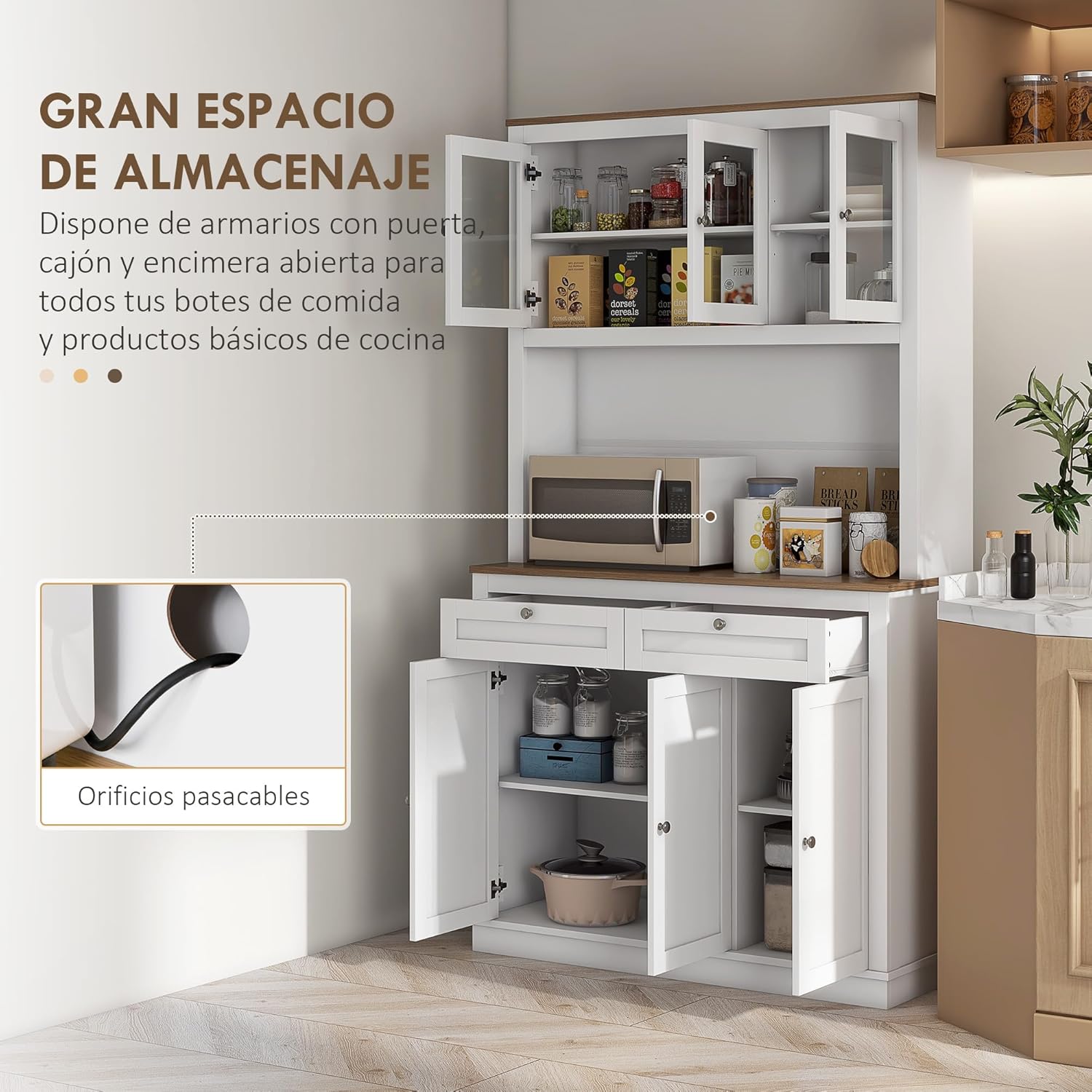
Figure 4.1: The cabinet's various storage compartments, including the open countertop with a cable management hole.
Adjustable Shelves:
Both the upper and lower cabinet sections feature adjustable shelves. This allows you to customize the storage space to accommodate items of various heights, such as tall jars or pasta containers.
- To adjust a shelf, carefully remove it from its current position.
- Relocate the shelf supports to the desired height.
- Place the shelf back onto the supports, ensuring it is level and secure.
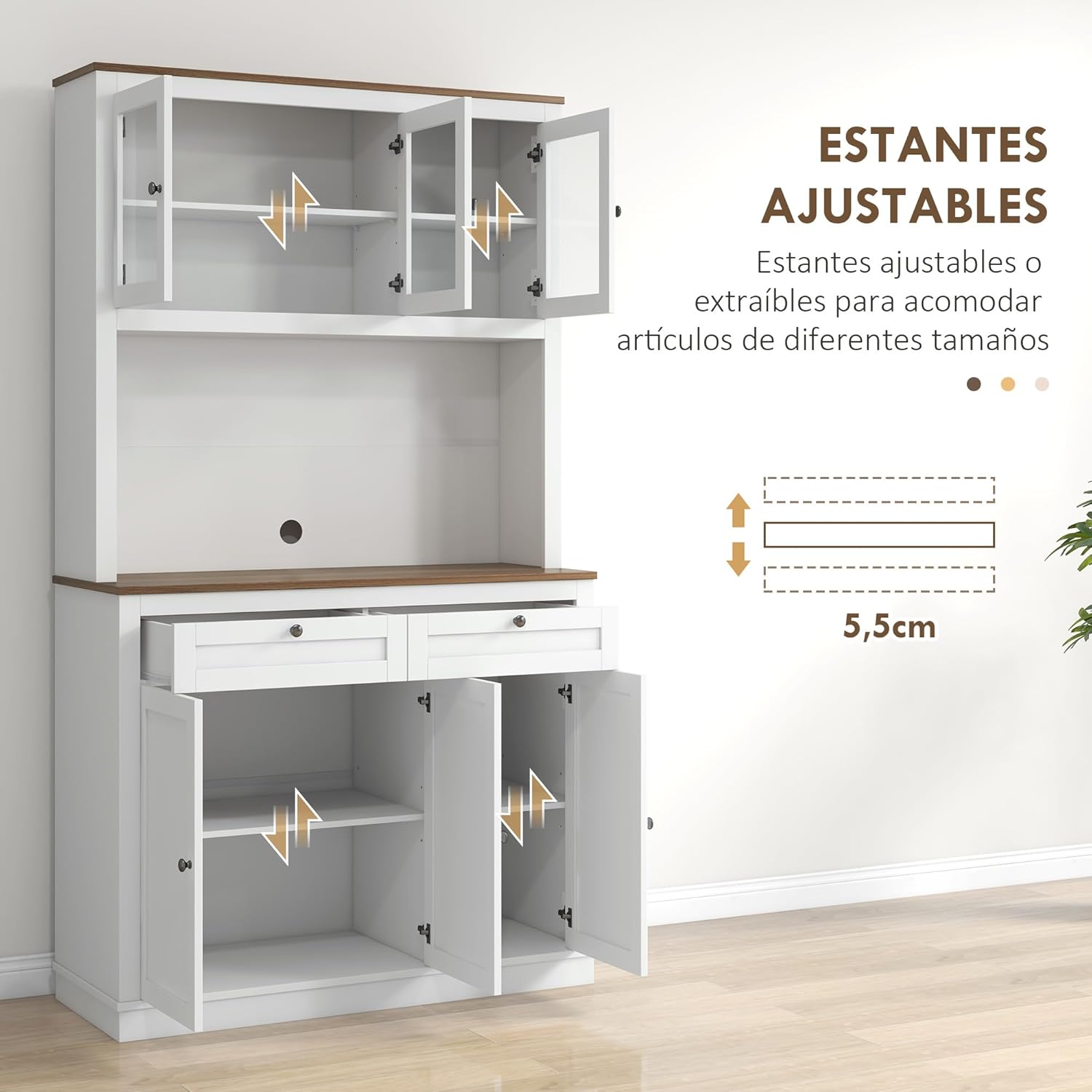
Figure 4.2: Illustration demonstrating the adjustable shelf feature, allowing for flexible storage configurations.
5. Maintenance and Care
Proper care will extend the life and appearance of your HOMCOM Kitchen Pantry Cabinet.
- Cleaning: Wipe surfaces with a soft, damp cloth. Avoid abrasive cleaners or harsh chemicals, as these can damage the finish.
- Spills: Clean up spills immediately to prevent staining or damage to the wood.
- Hardware: Periodically check all screws and fasteners to ensure they are tight. Retighten if necessary.
- Sunlight: Avoid prolonged exposure to direct sunlight, which can cause fading or discoloration.
- Moisture: Keep the cabinet away from excessive moisture or humidity.
6. Troubleshooting
If you encounter any issues with your cabinet, refer to the following common problems and solutions:
| Problem | Possible Cause | Solution |
|---|---|---|
| Doors are misaligned or do not close properly. | Hinges are not adjusted correctly. | Adjust the hinges using a screwdriver. Refer to the hinge adjustment diagram in the assembly section. |
| Cabinet feels wobbly or unstable. | Screws are loose; anti-tip device not installed or secured. | Ensure all assembly screws are tightened. Verify the anti-tip device is correctly installed and firmly anchored to the wall. |
| Drawers do not slide smoothly. | Drawer runners are misaligned or damaged. | Check the installation of the drawer runners. Ensure they are parallel and securely attached. Lubricate runners if necessary. |
| Missing parts during assembly. | Packaging error. | Do not proceed with assembly. Contact HOMCOM customer service immediately with your product model and a list of missing parts. |
7. Specifications
Detailed specifications for the HOMCOM Kitchen Pantry Cabinet:
- Brand: HOMCOM
- Model Number: ES83A-068V81WT0731
- Color: White
- Overall Dimensions (LxWxH): 100 cm x 40 cm x 180 cm (approximately 39.4 in x 15.7 in x 70.9 in)
- Product Weight: 53 kg (approximately 116.8 lbs)
- Maximum Supported Weight (Total): 137 kg (approximately 302 lbs)
- Maximum Supported Weight (Countertop): 25 kg (approximately 55 lbs)
- Maximum Supported Weight (Large Cabinet): 12 kg (approximately 26.5 lbs)
- Maximum Supported Weight (Small Cabinet): 8 kg (approximately 17.6 lbs)
- Maximum Supported Weight (Shelf): 4 kg (approximately 8.8 lbs)
- Maximum Supported Weight (Drawer): 4 kg (approximately 8.8 lbs)
- Special Features: Adjustable shelves, easy to clean, anti-tip system.
- Mounting Type: Floor Mount
- Room Type: Kitchen
- Components Included: Drawers, Shelves, Doors

Figure 7.1: Detailed dimensions of the cabinet, including individual compartment measurements.
8. Warranty and Customer Support
For warranty information, please refer to the documentation provided with your purchase or contact the retailer directly. HOMCOM is committed to customer satisfaction.
If you have any questions, require assistance with assembly, or need to report missing/damaged parts, please contact HOMCOM customer support through their official website or the retailer where you purchased the product. Please have your model number (ES83A-068V81WT0731) and purchase details ready.
Ask a question about this manual
Ask about setup, troubleshooting, compatibility, parts, safety, or missing instructions. Manuals+ will review the question and use this page’s manual context to help answer it.