
Introduction
This manual provides comprehensive instructions for the installation, operation, and maintenance of your Losuudy 4-Channel Backup Camera Dash Cam System, Model L-C2W. This system is designed to enhance driving safety and convenience for large vehicles such as trucks, RVs, and trailers, featuring a 10-inch HD touch screen monitor with CarPlay and Android Auto compatibility, four HD1080P wired cameras, and DVR recording capabilities.

Figure 1: Losuudy 4-Channel Backup Camera Dash Cam System components, including the 10-inch monitor, four cameras, and wiring cables.
1. Setup and Installation
1.1 Package Contents
Verify that all items are present in your package:
- 10-inch IPS Touch Monitor (x1)
- AHD 1080P Backup Camera (x4)
- Car Charger (x1)
- 49ft Camera Cable (x1)
- 23ft Camera Cable (x3)
- 64GB SD Card (pre-installed or included)
1.2 Power Supply Options
The system supports DC 12V to 36V power input and offers two primary methods for power supply:
- Car Charger: Connect the provided car charger to your vehicle's cigarette lighter socket. This offers a quick and portable power solution.
- Hardwired to Ignition Switch (ACC): For a more integrated installation, connect the system directly to your vehicle's ignition switch (ACC) wiring. This ensures the system powers on and off with your vehicle.

Figure 2: Wiring diagram illustrating power supply options via car charger or ignition switch (ACC).
1.3 Camera Placement and Wiring
The system includes four HD1080P cameras designed for comprehensive vehicle coverage. The provided cables (one 49ft, three 23ft) are suitable for large vehicles. Plan your camera placement to achieve optimal viewing angles and route cables securely, avoiding moving parts and heat sources.
- Rear Camera (CH2): Typically uses the 49ft cable. This camera is crucial for reverse assistance and parking lines.
- Front, Left, Right Cameras (CH1, CH3, CH4): Use the 23ft cables. Position these to cover blind spots and provide a 360-degree view.
Ensure all cable connections are tight and waterproofed where exposed to the elements. The cameras are IP68-rated for water and dust resistance.

Figure 3: Illustration of 4-camera system coverage for large vehicles, providing 360-degree visibility.
2. Operating Instructions
2.1 Monitor Overview
The 10-inch IPS touch screen monitor serves as the central interface for your system. It features a 16:9 aspect ratio, 178° wide viewing angle, and responsive touch controls.

Figure 4: The 10-inch HD IPS Touch Screen Monitor displaying the user interface.
2.2 CarPlay and Android Auto
Connect your smartphone wirelessly via Bluetooth or Wi-Fi to access CarPlay or Android Auto. This allows for:
- Real-time Navigation: Utilize Google Maps, Waze, or other navigation apps directly on the monitor.
- Voice Control: Use Siri or Google Assistant for hands-free calls, music playback, and navigation commands.
- Media Playback: Stream music and other audio content.
- AirPlay & Android Cast: Mirror your smartphone screen to the monitor (requires phone connection).
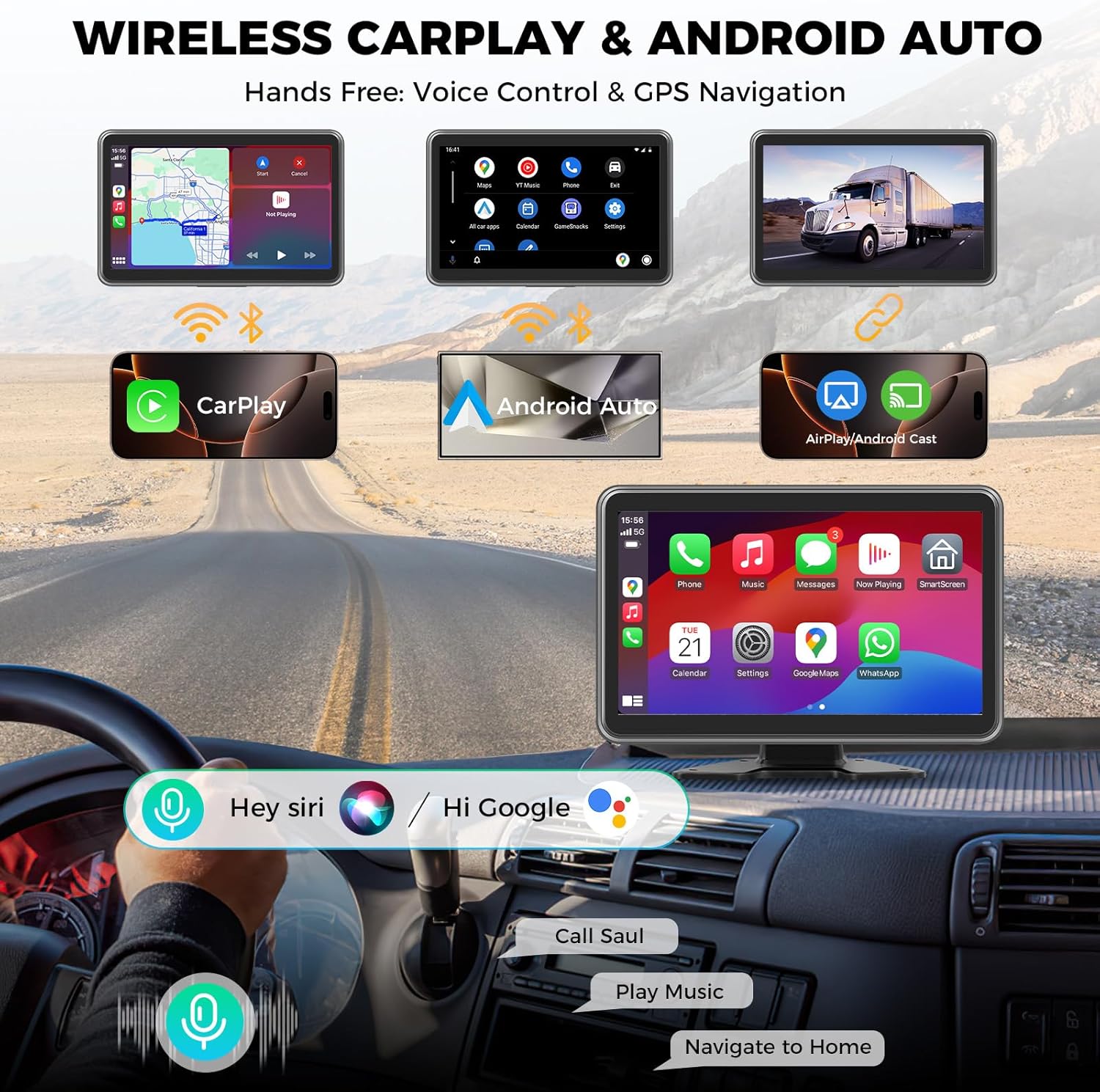
Figure 5: Display showing wireless CarPlay and Android Auto interfaces on the monitor.

Figure 6: Voice control demonstration with Siri and Google Assistant for hands-free operation.
2.3 DVR Recording and Playback
The system includes a 64GB SD card for continuous loop recording from all four cameras. The monitor supports quad-split screen viewing and playback of recorded footage.
- Loop Recording: Footage is continuously recorded, overwriting the oldest files when the SD card is full.
- Lock Video: Important footage can be manually locked to prevent overwriting.
- Playback: Access recorded videos directly from the monitor interface.
- Parking Lines: Customizable parking lines are available for the rear camera (CH2) to assist with reversing.

Figure 7: Monitor displaying quad-split screen view with loop recording indicator and playback options.
2.4 Audio Output
The monitor offers three audio output options:
- Built-in Speaker: For direct audio output from the monitor.
- Bluetooth: Connect to your vehicle's audio system via Bluetooth for enhanced sound.
- FM Radio: Transmit audio to your vehicle's FM radio by tuning to a specific frequency.

Figure 8: Visual representation of the three available audio output methods.
3. Maintenance
3.1 Cleaning
- Monitor: Use a soft, lint-free cloth to gently wipe the screen. For stubborn smudges, slightly dampen the cloth with water or a screen-cleaning solution. Avoid harsh chemicals.
- Cameras: Periodically clean the camera lenses with a soft cloth to ensure clear visibility. The IP68 rating means they can withstand water exposure, but gentle cleaning is recommended.
3.2 Cable and Connection Checks
Regularly inspect all wiring and connections for signs of wear, damage, or loose contacts. Secure any loose cables to prevent interference or disconnection during vehicle operation.
3.3 SD Card Management
The included 64GB SD card is essential for DVR recording. To maintain optimal performance:
- Format Regularly: Format the SD card every few months through the monitor's settings to prevent data corruption and ensure smooth recording.
- Replacement: If the SD card shows signs of degradation or error, replace it with a high-quality Class 10 or U3 microSD card.
4. Troubleshooting
| Problem | Possible Cause | Solution |
|---|---|---|
| Monitor does not power on. | No power supply; loose power connection. | Check car charger or ACC wiring connection. Ensure vehicle ignition is on if hardwired. Verify power source (12-36V). |
| No camera signal / Blank screen. | Loose camera cable connection; damaged cable; camera malfunction. | Check all camera cable connections to the monitor. Inspect cables for damage. Test individual cameras if possible. |
| Poor image quality / Blurry video. | Dirty camera lens; incorrect camera settings; low light conditions. | Clean camera lenses. Adjust brightness/contrast settings on the monitor. Ensure cameras are positioned correctly. |
| CarPlay/Android Auto not connecting. | Bluetooth/Wi-Fi issues; phone compatibility; incorrect settings. | Ensure Bluetooth and Wi-Fi are enabled on your phone and the monitor. Re-pair your phone. Check for phone OS updates. |
| DVR not recording. | SD card full or corrupted; loop recording disabled; faulty SD card. | Format the SD card via monitor settings. Ensure loop recording is enabled. Replace SD card if necessary. |
| Audio issues (no sound, distorted). | Incorrect audio output selected; Bluetooth connection issue; FM frequency interference. | Verify selected audio output (built-in speaker, Bluetooth, FM). Reconnect Bluetooth. Adjust FM frequency if using FM transmitter. |
5. Specifications
| Feature | Detail |
|---|---|
| Model Number | L-C2W |
| Screen Size | 10 Inches (IPS Touch Monitor) |
| Display Technology | LCD |
| Product Dimensions | 9.8"L x 3.3"W x 6.3"H |
| Item Weight | 7.7 pounds |
| Voltage | 12-36 Volts (DC) |
| Camera Resolution | AHD 1080P |
| Optical Sensor Technology | CMOS |
| Lens Type | Wide Angle |
| Real Angle of View | 130 Degrees (per camera) |
| Camera Rating | IP68 (Water and Dust Resistant) |
| Operating Temperature | -4°F to 139°F (-20°C to 59°C) |
| Connectivity Technologies | Bluetooth, Wi-Fi |
| Installation Type | Car Charger or Hardwired Ignition Switch |
| Compatible Devices | Truck, RV, Motorhome, Bus, Skid steer, Heavy duty truck, Garbage truck, Dump truck |
| What's in the Box | 10'' IPS Touch Monitor (x1), AHD 1080P Backup Camera (x4), Car Charger (x1), 49ft Cable (x1), 23ft Cable (x3), 64GB SD Card (x1) |
6. Warranty Information
The Losuudy 4-Channel Backup Camera Dash Cam System (Model L-C2W) is covered by a 24-month manufacturer's warranty from the date of purchase. This warranty covers defects in materials and workmanship under normal use. Please retain your proof of purchase for warranty claims.
The warranty does not cover damage caused by improper installation, accident, misuse, abuse, neglect, unauthorized modification, or natural disasters.
7. Customer Support
For any questions, technical assistance, or if you find any parts missing from your package, please contact Losuudy customer service. We are committed to providing 24-hour service and ensuring your complete satisfaction.
You can visit the official Losuudy store on Amazon for more information and support: Losuudy Store.