
Introduction
The Y&H RBL-10A Intelligent Solar Charge Controller is a multi-purpose charge and discharge controller designed for home photovoltaic systems, including home lighting. It automatically recognizes 12V and 24V lead-acid and gel batteries. This manual provides essential information for the safe and efficient operation of your solar charge controller.
Important Safety Information
WARNING: To prevent controller recognition errors and potential damage, the battery must be connected first. After connecting the battery, then connect the solar panel. An improper connection sequence can damage the controller.
- Ensure all connections are secure and correct polarity is observed.
- Do not attempt to repair or modify the controller yourself. Contact qualified personnel for service.
- Keep the controller away from water and corrosive environments.
- Ensure adequate ventilation around the controller to prevent overheating.
Product Features
- Built-in industrial micro-controller for reliable operation.
- LCD screen display for clear monitoring of system status.
- PWM (Pulse Width Modulation) charging mode for efficient battery charging.
- Dual USB ports (5V/3A) for charging external devices.
- Comprehensive protection features:
- Short-circuit protection
- Open-circuit protection
- Reverse polarity protection
- Over-load protection
- Dual MOSFET reverse current protection
- Adjustable charge/discharge control parameters.
- Settable operating modes for loads, including load timer settings.
- Automatic 12V/24V battery voltage recognition.
Setup and Connection
Follow these steps to connect your solar charge controller. Always connect the battery first, then the solar panel, and finally the load.
Connection Sequence:
- Connect the battery: Connect the battery to the charge regulator's battery terminals (plus and minus).
- Connect the photovoltaic module: Connect the solar panel to the regulator's solar panel terminals (plus and minus).
- Connect the load: Connect the consumer load to the charge regulator's load terminals (plus and minus).
NOTE: The reverse order applies when de-installing (disconnect load, then solar panel, then battery). An improper sequence order can damage the controller!
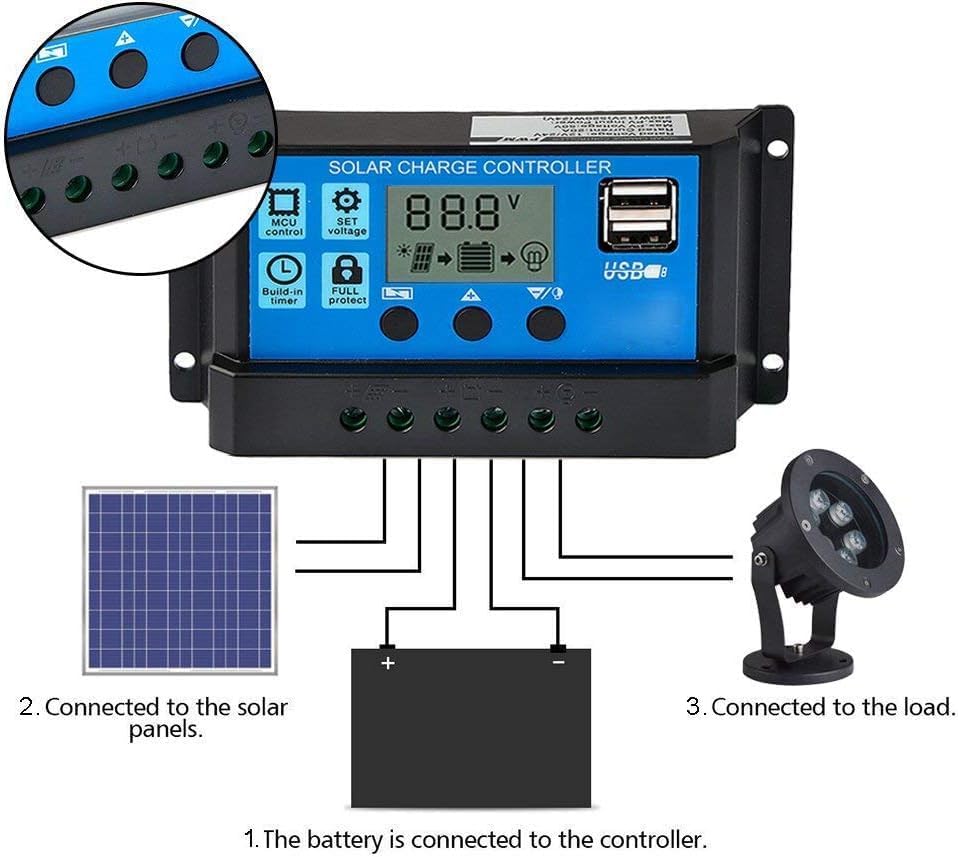
Figure 1: Connection diagram showing the battery, solar panel, and load connected to the solar charge controller. The battery is connected first, followed by the solar panels, and then the load.
Operating Instructions
LCD Display and Buttons:
The controller features an LCD display and three buttons for navigation and parameter adjustment.
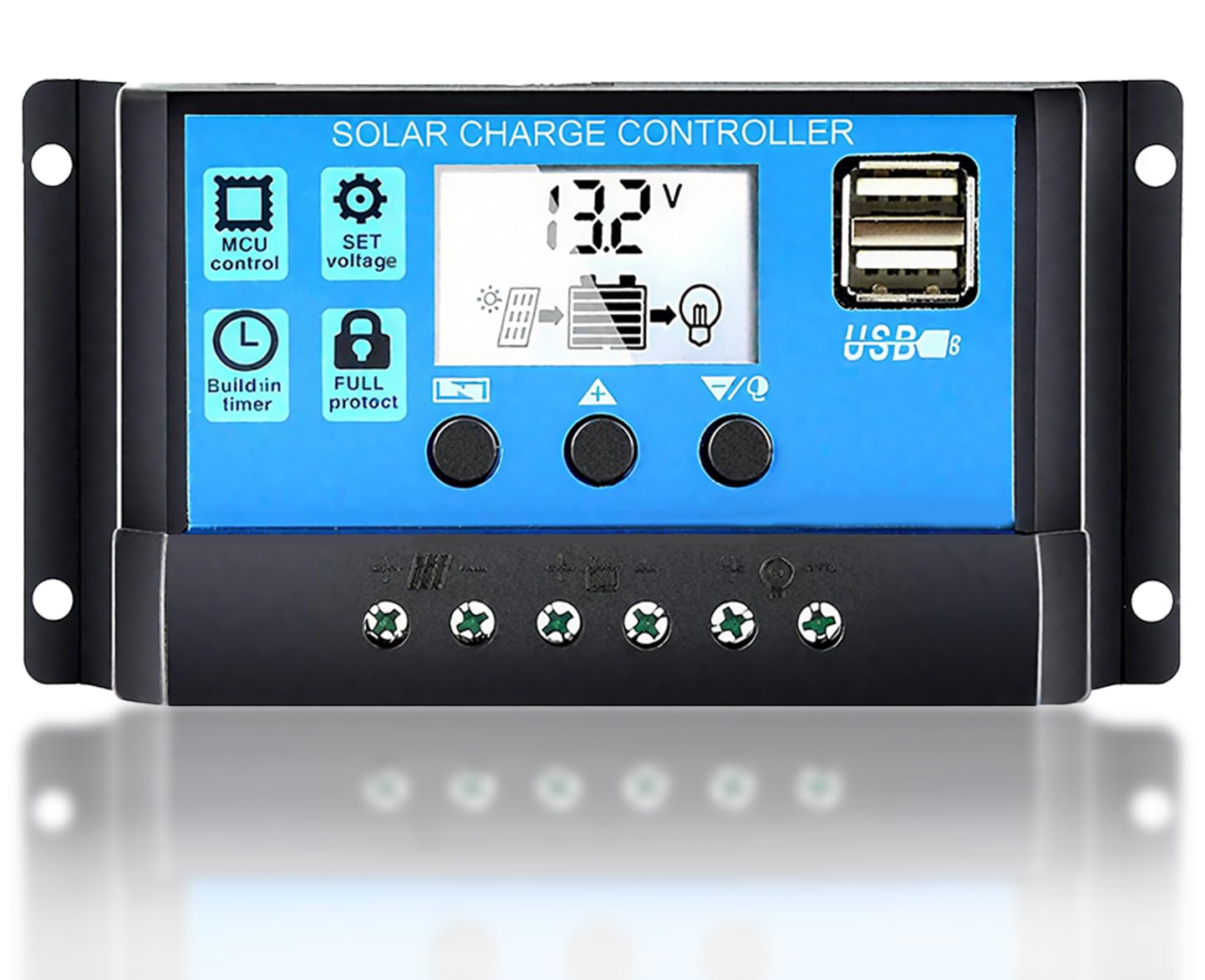
Figure 2: Overview of the solar charge controller's LCD display and button functions. The display shows voltage, charging status, and load status. Buttons include MENU, UP (Page Down/Manual), and DOWN (Page Up/Manual).
- MENU Button: Used to switch between different display interfaces or to enter/exit setting mode by long pressing.
- UP Button (Page Down / Manual): Press to increase a value during setting, or to navigate through display interfaces.
- DOWN Button (Page Up / Manual): Press to decrease a value during setting, or to navigate through display interfaces.
Browsing and Setting Parameters:
The LCD cycles through various display interfaces. You can browse these interfaces and adjust parameters as needed.
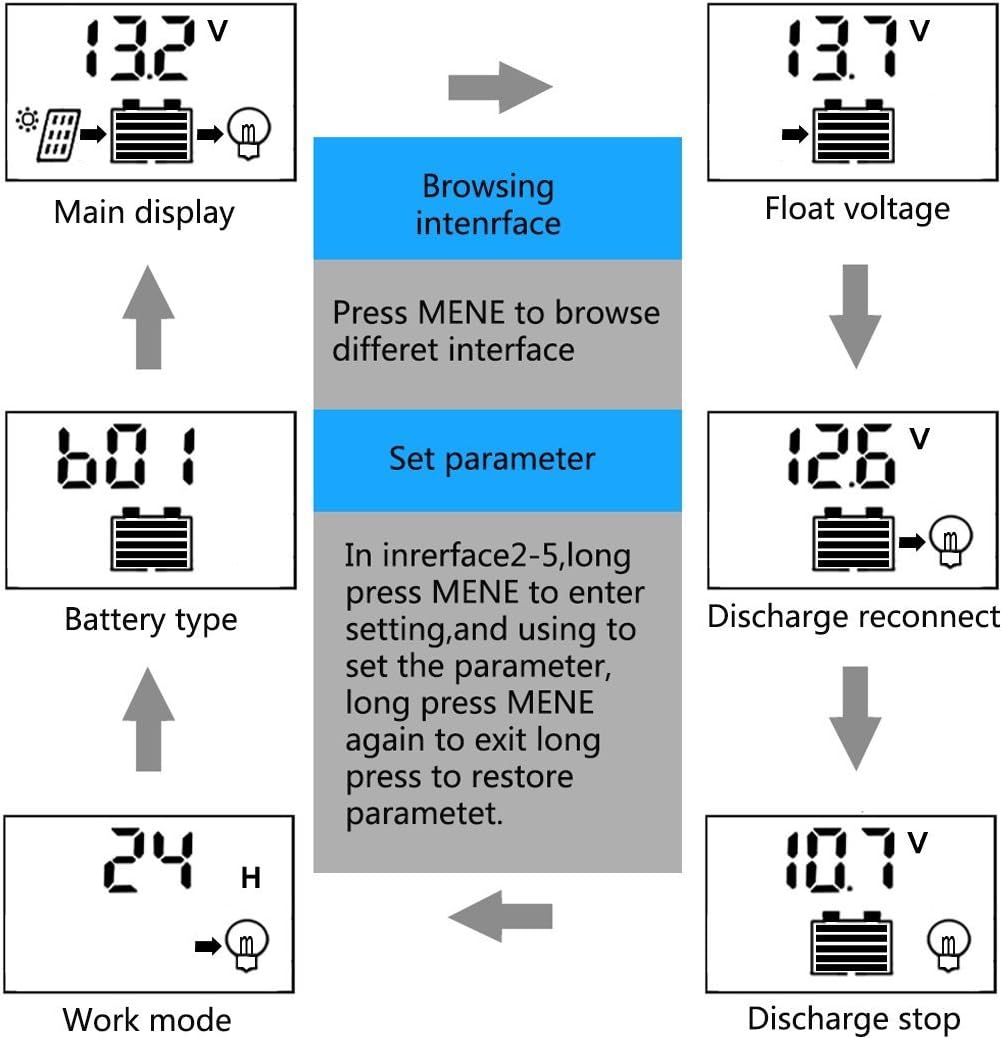
Figure 3: Flowchart illustrating how to browse different interfaces and set parameters on the LCD display. Press the MENU button to navigate. Long press MENU to enter setting mode for interfaces 2-5, and long press again to exit and save settings.
- Browsing Interfaces: Press the MENU button to cycle through the main display, float voltage, discharge reconnect, discharge stop, work mode, and battery type interfaces.
- Setting Parameters: In interfaces 2-5 (Float voltage, Discharge reconnect, Discharge stop, Work mode, Battery type), long press the MENU button to enter setting mode. Use the UP and DOWN buttons to adjust the value. Long press MENU again to exit setting mode and save the new parameter.
USB Output:
The controller includes dual USB ports for charging 5V devices.

Figure 4: Close-up view of the dual USB ports on the solar charge controller, providing 5V/3A output for charging mobile phones and other USB devices.
Technical Specifications
General Parameters (RBL-10A):
| Parameter | Value |
|---|---|
| Battery Voltage | 12V/24V auto |
| Charge Current | 10A |
| Discharge Current | 10A |
| Max Solar Input | <50V |
| Float Charge | 13.7V (default, adjustable) |
| Discharge Stop | 10.7V (default, adjustable) |
| Discharge Reconnect | 12.6V (default, adjustable) |
| USB Output | 5V/3A |
| Self-consume | <10mA |
| Operating Temperature | -35~+60 °C |
Battery Type Equalization Voltages:
- B01 Sealed Lead-Acid: 14.4V
- B02 Gel Battery: 14.2V
- B03 Flooded Lead-Acid: 14.6V
Adjustable Controller Parameters:
- Floating Charge Voltage (HVD): 13.3V-15V
- Recovery After Under Voltage (LVD): 11V-13.5V
- Under Voltage Protection (RVD): 9V-12.3V
- Load Mode: 24 hours, 1-23 hours, 0 hour (Dusk to Dawn)
- Battery Type: 14.4V (Lead-acid), 12.6V (Li(NiCoMn)O2), 14.6V (LifePO4) - Note: The product description mentions these battery types for voltage settings, but the equalization section only lists B01, B02, B03. Please refer to the controller's display for specific battery type settings.
Physical Dimensions:

Figure 5: Dimensions of the solar charge controller: approximately 15cm (5.9in) length, 7.8cm (3.1in) width, and 3cm (1.2in) depth.
Model Comparison (RBL Series):
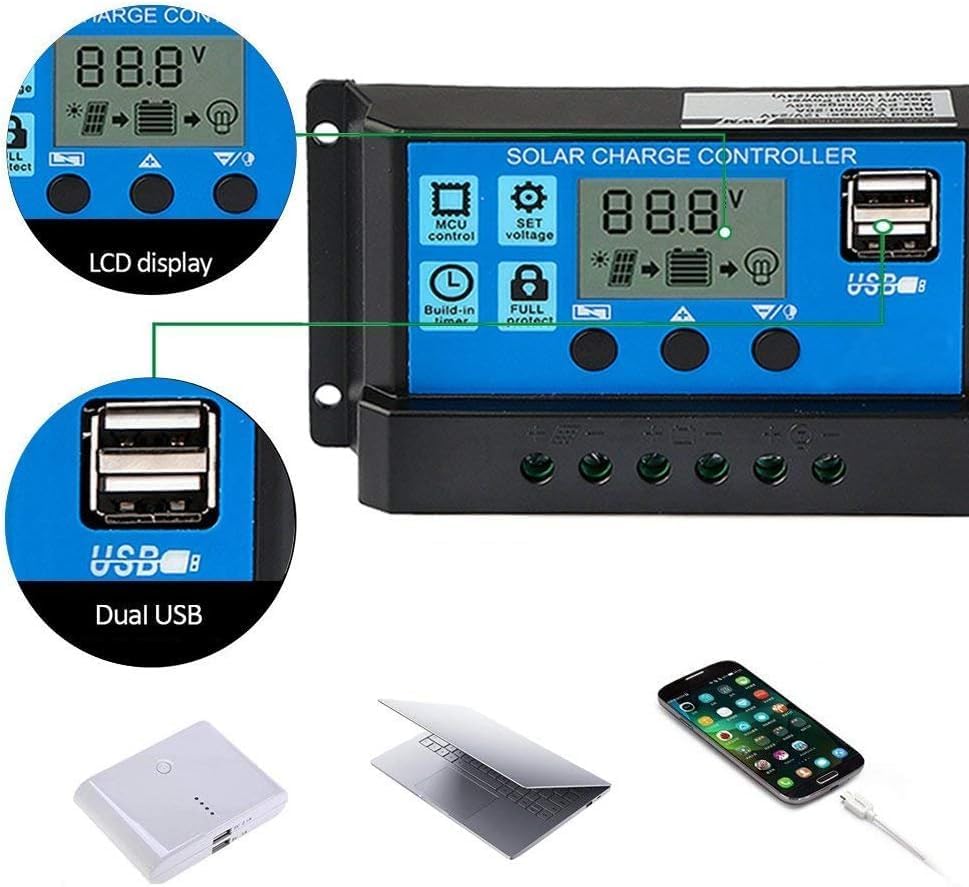
Figure 6: Comparison table for RBL series models (RBL10, RBL20, RBL30) showing differences in charge/discharge current and common specifications like battery voltage, float voltage, and USB output.
Maintenance
The Y&H RBL-10A solar charge controller requires minimal maintenance. To ensure optimal performance and longevity:
- Periodically check all wiring connections to ensure they are tight and free from corrosion.
- Keep the controller clean and free from dust and debris. Use a dry cloth for cleaning.
- Ensure the controller is installed in a well-ventilated area to prevent overheating.
- Inspect for any signs of damage or wear on the casing or terminals.
Troubleshooting
If you encounter issues with your solar charge controller, consider the following common troubleshooting steps:
- No Display/Power: Check battery connections and ensure the battery has sufficient charge. Verify correct polarity.
- Battery Not Charging: Ensure solar panel connections are correct and the panel is receiving adequate sunlight. Check for open circuits or short circuits in the solar panel wiring. Verify the charge current setting.
- Load Not Working: Check load connections and ensure the load is not exceeding the controller's rated current. Verify the load mode settings (e.g., 24 hours, timer). Check for short circuits in the load wiring.
- Error Codes: If the LCD displays an error code, refer to the specific error code section (if available in a more detailed manual) or contact customer support.
- Incorrect Voltage Readings: Ensure all connections are secure and there is no corrosion.
If problems persist after attempting these steps, please contact customer support.
Warranty and Support
For warranty information or technical support, please refer to the product packaging or contact your retailer. Keep your purchase receipt as proof of purchase.