
Omron BP5255
OMRON Silver Upper Arm Blood Pressure Monitor
Model: BP5255
Brand: Omron
1. Introduction
The OMRON Silver Blood Pressure Monitor is designed for accurate and convenient blood pressure measurement at home. It features a large, easy-to-read LCD screen and a pre-formed Easy-Wrap ComFit cuff for a secure and comfortable fit. This device helps users track their blood pressure trends and can detect irregular heartbeats and body movements during readings.

Image: The OMRON Silver Blood Pressure Monitor, showing the main unit, arm cuff, and a smartphone displaying the OMRON Connect app interface.
Key Features:
- Easy-to-Read Display and Symbols: Large LCD screen with clear symbols and descriptions for easy understanding of results.
- Irregular Heartbeat & Movement Detection: Alerts the user to irregular heartbeats or excessive body movement during measurement, aiding in accuracy.
- Wireless Bluetooth Convenience: Seamlessly syncs with the free OMRON Connect app for unlimited reading storage, trend tracking, and data sharing.
- Easy Storage & Comfortable Cuff: Includes a storage case and a soft, wide-range D-ring cuff (fits 9”–17” arms) designed for optimal fit and comfort.
- Advanced Accuracy Technology: Utilizes OMRON's proprietary technology for consistent and precise blood pressure readings.
2. Safety Information
This device is intended for adult use only. It is not intended for use when pregnant, in ambulatory environments, or in aircraft. Always consult with a healthcare professional for diagnosis and treatment of any health condition.
To help ensure an accurate reading, please follow these directions:
- Avoid taking measurements during stressful times.
- Measurements should be taken in a quiet place.
- It is important to take measurements at the same times each day, preferably in the morning and evening.
- A single measurement does not provide an accurate indication of your true blood pressure. It is recommended you take and record several readings over a period of time.
3. What's in the Box?

Image: Contents of the OMRON Silver Blood Pressure Monitor packaging, including the monitor unit, cuff, and storage case.
- Blood Pressure Monitor Unit
- Easy-Wrap ComFit Cuff (fits arms 9”–17” in circumference)
- Storage Case
- Instruction Manual (this document)
- Quick Start Guide
- 4 AA Batteries (included)
4. Setup
4.1 Battery Installation
The OMRON Silver Blood Pressure Monitor operates on 4 AA batteries, which are included. To install or replace batteries, open the battery compartment cover on the back of the monitor. Insert the batteries according to the polarity indicators (+/-) inside the compartment. Close the cover securely.
4.2 Cuff Connection
Connect the air plug of the Easy-Wrap ComFit cuff firmly into the air jack located on the side of the main monitor unit. Ensure a secure connection to prevent air leakage during measurement.
4.3 OMRON Connect App Setup
For wireless data transfer and advanced tracking features, download the free OMRON Connect app from your smartphone's app store. Follow the in-app instructions to pair your OMRON Silver Blood Pressure Monitor via Bluetooth. This allows you to store unlimited readings, track trends, and easily share your health data with your doctor.

Image: A person interacting with the OMRON Connect app on a smartphone while using the blood pressure monitor, demonstrating wireless convenience.
5. Operating Instructions
5.1 Proper Cuff Placement
Before taking a measurement, ensure you are in a quiet environment and have rested for at least 5-15 minutes. Sit in a chair with your back straight and your feet flat on the floor. Place the cuff on your left upper arm, approximately 1-2 cm (0.5-1 inch) above your elbow crease. The air tube should run along the inside of your arm, aligned with your middle finger. The cuff should be snug but not too tight; you should be able to insert one finger between the cuff and your arm.
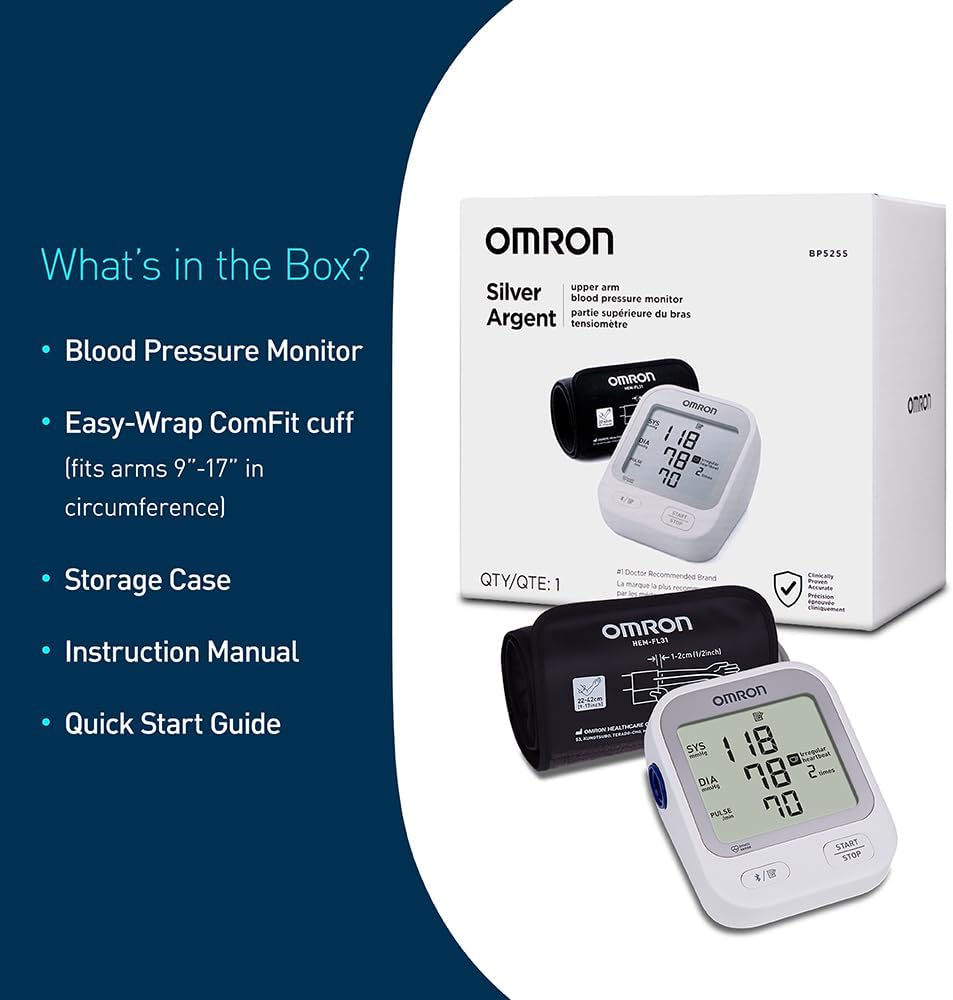
Image: A person demonstrating the proper application of the Easy-Wrap ComFit cuff on their upper arm.
5.2 Taking a Measurement
Rest your arm on a table or flat surface so that the cuff is at heart level. Keep your palm facing upward. Press the "START/STOP" button on the monitor. The cuff will begin to inflate automatically. Remain still and do not talk or move during the measurement. The monitor will display your Systolic (SYS), Diastolic (DIA), and Pulse readings once the measurement is complete.

Image: A close-up view of the OMRON blood pressure monitor's large LCD screen, highlighting its easy-to-read display and symbols.
Video: Official OMRON guide on "How to Take Your Blood Pressure" correctly for accurate readings.
5.3 Understanding Your Results
The monitor will display your Systolic (SYS) and Diastolic (DIA) blood pressure readings, along with your Pulse rate. If an irregular heartbeat or body movement is detected during the measurement, corresponding symbols will appear on the display. Consult your healthcare provider for interpretation of your readings and any concerns.

Image: The OMRON monitor display indicating detection of irregular heartbeat and body movement during a reading.
6. Maintenance
To ensure the longevity and accuracy of your OMRON Blood Pressure Monitor, follow these maintenance guidelines:
- Cleaning: Wipe the monitor and cuff with a soft, dry cloth. Do not use abrasive or volatile cleaners.
- Storage: Store the device and cuff in the provided storage case in a clean, dry place, away from direct sunlight, extreme temperatures, and humidity.
- Battery Care: Remove batteries if the unit will not be used for an extended period to prevent leakage.
- Inspection: Regularly check the cuff and air tube for any signs of damage or wear.
7. Troubleshooting
If you encounter issues with your OMRON Blood Pressure Monitor, refer to the following common solutions. For more detailed troubleshooting, please consult the full Instructions for Use (IFU) PDF linked in the Warranty & Support section.
- "E" or Error Message: This often indicates an issue with cuff placement, excessive movement during measurement, or an irregular heartbeat. Re-apply the cuff correctly, remain still, and try again.
- Inconsistent Readings: Ensure proper resting period before measurement, correct cuff size and placement, and consistent measurement times. Avoid talking or moving.
- No Display/Power: Check battery installation and ensure batteries are not depleted. Replace with new batteries if necessary.
- Bluetooth Pairing Issues: Ensure Bluetooth is enabled on your smartphone and the monitor is within range. Follow the pairing instructions in the OMRON Connect app carefully.
8. Specifications
| Feature | Detail |
|---|---|
| Product Dimensions | 5.3 x 3.3 x 4.3 inches |
| Item Model Number | BP5255 |
| Batteries | 4 AA batteries required (included) |
| Manufacturer | Omron |
| Country of Origin | Vietnam |
| Item Weight | 1.55 Pounds |
| Display Type | LCD |
| Cuff Size | 9-17" (22-42 cm) |
| Included Components | Cuff, Tube, Pump, Case |
9. Warranty & Support
The OMRON Silver Upper Arm Blood Pressure Monitor is backed by a 2-year warranty, ensuring reliability and peace of mind.
For complete information, detailed instructions, and further support, please refer to the official Instructions for Use (IFU) PDF document:
Download Instructions for Use (IFU) PDF
You can also visit the official Omron Store for additional products and support:
Ask a question about this manual
Ask about setup, troubleshooting, compatibility, parts, safety, or missing instructions. Manuals+ will review the question and use this page’s manual context to help answer it.