
1. Introduction
This manual provides instructions for the proper use and maintenance of your NEBO MYCRO 250 Rechargeable Headlamp. Please read this manual thoroughly before operating the device to ensure safe and efficient use.

Image 1.1: Two NEBO MYCRO 250 Rechargeable Headlamps, showcasing their compact design.
2. Package Contents
Verify that all items listed below are included in your package:
- NEBO MYCRO 250 Headlamp (x2)
- Adjustable Head Strap (x2)
- Cap Clip (x2)
- USB Charging Cable (x2)
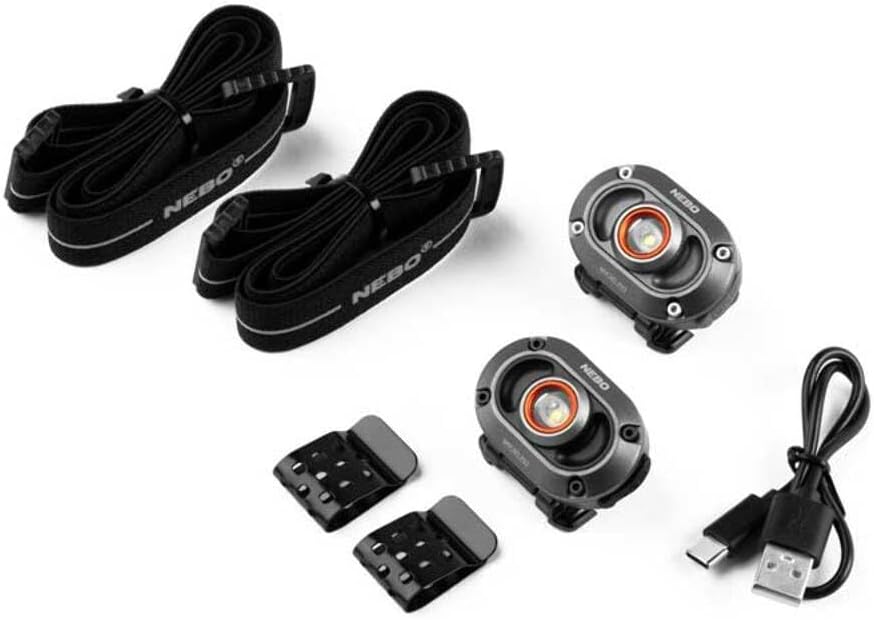
Image 2.1: Contents of the NEBO MYCRO 250 package, including two headlamps, head straps, cap clips, and USB charging cables.
3. Setup
3.1 Attaching the Head Strap
- Locate the two slots on the back of the headlamp unit.
- Thread each end of the adjustable head strap through these slots.
- Adjust the strap length for a comfortable and secure fit around your head.
3.2 Attaching the Cap Clip
- Align the cap clip with the mounting point on the back of the headlamp.
- Securely attach the clip to the headlamp.
- Slide the clip onto the brim of a cap or other suitable edge for hands-free use.

Image 3.1: The NEBO MYCRO 250 Headlamp securely clipped to the brim of a baseball cap, demonstrating its cap-compatible feature.
4. Operating Instructions
4.1 Power On/Off and Light Modes
The NEBO MYCRO 250 features 3 distinct light modes. To cycle through these modes:
- Press the power button once to turn the headlamp ON to the default mode.
- Press the power button repeatedly to cycle through the available light modes.
- To turn the headlamp OFF, press the power button after cycling through all modes, or hold the button down for approximately 2 seconds.
4.2 Charging the Headlamp
The NEBO MYCRO 250 is rechargeable via a USB-C port.
- Locate the USB-C charging port on the side of the headlamp.
- Connect the included USB charging cable to the headlamp's USB-C port.
- Connect the other end of the USB cable to a powered USB port (e.g., computer, wall adapter).
- An indicator light will show the charging status. Refer to the product packaging for specific indicator light behavior (e.g., red for charging, green for fully charged).
- Once fully charged, disconnect the charging cable.

Image 4.1: The NEBO MYCRO 250 Headlamp being charged via its USB-C port, illustrating the rechargeable feature.
5. Features
- Lightweight Design: The MYCRO 250 features a small form factor and ultra-lightweight construction, making it comfortable for extended wear and easy to carry.
- Water-Resistant: Designed to withstand exposure to water, the headlamp is suitable for use in various weather conditions, including rain and humid environments.
- Hands-Free Lighting: The adjustable head strap and cap clip options provide versatile hands-free illumination, ideal for tasks requiring both hands.

Image 5.1: A NEBO MYCRO 250 Headlamp held in a person's hand, highlighting its compact and lightweight design.

Image 5.2: A man wearing the NEBO MYCRO 250 Headlamp on his forehead, illustrating its hands-free functionality.
6. Maintenance
6.1 Cleaning
To clean the headlamp, wipe it with a soft, damp cloth. Do not use abrasive cleaners or solvents, as these may damage the finish or internal components.
6.2 Storage
Store the headlamp in a cool, dry place away from direct sunlight and extreme temperatures. If storing for an extended period, ensure the battery is partially charged (around 50%) to prolong its lifespan.
6.3 Battery Care
Recharge the battery regularly, even if the headlamp is not in frequent use, to maintain battery health. Avoid fully discharging the battery for prolonged periods.
7. Troubleshooting
| Problem | Possible Cause | Solution |
|---|---|---|
| Headlamp does not turn on. | Battery is depleted. | Charge the headlamp using the provided USB cable. |
| Light is dim or flickers. | Low battery charge. | Recharge the headlamp. |
| Headlamp not charging. | Faulty USB cable or power source. | Try a different USB cable or power adapter. Ensure connections are secure. |
8. Specifications
- Model: MYCRO 250
- Brightness: Up to 250 Lumens
- Light Modes: 3
- Power Source: Rechargeable Battery (Li-ion)
- Battery Type: 1 D battery (included, likely internal rechargeable)
- Charging: USB-C
- Material: Metal
- Dimensions: 1.26"D x 1.69"W x 2.17"H
- Weight: 0.14 Kilograms (approx. 0.31 lbs)
- Water Resistance Level: Water Resistant (IP44)
- Color: Red
9. Safety Information
- Do not look directly into the light beam to avoid eye injury.
- Keep out of reach of children.
- Do not disassemble the headlamp; this may void the warranty and cause damage.
- Use only the provided or approved USB charging cable.
- Avoid exposing the headlamp to extreme heat or fire.
10. Warranty and Support
10.1 Warranty
The NEBO MYCRO 250 Headlamp comes with a 1-year limited warranty from the date of purchase, covering manufacturing defects. This warranty does not cover damage caused by misuse, accidents, unauthorized modifications, or normal wear and tear.
10.2 Customer Support
For warranty claims, technical assistance, or product inquiries, please contact NEBO customer support through their official website or the retailer where the product was purchased. Please have your proof of purchase and model information ready.