
Introduction
This manual provides essential information for the safe and effective use of your Newise Graphene Rapid Heating Food Warming Mat, Model RFW002. Please read all instructions carefully before initial use and retain this manual for future reference.
Safety Information
Observe the following safety precautions to prevent injury or damage to the product:
- Always place the warming mat on a stable, flat, and heat-resistant surface.
- When using high temperatures on delicate surfaces like stone or quartz, place an additional insulating mat underneath the warming mat to protect the countertop.
- The heating zone reaches high temperatures. Avoid direct contact with the mat's surface during operation to prevent burns.
- Ensure the power cord is not damaged or pinched. Do not operate the mat if the cord is compromised.
- Keep out of reach of children when in use. Utilize the child lock feature for added safety.
- Do not immerse the mat or its electrical components in water or other liquids.
- Allow the mat to cool completely to room temperature before cleaning or storing.
- Use only with compatible cookware (ceramic, glass, metal).
Product Features
The Newise Graphene Rapid Heating Food Warming Mat incorporates advanced technology for efficient food warming:
- Graphene Rapid Heating: Utilizes 500W graphene technology for fast and even heat distribution across the entire surface, reaching desired temperatures in approximately 10 seconds.
- Adjustable Temperature Levels: Offers 6 temperature settings ranging from 122°F (50°C) to 212°F (100°C) for precise control.
- Timer Control: Features a 0-6 hour timer for convenient operation.
- Food-Grade Silicone Construction: Made from non-toxic, heat-resistant, and stain-proof silicone for durability and easy cleaning.
- Rollable Design: Flexible material allows for compact storage.
- Touchscreen Display: Intuitive touchscreen interface displays real-time temperature and timer settings.
- Safety Features: Includes a child lock and heat-resistant edges for secure operation. Silicone feet protect countertops from heat damage.
- Versatile Use: Compatible with various cookware materials including ceramic, glass, and metal.

Image: Internal structure of the Newise Graphene Rapid Heating Food Warming Mat, highlighting the 500W graphene heating layer for full-surface heating.
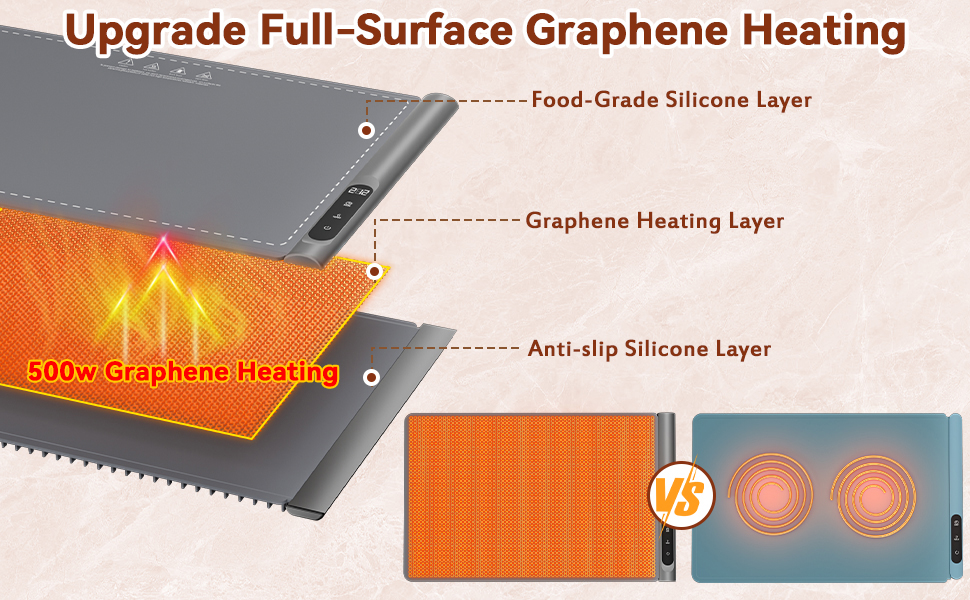
Image: Visual comparison demonstrating the upgraded full-surface graphene heating technology versus conventional heating methods, emphasizing even heat distribution.
Setup
- Unpack: Carefully remove the warming mat and all accessories from the packaging.
- Placement: Unroll the mat and place it on a clean, dry, stable, and heat-resistant countertop or table. Ensure there is adequate space around the mat for ventilation.
- Power Connection: Plug the power cord into a standard electrical outlet. The control panel will illuminate, indicating it is ready for use.
Operating Instructions

Image: The control panel of the warming mat, displaying temperature settings and the child lock function. The power button is visible, along with indicators for temperature and timer.

Image: A visual guide to the 6 available temperature settings (122°F to 212°F) and the 0-6 hour timer options on the control panel.
- Power On: Press the power button on the control panel to turn on the warming mat.
- Set Temperature: Press the 'TEMP' button to cycle through the 6 available temperature levels (122°F, 140°F, 158°F, 176°F, 194°F, 212°F). The touchscreen will display the selected temperature.
- Set Timer: Press the 'TIME' button to select a desired operating duration from 0 to 6 hours. The display will show the remaining time.
- Child Lock: To activate the child lock, press and hold the power button for 3 seconds. This prevents accidental changes to settings. Repeat the action to unlock.
- Place Food: Place dishes containing food directly onto the warming mat. Ensure cookware is compatible (ceramic, glass, metal).
- Power Off: Press the power button to turn off the mat when no longer needed.
Video: Demonstration of the Newise Graphene Electric Food Warming Mat in use for parties and buffets, showcasing its ability to keep various dishes warm. The video highlights the mat's functionality and ease of use in a social setting.
Maintenance and Cleaning
Proper maintenance ensures the longevity and performance of your warming mat:
- Cool Down: Always allow the warming mat to cool completely before attempting to clean it.
- Cleaning: The food-grade silicone surface is stain-proof and easy to clean. Wipe the surface with a damp cloth. For stubborn stains, use a mild soap solution and then wipe clean with a damp cloth.
- Drying: Ensure the mat is completely dry before storing or reusing.
- Do not use abrasive cleaners, scouring pads, or harsh chemicals, as these can damage the surface.
Storage
The flexible design of the warming mat allows for convenient storage:
- After ensuring the mat is cool and dry, it can be rolled up for compact storage.
- Store the rolled mat in the included storage bag to protect it from dust and damage.
- Keep the mat in a cool, dry place away from direct sunlight.
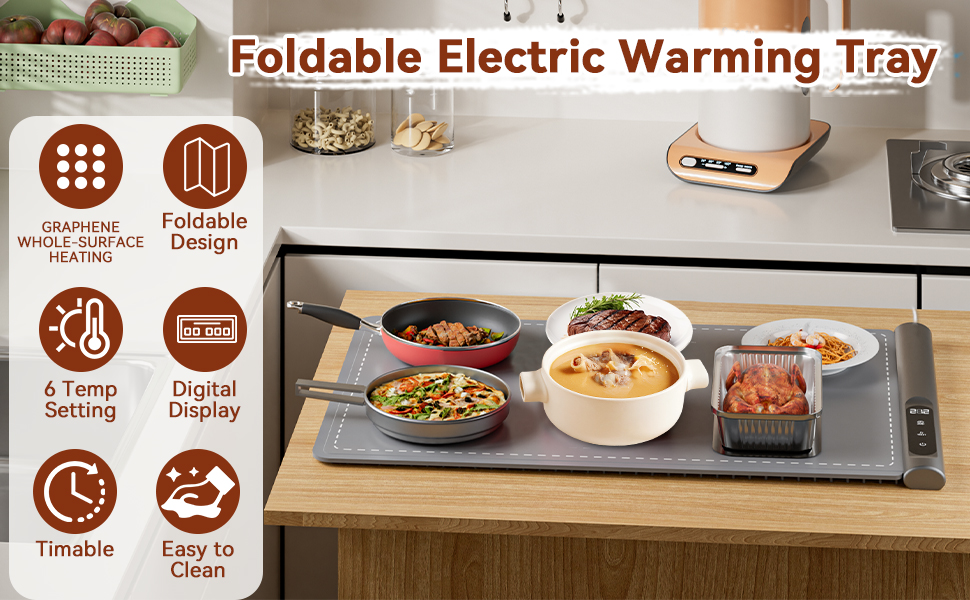
Image: The Newise Graphene Rapid Heating Food Warming Mat demonstrating its foldable design, being rolled up for compact storage.
Troubleshooting
| Problem | Possible Cause | Solution |
|---|---|---|
| Mat does not turn on. | Not plugged in; power outlet malfunction; child lock activated. | Ensure the power cord is securely plugged into a working outlet. Deactivate child lock by pressing and holding the power button for 3 seconds. |
| Mat is not heating or heating unevenly. | Incorrect temperature setting; mat not fully unrolled. | Verify the temperature setting. Ensure the mat is fully unrolled and flat on the surface. |
| Display is not working. | Power issue; internal malfunction. | Check power connection. If the issue persists, contact customer support. |
Specifications
| Feature | Detail |
|---|---|
| Model Number | RFW002 |
| Color | Gray |
| Material | Silicone & Graphene Heating |
| Special Features | Graphene Heating, Portable, Temperature Control, Timer |
| Heating Elements | 1 |
| Product Dimensions | 23"D x 15"W x 0.5"H |
| Wattage | 500 watts |
| Controls Type | Touch |
| Voltage | 2.3E+2 Volts |
| Power Source | Electric |
| Item Weight | 1.7 Kilograms (3.74 pounds) |
Warranty and Support
For warranty information or technical support, please refer to the product packaging or contact Newise customer service. Keep your purchase receipt as proof of purchase.