1. Introduction
This manual provides detailed instructions for the setup, operation, and maintenance of your Hobby Fans 4-channel 2.4G RC Radio System. This system includes a T-6B19A transmitter and an RX-G4 receiver, designed for use with various RC vehicles such as cars, crawlers, and boats. Please read this manual thoroughly before use to ensure proper function and safety.

Figure 1: Hobby Fans 4CH 2.4G RC Transmitter, RX-G4 Receiver, and Lanyard.
2. Package Contents
Verify that all items listed below are included in your package:
- Hobby Fans T-6B19A 4CH 2.4G Transmitter
- Hobby Fans RX-G4 Receiver
- Adjustable Lanyard
3. Product Overview
3.1 Transmitter Components (T-6B19A)
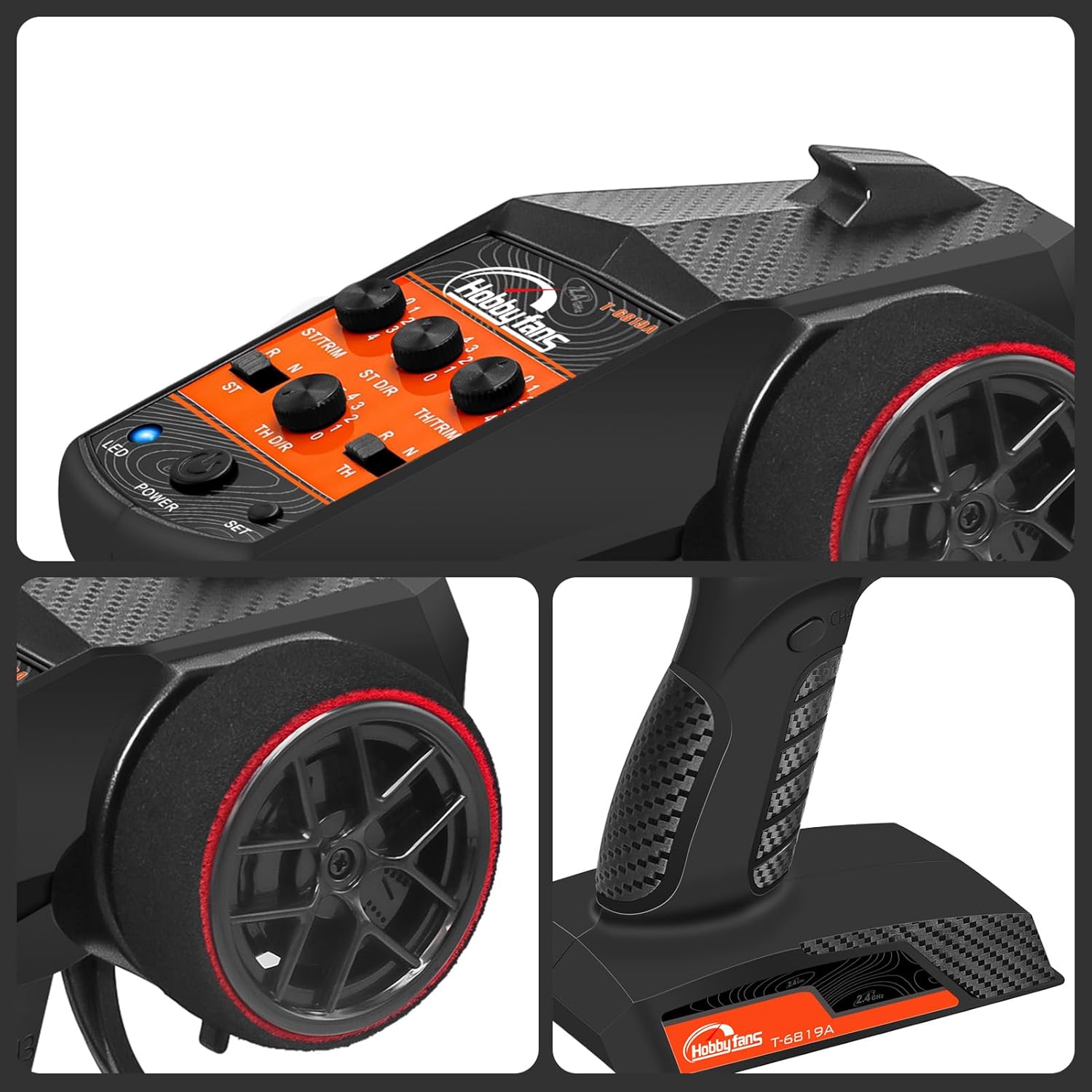
Figure 2: Transmitter Controls and Features.
- Steering Wheel (CH1): Controls the steering of the vehicle.
- Throttle Trigger (CH2): Controls forward, reverse, and braking.
- ST.TRIM: Steering trim adjustment.
- TH.TRIM: Throttle trim adjustment.
- ST D/R (Steering Dual Rate): Adjusts the maximum steering angle.
- TH D/R (Throttle Dual Rate): Adjusts the maximum throttle output.
- ST.REV (Steering Reverse): Reverses the steering channel direction.
- TH.REV (Throttle Reverse): Reverses the throttle channel direction.
- Power LED: Indicates power status.
- Power Switch: Turns the transmitter on/off.
- SET Button: Used for binding and mixing control.
- CH3 Button: Controls Channel 3 functions (e.g., lights).
- CH4 Button: Controls Channel 4 functions (e.g., lights).
- Lanyard Eye: Attachment point for the included lanyard.
- Battery Compartment: Holds 4 'AA' batteries.
3.2 Receiver Components (RX-G4)

Figure 3: RX-G4 Receiver Ports and Indicators.
- CH1-CH4 Ports: Connectors for servos, ESC, and other accessories.
- LED: Indicates receiver status (e.g., power, binding).
- BIND Button: Used for pairing the receiver with the transmitter.
- -HL: Headlight output.
- -CL-R: Right cornering light output.
- -CL-L: Left cornering light output.
4. Setup
4.1 Battery Installation (Transmitter)
- Open the battery compartment cover on the bottom of the transmitter.
- Insert four (4) 'AA' batteries, ensuring correct polarity (+/-).
- Close the battery compartment cover securely.
Note: The transmitter requires 4 'AA' batteries (not included).
4.2 Receiver Installation and Connections
- Mount the RX-G4 receiver securely in your RC vehicle, away from motors, ESCs, and other sources of electrical interference.
- Connect your steering servo to the CH1 port on the receiver.
- Connect your Electronic Speed Controller (ESC) to the CH2 port on the receiver.
- Connect any optional accessories (e.g., additional servos, light modules) to the CH3, CH4, -HL, -CL-R, and -CL-L ports as required.
Important: This transmitter is only compatible with the receiver included in this set. Ensure all connections are firm and correctly oriented.
4.3 Binding the Transmitter and Receiver
Binding is the process of linking the transmitter and receiver. This system is typically pre-bound from the factory. If re-binding is necessary:
- Ensure the transmitter is powered off.
- Power on the receiver (via the ESC or a separate battery). The receiver's LED will likely flash, indicating it's not bound.
- Press and hold the BIND button on the receiver.
- While holding the BIND button, turn on the transmitter.
- Release the BIND button on the receiver once the receiver's LED becomes solid, indicating a successful bind.
- Turn off both the transmitter and receiver, then power them on again in the correct sequence (transmitter first, then receiver) to confirm the bind.
5. Operating Instructions
5.1 Basic Control
- Steering: Rotate the steering wheel left or right to control the vehicle's direction.
- Throttle: Pull the throttle trigger back for forward movement. Push the trigger forward for braking, then push further for reverse.
5.2 CH1 & CH2 Mixing Control
This feature allows simultaneous control of steering and throttle through a single input. To activate:
- Hold the SET button.
- Long press the POWER button for 2 seconds.
- The system will enter mixing control mode. You can now control both steering and throttle using either the throttle stick or the steering wheel, depending on the specific mixing setup.
5.3 Light Control System
The transmitter features a built-in light control system, allowing easy operation of connected lights.

Figure 4: Demonstrating light control with the transmitter.
- Use the CH3 and CH4 buttons to control connected accessories, such as headlights, right cornering lights, and left cornering lights, if wired to the corresponding receiver ports.
5.4 Adjusting Dual Rate (D/R)
The ST D/R and TH D/R knobs adjust the sensitivity and maximum travel of the steering and throttle channels, respectively. This allows fine-tuning for different driving conditions or personal preference.
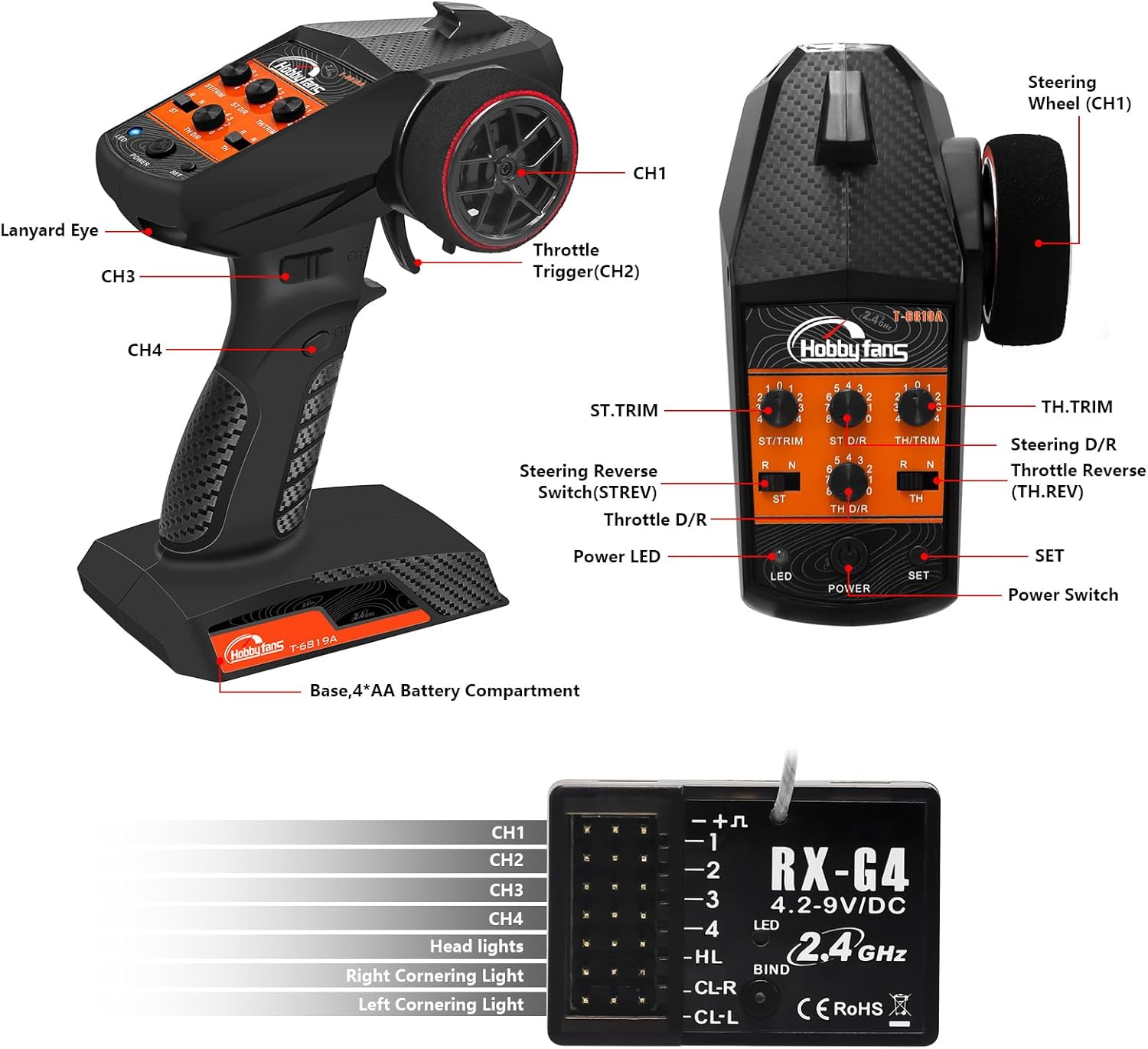
Figure 5: Location of Steering and Throttle D/R adjustments.
- Rotate the ST D/R knob to increase or decrease the steering throw.
- Rotate the TH D/R knob to increase or decrease the throttle response.
6. Maintenance
- Cleaning: Use a soft, dry cloth to clean the transmitter and receiver. Avoid using solvents or harsh chemicals.
- Storage: Store the radio system in a cool, dry place away from direct sunlight and extreme temperatures. Remove batteries from the transmitter if storing for extended periods to prevent leakage.
- Battery Check: Regularly check the transmitter batteries for low voltage. The Power LED will indicate low battery status.
7. Troubleshooting
| Problem | Possible Cause | Solution |
|---|---|---|
| Transmitter does not power on. | Dead or incorrectly installed batteries. | Replace batteries with fresh 'AA' batteries, ensuring correct polarity. |
| Vehicle does not respond to controls. | Not bound, receiver not powered, loose connections, low transmitter battery. | Perform binding procedure. Check receiver power and all cable connections. Replace transmitter batteries. |
| Steering or throttle is unresponsive or weak. | ST D/R or TH D/R set too low. Servo/ESC issue. | Adjust the ST D/R or TH D/R knobs to the maximum level. Check servo and ESC connections and functionality. |
| Steering/Throttle operates in reverse. | ST.REV or TH.REV switch is engaged. | Toggle the corresponding ST.REV or TH.REV switch to correct the direction. |
| Interference or short range. | Environmental interference, receiver antenna obstructed. | Operate in an open area. Ensure receiver antenna is positioned correctly and not damaged. |
8. Specifications
| Feature | Detail |
|---|---|
| Channels | 4 |
| Frequency | 2.4GHz FHSS |
| Transmitter Model | T-6B19A |
| Receiver Model | RX-G4 |
| Transmitter Power | 4 x 'AA' Batteries (not included) |
| Receiver Voltage Range | 4.2 - 9V DC |
| Control Distance | Approximately 250 meters |
| Dimensions (Transmitter) | 4.96 x 2.72 x 7.76 inches (126 x 69 x 197 mm) |
| Item Weight (Transmitter) | 14.1 ounces (400 grams) |
| Recommended Age | 14 years and up |

Figure 6: Physical dimensions of the transmitter and lanyard.
9. Warranty and Support
For warranty information or technical support, please contact Hobby Fans customer service through the retailer where the product was purchased or visit the official Hobby Fans website. Please retain your proof of purchase for warranty claims.


