
E-Ant COCY-023
E-Ant 4000A Car Battery Jump Starter (Model COCY-023) Instruction Manual
Your reliable companion for vehicle emergencies and portable power needs.
1. Introduction
The E-Ant 4000A Car Battery Jump Starter is a versatile and essential device designed to provide emergency starting power for vehicles and serve as a portable power bank. It is engineered for reliability and ease of use, ensuring you are prepared for unexpected battery issues.
This jump starter delivers an instant peak current of 4000A, capable of reviving 12V vehicles with engines up to 8.0L gas and 5.0L diesel. Its robust design allows for operation in extreme temperatures ranging from -4°F to 140°F.

Image: The E-Ant Jump Starter functions as a 3-in-1 device, offering jump-starting, power bank, and flashlight capabilities with 4000A peak current and 10-layer safety protection.

Image: The E-Ant Jump Starter is designed to be a lifesaver on the road, assisting in various emergency situations.
2. What's in the Box
Please verify that all items are present upon opening the package:
- E-Ant 4000A Car Jump Starter Portable
- Smart Jumper Clamps
- USB-C Charging Cable
- EVA Storage Case
- User Manual

Image: All components included in the E-Ant Car Jump Starter package.
3. Specifications
| Feature | Specification |
|---|---|
| Brand | E-Ant |
| Model | COCY-023 |
| Peak Current | 4000 Amps |
| Engine Compatibility | Up to 8.0L Gas, 5.0L Diesel (12V vehicles) |
| Battery Capacity | 20000 milliamp-hours (mAh) / 45Wh |
| USB Output 1 | QC3.0 (5V/3A) |
| USB Output 2 | 5V/2A |
| Input | 5V/3A (USB-C) |
| Operating Temperature | -4°F to 140°F (-20°C to 60°C) |
| LED Light Modes | Flashlight, Strobe, SOS |
| Product Dimensions | 1"D x 1"W x 2"H (approximate) |
| Item Weight | 16 ounces (1 pound) |
| UPC | 644134746221 |

Image: The E-Ant Jump Starter is designed to perform reliably across a wide range of temperatures.
4. Safety Information
Read all safety warnings and instructions before using this product. Failure to follow the warnings and instructions may result in electric shock, fire, and/or serious injury.
General Safety Precautions:
- Keep out of reach of children.
- Do not operate the unit if it has been damaged.
- Do not expose the unit to rain or wet conditions.
- Do not disassemble the unit. Refer all servicing to qualified personnel.
- Ensure proper ventilation during use and charging.
- Avoid short-circuiting the clamps.
- Do not jump-start a frozen battery.
- Always connect the positive (+) clamp to the positive (+) terminal and the negative (-) clamp to the negative (-) terminal or vehicle chassis as instructed.
Integrated Safety Protections:
The E-Ant jump starter is equipped with an upgraded smart battery charger system that provides 10 safety protections to ensure safe operation for all users. These protections include:
- Over Charge Protection
- Over Discharge Protection
- Over Current Protection
- Short Circuit Protection
- Over Heat/Cool Protection
- Reverse Polarity Protection
- Reverse Connection Protection
- Reverse Charge Protection
- Low Voltage Protection
- Discharge High Temperature Protection

Image: The E-Ant Jump Starter features a comprehensive smart protection system for user safety.

Image: Details of the smart jumper clamps, emphasizing high-quality materials and safety features.
5. Setup and Initial Charging
Product Overview:
Familiarize yourself with the components and ports of your E-Ant jump starter:
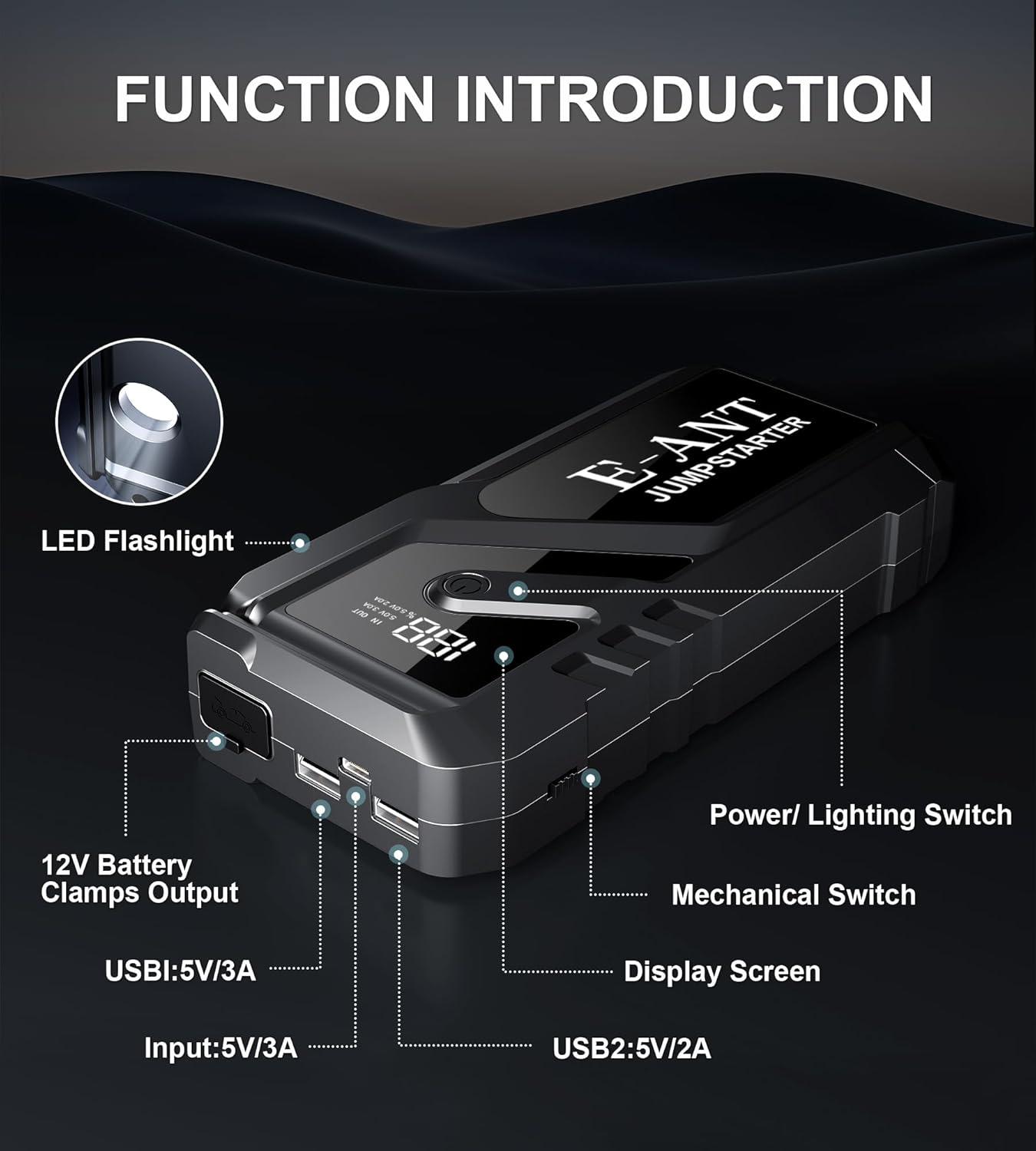
Image: Functional diagram of the E-Ant Jump Starter, indicating all ports and controls.
Initial Charging:
Before first use, fully charge the jump starter. It is recommended to charge the unit every 3-6 months to maintain optimal battery health, even when not in use.
- Connect the provided USB-C charging cable to the 'Input' port on the jump starter.
- Connect the other end of the USB-C cable to a USB wall adapter (not included) or a powered USB port.
- The display screen will show the charging progress. Charge until the display indicates 100%.
The display screen provides real-time battery level information, so you always know the charge status.

Image: The digital display screen shows the current battery level and charging status.
6. Operating Instructions
6.1. Jump Starting a Vehicle
Ensure the jump starter is fully charged before attempting to jump-start a vehicle. Follow these steps carefully:
- Connect to Starter: Insert the blue end of the smart jumper clamps into the 12V Battery Clamps Output port on the jump starter. Ensure a secure connection.
- Connect to Car Battery: Attach the red positive (+) clamp to the positive (+) terminal of the vehicle's battery. Attach the black negative (-) clamp to the negative (-) terminal of the vehicle's battery.
- Start the Vehicle: Once the clamps are correctly connected, the indicator on the smart clamps will turn green. Start your vehicle's engine.
- Remove Clamps: After the vehicle starts, immediately remove the smart jumper clamps from the car battery terminals, then disconnect the clamps from the jump starter.
Important: If the vehicle does not start on the first attempt, wait at least 30 seconds before trying again. Do not attempt more than 3 consecutive jump starts.

Image: Step-by-step guide for jump-starting a vehicle.

Image: The E-Ant Jump Starter can quickly start your vehicle's battery.
6.2. Using as a Portable Power Bank
The jump starter features two USB output ports to charge your electronic devices.
- USB1 (QC3.0): Provides fast charging at 5V/3A for compatible devices.
- USB2: Provides standard charging at 5V/2A.
- Connect your device's USB charging cable to either USB1 or USB2 port on the jump starter.
- The jump starter will automatically begin charging your device.

Image: The E-Ant Jump Starter functions as a portable power bank for various electronic devices.
6.3. Using the Emergency LED Light
The integrated LED light offers three modes for various situations:
- Flashlight Mode: For general illumination.
- Strobe Mode: For signaling or attracting attention.
- SOS Mode: For emergency signaling.
- Activate: Long press the Power/Lighting Switch to turn on the LED light in Flashlight Mode.
- Change Mode: Short press the Power/Lighting Switch to cycle through Strobe Mode and SOS Mode.
- Turn Off: Long press the Power/Lighting Switch again to turn off the LED light.

Image: The LED light offers Flashlight, SOS, and Strobe modes for emergency and utility use.
7. Maintenance
Proper maintenance ensures the longevity and optimal performance of your E-Ant jump starter.
- Cleaning: Wipe the unit with a dry, soft cloth. Do not use harsh chemicals or abrasive materials.
- Storage: Store the jump starter in its EVA storage case in a cool, dry place away from direct sunlight and moisture.
- Charging: Recharge the unit every 3-6 months, even if not used, to prevent deep discharge and extend battery life.
- Clamp Care: Keep the jumper clamps clean and free of corrosion.
8. Troubleshooting
If you encounter issues with your E-Ant jump starter, refer to the following common problems and solutions:
| Problem | Possible Cause | Solution |
|---|---|---|
| Jump starter does not turn on. | Battery is completely discharged. | Charge the jump starter fully. |
| Vehicle does not start after jump-starting. | Incorrect clamp connection; vehicle battery too severely discharged; vehicle issue not battery-related. | Ensure clamps are connected correctly (positive to positive, negative to negative). Wait 30 seconds and try again. If still unsuccessful, consult a mechanic. |
| Smart clamps indicator does not turn green. | Incorrect connection; jump starter battery low; vehicle battery voltage too low. | Check clamp connections. Ensure jump starter is fully charged. If vehicle battery is extremely low, the boost function should activate automatically; if not, ensure the jump starter has sufficient charge. |
| USB devices are not charging. | Jump starter battery low; incorrect USB cable; device not compatible. | Charge the jump starter. Use a functional USB cable. Verify device compatibility. |
If the problem persists after attempting these solutions, please contact customer support.
9. Warranty and Support
E-Ant is committed to providing reliable products and excellent customer service.
Warranty Information:
This E-Ant jump starter comes with a one-year warranty from the date of purchase. This warranty covers manufacturing defects and issues arising from normal use.
Return Policy:
A 30-day unconditional return guarantee is provided for this product.
Customer Support:
For any questions, concerns, or warranty claims, please do not hesitate to contact our customer support team. We offer:
- 24/7 Customer Support: Available to assist you with any inquiries.
- Lifetime Technical Support: Ongoing assistance for the lifespan of your product.
Please refer to the contact information provided in your product packaging or on the official E-Ant website for direct support.

Image: E-Ant Brand Logo.
Related Documents - COCY-023
 |
ASCO Series 386 Non-Automatic Transfer Switch Operator's Manual Operator's Manual for the ASCO Series 386 Electrically-Operated Non-Automatic Transfer Switches. Covers installation, sequence of operation, testing, service, adjustments, and optional features for various models. |
 |
AMADA UF Series Hot Bar Soldering Control Systems - UF-4000A Datasheet Detailed technical specifications and features for the AMADA UF Series Hot Bar Soldering Control systems, including the UF-4000A and UF-R4000A models, designed for precision temperature control in various soldering applications. |
 |
TOA Canada Summer Sale: Overstock, Discontinued & B-Stock Audio Equipment Shop TOA Canada's Summer Sale for overstock, discontinued, and B-stock audio equipment. Find speakers, microphones, amplifiers, and more at discounted prices. Limited quantities available. |
 |
TOA Canada Overstock and B-Stock Product Sale Discover significant discounts on overstock and B-stock audio equipment from TOA Canada. This catalog lists new and refurbished items, including speakers, microphones, amplifiers, and accessories, available at reduced prices while supplies last. |
 |
TOA Canada Summer Sale: Overstock & Discontinued Audio Products Explore TOA Canada's Summer Sale featuring new overstock audio equipment and discounted discontinued/B-stock items. Find product details, part numbers, and availability. |
 |
Sansui Model Report: Comprehensive Catalog of Audio Equipment Explore the extensive Sansui Model Report, a detailed catalog listing numerous audio equipment models, including receivers, integrated amplifiers, speakers, turntables, and more, with their specifications and entry dates. |
Ask a question about this manual
Ask about setup, troubleshooting, compatibility, parts, safety, or missing instructions. Manuals+ will review the question and use this page’s manual context to help answer it.