
Ankway D1
Ankway Wireless Chime for Doorbell User Manual
Model: D1
Introduction
Thank you for choosing the Ankway Wireless Chime for Doorbell. This device is designed to provide clear and timely audio alerts when your compatible video doorbell is activated. It features adjustable melodies and volume levels, offering a customizable experience for your home or office environment. This manual provides detailed instructions for setup, operation, maintenance, and troubleshooting to ensure optimal performance of your chime.

Figure 1: Ankway Wireless Chime (Front View)
This image shows the main product view of the Ankway Wireless Chime, a compact white device with a patterned front surface and a blue musical note icon illuminated, indicating its function as an audio alert system.
Product Features
- Adjustable Wireless Indoor Chime: Choose from 38 melodies, with 4 volume levels and a silent mode for customized alerts.
- Instant Alerts: Hear real-time notifications when someone rings your doorbell.
- Easy to Set: After installing batteries, it takes less than 10 seconds to pair the indoor chime with your video doorbell.
- Wide Coverage: Wireless range of up to 60m (196ft) in open areas and 30m (98ft) with obstacles.
- Place at Ease: Powered by 3 AAA batteries and connecting via Wi-Fi, this chime is easy to place wherever desired.

Figure 2: Key Features Overview
This image highlights the key audio features of the Ankway Wireless Chime, indicating that it offers 38 ringtones, 4 adjustable volume levels, and a maximum volume of 100dB, providing versatile sound options for users.
Setup Guide
1. Powering the Chime
The Ankway Wireless Chime can be powered by 3 AAA batteries or via a USB cable (not included). For battery installation, locate the battery compartment on the back of the device, insert 3 AAA batteries, ensuring correct polarity, and close the compartment. For USB power, connect a standard USB cable to the chime's USB port and to a compatible USB power adapter (e.g., 5V/1A).

Figure 3: Chime Controls and Power Options
This image illustrates the side of the Ankway Wireless Chime, pointing out the ringtone button for melody selection, the volume button for adjusting sound levels, and indicating that the device can be powered by 3 AAA batteries or a USB cable.
2. Pairing with Your Doorbell
To pair the chime with your compatible video doorbell (e.g., J10, X5, X2, P6 models controlled by CouldEdge APP), follow these steps:
- Ensure both the chime and your video doorbell are powered on.
- Activate the pairing mode on your video doorbell according to its specific instructions.
- On the Ankway Wireless Chime, press and hold the pairing button (refer to your doorbell's manual for specific pairing instructions if needed). The chime will indicate successful pairing, usually with a sound or light indicator.
- Test the connection by pressing your doorbell button. The chime should ring.
The pairing process typically takes less than 10 seconds.
3. Placement
Place the wireless chime in a central location within your home or office where the sound can be easily heard. Consider the wireless range, which is up to 60m (196ft) in open areas and 30m (98ft) with obstacles. Avoid placing it near large metal objects or other electronic devices that might cause interference.

Figure 4: Optimal Chime Placement
This image depicts the Ankway Wireless Chime in a home environment, illustrating its wireless capability by showing a doorbell installed outside a house and the chime placed indoors on a table, emphasizing its ability to provide clear and in-time alerts anywhere in the home.
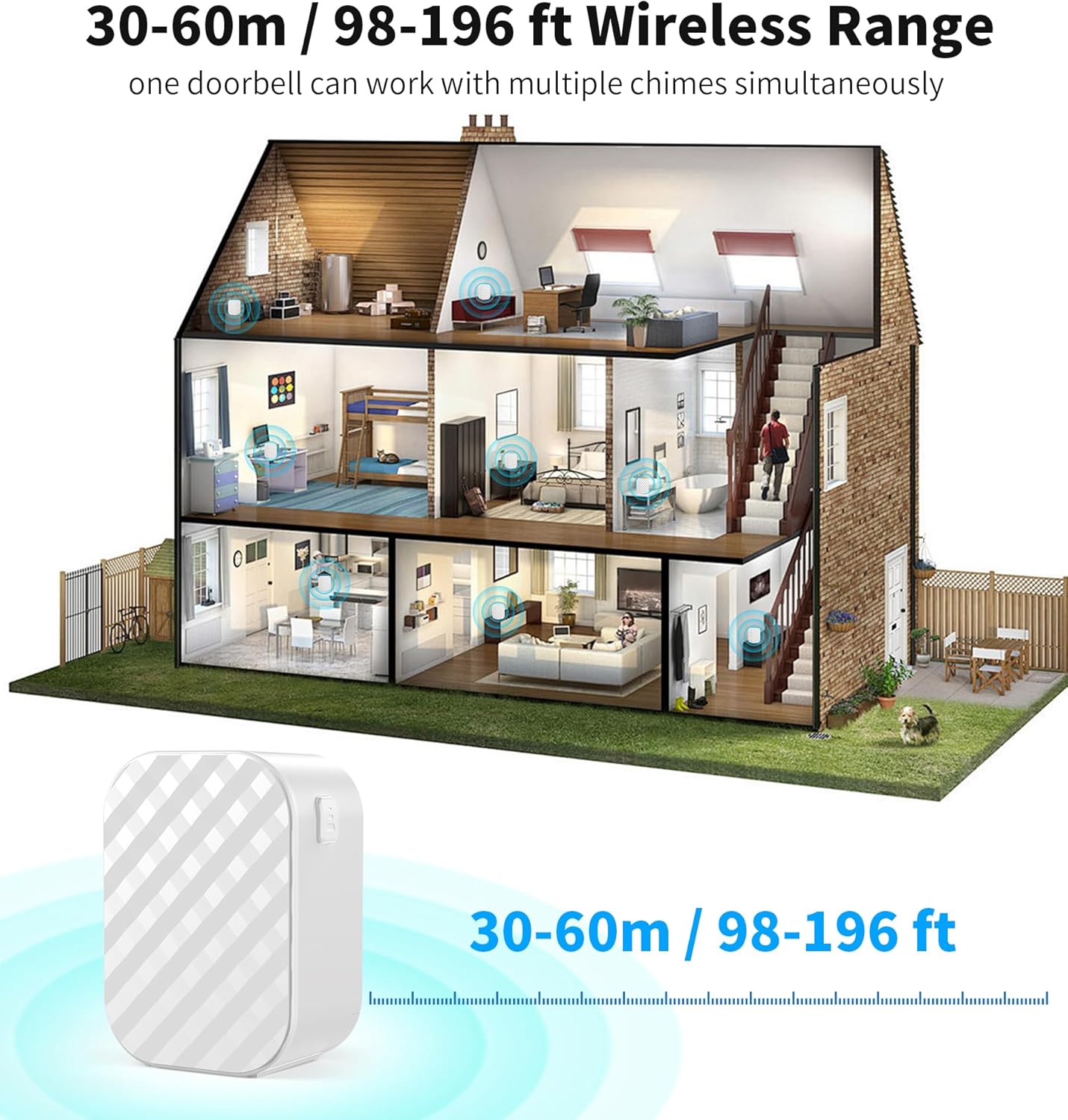
Figure 5: Wireless Range Illustration
This diagram illustrates the wireless range of the Ankway Wireless Chime within a multi-story house, showing that it can cover 30-60 meters (98-196 feet) and that one doorbell can work with multiple chimes simultaneously, ensuring alerts are heard throughout the property.
Operating Instructions
1. Selecting Melodies
The chime offers 38 different melodies. To change the melody, short press the ringtone button located on the side of the chime (refer to Figure 3). Each press will cycle through the available melodies. Stop pressing when you find your preferred melody.
2. Adjusting Volume
There are 4 volume levels and a silent mode. To adjust the volume, short press the volume button located next to the ringtone button (refer to Figure 3). Each press will cycle through the volume levels from loudest to silent. Select the volume level that best suits your environment.
3. Receiving Alerts
Once paired, the chime will automatically sound the selected melody at the chosen volume level whenever your compatible video doorbell is activated (e.g., someone presses the doorbell button or motion is detected, depending on your doorbell's features).
Maintenance
To ensure the longevity and optimal performance of your Ankway Wireless Chime, follow these simple maintenance guidelines:
- Cleaning: Use a soft, dry cloth to wipe the exterior of the chime. Do not use abrasive cleaners, solvents, or strong chemicals, as these can damage the surface.
- Battery Replacement: If the chime's volume decreases significantly or it stops responding, it may be time to replace the AAA batteries. Ensure to replace all three batteries at once and dispose of old batteries responsibly.
- Storage: If storing the chime for an extended period, remove the batteries to prevent leakage and store it in a cool, dry place away from direct sunlight.
- Environment: Avoid exposing the chime to extreme temperatures, high humidity, or direct water contact. It is designed for indoor use only.
Troubleshooting
If you encounter issues with your Ankway Wireless Chime, please refer to the following common problems and their solutions:
| Problem | Possible Cause | Solution |
|---|---|---|
| Chime does not ring when doorbell is pressed. |
|
|
| Chime volume is too low or too high. | Volume setting needs adjustment. | Press the volume button on the side of the chime to cycle through the 4 volume levels. |
| Chime sounds intermittently or has poor signal. |
|
|
Specifications
| Feature | Detail |
|---|---|
| Model Number | D1 |
| Brand | Ankway |
| Power Source | 3 x AAA Batteries (not included) or USB Cable (not included) |
| Melodies | 38 selectable melodies |
| Volume Levels | 4 levels + Silent mode |
| Wireless Range (Open Area) | Up to 60m (196ft) |
| Wireless Range (with Obstacles) | Up to 30m (98ft) |
| Dimensions | 6.86 x 4.83 x 3.3 cm (2.7 x 1.9 x 1.3 inches) |
| Item Weight | 49.9 g (1.76 oz) |
| Compatible Doorbells | Ankway J10, X5, X2, P6, and other video doorbells controlled by CouldEdge APP |
Warranty and Support
Ankway is committed to providing high-quality products. For specific warranty information regarding your Ankway Wireless Chime, please refer to the documentation included with your purchase or visit the official Ankway website. For technical support or further assistance, please contact Ankway customer service through the contact information provided on their official website or through your retailer.

Figure 6: Product Packaging (Front)
This image displays the front of the Ankway Wireless Chime's product packaging, featuring a label with the ASIN (B0DDXRNJ24) and basic product description: "Wireless Doorbell Accessories, Ding Dong, White, New, Made in China."

Figure 7: Product Packaging (Back)
This image shows the back of the Ankway Wireless Chime's product packaging, which includes a label with detailed information such as the Model (D1), Manufacturer (Shenzhen PUHRI Technology Co., Ltd.), Address, Contact information (email and phone), and EC REP details, along with "Made in China" and "Lot: 1103."
Ask a question about this manual
Ask about setup, troubleshooting, compatibility, parts, safety, or missing instructions. Manuals+ will review the question and use this page’s manual context to help answer it.