
1. Introduction
The i4SEE M25-384 Thermal Imaging Monocular is a high-performance infrared optical device designed for various outdoor activities, including hunting, search and rescue, and personal security. It features a 384x288 thermal imaging camera sensor, a 10mm focal lens, and a 50Hz refresh rate, providing clear thermal vision in low-light conditions. This manual provides essential information for the proper setup, operation, and maintenance of your device.
2. Package Contents
Verify that all items are present in your package:
- i4SEE M25-384 Thermal Imaging Monocular
- Quick Start Guide
- Lens Cap
- Wrist Strap
- Micro USB Cable
- Battery Charger
- Rechargeable Batteries (x2)
- Carry Bag
- Video Cable

Figure 2.1: Component illustration and accessories included with the i4SEE M25-384 Thermal Imaging Monocular.
3. Device Overview
Familiarize yourself with the main parts and controls of your monocular.

Figure 3.1: Front view of the i4SEE M25-384 Thermal Imaging Monocular.
Controls and Ports:
- Power Button: Turns the device on/off.
- Color Palettes Button: Cycles through display modes.
- Ranging Button: Activates ranging function (if available).
- Zoom Knob: Adjusts digital zoom levels.
- Focus Ring: Adjusts the focus of the lens.
- Diopter Regulation: Adjusts eyepiece focus for individual vision.
- Lens Cover: Protects the objective lens.
- Laser: Laser pointer output.
- Video and External Power Supply Interface: For charging and video output.
- CAMBOX Port: Specific port for camera box connection.
- Cell Cover Button: Releases the battery compartment cover.
4. Setup
4.1 Battery Installation
- Locate the cell cover button on the monocular.
- Press the cell cover button to open the battery compartment.
- Insert the two provided Lithium-Ion batteries, ensuring correct polarity.
- Close the battery compartment securely.
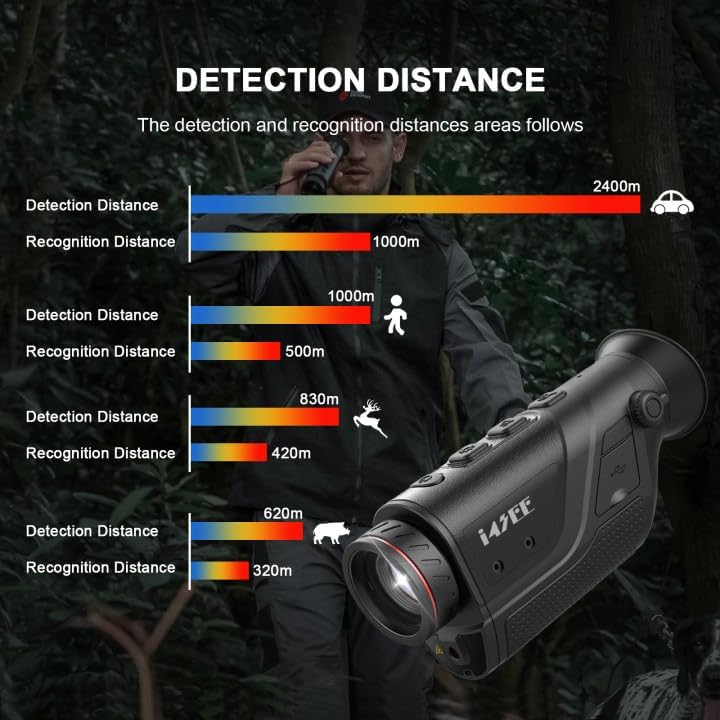
Figure 4.1: Battery installation in the i4SEE M25-384 monocular.
The device is designed for long-lasting use, providing over 10 hours of continuous operation with fully charged batteries.
4.2 Initial Power On
Press and hold the Power Button to turn on the monocular. The device typically boots up within 2 seconds.
4.3 App Connection (Wi-Fi)
The i4SEE M25-384 can connect to a mobile application via Wi-Fi for real-time image sharing and firmware updates.
- Download the "TargetIR" app from your device's app store (available for Android and iOS).
- Turn on the monocular.
- Enable Wi-Fi on your smartphone and connect to the monocular's Wi-Fi network.
- Open the TargetIR app to view thermal images, share content, and perform OTA (Over-The-Air) firmware upgrades.

Figure 4.2: Connecting the monocular to the TargetIR app via Wi-Fi.
5. Operating Instructions
5.1 Basic Viewing
Once powered on, look through the eyepiece. Adjust the diopter regulation for a clear view tailored to your eyesight. Use the focus ring to sharpen the image of distant objects.
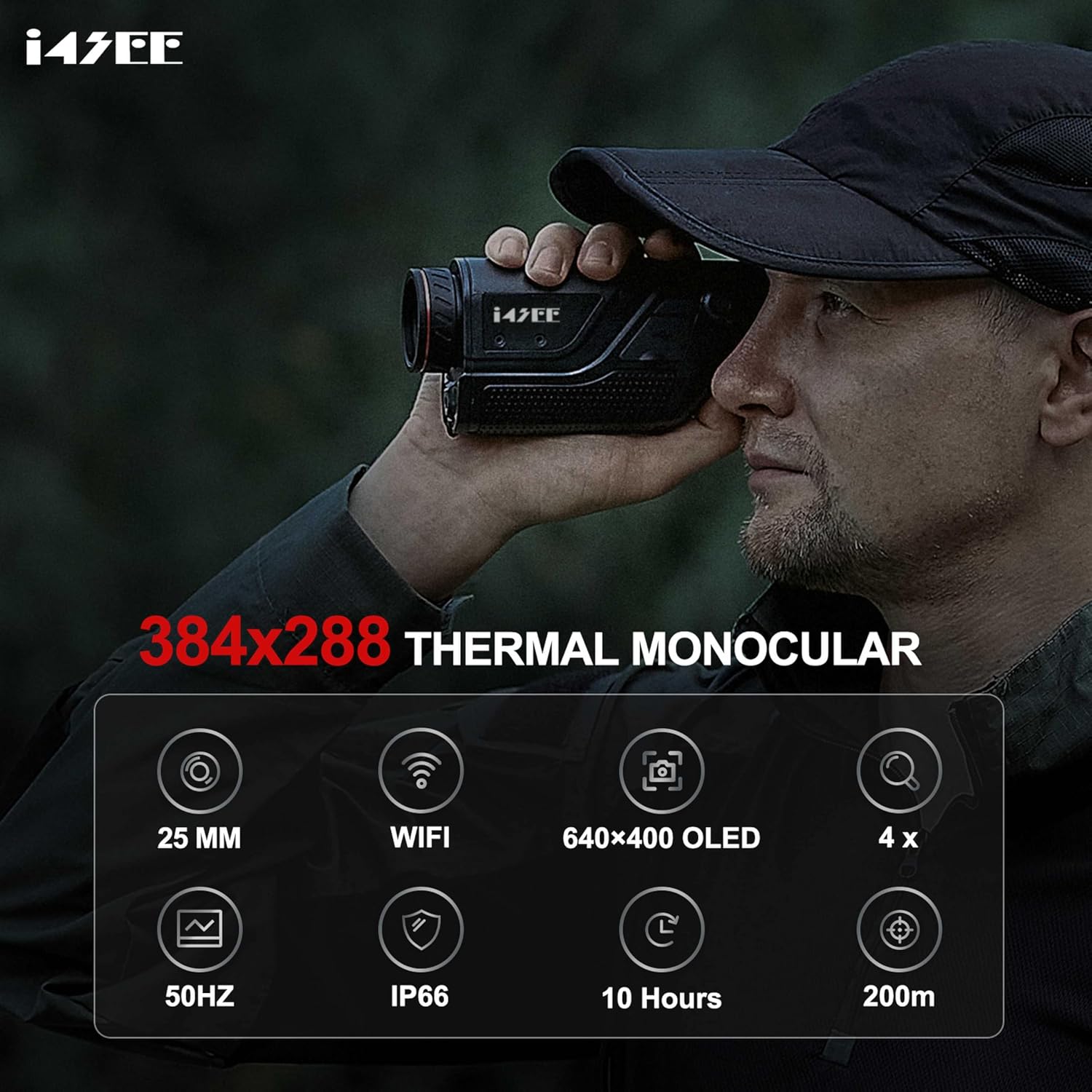
Figure 5.1: Proper usage of the i4SEE M25-384 monocular.
5.2 Display Modes and Color Palettes
The monocular offers 5 color palettes and 3 scene modes to optimize viewing for different environments and target identification. Press the Color Palettes Button to cycle through these options.
- Color Palettes: White Hot, Black Hot, Red Hot, Iron Red, Blue Heat.
- Scene Modes: Natural Mode, Enhance Mode, Highlight Mode.

Figure 5.2: Examples of different color palettes and scene modes.
5.3 Picture-in-Picture (PIP) Mode
Activate PIP mode to zoom in on a specific target area while maintaining a wider field of view. This helps highlight details in complex outdoor scenes.

Figure 5.3: PIP mode highlighting a target.
5.4 Digital Zoom
The monocular supports 1x, 2x, and 4x digital zoom. Use the Zoom Knob to adjust the magnification as needed for different distances.

Figure 5.4: Digital zoom levels.
5.5 Laser Pointer
The integrated laser pointer can be used to quickly indicate targets up to 200 meters away, allowing for easy communication with partners.

Figure 5.5: Using the 200m laser pointer.
5.6 High Refresh Rate
The 50Hz high refresh rate ensures smooth thermal imaging, reducing stuttering and providing a more fluid viewing experience.

Figure 5.6: Comparison of 50Hz refresh rate with lower refresh rates.
6. Maintenance
6.1 Cleaning
- Use a soft, lint-free cloth to clean the exterior of the monocular.
- For lenses, use a specialized lens cleaning cloth and solution. Avoid abrasive materials.
- Do not use harsh chemicals or solvents.
6.2 Storage
- Store the monocular in its carry bag in a cool, dry place when not in use.
- Remove batteries if storing for extended periods to prevent leakage.
6.3 Durability and Weather Resistance
The i4SEE M25-384 is IP66 waterproof-rated, providing protection against heavy rainfall, dust, and impact. It is designed to operate in temperatures ranging from -86°F to 140°F, making it suitable for various harsh weather conditions.

Figure 6.1: The monocular's IP66 waterproof design.
7. Troubleshooting
If you encounter issues with your i4SEE M25-384 monocular, refer to the following common solutions:
| Problem | Possible Cause | Solution |
|---|---|---|
| Device does not power on. | Low or depleted batteries; incorrect battery installation. | Ensure batteries are fully charged and correctly inserted. |
| Image is blurry. | Improper focus; diopter not adjusted. | Adjust the focus ring and diopter regulation for clarity. |
| Wi-Fi connection issues. | Monocular Wi-Fi not enabled; incorrect app settings. | Ensure monocular Wi-Fi is active and check app connection steps. |
| Short battery life. | Batteries not fully charged; old batteries. | Fully charge batteries before use. Consider replacing old batteries. |
If problems persist, please contact customer support.
8. Specifications
| Feature | Detail |
|---|---|
| Brand | i4SEE |
| Model Name | i4SEE-M25-384 |
| Thermal Camera Sensor | 384x288 |
| Infrared Detector | 12µm |
| Focal Lens | 10mm |
| Refresh Rate | 50Hz |
| Recognition Distance | Up to 400 yards |
| Detection Range | Up to 1000 yards |
| Display | 0.23-inch 640x400 AMOLED |
| Battery Life | Over 10 hours (with 2x 3350mAh Lithium Ion batteries) |
| Waterproof Rating | IP66 |
| Operating Temperature | -86°F to 140°F (-65°C to 60°C) |
| Product Dimensions | 5.51"D x 1.77"W x 2.91"H |
| Focus Type | Fixed Focus |
| Field Of View | 6 Degrees |
| Compatible Devices | Smartphone (via app) |
9. Warranty and Support
9.1 Warranty Information
The i4SEE M25-384 Thermal Imaging Monocular comes with a 5-year warranty for the entire device. This warranty covers manufacturing defects and ensures reliable performance.
9.2 Technical Support and Firmware Updates
Lifetime firmware updates and technical support are included with your purchase. For assistance, please refer to the contact information provided in your product packaging or visit the official i4SEE website.
Firmware updates can be performed via the TargetIR mobile application (OTA Upgrading).
10. Product Video
Video 10.1: Official product overview of the i4SEE M25-384 Thermal Imaging Monocular, demonstrating its features and capabilities.