
1. Product Overview
The eufy Security Baby Monitor E21 provides comprehensive monitoring of your baby with advanced features for peace of mind. This system includes a 4K UHD camera and a 5-inch 720p display, offering clear visuals day and night. It supports both Wi-Fi and local connections, ensuring reliable monitoring in various environments.
Key Features:
- Hybrid Monitoring: Connect via Wi-Fi for remote access or use the local connection for privacy and reliability without internet.
- 4K UHD Camera with 8x Zoom: Capture detailed images and zoom in to observe your baby closely.
- Pan-Tilt Functionality: The camera offers 330° pan and 60° tilt for a wide viewing area.
- Crystal-Clear Night Vision: Monitor your baby in low-light conditions with enhanced clarity.
- Portable Camera with Built-in Battery: The camera features a 5,000mAh battery for flexible placement and use during power outages.
- Noise Reduction and Smart Alerts: Active noise reduction minimizes background sound, while alerts notify you of cries, temperature changes, and loud noises.
- 24/7 Recording (via app): Continuous recording available through the app, requiring an SD card (not included).
- Privacy Switch: A physical switch to disable Wi-Fi for a secure local connection.

Figure 1: eufy Security Baby Monitor E21 system components.
2. Package Contents
Verify that all items are present in the package:
- Baby Camera (4K UHD)
- Parent Unit (5'' 720p Display)
- Power Adapter for Camera
- Power Adapter for Parent Unit
- USB Charging Cable
- Wall Mount Kit (if included)
- Quick Start Guide
3. Setup Instructions
3.1 Charging the Devices
- Connect the camera to its power adapter and plug it into an electrical outlet.
- Connect the parent unit to its power adapter and plug it into an electrical outlet.
- Allow both devices to fully charge before initial use. The camera's built-in battery provides portability.
3.2 Camera Placement
Place the camera on a flat, stable surface or mount it to a wall using the provided kit. Ensure the camera has a clear view of the baby's crib or play area. Maintain a safe distance from the baby to prevent accidental contact with the camera or its cable.

Figure 2: Optimal camera placement for monitoring.
3.3 Initial Pairing (Local Connection)
The camera and parent unit are typically pre-paired for a direct local connection. If they do not connect automatically:
- Ensure both devices are powered on and within range.
- On the parent unit, navigate to the settings menu and select "Add Camera" or "Pairing."
- Follow the on-screen instructions to complete the pairing process. This may involve pressing a pairing button on the camera.
3.4 App Installation and Wi-Fi Setup (Optional)
For remote monitoring and additional features, install the eufy Security app on your smartphone.
- Download the "eufy Security" app from your device's app store.
- Create an account or log in.
- Follow the in-app instructions to add your Baby Monitor E21. This will guide you through connecting the camera to your home Wi-Fi network (2.4GHz only).
- Ensure the Wi-Fi switch on the camera is in the "Wi-Fi On" position for app connectivity.

Figure 3: Remote monitoring via the eufy Security app.
4. Operating the Baby Monitor
4.1 Parent Unit Controls
- Power Button: Press and hold to turn on/off. Press briefly to turn the screen on/off.
- Volume Buttons: Adjust the audio level from the camera.
- Navigation Buttons: Use to pan/tilt the camera, navigate menus, and adjust settings.
- Zoom Button: Magnify the image up to 8x.
- Talk Button: Press and hold to speak through the camera's speaker.
- Menu Button: Access settings, alerts, and other features.
4.2 Camera Pan and Tilt
From the parent unit or the app, use the navigation controls to remotely adjust the camera's viewing angle. The camera supports 330° horizontal pan and 60° vertical tilt.
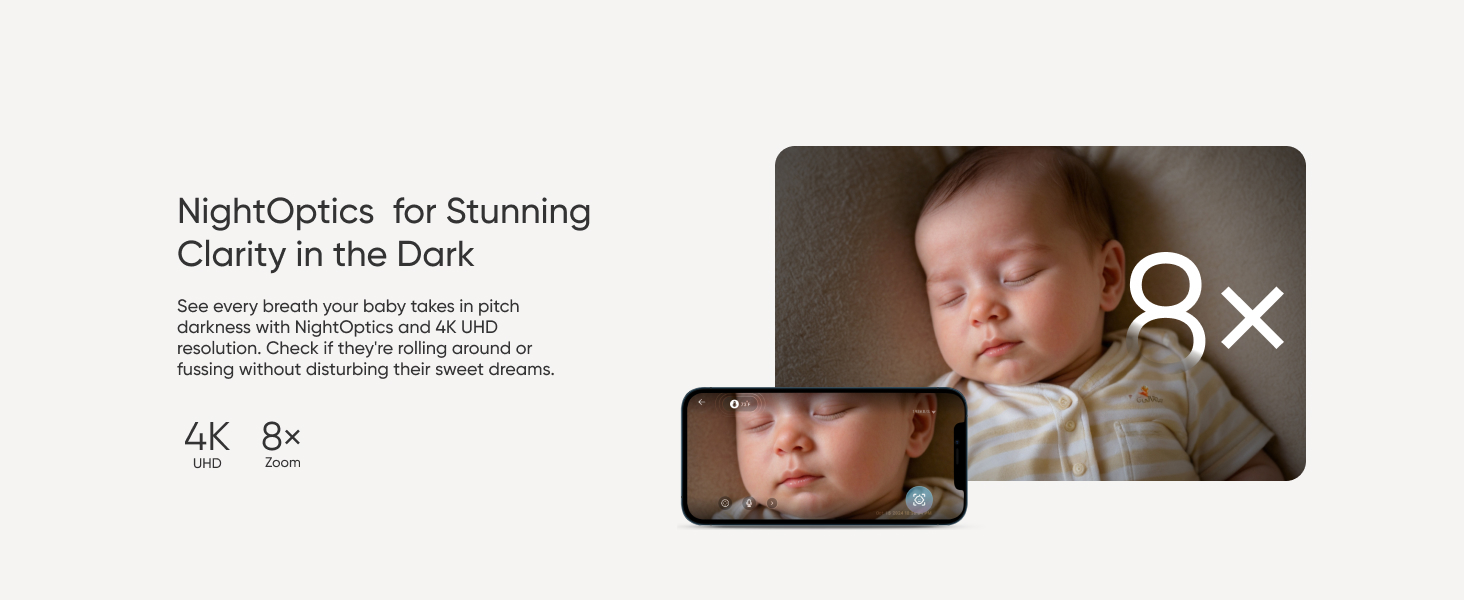
Figure 4: Camera pan and tilt range.
4.3 Night Vision
The monitor automatically switches to night vision in low-light conditions, providing a clear view of your baby in the dark.

Figure 5: Night vision clarity.
4.4 Smart Alerts
Configure alerts for crying detection, room temperature changes, and loud noises through the parent unit's menu or the eufy Security app. These alerts help you stay informed of your baby's environment.
4.5 Recording (App Only)
To enable 24/7 recording and access past footage, insert a micro-SD card (up to 128GB, not included) into the camera and configure recording settings within the eufy Security app.
Figure 6: SD card slot for local recording.
4.6 Privacy Switch
The camera features a physical switch to disable Wi-Fi connectivity, ensuring a completely local and private connection between the camera and the parent unit.
5. Maintenance
5.1 Cleaning
- Wipe the camera lens and display screen with a soft, dry cloth.
- Do not use liquid cleaners or aerosols directly on the devices.
5.2 Battery Care
- To prolong battery life, avoid fully discharging the camera's built-in battery frequently.
- Store the device in a cool, dry place when not in use for extended periods.
6. Troubleshooting
| Issue | Possible Solution |
|---|---|
| No image on parent unit. |
|
| Poor video quality or buffering. |
|
| App not connecting to camera. |
|
| No audio or distorted audio. |
|
7. Specifications
| Feature | Detail |
|---|---|
| Model Number | T8354 |
| Video Capture Resolution | 4K UHD |
| Display Resolution | 5'' 720p |
| Optical Zoom | 8x |
| Viewing Angle (Pan) | 330 Degrees |
| Viewing Angle (Tilt) | 60 Degrees |
| Power Source | Battery Powered (Camera), AC Adapter (Parent Unit) |
| Battery Capacity (Camera) | 5000 Milliamp Hours |
| Connectivity Technology | Wireless (Wi-Fi, Local) |
| Wireless Communication Technology | Wi-Fi (2.4GHz) |
| Indoor/Outdoor Usage | Indoor |
| Material | Acrylonitrile Butadiene Styrene (ABS), Polycarbonate (PC) |
| Item Dimensions (L x W x H) | 9.06 x 3.94 x 5.51 inches |
| Item Weight | 3.74 pounds |
| UPC | 194644298609 |
8. Warranty and Support
For warranty information, technical support, or service inquiries, please refer to the warranty card included in your product packaging or visit the official eufy Security website. You can also contact eufy Security customer support directly through their website or the eufy Security app.
Online Resources:
- Official eufy Security Website: www.eufylife.com
- eufy Security App: Available on iOS App Store and Google Play Store.


