
Introduction
Thank you for choosing the AVIOT TE-V1R-GTO Gintama Collaboration Wireless Earbuds (Ossan Model). These earbuds combine advanced audio technology with unique Gintama-themed features, including special voice lines and design. This manual provides essential information for setting up, operating, maintaining, and troubleshooting your earbuds to ensure optimal performance and enjoyment.
Package Contents
Please check that all the following items are included in your package:
- AVIOT TE-V1R-GTO Wireless Earbuds (Ossan Model)
- Wireless Charging Case
- USB Charging Cable
- User Manual (this document)
Product Overview
The AVIOT TE-V1R-GTO earbuds are designed for a premium audio experience with unique Gintama collaboration elements. They feature adaptive noise cancellation, Bluetooth 5.3 connectivity, and Hi-Res audio support.
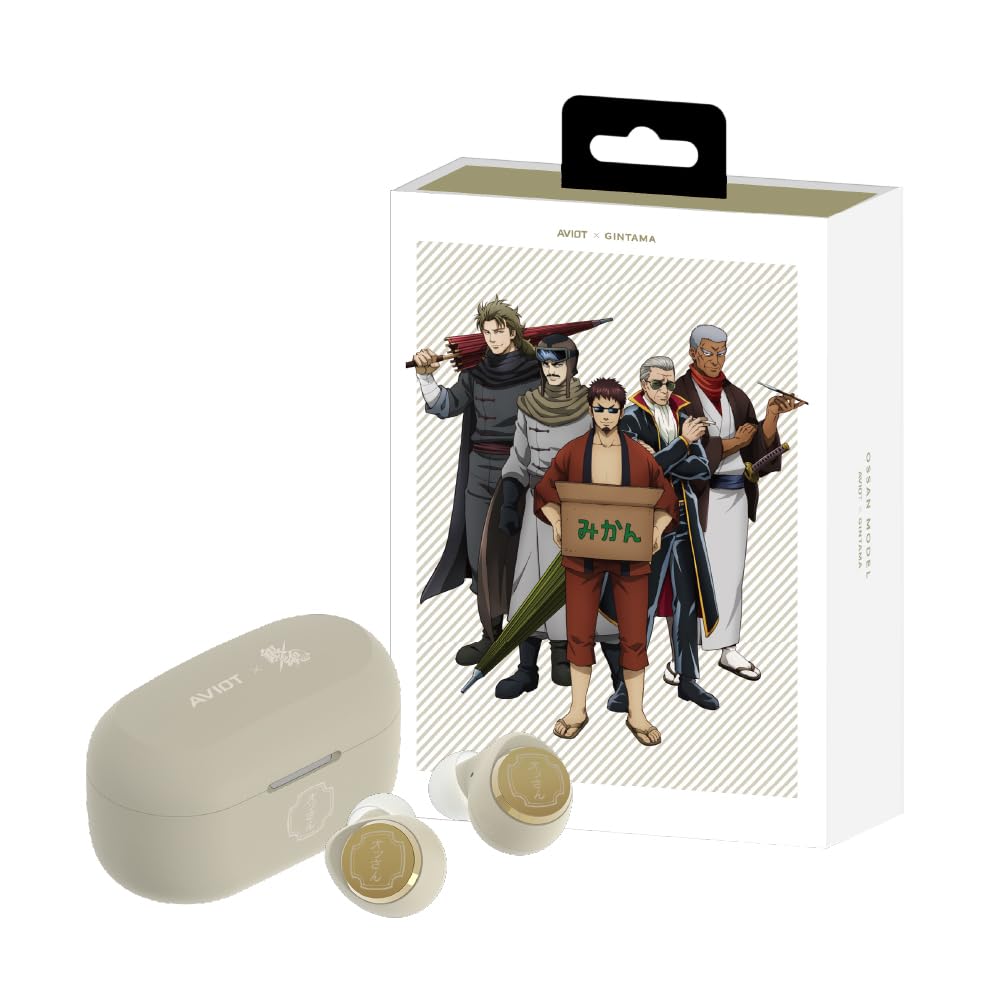
Image: The AVIOT TE-V1R-GTO Ossan Model wireless earbuds and their matching charging case.
Each earbud and the charging case feature unique logos specifically designed for this Gintama collaboration, incorporating character motifs while maintaining a sleek appearance.

Image: A close-up view highlighting the special design elements on the earbuds and charging case.
The earbuds offer up to 19 hours of playback on a single charge, extended to 62 hours with the charging case. Key features include Hybrid Adaptive Noise Cancelling, Multipoint Pairing, IPX4 water resistance, and wireless charging capability.
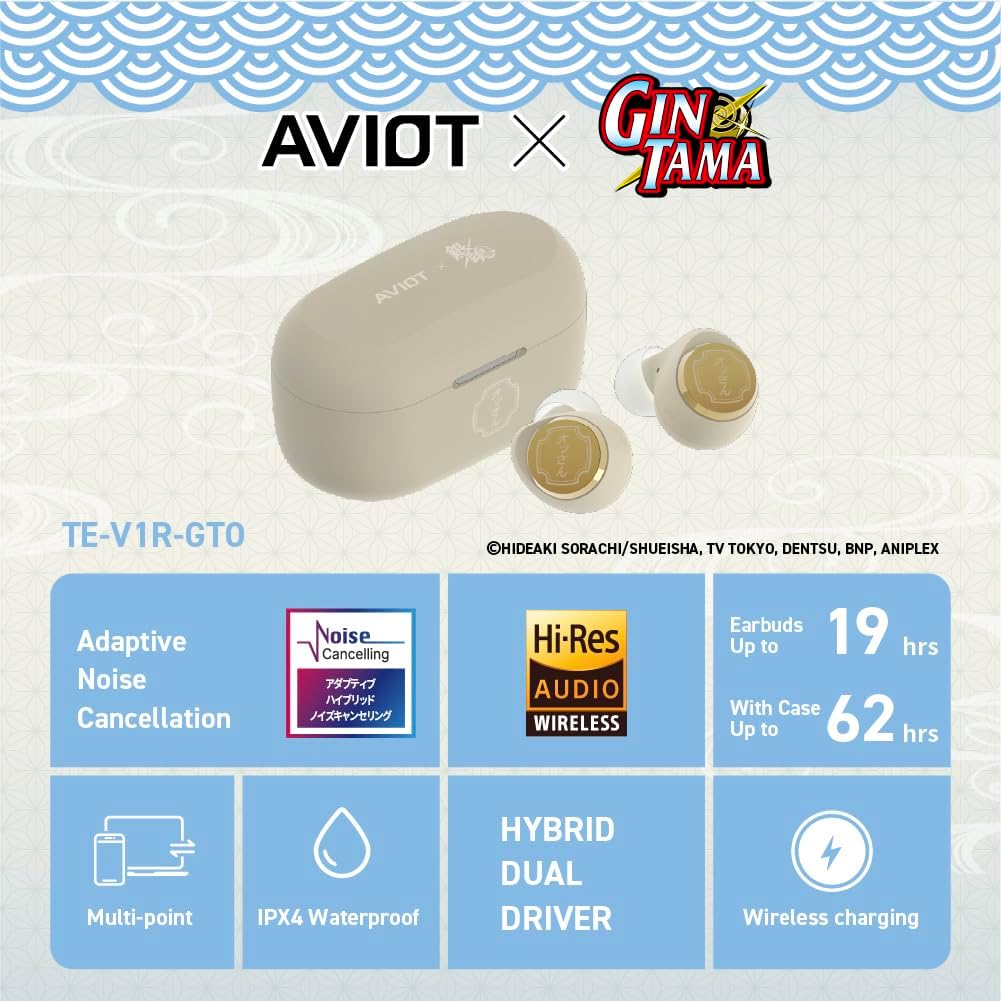
Image: An overview of the earbuds highlighting key features such as Adaptive Noise Cancellation, Hi-Res Audio, battery life, Multipoint connectivity, IPX4 water resistance, Hybrid Dual Driver, and wireless charging.
Setup
1. Charging the Earbuds and Case
Before first use, fully charge the earbuds and the charging case. Connect the provided USB charging cable to the charging case and a power source. The case also supports wireless charging.
- Earbuds Charging Time: Approximately 1.5 hours.
- Case Charging Time: Approximately 2 hours via USB-C, longer with wireless charging.
- Battery Indicator: Refer to the LED indicators on the charging case for battery status.
2. Initial Bluetooth Pairing
- Open the charging case. The earbuds will automatically enter pairing mode, indicated by flashing LED lights on the earbuds.
- On your device (smartphone, tablet, etc.), go to Bluetooth settings and enable Bluetooth.
- Select "AVIOT TE-V1R-GTO" from the list of available devices.
- Once connected, a voice prompt will confirm successful pairing.
3. AVIOT CONNECT App Installation
For full functionality, including switching character voice modes and customizing settings, download the AVIOT CONNECT app from your device's app store. Follow the in-app instructions to connect your earbuds.
Operating Instructions
1. Touch Controls
The earbuds feature touch-sensitive controls for various functions:
| Action | Function |
|---|---|
| Single Tap (Left/Right) | Play/Pause, Answer/End Call |
| Double Tap (Right) | Next Track |
| Double Tap (Left) | Previous Track |
| Triple Tap (Right) | Volume Up |
| Triple Tap (Left) | Volume Down |
| Long Press (Left/Right) | Toggle Noise Cancellation / Ambient Sound Mode |
| Hold (Right Earbud) | Activate Random Voice Line |
2. Adaptive Noise Cancellation
The earbuds feature Hybrid Adaptive Noise Cancelling, which automatically adjusts noise cancellation strength based on your surrounding environment. You can manually toggle between Noise Cancellation, Ambient Sound, and Off modes by long-pressing either earbud or through the AVIOT CONNECT app.
3. Special Voice Lines
This model includes over 360 newly recorded voice lines from the Gintama series. These voices provide guidance for notifications (e.g., earbud activation/deactivation, connection status) and a "random voice" feature with iconic quotes. You can switch between different character voice modes using the AVIOT CONNECT app.

Image: Visual representation of the different Gintama character models available for voice lines, including Odd Jobs, Shinsengumi, Joui Shitennou, and Ossan.
4. Multipoint Pairing
The earbuds support multipoint pairing, allowing them to be connected to two devices simultaneously. This enables seamless switching between audio sources without needing to manually disconnect and reconnect.
Maintenance
1. Cleaning
- Regularly clean the earbuds and charging case with a soft, dry, lint-free cloth.
- Remove any earwax or debris from the ear tips and speaker grilles using a small, soft brush or cotton swab.
- Do not use abrasive cleaners, solvents, or aerosol sprays.
2. Storage
When not in use, store the earbuds in their charging case to protect them from dust, damage, and to keep them charged. Store the case in a cool, dry place away from direct sunlight and extreme temperatures.
3. Water Resistance (IPX4)
The earbuds are rated IPX4 water resistant, meaning they are protected against splashing water from any direction. This makes them suitable for light rain or sweaty workouts. They are not designed for swimming or submersion in water. Ensure the earbuds are dry before placing them back in the charging case to prevent damage.
Troubleshooting
| Problem | Possible Solution |
|---|---|
| Earbuds not pairing | Ensure earbuds are charged. Place them in the case, close, then reopen. Check your device's Bluetooth settings and try re-pairing. |
| No sound from one earbud | Ensure both earbuds are charged. Try placing both back in the case, closing it, and then taking them out again. Check for debris blocking the speaker grille. |
| Charging issue | Ensure the charging cable is securely connected. Try a different USB port or power adapter. Clean the charging contacts on both earbuds and the case. |
| Noise cancellation not working | Ensure the feature is enabled via touch control or the AVIOT CONNECT app. Adjust earbud fit to ensure a proper seal. |
| App not connecting to earbuds | Ensure Bluetooth is enabled and earbuds are paired to your device. Restart the app and try again. |
Specifications
The following table details the technical specifications of the AVIOT TE-V1R-GT earbuds:
| Feature | Detail |
|---|---|
| Model Name | TE-V1R-GT |
| Connectivity Technology | Wireless (Bluetooth 5.3) |
| Noise Control | Adaptive Noise Cancellation |
| Audio Driver Type | Dynamic Driver |
| Battery Life (Earbuds) | Up to 19 Hours |
| Battery Life (with Case) | Up to 62 Hours |
| Charging Time | 19 Hours (This seems to be a typo in the source data, likely referring to total playback, not charge time. Typical charge time is 1.5-2 hours.) |
| Water Resistance Level | IPX4 (Water Resistant) |
| Control Method | App, Touch Control |
| Special Features | Microphone Included, Multipoint Pairing, Noise Cancellation, Touch Control, Wireless Charging |
| Item Weight | 200 Grams / 7.1 ounces |
| Package Dimensions | 4.72 x 1.97 x 0.47 inches |
| Batteries | 1 Lithium Ion battery (included) |
| Compatible Devices | Smartphones, Laptops, Desktops, Tablets, Smart Speakers, Televisions, Vehicles |
Official Product Videos
Video: Product overview and features demonstration.
Video: Demonstration of sound quality and noise cancellation.
Video: Guide to using the AVIOT CONNECT app with the earbuds.
Warranty Information
AVIOT products typically come with a limited manufacturer's warranty. Please refer to the warranty card included in your product packaging or visit the official AVIOT website for detailed warranty terms and conditions specific to your region and model. Keep your proof of purchase for warranty claims.
Customer Support
If you encounter any issues not covered in this manual or require further assistance, please contact AVIOT customer support. You can usually find contact information (phone, email, or support portal) on the official AVIOT website or through the AVIOT CONNECT app.