
Introduction
This manual provides comprehensive instructions for the installation, operation, and maintenance of Generic 119A W2090A series toner cartridges. These cartridges are designed to be compatible with specific HP printer models, ensuring reliable performance and print quality. Please read this manual carefully before installation and use.
Compatibility
This toner cartridge is compatible with the following models:
- Toner Cartridge Models: 119A W2090A, W2091A, W2092A, W2093A
- Printer Models: HP 150A, HP 150NW, HP MFP 178FNW, HP MFP 179FNW
Always confirm your printer model before purchasing to ensure compatibility. Some regional printer models may require specific chip replacements.

This image illustrates the compatible toner cartridge and printer models.
Setup and Installation
Follow these steps to install the toner cartridge:
- Preparation: Before installation, it is recommended to clean any remaining toner or paper scraps from the printer using a vacuum cleaner or a soft cloth. Avoid blowing air into the printer as this can spread toner dust.
- Shake the Cartridge: Take the new toner cartridge out of its packaging and gently shake it horizontally 4-8 times. This helps to evenly distribute the toner powder inside the cartridge.
- Remove Protective Buckles: Locate and remove the orange protective buckles on both sides of the toner cartridge.
- Remove Isolation Paper (if present): If there is black isolation paper, slowly pull it out in the direction indicated.
- Pull the Seal: Pull the sealing strip evenly and straight until it is fully removed. The length of the seal is approximately twice the length of the toner cartridge. Ensure it does not break during removal.
- Install into Printer: Carefully push the toner cartridge smoothly along the guide rails on both sides of the printer device until it clicks securely into place.
Important Note: Do not touch the drum core or the chip on the toner cartridge during installation to prevent damage and ensure optimal printing performance.
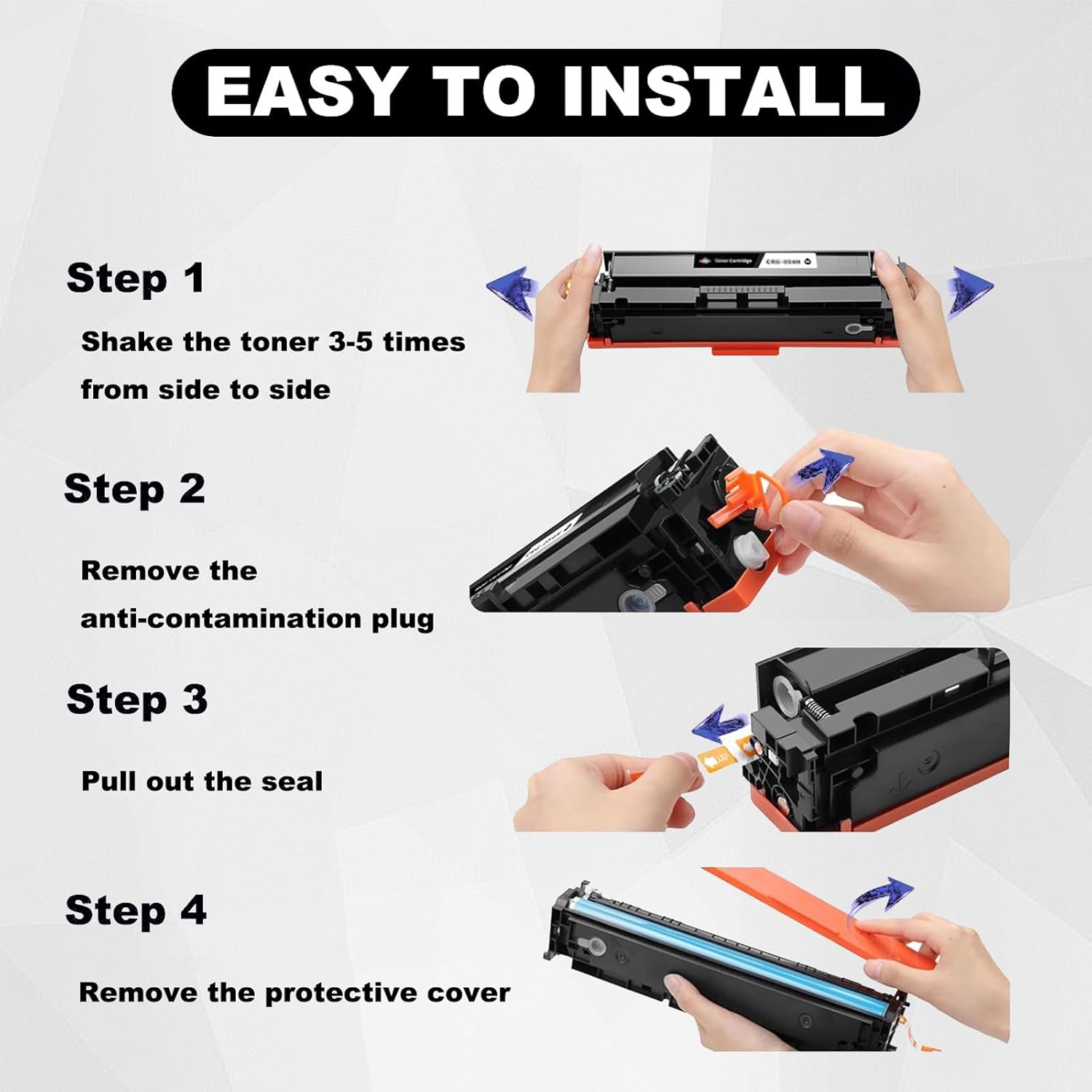
This image provides a visual guide for the toner cartridge installation steps.
Operating Instructions
Once the toner cartridge is correctly installed, your printer should automatically detect it. You can then proceed with your printing tasks as usual. The cartridge is designed for high-quality output in various scenarios.
Page Yield
The estimated page yield for these toner cartridges (at 5% A4 paper coverage) is:
- Black Toner Cartridge (119A W2090A): Up to 1000 pages
- Color Toner Cartridges (119A W2091A, W2092A, W2093A): Up to 700 pages

This image illustrates the estimated page yield for black and color toner cartridges.
Print Quality
These cartridges are engineered to deliver clear text and bright colors, meeting high printing standards for various applications.

This image highlights the clear and sharp black, and clear and bright color print quality.
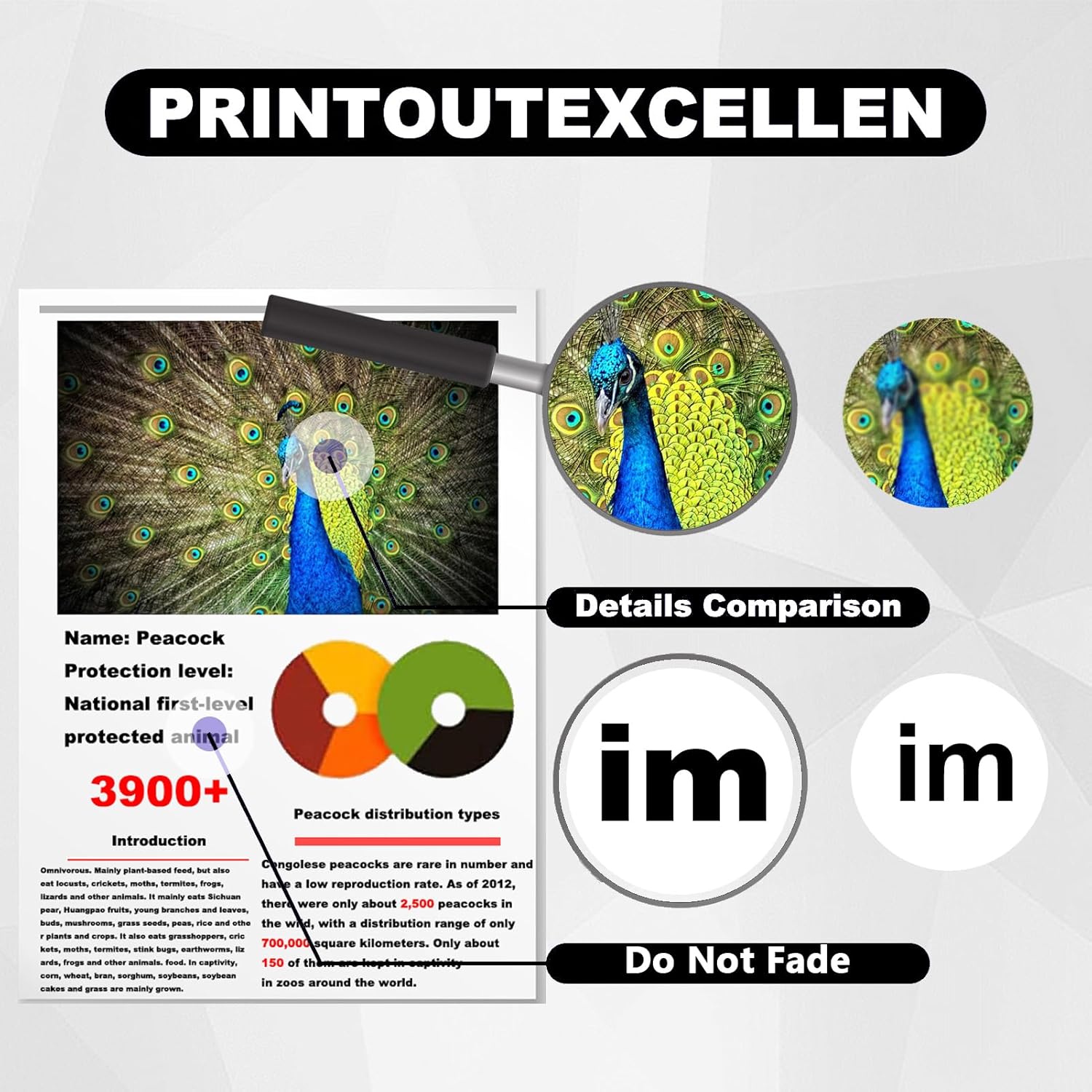
This image demonstrates the excellent print detail and fade resistance.
Maintenance
Proper maintenance ensures the longevity and optimal performance of your toner cartridge and printer.
- Storage: Store unused toner cartridges in their original sealed packaging in a cool, dry place, away from direct sunlight and extreme temperatures.
- Handling: Always handle toner cartridges carefully. Avoid touching the drum core or the electronic chip, as oils from your skin can affect print quality or cartridge recognition.
- Printer Cleaning: Regularly clean your printer according to its manufacturer's guidelines to prevent toner buildup and ensure smooth operation.
Troubleshooting
If you encounter issues with your toner cartridge, consider the following:
- Printer Not Recognizing Cartridge:
- Ensure the cartridge is fully seated in its slot. Remove and re-install it firmly.
- Check if the electronic chip on the cartridge is clean and free from obstructions. Gently wipe it with a dry, lint-free cloth if necessary.
- Restart your printer and computer.
- Some printer models or regional versions may require transferring the original chip to the new cartridge. Refer to your printer's specific instructions if this applies.
- Poor Print Quality (Streaks, Fading, Inconsistent Color):
- Gently shake the toner cartridge horizontally to redistribute the toner.
- Ensure all protective seals and covers were completely removed during installation.
- Perform a printer head cleaning cycle through your printer's software or control panel (if applicable).
- Check the toner level. If low, replace the cartridge.
- Paper Jams:
- Ensure no paper scraps or debris are inside the printer.
- Verify that the paper is loaded correctly and is not creased or damaged.
Specifications
| Feature | Detail |
|---|---|
| Brand | Generic |
| Compatible Toner Models | 119A W2090A, W2091A, W2092A, W2093A |
| Compatible Printer Models | HP 150A, 150NW, MFP 178FNW, MFP 179FNW |
| Black Page Yield (5% coverage) | Up to 1000 pages |
| Color Page Yield (5% coverage) | Up to 700 pages |
| Certifications | ISO9001, ISO14001 |
| Item Weight | 1 Kilogram (approximate) |
| Manufacturer | WANGDPJUE |
| Manufacturer Part Number | 115218085 |
Warranty and Support
While specific warranty details are not provided, we are committed to customer satisfaction. If you have any questions, concerns, or require assistance with your toner cartridge, please contact us directly. We guarantee to respond to your message within 24 hours and provide solutions to resolve your issue.
For support, please refer to the contact information provided with your purchase or on the product packaging.
Usage Scenarios
These toner cartridges are suitable for a wide range of printing environments, including:
- Home use
- School and educational institutions
- Office environments
- Medical facilities
- Banks and financial institutions
- Retail and shopping centers

This image illustrates the wide range of applications for this toner cartridge.