
Rockville TITAN COLUMN 12
Rockville TITAN COLUMN 12 Pro/DJ Powered Array Speaker System User Manual
Model: TITAN COLUMN 12
Brand: Rockville
1. Introduction
This manual provides essential information for the safe and efficient operation of your Rockville TITAN COLUMN 12 Pro/DJ Powered Array Speaker System. Please read this manual thoroughly before use to ensure proper setup, operation, and maintenance. Retain this manual for future reference.
2. Safety Instructions
- Power Source: Connect the unit only to a grounded AC power outlet of the specified voltage. Ensure the power cord is not pinched or damaged.
- Ventilation: Do not block ventilation openings. Ensure adequate airflow around the unit to prevent overheating.
- Moisture: Do not expose the unit to rain, moisture, or excessive humidity. Avoid placing liquid-filled objects on the unit.
- Placement: Place the unit on a stable, level surface. Avoid extreme temperatures, direct sunlight, and strong vibrations.
- Servicing: Do not attempt to service this unit yourself. Refer all servicing to qualified service personnel.
- Cleaning: Disconnect power before cleaning. Use a dry, soft cloth. Do not use liquid cleaners or aerosols.
3. Package Contents
Carefully unpack your system and ensure all items are present. If any items are missing or damaged, contact your dealer immediately.
- (2) 12" Powered Subwoofers with DSP (Plywood enclosure)
- (2) Column Speakers with (8) 2" Neodymium Drivers (Plywood enclosure)
- (2) Poles to connect the column to the subwoofer
- (2) Travel bags for the column speakers
- (2) Travel covers for the subwoofers
- (2) 8-Foot Power cables
- (1) Rockville RCXFM20E-B 20-Foot Female to Male XLR Mic Cable
- User Manual
- Warranty Card

Image: Complete Rockville TITAN COLUMN 12 Pro/DJ Powered Array Speaker System bundle, including two full speaker setups and an XLR cable.
4. Product Overview
The Rockville TITAN COLUMN 12 is a professional-grade column array speaker system designed for various audio applications. It features a powerful 12-inch subwoofer and eight 2-inch neodymium drivers for comprehensive sound reproduction.
Key Features:
- Power Output: 2600W Peak / 1300W Program / 650W Continuous RMS per system.
- Coverage: Suitable for events with up to 250 people in an 8,500 sq. ft. space.
- Wireless Connectivity: Bluetooth 5.2 with a 65 ft. range for seamless streaming and TWS stereo pairing.
- Subwoofer: 12-inch subwoofer with a plywood enclosure for deep bass (450W RMS).
- Drivers: (8) 2-inch neodymium drivers for clear mids and highs (200W RMS).
- Construction: Durable plywood enclosures with sandblasted finishes.
- Adjustable Pole: Extendable from 22 inches to 46.5 inches for flexible setup.
- DSP Settings: User-adjustable modes (Normal, DJ, Voice, Live, Flat).
- Maximum SPL: 121dB.
- Frequency Response: 45Hz - 20kHz (-3dB).
- Mixer Features: USB & SD Playback (32GB max), XLR / ¼” Combo Jack inputs, RCA Input, XLR Mix Output.
- Amplifier: Class D for efficient power management.
- Protection: Limiter Protection to prevent distortion.
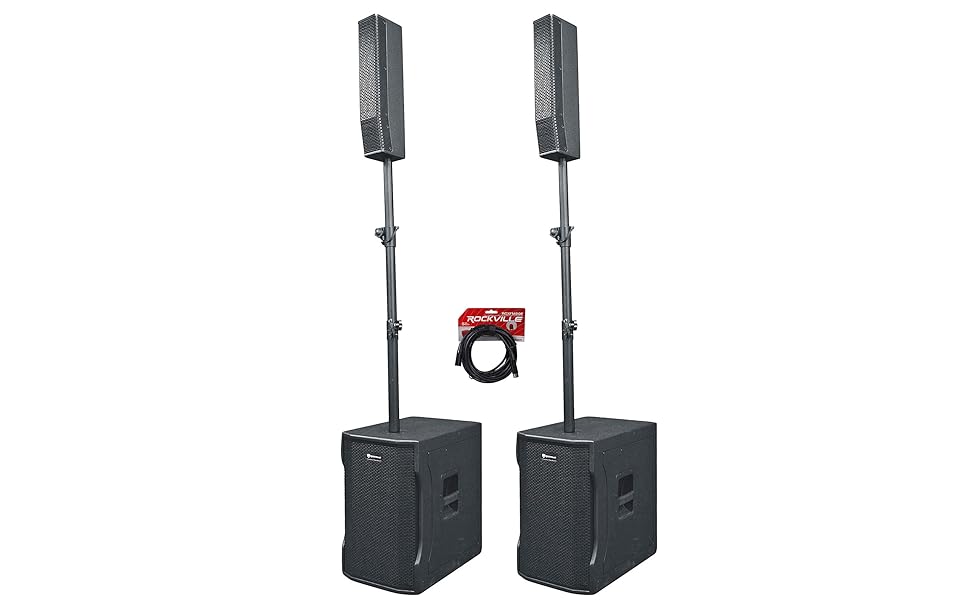
Image: Two TITAN COLUMN 12 systems demonstrating TWS (True Wireless Stereo) pairing for a wider soundstage.

Image: Examples of the TITAN COLUMN 12 system deployed in different event settings, such as DJ performances and live music.
5. Setup
5.1 Assembly
- Place the subwoofer on a stable, level surface.
- Insert the adjustable pole into the designated socket on top of the subwoofer. Secure it by tightening the locking mechanism.
- Attach the column speaker to the top of the adjustable pole. Ensure it is firmly seated.
- Adjust the pole height (22" to 46.5") to your desired level and tighten the locking collar.
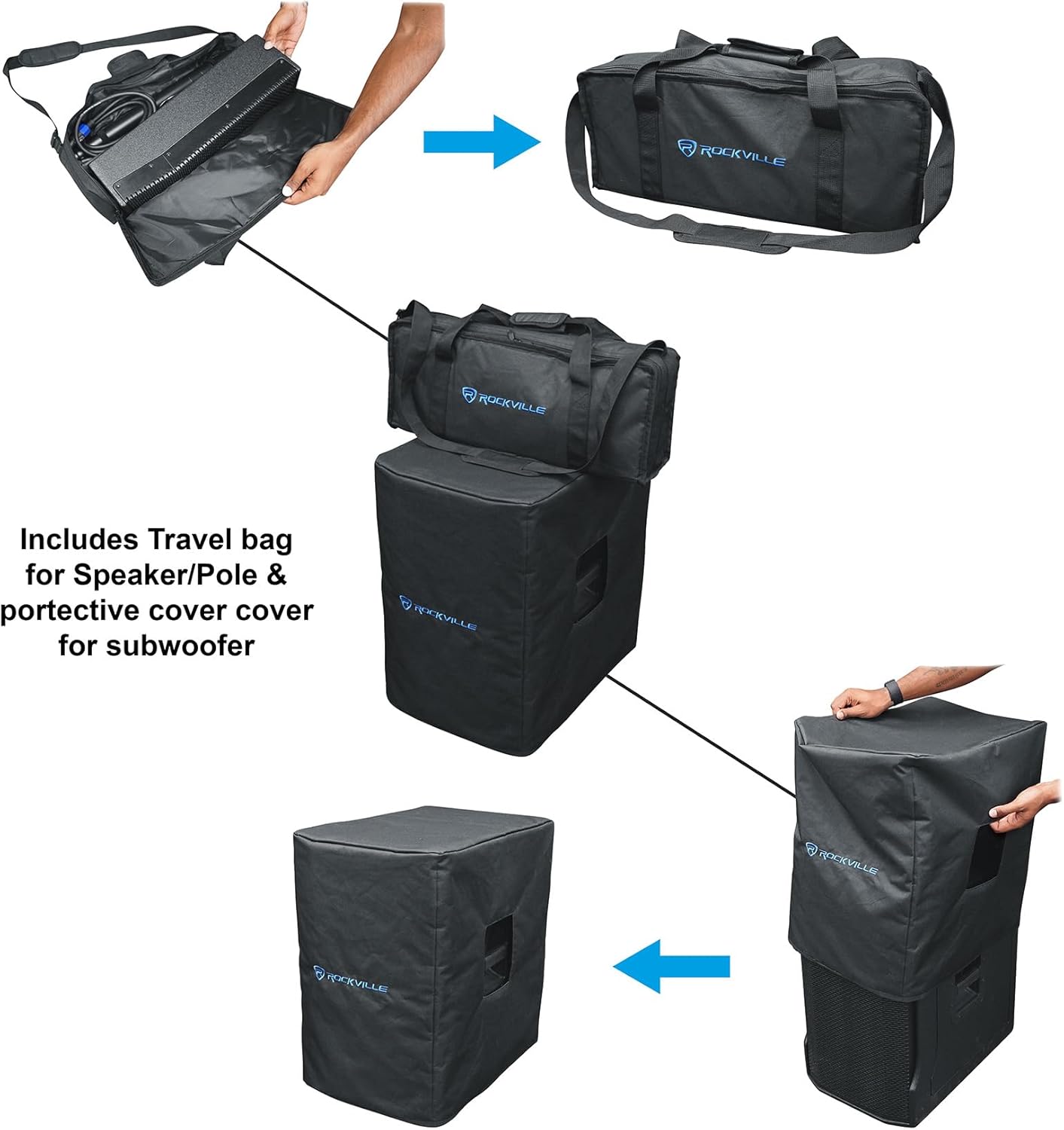
Image: Step-by-step assembly of the pole mount system, showing how to connect the column speaker to the subwoofer via the adjustable pole.
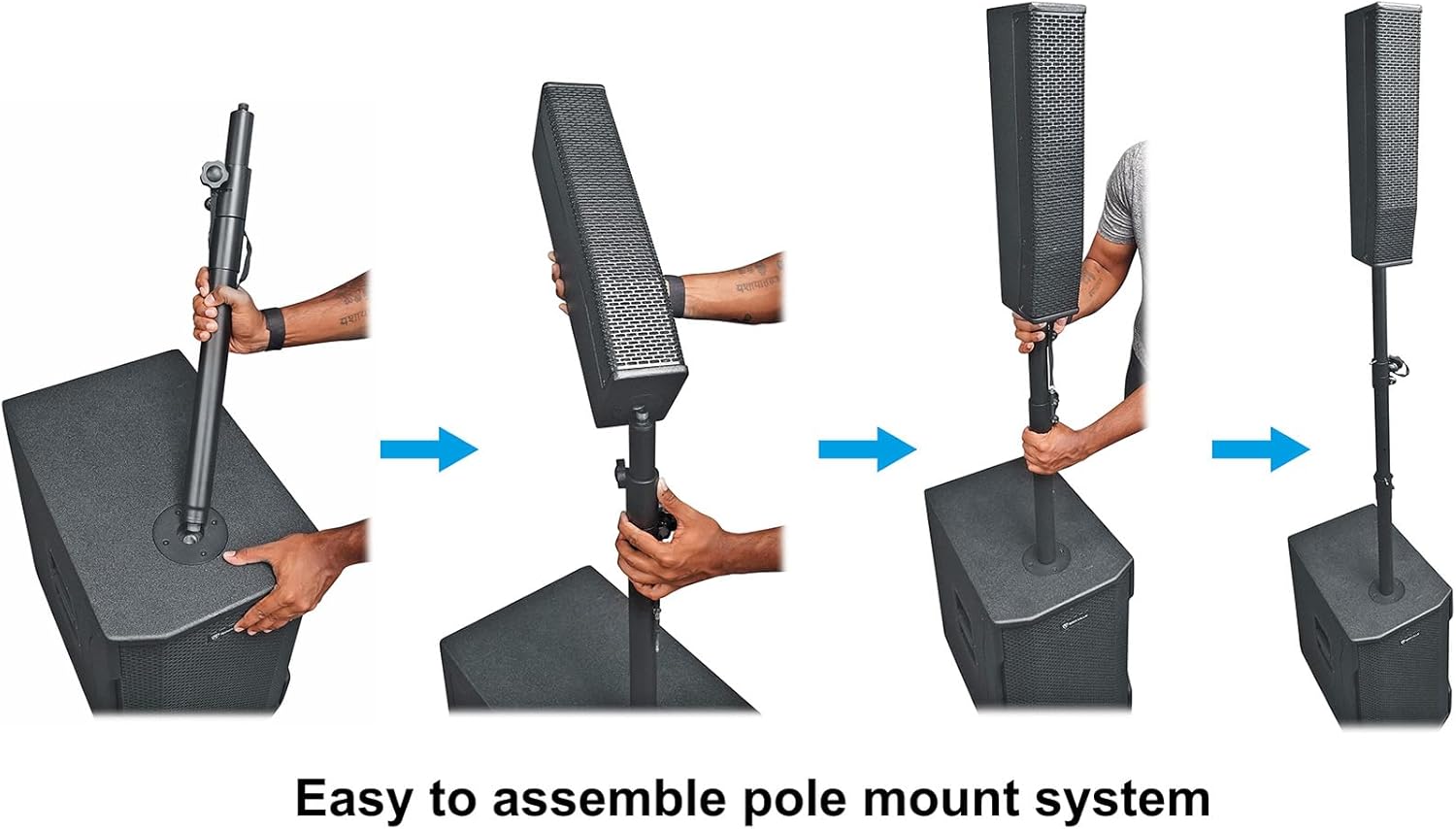
Image: Customizing the setup with the telescoping array pole, which can be adjusted from 22 to 46.5 inches in height for optimal sound coverage.
5.2 Connections
- Power: Connect the provided 8-foot power cable to the power inlet on the subwoofer and then to a grounded AC outlet.
- Audio Inputs:
- Input 1 (Mic/Line): Use an XLR or 1/4" cable for microphones or line-level devices.
- Input 2 (Line): Use an XLR or 1/4" cable for line-level devices.
- RCA Input: For connecting devices with RCA outputs.
- XLR Mix Output: Use an XLR cable to connect to additional speakers or an external amplifier.
- USB/SD: Insert a USB drive or SD card (up to 32GB) for direct audio playback.

Image: Rear panel of the subwoofer, detailing the input/output connections and control interface.

Image: Close-up of the control panel, illustrating the Bluetooth module, user-selectable DSP presets, XLR Mix output, and Mic/Line combo jack.
6. Operating Instructions
6.1 Power On/Off
Connect the power cable and flip the power switch located on the rear panel of the subwoofer to the "ON" position. The display will illuminate.
6.2 Volume Control
Adjust the main volume knob on the control panel to set the overall output level. Individual input gain controls may also be available for fine-tuning.
6.3 DSP Presets
The TITAN COLUMN 12 features user-selectable Digital Signal Processing (DSP) modes to optimize sound for different applications. Press the DSP button to cycle through the following presets:
- Normal: Standard sound profile for general use.
- DJ: Enhanced bass and treble for music playback.
- Voice: Optimized for clear vocal reproduction.
- Live: Balanced sound for live instrument and vocal performances.
- Flat: A neutral frequency response for custom equalization.
6.4 Bluetooth Pairing (TWS)
- Ensure both TITAN COLUMN 12 units are powered on and within 65 feet of each other.
- On one unit, press the "TWS" button. The display will indicate "TWS Pairing".
- On your Bluetooth-enabled device, search for "TITAN COLUMN 12" and select it to pair.
- Once paired, audio will play in stereo across both units.
6.5 USB/SD Playback
Insert a USB flash drive or SD card (formatted to FAT32, max 32GB) into the respective slot. The system will automatically detect and begin playing compatible audio files. Use the control panel buttons for playback control (play/pause, skip track).
7. Maintenance
- Cleaning: Use a soft, dry cloth to clean the exterior surfaces. Do not use abrasive cleaners or solvents.
- Storage: When not in use, store the system in a cool, dry place. Utilize the provided travel bags and covers for protection during transport and storage.
- Cable Care: Handle cables carefully. Avoid sharp bends or kinks. The included Rockville RCXFM20E-B XLR cable is designed for durability.
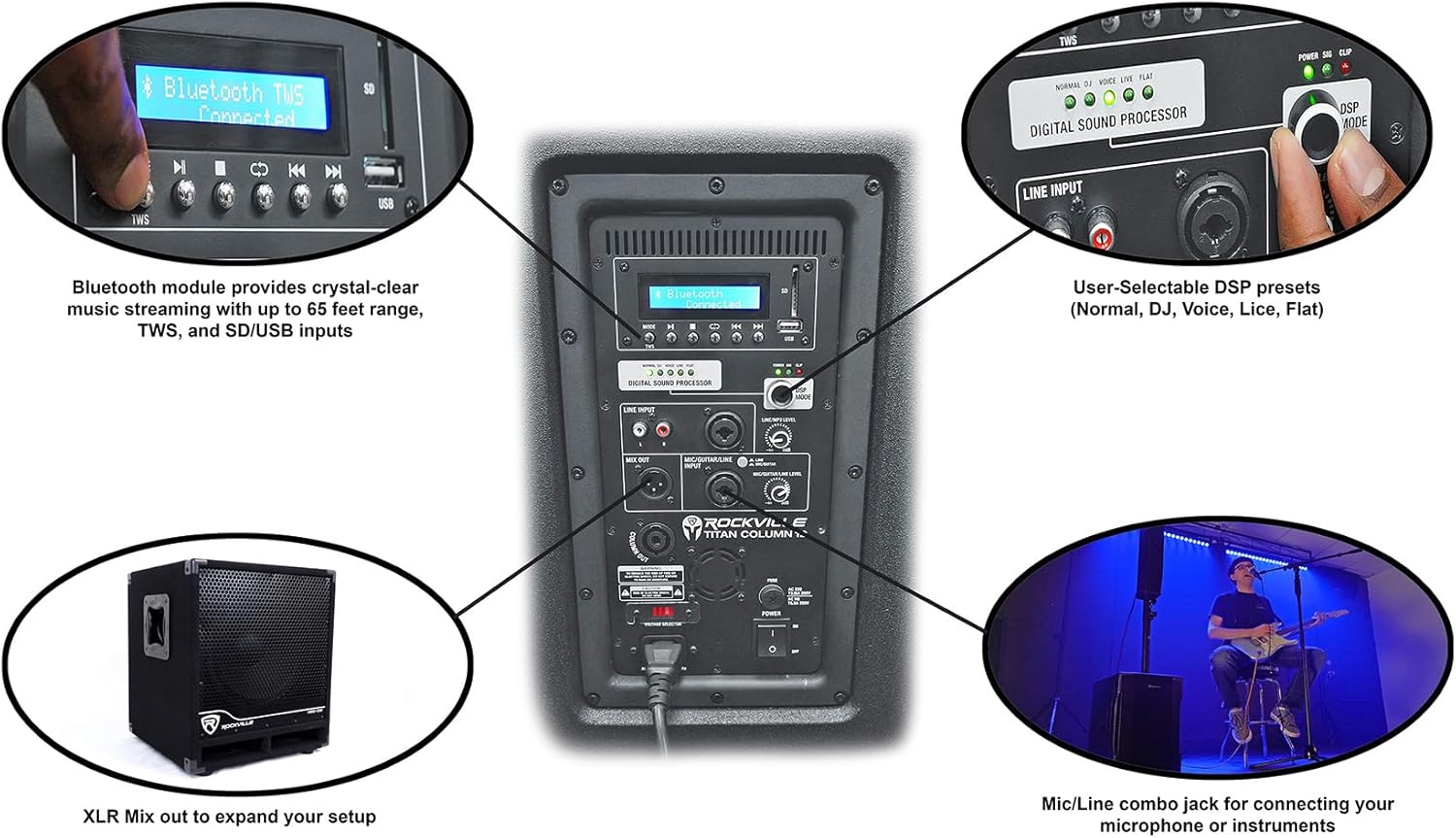
Image: Travel bag for column speakers and protective cover for the subwoofer, designed for easy transport and storage.
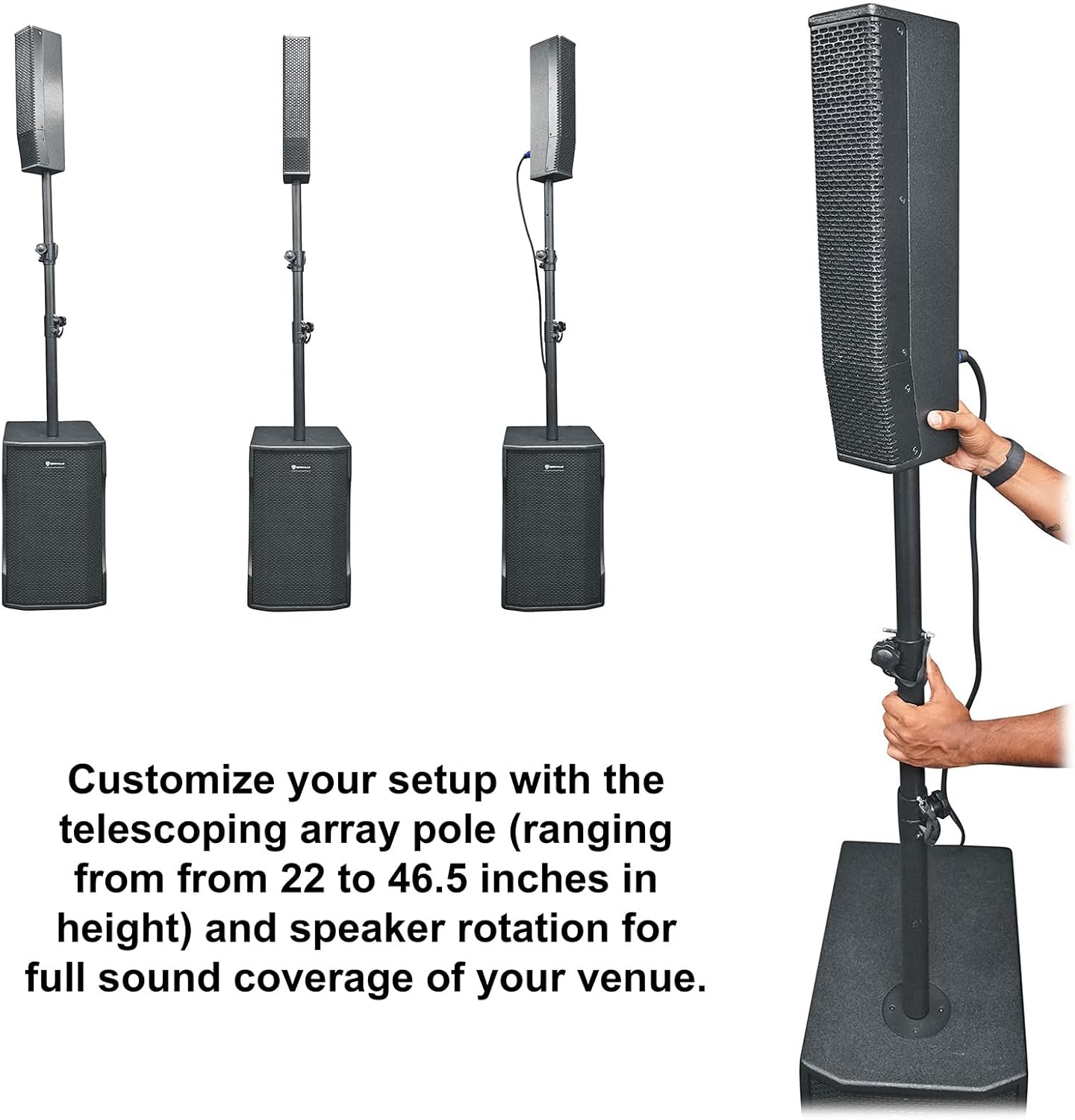
Image: The included Rockville RCXFM20E-B 20-Foot XLR Mic Cable, made of 100% oxygen-free copper for signal clarity.
8. Troubleshooting
| Problem | Possible Cause | Solution |
|---|---|---|
| No power | Power cable not connected; power switch off; faulty outlet. | Ensure power cable is securely connected and power switch is ON. Test the outlet with another device. |
| No sound output | Volume too low; incorrect input selected; faulty cable; source device issue. | Increase master volume and input gain. Verify correct input selection. Test with different cables and source devices. |
| Bluetooth not pairing | Device too far; Bluetooth not enabled on source; already paired to another device. | Ensure device is within range (65 ft). Enable Bluetooth on your source device. Disconnect from other devices. |
| Distorted sound | Input signal too high; volume too high; faulty speaker. | Reduce input gain or master volume. Check source signal level. If distortion persists, contact support. |
| TWS pairing issues | Units too far apart; TWS not initiated correctly. | Ensure both units are within close proximity. Re-initiate TWS pairing process as described in section 6.4. |
9. Specifications
| Feature | Detail |
|---|---|
| Model | TITAN COLUMN 12 |
| Power Output (Peak) | 2600W |
| Power Output (Program) | 1300W |
| Power Output (Continuous RMS) | 650W |
| Subwoofer Size | 12 inches |
| Column Drivers | (8) 2-inch Neodymium |
| Frequency Response | 45Hz - 20kHz (-3dB) |
| Maximum SPL | 121dB |
| Bluetooth Version | 5.2 |
| Bluetooth Range | 65 feet |
| USB/SD Max Storage | 32GB |
| Audio Inputs | XLR, 1/4", RCA |
| Audio Output | XLR Mix Output |
| Pole Height Adjustment | 22" to 46.5" |
| Construction Material | Plywood enclosures |
| Item Weight (per system) | Approximately 24.7 lbs (subwoofer) |
| Power Source | Corded Electric |
10. Warranty and Support
Rockville products are designed for reliability and performance. This product comes with a manufacturer's warranty. Please refer to the included warranty card for specific terms and conditions.
For technical support, service, or warranty claims, please contact Rockville customer service. Have your model number and purchase date ready when contacting support.
Contact Information: Please visit the official Rockville website or your point of purchase for the most current support contact details.