
Introduction
Thank you for choosing the OMQ Portable Tire Inflator Air Compressor. This device is designed for efficient and precise inflation of various items, including car tires, bicycle tires, motorcycle tires, and sports balls. Featuring a high-performance chip, it can reach up to 150 PSI, offering quick inflation and automatic shut-off for convenience and safety. This manual provides essential information for safe and effective use of your new inflator.
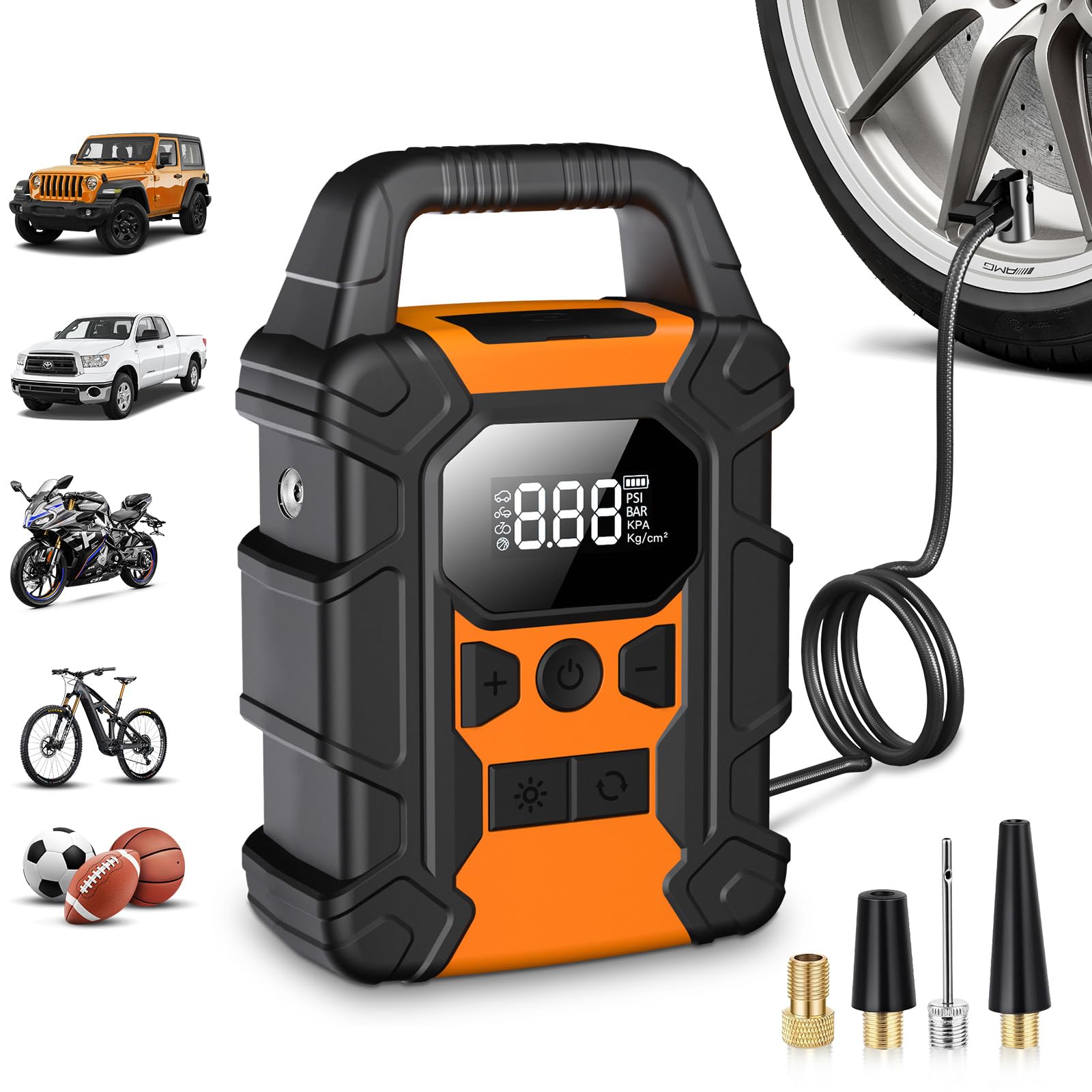
Image: The OMQ Portable Tire Inflator, showcasing its compact design and digital display.
Safety Information
- Read all instructions before use.
- Keep out of reach of children.
- Do not operate in wet conditions or near flammable liquids/gases.
- Do not leave the inflator unattended during operation.
- Ensure the correct pressure setting for the item being inflated to prevent over-inflation.
- Avoid prolonged continuous operation to prevent overheating. Allow the device to cool down if it becomes hot.
- Use only the provided accessories and charging cable.
Setup
1. Unboxing and Initial Charge
Carefully remove all components from the packaging. Before first use, fully charge the device using the provided Type-C charging cable. The LED display will indicate the charging status.
2. Attaching the Air Hose and Nozzles
Screw the air hose securely onto the inflator's air outlet. Select the appropriate nozzle for the item you wish to inflate and attach it to the other end of the air hose.

Image: The compact size of the OMQ inflator, showing its dimensions and integrated air nozzle storage.
Operating Instructions
1. Powering On and Display
Press the power button to turn on the inflator. The large LED screen will display the current tire pressure and the preset pressure value. You can switch between pressure units (PSI, BAR, KPA, kg/cm²) by pressing the unit button.

Image: The LED display of the OMQ inflator, highlighting the digital pressure readout and mode selection buttons.
2. Selecting Inflation Mode and Setting Pressure
The inflator offers 5 inflation modes:
- Car Mode: Preset for car tires.
- Bicycle Mode: Preset for bicycle tires.
- Motorcycle Mode: Preset for motorcycle tires.
- Ball Mode: Preset for sports balls.
- Custom Mode: Allows manual adjustment of the target pressure.
Use the mode button to cycle through the preset modes. For Custom Mode, use the '+' and '-' buttons to adjust the desired pressure. The device will automatically stop when the preset pressure is reached.

Image: The auto-stop feature of the OMQ inflator, demonstrating preset pressures for car, motorcycle, bicycle, and ball.

Image: Various applications of the OMQ inflator, including cars, motorcycles, bicycles, RVs, riding mowers, electric scooters, scooters, sports balls, and small swim rings.
3. Starting Inflation
Connect the air hose with the appropriate nozzle to the item's valve. Once the desired pressure is set, press the inflation button to start. The inflator will display the real-time pressure and stop automatically when the target pressure is reached.

Image: The OMQ inflator connected to a car tire, demonstrating its fast inflation capability.
4. LED Light Function
Press the light button to activate the integrated LED light. This is useful for operating in low-light conditions. The light also features SOS and fast flash modes for emergency situations.
5. Power Bank Function
The inflator can also function as a power bank. Connect your mobile phone or other electronic devices to the USB output port to charge them in emergencies.

Image: The OMQ inflator demonstrating its emergency power bank feature via USB output and its LED light functions (steady, SOS, fast flash).
Maintenance
- Charging: Recharge the device regularly, especially after prolonged storage, to maintain battery health.
- Cleaning: Wipe the exterior with a soft, dry cloth. Do not use harsh chemicals or immerse the device in water.
- Storage: Store the inflator in a cool, dry place, away from direct sunlight and extreme temperatures. Ensure the air hose and nozzles are properly stored in their designated compartments.
Troubleshooting
| Problem | Possible Cause | Solution |
|---|---|---|
| Device does not turn on. | Low battery or no charge. | Charge the device fully. |
| Inflator not inflating. | Air hose not securely connected; nozzle not properly attached to valve; target pressure not set or too low. | Ensure all connections are tight. Check nozzle attachment. Set target pressure above current pressure. |
| Inaccurate pressure reading. | Loose connection; sensor issue. | Ensure connections are secure. If issue persists, contact customer support. |
| Device overheats and shuts off. | Prolonged continuous use. | Allow the device to cool down for at least 15-20 minutes before resuming operation. |
Specifications
- Model Name: Y-QB02
- Brand: OMQ
- Dimensions (L x W x H): 19.81 x 13.97 x 6.35 cm (7.8 x 5.5 x 2.5 inches)
- Weight: 1.06 kg (2.34 lbs)
- Material: Plastic
- Power Source: Battery Powered
- Maximum Pressure: 150 PSI
- Special Features: Automatic Shut-off, Fast Inflation, LED Light, Portable, Cordless
- Included Components: Tire inflator, various nozzles
- Recommended Uses: Tire inflation (car, bike, motorcycle), sports balls
- Battery Capacity: 20000mAh

Image: The OMQ inflator highlighting its 20000mAh large capacity battery and 150 PSI maximum pressure, with examples of inflation capacity for various items.
Warranty Information
Specific warranty details are not provided in the product information. Please refer to the retailer's return policy or contact OMQ customer support for warranty terms and conditions.
Customer Support
For any questions, technical assistance, or support regarding your OMQ Portable Tire Inflator, please contact the seller or refer to the official OMQ website for contact information.