
1. Product Overview
The AirheadStorm 450W 80A MPPT Solar Charge Controller is designed for efficient and reliable charging across a wide range of applications. It features advanced Maximum Power Point Tracking (MPPT) technology to optimize power conversion, achieving an efficiency rate of 98%. This controller supports various battery types, including lead-acid, lithium, LiFePO4, and gel batteries, offering flexibility for different energy storage solutions.
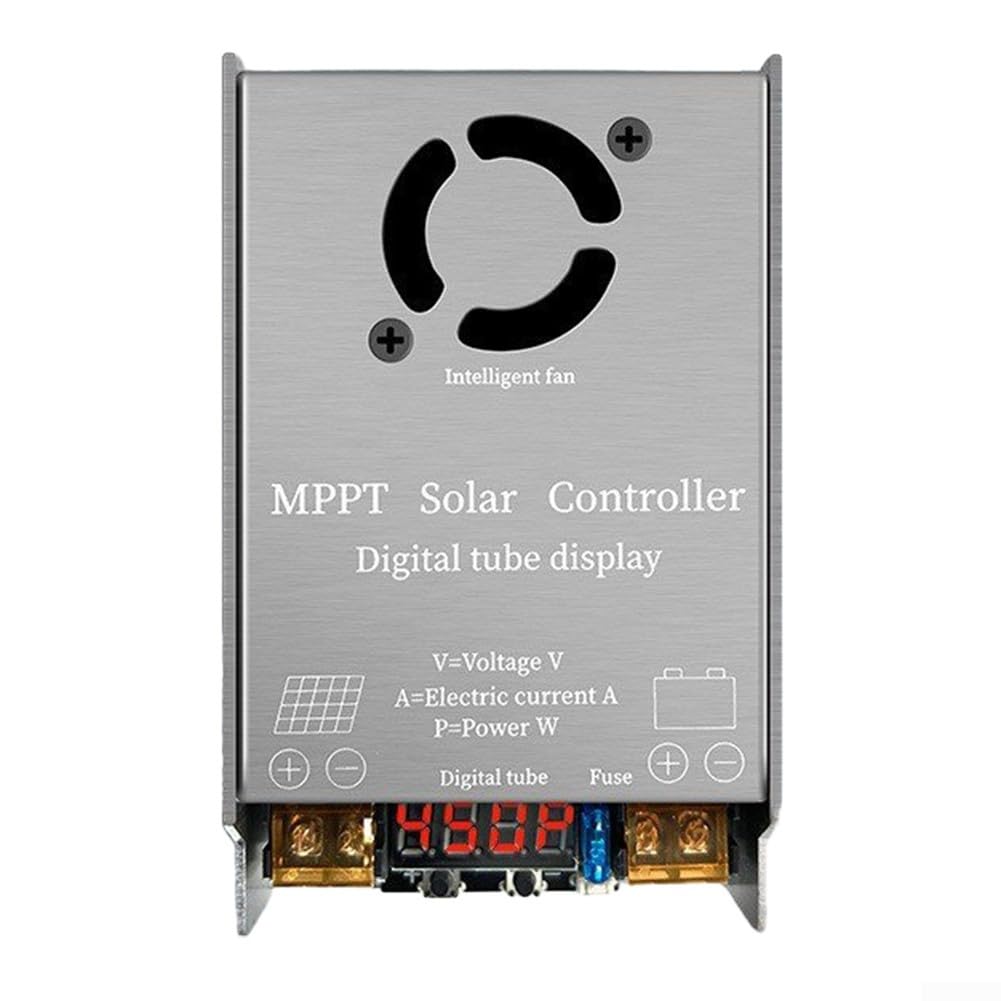
Figure 1: Front view of the MPPT Solar Charge Controller, showing input/output terminals and digital display.
The controller is built with a sturdy magnesium aluminum alloy shell, providing excellent durability and heat dissipation. It includes a user-friendly LED display for monitoring operational status and is equipped with several protective features to ensure safe and reliable operation.
2. Safety Precautions
- Do not use the solar controller under voltage overload or power overload conditions.
- Ensure the solar controller voltage is consistent with the battery voltage before installation.
- All input and output lines of the solar controller use red for the positive pole and black for the negative pole. Observe correct polarity during connection.
- Keep connecting cables as short as possible to avoid potential power loss.
- Install the solar controller in a well-ventilated environment, as it is normal for the unit to generate heat during operation.
- Do not attempt to change or replace the internal 15A fuse yourself. Contact qualified personnel if fuse replacement is necessary.
- Avoid placing solar panels behind glass objects or allowing anything to cover them, as this reduces power generation.
3. Setup and Installation
Follow these steps for proper installation of your MPPT Solar Charge Controller:
- Voltage Setting: Before connecting any components, set the output voltage of the controller to match your battery bank's voltage (24V, 36V, 48V, 60V, or 72V). Refer to the operating instructions for voltage adjustment.
- Solar Panel Connection: Connect the solar panel(s) to the controller's input terminals (VIN). Ensure correct polarity: red for positive (+), black for negative (-).
- Battery Connection: After connecting the solar panel, connect the battery bank to the controller's output terminals (OUT). Again, ensure correct polarity: red for positive (+), black for negative (-).

Figure 2: Angled view of the controller, highlighting the input (VIN) and output (OUT) connection points.
Important: The solar controller will not function correctly if the solar panel is not connected or if the connection order is reversed.
4. Operation
Once properly installed, the MPPT Solar Charge Controller will automatically begin optimizing the power transfer from your solar panels to your battery bank. The built-in LED display provides real-time information on the operational status, allowing you to monitor system performance at a glance.
4.1. Supported Battery Types
This controller is compatible with a wide range of battery chemistries, including:
- Lead-acid batteries
- Lithium batteries
- LiFePO4 batteries
- Gel batteries
4.2. Voltage and Power Management
The controller accepts an input voltage range of 12V to 50V from solar panels and can output voltage from 24V to 72V to charge compatible battery banks. It manages a maximum current of 12A and has rated power outputs of 18V/300W and 36V/450W, ensuring robust performance for various energy requirements.
5. Maintenance
To ensure the longevity and optimal performance of your solar charge controller, consider the following maintenance guidelines:
- Ventilation: The controller generates heat during operation. Ensure it is installed in a well-ventilated area to prevent overheating. Regularly check that the intelligent fan (if present) is free from obstructions.
- Connections: Periodically inspect all wiring connections for tightness and corrosion. Loose connections can lead to power loss or system malfunction.
- Cleaning: Keep the controller's exterior clean and free of dust and debris. Use a dry, soft cloth for cleaning. Do not use liquid cleaners.
- Fuse: The controller is equipped with a 15A fuse for protection against electrical faults. Do not attempt to change or replace this fuse yourself. Unauthorized replacement can void the warranty and pose a safety risk.

Figure 3: Top view of the controller, showing the intelligent fan for heat dissipation.
6. Troubleshooting
If you encounter issues with your solar charge controller, consider the following common troubleshooting steps:
- No Power Output:
- Check if the solar panel is properly connected to the controller. The controller requires solar input to operate.
- Verify that the battery bank is correctly connected to the output terminals with correct polarity.
- Ensure the input voltage from the solar panels is within the specified range (12V-50V).
- Low Charging Efficiency:
- Confirm that solar panels are exposed to strong, direct sunlight. Obstructions or placement behind glass can significantly reduce power.
- Check for any shading on the solar panels.
- Ensure cable lengths are minimized to reduce resistance and power loss.
- Overheating:
- Verify that the controller is installed in a well-ventilated area.
- Ensure the fan (if applicable) is not blocked and is functioning correctly.
- Incorrect Voltage Reading:
- Confirm that the controller's voltage setting matches the battery bank's nominal voltage.
If problems persist after following these steps, consult a qualified technician.
7. Specifications
| Feature | Specification |
|---|---|
| Product Name | MPPT Solar Controller |
| Input Voltage | 12V - 50V |
| Output Voltage | 24V / 36V / 48V / 60V / 72V |
| Maximum Current | 12A |
| Rated Power | 18V/300W, 36V/450W |
| Compatible Batteries | Lead-acid, Lithium, LiFePO4, Gel |
| Size (L*W*H) | 113 x 86 x 39 mm |
| Weight | 232 Grams |
| Conversion Efficiency | 98% |
| Protection Level | IP30 |
| Shell Material | Magnesium Aluminum Alloy |
| Working Temperature | -20℃ to 60℃ |
| Display Type | LED |
| Fuse | 15A |

Figure 4: Side and bottom views of the controller, illustrating its compact dimensions and robust casing.