
1. Introduction
Thank you for purchasing the Delighkidz Dinosaur Karaoke Machine. This portable Bluetooth speaker with two wireless microphones is designed to provide an enjoyable audio experience. This manual provides essential information for safe and effective use of your device.

Image 1.1: The Delighkidz Dinosaur Karaoke Machine, featuring a light blue speaker with a dinosaur graphic and two matching wireless microphones.
2. Package Contents
Please verify that all items listed below are included in your package:
- 1 x Karaoke Speaker Unit
- 2 x Wireless Microphones
- 1 x USB Charging Cable
- 1 x User Manual (This document)
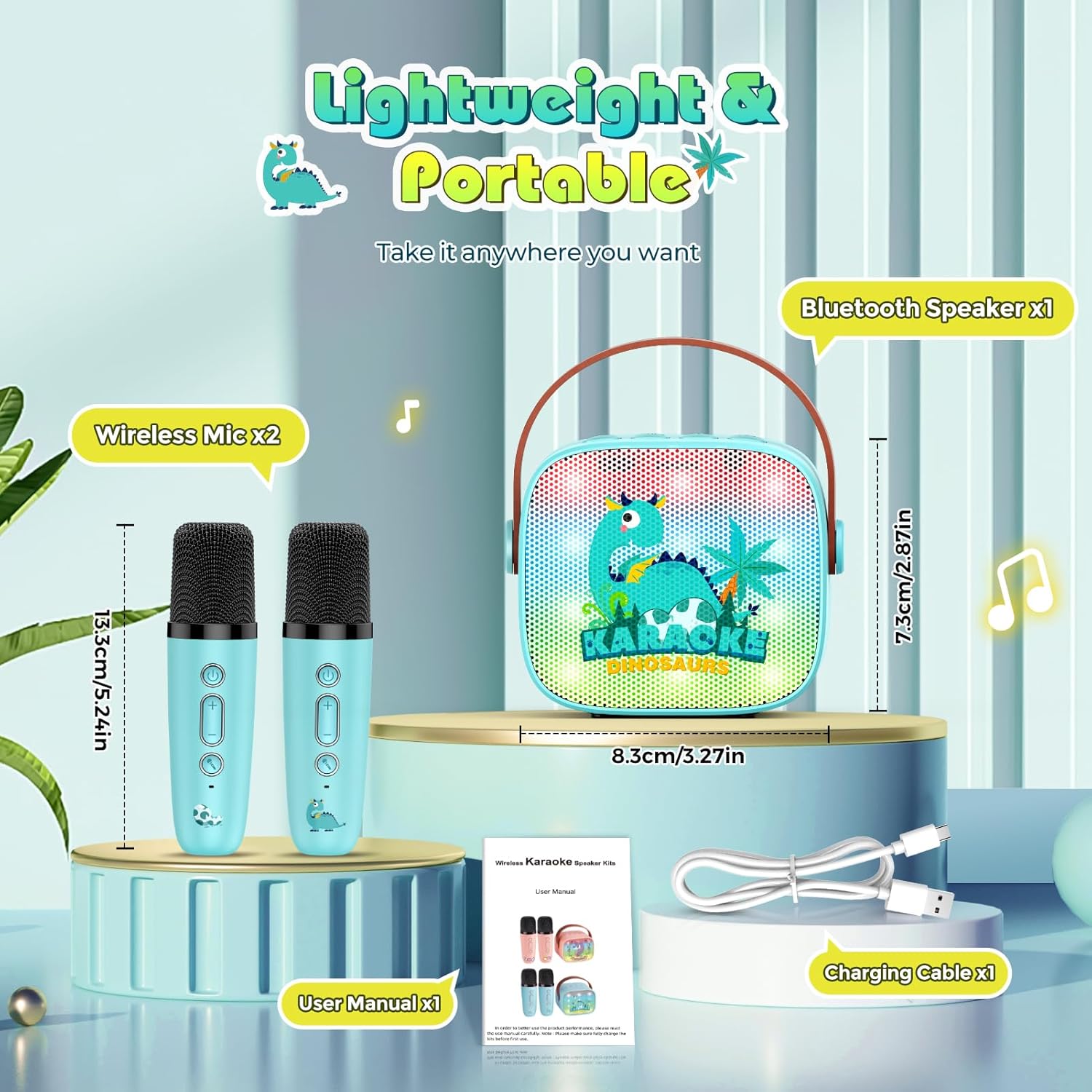
Image 2.1: An illustration showing the speaker, two microphones, USB cable, and user manual included in the package, along with their approximate dimensions.
3. Product Overview
3.1 Speaker Unit
The main speaker unit features a dinosaur design with colorful LED lights. It includes control buttons for power, volume, mode selection, and sound effects.
3.2 Wireless Microphones
Each microphone is wireless and includes buttons for power, volume adjustment, and sound effects. They are designed for easy handling.
4. Setup
4.1 Charging the Device
Before first use, fully charge the karaoke machine and both microphones. Use the provided USB charging cable to connect the devices to a compatible USB power source (e.g., computer USB port, USB wall adapter).
- Charging Time: Approximately 2 hours for a full charge.
- Battery Life: Up to 10 hours of continuous use on a full charge.
4.2 Powering On/Off
Press and hold the power button on the speaker unit and each microphone to turn them on or off.
4.3 Bluetooth Connection
The karaoke machine utilizes Bluetooth 5.3 for wireless connectivity.
- Turn on the karaoke speaker unit. It will automatically enter Bluetooth pairing mode.
- On your smartphone, tablet, or computer, enable Bluetooth and search for available devices.
- Select "Delighkidz Karaoke" (or similar name) from the list to connect. A confirmation sound will indicate a successful connection.
- Turn on both wireless microphones. They should automatically pair with the speaker unit.

Image 4.1: This image illustrates various connection methods including Bluetooth 5.3, TF Card, AUX, and Type-C USB, showing compatibility with phones, tablets, and laptops.
5. Operating Instructions
5.1 Playing Music
- Bluetooth Mode: Once connected via Bluetooth (Section 4.3), play music from your paired device.
- TF Card Mode: Insert a TF (MicroSD) card with MP3 audio files into the designated slot on the speaker. The device will automatically switch to TF Card mode and begin playback.
- AUX Mode: Connect an external audio source using an AUX cable (not included) to the AUX input port on the speaker.
5.2 Volume Control
- Speaker Volume: Use the volume buttons on the speaker unit to adjust the overall music playback volume.
- Microphone Volume: Use the volume buttons on each wireless microphone to adjust the microphone's output level.
5.3 Sound Effects and Voice Changer
The karaoke machine offers various sound effects and voice modulation options.
- Press the dedicated sound effect button on the speaker or microphones to cycle through available voice effects (e.g., Baby Voice, Male Voice, Female Voice, Monster Voice, Normal).
- The LED lights on the speaker will sync with the music and sound effects.
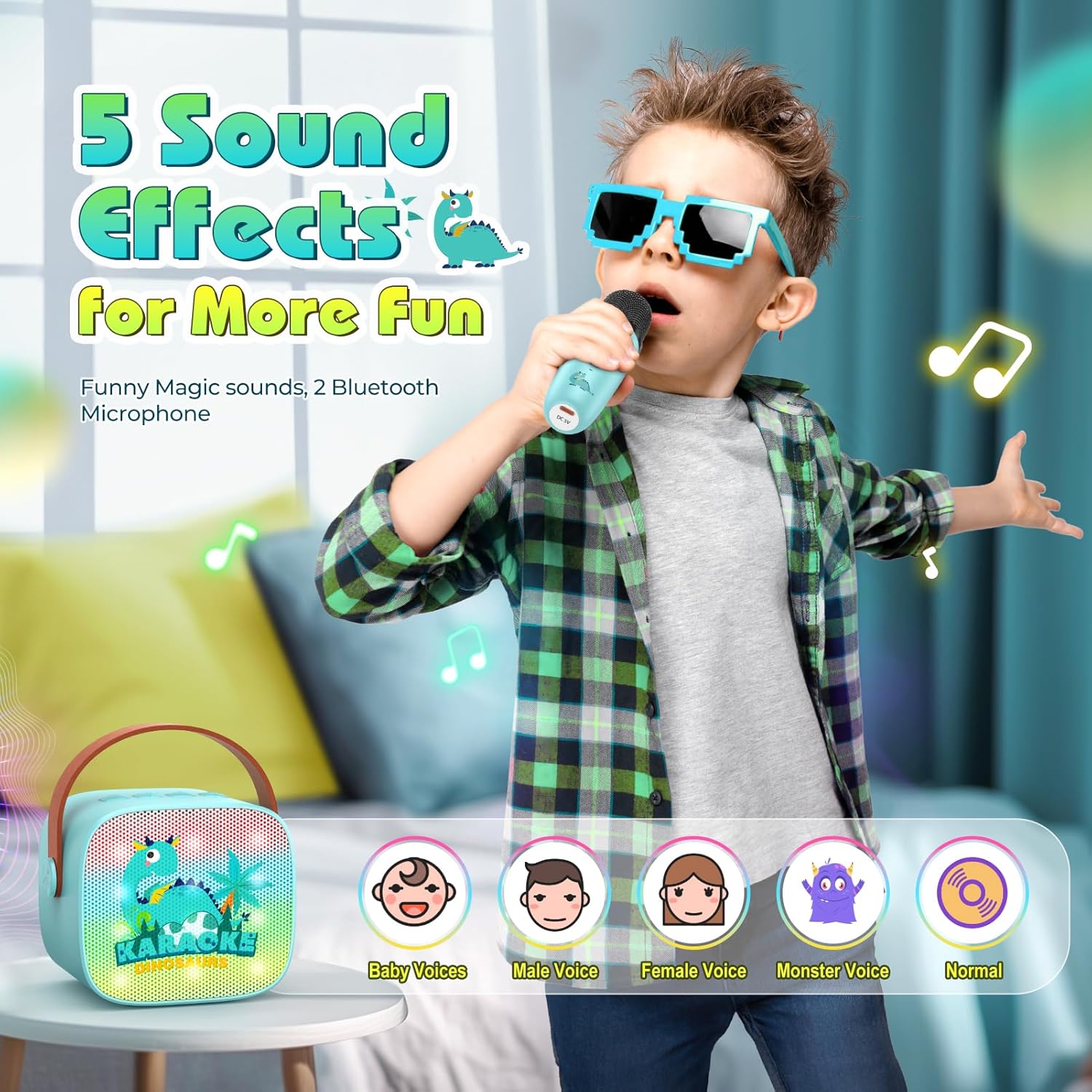
Image 5.1: This image displays the five available sound effects: Baby Voice, Male Voice, Female Voice, Monster Voice, and Normal, demonstrating the voice changer feature.
6. Maintenance
- Clean the device with a soft, dry cloth. Do not use abrasive cleaners or solvents.
- Keep the device away from water, moisture, and extreme temperatures.
- Store the device in a cool, dry place when not in use.
- Avoid dropping or subjecting the device to strong impacts.
7. Troubleshooting
| Problem | Possible Cause | Solution |
|---|---|---|
| Device does not power on. | Low battery. | Charge the device fully using the provided USB cable. |
| No sound from speaker. | Volume too low; incorrect mode selected; device not paired. | Increase volume; ensure correct mode (Bluetooth, TF, AUX) is selected; re-pair Bluetooth device. |
| Microphone not working. | Microphone not powered on; low battery; not paired with speaker. | Ensure microphone is on; charge microphone; power cycle both microphone and speaker to re-establish connection. |
| Bluetooth connection unstable. | Device too far from speaker; interference. | Move the paired device closer to the speaker; avoid obstacles between devices. |
8. Specifications
| Feature | Detail |
|---|---|
| Brand | Delighkidz |
| Model Number | WJ12484 |
| Product Dimensions | 9.65 x 9.65 x 11.43 cm |
| Item Weight | 549 g |
| Batteries | 3 Lithium Polymer batteries (included, rechargeable) |
| Power Source | Battery Powered |
| Connector Type | Bluetooth 5.3 |
| Special Features | Light Up Speaker, Lightweight, Portable, Rechargeable, Voice Changer |
| Compatible Devices | Personal Computer, Smartphone |
| Country of Origin | China |

Image 8.1: An exploded view of the speaker's internal components, highlighting the acoustic structure for 360-degree HD stereo sound and advanced digital signal processing.
9. Safety Information
- Do not disassemble or attempt to repair the device yourself. This may void the warranty and cause damage.
- Keep the device out of reach of small children to prevent choking hazards from small parts.
- Use only the provided charging cable or a certified equivalent.
- Dispose of batteries and electronic components responsibly according to local regulations.
10. Warranty and Support
For warranty information or technical support, please refer to the contact details provided with your purchase documentation or visit the official Delighkidz website. Please retain your proof of purchase for warranty claims.