
1. Introduction
This manual provides essential information for the safe and efficient operation of your Skyworth Camera-B-ADDON. Please read this manual thoroughly before using the device and retain it for future reference. The Skyworth Camera-B-ADDON is designed to deliver clear and sharp visuals, seamlessly integrating with compatible Skyworth devices for various applications such as security monitoring and video communication.
2. Safety Information
- Ensure the camera is installed in a stable location to prevent falling.
- Do not expose the camera to extreme temperatures, humidity, or direct sunlight for prolonged periods.
- Use only the specified power source and accessories.
- Keep the device away from water and other liquids, unless specifically rated for such exposure. This model has an IP65 protection level, suitable for outdoor use in various weather conditions.
- Do not attempt to disassemble or repair the camera yourself. Refer all servicing to qualified personnel.
- Keep out of reach of children.
3. Package Contents
Please check the package contents upon opening. If any items are missing or damaged, contact your retailer.
- Skyworth Camera-B-ADDON Unit
- Mounting Bracket/Hardware
- Power Adapter (Corded Electric)
- User Manual (this document)
4. Product Overview
The Skyworth Camera-B-ADDON is a compact and lightweight camera designed for versatile placement. It features a high-definition lens, integrated microphone and speaker, and a robust casing suitable for various environments.

Figure 4.1: Front and back views of the Skyworth Camera-B-ADDON. The front features the camera lens and a "HELO" branding. The back shows ventilation, a reset button, and ports for power, USB, and Ethernet.
The camera is equipped with an IP65 protection level, making it suitable for both indoor and outdoor use, capable of withstanding windy, rainy, or snowy conditions.

Figure 4.2: The Skyworth Camera-B-ADDON demonstrating its weatherproof capabilities with water droplets on its casing while mounted outdoors.
5. Setup
5.1 Mounting the Camera
The Skyworth Camera-B-ADDON is designed for easy, wireless setup. It can be freely placed and installed in minutes.
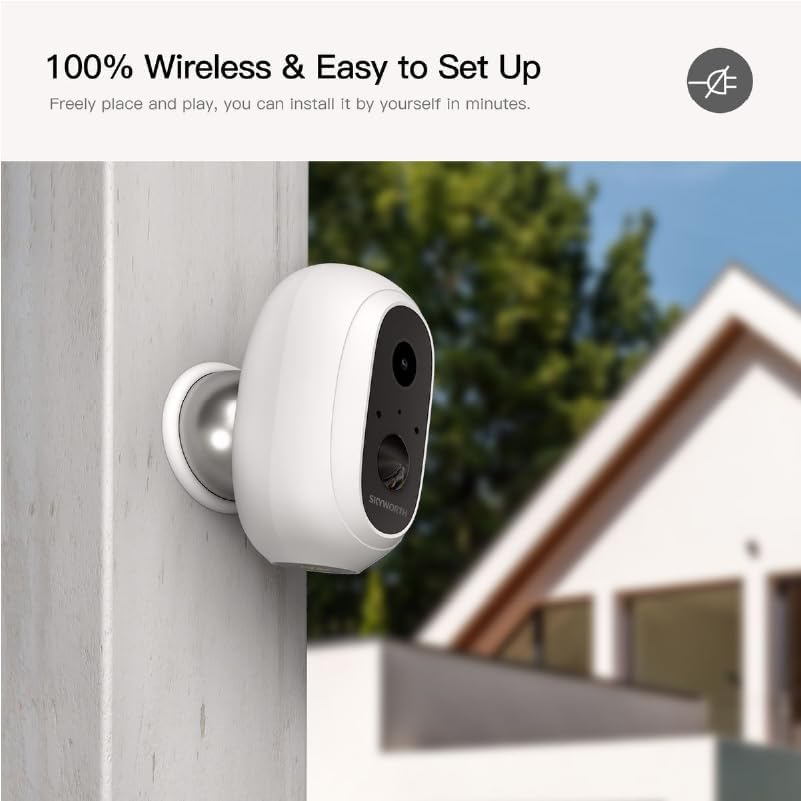
Figure 5.1: The Skyworth Camera-B-ADDON mounted on an exterior wall, highlighting its wireless installation.
- Choose a Location: Select a suitable location for optimal viewing, considering the camera's field of view and power source proximity if using corded electric. For outdoor use, ensure the mounting surface is sturdy.
- Install Mounting Bracket: Use the provided screws and anchors to securely attach the mounting bracket to the desired surface.
- Attach Camera: Securely attach the camera unit to the mounting bracket. Adjust the angle for the desired coverage.
5.2 Powering On and Initial Connection
- Insert Batteries (if applicable): If your model uses rechargeable batteries, ensure they are correctly inserted and charged.
- Connect Power: Plug the power adapter into the camera's power port and then into a wall outlet. The camera will power on automatically.
- Download App: Download the official Skyworth smart home application from your device's app store (iOS or Android).
- Add Device: Open the app, create an account or log in, and follow the on-screen instructions to add your new camera. This typically involves scanning a QR code on the camera or selecting the device from a list.
- Connect to Wi-Fi: Follow the app prompts to connect the camera to your home Wi-Fi network. Ensure your Wi-Fi signal is strong at the camera's location.
6. Operating the Camera
6.1 Live View and Recording
- Access Live View: Open the Skyworth app and select your camera from the device list to view the live feed.
- Manual Recording: Within the live view interface, you can typically find an option to manually start and stop video recording.
- Motion Detection: Configure motion detection settings in the app. The camera can automatically record and send alerts when motion is detected.
6.2 Two-Way Audio
The camera supports two-way audio communication. In the live view, tap the microphone icon to speak through the camera's speaker and listen through your phone's speaker.
6.3 Cloud Storage / Local Storage
Review your app settings for options regarding video storage. This may include cloud subscription services or local storage via a microSD card (if a slot is present).
7. Maintenance
7.1 Cleaning the Camera
- Ensure the camera is powered off before cleaning.
- Use a soft, dry cloth to wipe the camera body.
- For the lens, use a specialized lens cleaning cloth to avoid scratches. Do not use harsh chemicals or abrasive cleaners.
7.2 Battery Management (if applicable)
The camera may utilize rechargeable batteries for extended standby time. This model supports 2 pcs 18650 rechargeable batteries with 6000mAh capacity.

Figure 7.1: Internal view of the Skyworth Camera-B-ADDON, illustrating the placement of two 18650 rechargeable batteries.
- Charging: Ensure batteries are fully charged before initial use. Charge them regularly as indicated by the app or device status.
- Replacement: If battery life significantly degrades, replace with genuine 18650 rechargeable batteries of the specified capacity. Follow proper polarity when inserting.
- Disposal: Dispose of old batteries according to local regulations.
8. Troubleshooting
| Problem | Possible Cause | Solution |
|---|---|---|
| Camera not powering on | No power, dead batteries, faulty adapter | Check power connection. Ensure batteries are charged/inserted correctly. Try a different power outlet. |
| Cannot connect to Wi-Fi | Incorrect Wi-Fi password, weak signal, camera too far from router | Verify Wi-Fi password. Move camera closer to router. Ensure router is 2.4GHz compatible if required. |
| No live view in app | Internet connection issue, camera offline, app glitch | Check your phone's internet connection. Restart the camera and the app. Ensure camera is connected to Wi-Fi. |
| Poor video quality | Dirty lens, low bandwidth, poor lighting | Clean the camera lens. Check your internet speed. Ensure adequate lighting in the monitored area. |
9. Specifications
| Feature | Detail |
|---|---|
| Model | Camera-B-ADDON |
| Brand | Generic (Skyworth) |
| Power Source | Corded Electric (and 2x 18650 rechargeable batteries for standby) |
| Controller Type | Amazon Alexa (App controlled) |
| Color | WHITE |
| Recommended Use | Outdoor Security |
| Protection Level | IP65 (Weatherproof) |
| Battery Capacity | 6000mAh (for 2x 18650 batteries) |
| ASIN | B0DDR5SYX1 |
10. Warranty and Support
For warranty information and technical support, please refer to the documentation provided with your purchase or visit the official Skyworth website. Keep your proof of purchase for warranty claims.
For further assistance, contact customer support through the Skyworth application or their official support channels.


