
1. Introduction
This manual provides comprehensive instructions for the safe and efficient use of your Samsung Galaxy AI Watch 7 (Model SM-L300). Please read this manual thoroughly before using the device to ensure proper operation and to prevent damage.
The Samsung Galaxy AI Watch 7 is a sophisticated wearable device designed to enhance your daily life with advanced health monitoring, fitness tracking, and smart connectivity features, powered by Galaxy AI.
2. What's in the Box
Verify that all components are present in the package:
- Samsung Galaxy AI Watch 7 (SM-L300)
- Dock Station
- 15W Dual Port Charger
- Quick Start Guide (separate document, if applicable)
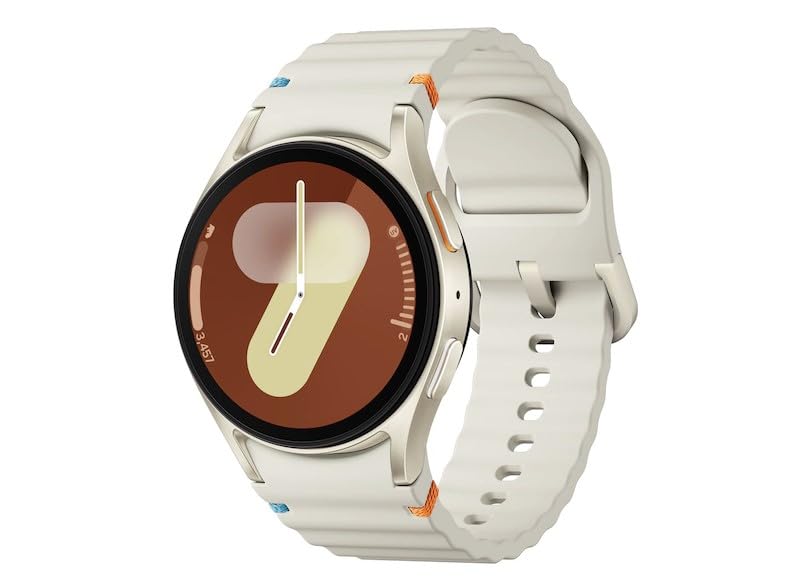
Figure 2.1: Samsung Galaxy AI Watch 7 (SM-L300) - Cream variant. This image shows the smartwatch from an angled perspective, highlighting its circular display and the textured cream-colored strap. The watch face displays a stylized '9' and a time indicator.
3. Setup
3.1 Charging the Device
- Connect the 15W Dual Port Charger to a power outlet.
- Place the Galaxy AI Watch 7 onto the Dock Station. Ensure the charging pins align correctly.
- The watch display will indicate charging status. Allow the watch to fully charge before first use.
3.2 Initial Pairing with Smartphone
- Ensure your smartphone has Bluetooth enabled.
- Download and install the latest version of the Galaxy Wearable app from your smartphone's app store.
- Turn on the Galaxy AI Watch 7 by pressing and holding the Power key.
- Open the Galaxy Wearable app on your smartphone and follow the on-screen instructions to pair your watch.
- Accept all necessary permissions for full functionality.
4. Operating the Device
4.1 Basic Navigation
- Touchscreen: Swipe left/right to navigate through tiles, swipe up/down for notifications/quick panel. Tap to select.
- Home Key (Top Button): Press to go to the Watch face or App screen. Double-press for a customizable shortcut.
- Back Key (Bottom Button): Press to go back to the previous screen.
4.2 Health and Fitness Tracking
The Galaxy AI Watch 7 offers comprehensive health and fitness tracking:
- Heart Rate Monitoring: Continuously tracks your heart rate. Access data via the Samsung Health app.
- Sleep Monitoring: Analyzes sleep stages and provides a sleep score. Offers personalized sleep coaching.
- Activity Tracking: Automatically detects and tracks various workouts. Manual tracking available for specific exercises.
- Energy Score: Provides insights into your body's readiness based on sleep, heart rate, and activity.
- Wellness Tips: Personalized advice based on your Samsung Health data.
4.3 Water Lock Mode
Activate Water Lock mode before engaging in water activities to prevent accidental touches and ensure proper water resistance. This mode disables the touchscreen and wake-up gestures.
5. Maintenance
5.1 Cleaning the Device
- Wipe the watch and strap with a soft, lint-free cloth.
- For stubborn dirt, slightly dampen the cloth with water. Do not use harsh chemicals or abrasive cleaners.
- Ensure the watch is completely dry before charging.
5.2 Battery Care
- Avoid exposing the watch to extreme temperatures.
- Charge the battery regularly, avoiding complete discharge for extended periods.
6. Troubleshooting
6.1 Common Issues and Solutions
| Problem | Possible Cause | Solution |
|---|---|---|
| Watch not turning on | Low battery | Charge the watch using the provided charger. |
| Cannot pair with smartphone | Bluetooth off, app issue, or watch not in pairing mode | Ensure Bluetooth is on, restart both devices, try pairing again via Galaxy Wearable app. |
| Heart rate sensor not working | Watch fit too loose, sensor dirty | Tighten the watch strap, clean the sensor on the back of the watch. |
6.2 Factory Reset
If issues persist, a factory reset may be necessary. Warning: This will erase all data on your watch. Navigate to Settings > General > Reset on your watch.
7. Specifications
| Feature | Detail |
|---|---|
| Model Name | Samsung Galaxy AI Watch 7 |
| Model Number | SM-L300 |
| Display Type | Super AMOLED |
| Display Size | 1.3 inches (33.3mm) |
| Resolution | 432 x 432 |
| Operating System | Galaxy AI |
| Processor | 1.6GHz, 1.5GHz |
| Memory Storage Capacity | 32 GB |
| Battery Capacity | 300 Milliamp Hours (Lithium Ion) |
| Connectivity | Bluetooth v5.3, Wi-Fi 802.11a/b/g/n 2.4GHz+5GHz, NFC (Latin America only) |
| Location Technology | GPS, Glonass, Beidou, Galileo |
| Sensors | Accelerometer, Barometer, Bioelectrical Impedance Analysis Sensor, Electrical Heart Sensor, Gyro Sensor, Geomagnetic Sensor, Infrared Temperature Sensor, Light Sensor, Optical Heart Rate Sensor |
| Item Weight | 140 g |
8. Warranty Information
This product is covered by Samsung's standard limited warranty. For detailed warranty terms and conditions, please refer to the warranty card included with your product or visit the official Samsung support website. Keep your proof of purchase for warranty claims.
- Total Protection Plan for 1 Year (Optional purchase)
- Extended Warranty (Optional purchase)
9. Support
For further assistance, technical support, or service inquiries, please contact Samsung Customer Service or visit the official Samsung support website:
- Samsung Official Website: www.samsung.com
- Samsung Support: Refer to your region's specific support page for contact numbers and service center locations.


