
1. Important Safety Information
Please read all instructions carefully before assembling and using the DMASUN Magnetic Rowing Machine. Retain this manual for future reference.
- Consult a physician before starting any exercise program, especially if you have pre-existing health conditions.
- This rowing machine is designed for home use only.
- Ensure the machine is placed on a stable, level surface with adequate clear space around it (at least 0.6 meters or 2 feet).
- Keep children and pets away from the machine during operation.
- The maximum user weight capacity is 158.8 kg (350 lbs). Do not exceed this limit.
- Regularly inspect the machine for loose parts, wear, or damage before each use. Do not use if any components are damaged.
- Wear appropriate exercise clothing and footwear.
- Stop exercising immediately if you feel faint, dizzy, or experience pain.
2. Product Overview
The DMASUN Magnetic Rowing Machine 106B provides an effective full-body workout with its advanced features and ergonomic design.
Key Features:
- Magnetic Resistance System: Offers 16 adjustable resistance levels for varied workout intensity.
- Bluetooth Connectivity: Compatible with fitness apps like Kinomap and EXR for interactive training.
- LCD Monitor: Tracks essential workout data including time, calories burned, strokes, resistance, and distance.
- Ergonomic Design: Features a comfortable padded seat and dual sliding rail for smooth operation.
- Space-Saving: Foldable design with integrated transport wheels for easy storage.
- Quiet Operation: Magnetic resistance ensures a low-noise workout experience.
Components Included:
- 1 x DMASUN Magnetic Rowing Machine (main unit)
- Instruction Manual
- Assembly Tools (typically included)
Product Diagram:
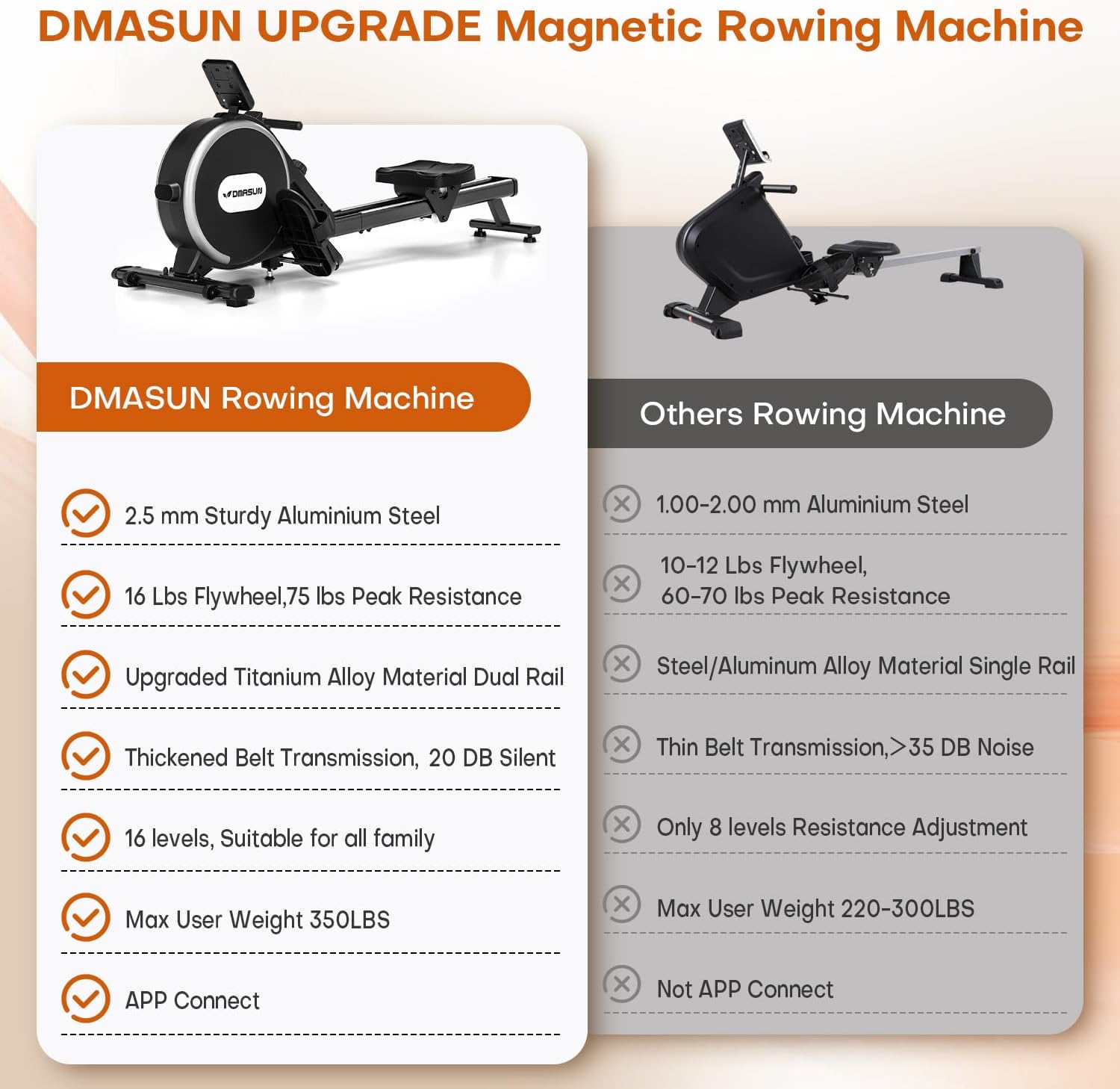
Image: Overview of the DMASUN Magnetic Rowing Machine 106B, highlighting its design and key features.
3. Assembly Instructions
The DMASUN Rowing Machine comes 75% pre-assembled. Most users can complete the assembly within 25 minutes by following the provided instructions.
- Unpack all components and verify against the parts list in the separate instruction guide.
- Place the main frame on a clear, level surface.
- Attach the front and rear stabilizers as per the detailed steps in the instruction guide. Ensure all bolts are securely tightened.
- Install the seat onto the dual sliding rail.
- Connect the foot pedals and handle.
- Insert 2 AAA batteries (not included) into the LCD monitor. The battery compartment is typically located on the left side of the device, near the left pedal.
- Perform a quick check to ensure all connections are secure and the machine is stable.
For a visual guide, refer to the QR code in your instruction guide or contact DMASUN customer service for an installation video.
4. Operating Instructions
4.1 Powering On and Off
- To power on the LCD monitor, ensure batteries are installed and locate the power switch, usually at the back of the battery compartment.
- The monitor will automatically turn off after a period of inactivity.
4.2 Adjusting Resistance
The DMASUN Rowing Machine features 16 levels of magnetic resistance, allowing you to customize your workout intensity.

Image: Diagram illustrating the 16 adjustable resistance levels, from beginner to advanced.
- Locate the resistance adjustment knob, typically positioned near the flywheel.
- Turn the knob clockwise to increase resistance (higher numbers for more intensity).
- Turn the knob counter-clockwise to decrease resistance (lower numbers for less intensity).
- Levels 1-4 are suitable for beginners, 5-8 for aerobic exercise, 9-12 for fat burning, and 13-16 for high resistance training.
4.3 Using the LCD Monitor
The integrated LCD monitor displays real-time workout data to help you track your progress.
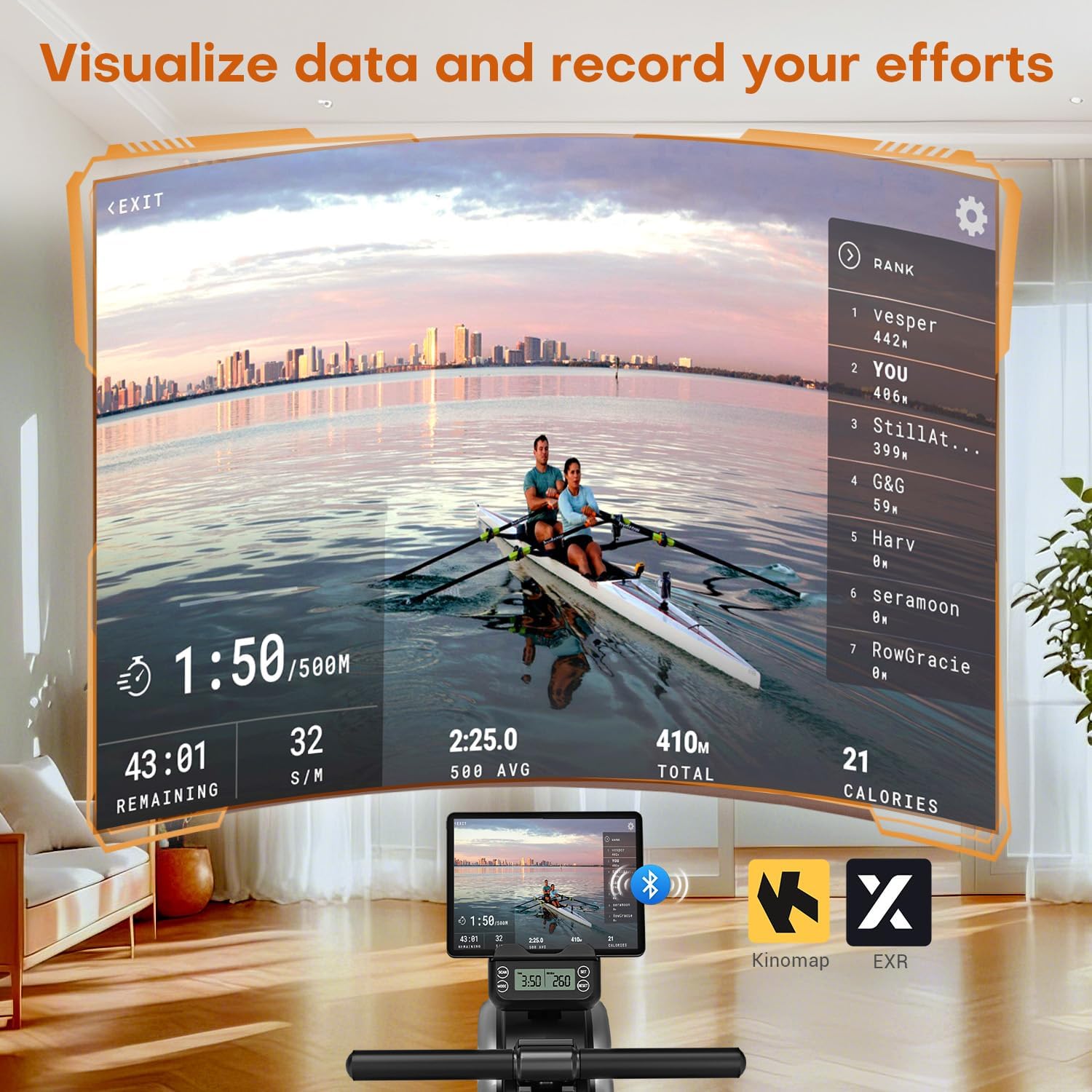
Image: A visual representation of the LCD monitor displaying various workout metrics like time, strokes, distance, and calories.
- The monitor automatically activates when you begin rowing.
- It displays: Time (duration of workout), Calories (estimated calories burned), Strokes (total strokes), Resistance (current level), and Distance (rowed distance).
- Use the buttons on the monitor (if available) to cycle through display modes or reset values. Refer to the specific monitor instructions in your guide.
4.4 Bluetooth App Connection (Kinomap, EXR)
Enhance your workout experience by connecting your rowing machine to popular fitness applications.

Image: Step-by-step guide for connecting the rowing machine to fitness apps like Kinomap via Bluetooth.
- Download the desired fitness app (e.g., Kinomap, EXR) from your device's app store.
- Register for an account if required by the app.
- Ensure Bluetooth is enabled on your smartphone or tablet.
- Open the fitness app and navigate to the device connection section (often labeled "My Device" or "Add New Device").
- Select "ROWING MACHINE" or search for the device named "SMARTROWER106".
- Follow the on-screen prompts to complete the connection.
If you encounter issues with Bluetooth connection, contact DMASUN customer service for assistance.
4.5 Effective Workout Techniques
The DMASUN Rowing Machine engages up to 90% of your muscle groups for a comprehensive workout.

Image: Illustration showing the primary muscle groups (legs, abdominal core, arms, back) activated during a rowing workout.
- The Catch: Start with knees bent, arms extended forward, and back straight.
- The Drive: Push off with your legs, then lean back slightly, and finally pull the handle towards your abdomen.
- The Finish: Legs extended, body leaned back, handle near your chest.
- The Recovery: Extend arms forward, then lean forward, and finally bend knees to return to the catch position.
- Maintain a smooth, controlled motion throughout the stroke.
5. Maintenance
Regular maintenance ensures the longevity and optimal performance of your rowing machine.
- Cleaning: Wipe down the machine with a damp cloth after each use to remove sweat and dust. Avoid abrasive cleaners.
- Inspection: Periodically check all bolts, nuts, and moving parts for tightness and wear. Tighten any loose fasteners.
- Rail Cleaning: Keep the dual sliding rail clean and free of debris to ensure smooth seat movement.
- Storage: The machine can be folded and stored upright to save space. Use the integrated transport wheels to move it easily.

Image: The DMASUN Rowing Machine folded vertically, demonstrating its compact storage capability and transport wheels.
6. Troubleshooting
If you encounter any issues, refer to the following common solutions:
- Monitor Not Displaying:
- Check if 2 AAA batteries are correctly installed and not depleted.
- Ensure the power switch (if present) is in the 'ON' position.
- Verify that the sensor cable is securely connected to the monitor.
- Resistance Feels Uneven or Too Weak/Strong:
- Ensure the resistance adjustment knob is correctly set to your desired level.
- Check for any obstructions around the flywheel or magnetic system.
- Seat Not Sliding Smoothly:
- Clean the dual sliding rails to remove any dust or debris.
- Inspect the seat rollers for damage or wear.
- Bluetooth Connection Issues:
- Ensure the rowing machine's monitor is powered on.
- Verify Bluetooth is enabled on your smart device.
- Restart both your smart device and the rowing machine monitor.
- Ensure no other devices are interfering with the Bluetooth signal.
If problems persist, please contact DMASUN customer support.
7. Specifications
| Feature | Specification |
|---|---|
| Model Name | 106B |
| Resistance Mechanism | Magnetic |
| Resistance Levels | 16 Adjustable Levels |
| Flywheel Weight | 16 lbs |
| Peak Resistance | 75 lbs |
| Max User Weight | 158.8 kg (350 lbs) |
| Dimensions (L x W x H) | 162 x 63 x 52 cm (63.8 x 24.8 x 20.5 inches) |
| Product Weight | 21.5 kg (47.4 lbs) |
| Material | Alloy Steel, Aluminum, ABS |
| Color | Black |
| Special Features | Bluetooth App Connectivity, Low Noise, Digital Monitor, Easy Assembly, Adjustable Resistance, Foldable Design |
| Monitor Display | Time, Calories Burned, Strokes, Resistance, Distance |
8. Warranty and Support
DMASUN provides a 3-year manufacturer service on all products, ensuring your satisfaction.
- For any concerns regarding your rowing machine, including assembly assistance, Bluetooth connection issues, or warranty claims, please contact DMASUN customer service.
- Refer to the contact information provided in your product packaging or on the official DMASUN website.


