
vannect 917T
Vannect Fitness Bike User Manual
Model: 917T
1. Introduction
This user manual provides essential information for the safe and effective operation of your Vannect Fitness Bike, Model 917T. Please read this manual thoroughly before assembly, operation, or maintenance. Keep this manual for future reference.
The Vannect Fitness Bike is designed to provide an effective full-body workout, helping you improve endurance and strength from the comfort of your home. Its robust design and adjustable features make it suitable for users of various fitness levels.
2. Safety Instructions
To reduce the risk of serious injury, read the following safety instructions before using the fitness bike:
- Consult your physician before starting any exercise program.
- Keep children and pets away from the equipment during use.
- Place the fitness bike on a flat, stable surface. Ensure adequate space around the bike for safe operation.
- Inspect the equipment before each use for loose parts or signs of wear. Do not use if damaged.
- Wear appropriate exercise clothing and footwear. Avoid loose clothing that could get caught in moving parts.
- Do not exceed the maximum user weight capacity of 150 kg (330 lbs).
- Adjust the seat and handlebars to a comfortable and safe position before beginning your workout.
- Stop exercising immediately if you feel faint, dizzy, or experience pain.
- Keep hands and feet clear of all moving parts.
3. Package Contents
Please check that all parts are present and undamaged before assembly. If any parts are missing or damaged, contact customer support.
- Main Frame Assembly
- Front and Rear Stabilizers
- Pedals (Left and Right)
- Seat and Backrest
- Handlebar Assembly with LCD Monitor
- Hardware Kit (Bolts, Washers, Nuts, Tools)
- User Manual
4. Assembly Instructions
Assembly typically takes 30-60 minutes. It is recommended to have two people for assembly.
-
Attach Stabilizers: Secure the front and rear stabilizers to the main frame using the provided bolts and washers. Ensure they are tightened securely for stability.
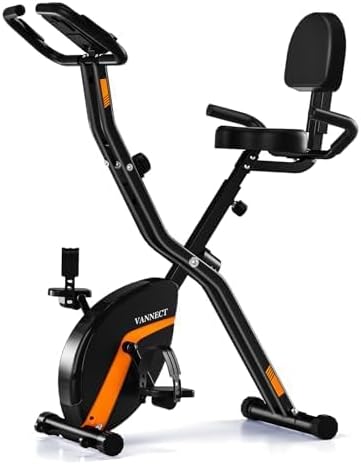
Image: The Vannect Fitness Bike showing the main frame with front and rear stabilizers securely attached to provide a stable base.
- Install Pedals: Identify the left (L) and right (R) pedals. The left pedal screws counter-clockwise, and the right pedal screws clockwise. Thread them carefully into the crank arms and tighten firmly.
- Mount Seat and Backrest: Attach the seat to the seat post, then secure the backrest to the seat assembly. Adjust the seat height to your preference using the quick-release knob.
-
Attach Handlebar and Monitor: Connect the handlebar assembly to the main frame. Carefully connect the sensor wires from the main frame to the LCD monitor. Secure the monitor to the handlebar.

Image: A detailed view of the Vannect Fitness Bike, highlighting the handlebar with the integrated LCD monitor and heart rate sensors. The overall structure of the bike is visible, including the seat and pedals.
- Insert Batteries: Open the battery compartment on the LCD monitor and insert 2 AAA batteries (not included), ensuring correct polarity.
- Final Check: Before first use, double-check all bolts and connections to ensure they are tight and secure.
5. Operating Instructions
5.1 Adjusting Resistance
The Vannect Fitness Bike features an upgraded magnetic resistance system with 8 levels. To adjust the resistance, turn the resistance knob located on the main frame. Turn clockwise to increase resistance for a more challenging workout, and counter-clockwise to decrease resistance for an easier ride. This system ensures a smooth and quiet operation.
5.2 Using the LCD Display and Heart Rate Monitor
The integrated LCD display tracks your workout data in real-time. It shows:
- Time: Duration of your workout.
- Speed: Current cycling speed.
- Distance: Total distance covered during the session.
- Calories: Estimated calories burned.
- Pulse/Heart Rate: Your heart rate, measured by the sensors on the handlebars. Grip the sensors firmly for an accurate reading.
Use the button on the monitor to cycle through different display modes or to reset the values. Refer to the monitor's specific instructions for detailed operation.
5.3 Adjusting Seat and Handlebar Height
For optimal comfort and exercise posture, adjust the seat height and handlebar position. Use the quick-release knobs to loosen, adjust, and then firmly tighten them back into place. The bike also features a comfortable backrest for added support during longer sessions.
5.4 Folding and Storage
The Vannect Fitness Bike is designed to be foldable for easy storage. Locate the folding mechanism (usually a pin or knob) on the main frame. Follow the instructions to safely fold the bike. Once folded, the integrated lower pulley system allows for easy movement and storage in compact spaces.
6. Maintenance
Regular maintenance ensures the longevity and safe operation of your fitness bike.
- Cleaning: Wipe down the bike with a damp cloth after each use to remove sweat and dust. Do not use abrasive cleaners or solvents.
- Lubrication: The magnetic resistance system is generally maintenance-free. However, occasionally check for any squeaking noises from joints and apply a small amount of silicone-based lubricant if necessary.
- Tightness Check: Periodically check all bolts, nuts, and connections to ensure they are tight. Retighten as needed.
- Storage: Store the bike in a cool, dry place away from direct sunlight and extreme temperatures. Utilize its foldable design for compact storage.
- Battery Replacement: Replace the AAA batteries in the LCD monitor when the display becomes dim or unresponsive.
7. Troubleshooting
| Problem | Possible Cause | Solution |
|---|---|---|
| LCD display not working | Dead batteries; Loose connection. | Replace AAA batteries; Check sensor wire connections to the monitor. |
| No heart rate reading | Hands not firmly on sensors; Loose sensor wires. | Ensure firm and consistent grip on both handlebar sensors; Check sensor wire connections. |
| Squeaking or grinding noise | Loose bolts; Lack of lubrication on moving parts (rare for magnetic system). | Check and tighten all assembly bolts; If noise persists, contact customer support. |
| Resistance not changing | Resistance knob mechanism issue. | Ensure the knob is turning freely; If stuck or ineffective, contact customer support. |
| Bike feels unstable | Uneven surface; Loose stabilizer bolts. | Move bike to a flat, level surface; Check and tighten all stabilizer bolts. |
8. Specifications
| Feature | Detail |
|---|---|
| Brand | Vannect |
| Model Number | 917T |
| Color | Black-Orange |
| Drive System | Belt |
| Resistance Mechanism | Magnetic |
| Resistance Levels | 8 |
| Product Dimensions (L x W x H) | 80 x 45 x 112 cm (31.5 x 17.7 x 44.1 inches) |
| Item Weight | 18.85 kg (41.56 lbs) |
| Maximum Weight Capacity | 150 kg (330 lbs) |
| Recommended Maximum Height | 191 cm (6 ft 3 inches) |
| Material Type | Metal |
| Power Source (Monitor) | AAA Batteries (not included) |
| Special Features | Foldable, Adjustable Resistance, Padded Seat, Speed Monitoring, Pulse Sensor, Calorie Monitoring, Adjustable Seat, Adjustable Pedal |
9. Warranty and Support
Your Vannect Fitness Bike comes with a 12-month warranty from the date of purchase. This warranty covers manufacturing defects and material flaws under normal use.
For any questions, concerns, or warranty claims, please contact our customer service. We aim to respond to all inquiries within 12 hours.
How to Contact Support:
- Log in to your Amazon account.
- Select 'Your orders'.
- Find the order ID for your Vannect Fitness Bike.
- Click on 'Seller name' (YuYou-EU).
- Click on 'Ask a question'.
We are committed to 100% customer satisfaction.
Related documents917T

Ask a question about this manual
Ask about setup, troubleshooting, compatibility, parts, safety, or missing instructions. Manuals+ will review the question and use this page’s manual context to help answer it.