
Introduction
The REACELL 4-Slot Battery Charger Station is designed for efficient and safe charging of Zebra Symbol TC70, TC72, TC75, and TC77 barcode scanner batteries. This advanced charging cradle features high-efficiency microchips, enabling fast simultaneous charging for up to four batteries. Its robust design incorporates multiple protection mechanisms to ensure reliable power management.
Key Features:
- 4-Slot Fast Charging: Supports 4A output, capable of fully charging one TC70 battery in approximately 1 hour. Charges four batteries concurrently.
- Dual Power Input: Equipped with both USB-C and DC input options for versatile power connectivity. (Note: DC adapter is not included.)
- Wide Compatibility: Specifically designed for Zebra TC75, TC70, TC77, and TC72 barcode scanner batteries.
- Battery Protection: Features built-in safeguards against overcharge, overheating, and short-circuits, ensuring safe operation.
- LED Indicator: Smart LED lights provide clear charging status: Red indicates charging, Green indicates fully charged.
Setup Guide
Follow these steps to set up your REACELL 4-Slot Battery Charger Station:
- Unpack the Charger: Carefully remove the charging cradle and USB-C cable from the packaging.
- Choose Power Source:
- USB-C Input: Connect the provided USB-C cable to the "Type-C IN: 22.5W" port on the back of the charger. Connect the other end of the USB-C cable to a compatible USB power adapter (not included) or a powered USB port.
- DC Input: Alternatively, connect a 12V DC power adapter (not included) to the "DC IN: 12V" port on the back of the charger.
- Place the Charger: Position the charger on a stable, flat surface away from direct sunlight, heat sources, and moisture.
- Power On: Once connected to a power source, the charger is ready for use.

Image: Rear view of the REACEELL 4-Slot Battery Charger showing DC IN 12V and Type-C IN 22.5W ports, along with overall dimensions (4.5 in height, 3.3 in width, 2.3 in depth).

Image: Diagram illustrating the charger connected to a wall outlet, showing Input: 12V/22.5W and Output: 4.2V, 4A (4 Channels) specifications.
Operating Instructions
To charge your Zebra scanner batteries:
- Insert Batteries: Gently slide up to four compatible Zebra TC70, TC72, TC75, or TC77 batteries into the charging slots. Ensure the battery contacts align correctly with the charger's pins.
- Monitor Charging Status: Observe the LED indicator next to each slot:
- Red LED: Indicates that the battery is currently charging.
- Green LED: Indicates that the battery is fully charged.
- Remove Batteries: Once the LED turns green, the battery is fully charged and ready for use. Carefully remove the battery from the slot.
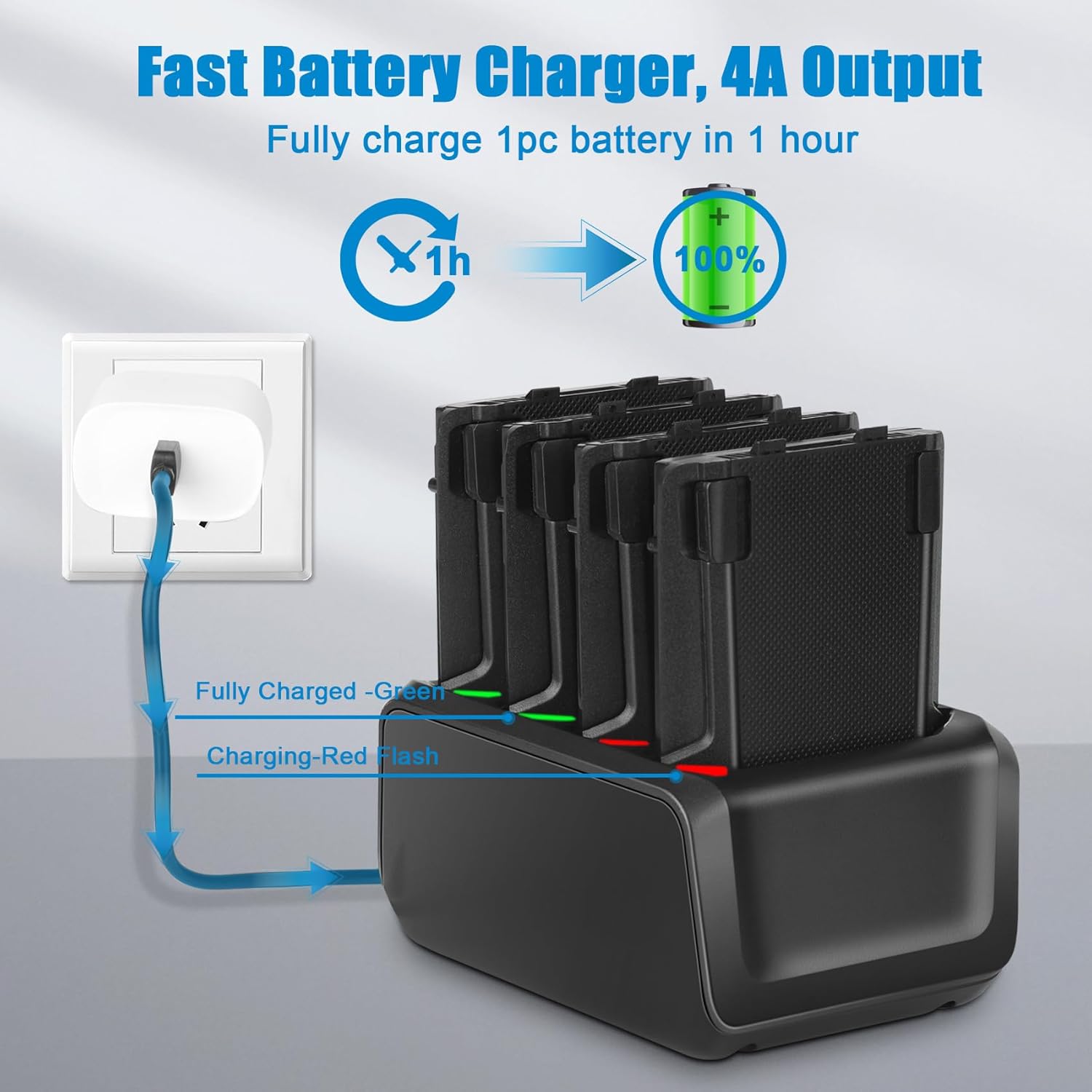
Image: The charger with batteries inserted, illustrating the LED indicators: Red for charging and Green for fully charged.
Maintenance
Proper maintenance ensures the longevity and optimal performance of your charger:
- Cleaning: Disconnect the charger from the power source before cleaning. Use a soft, dry cloth to wipe the exterior. Do not use liquid cleaners or solvents.
- Contact Pins: Periodically inspect the charging contact pins for any debris or corrosion. Clean gently with a cotton swab if necessary.
- Storage: When not in use, store the charger in a cool, dry place, away from extreme temperatures and humidity.
- Avoid Obstruction: Ensure that the charger's ventilation areas are not blocked during operation to prevent overheating.
Troubleshooting
If you encounter issues with your REACELL charger, refer to the table below for common problems and solutions:
| Problem | Possible Cause | Solution |
|---|---|---|
| Charger not powering on / No LED indication | No power supply; loose connection; faulty cable/adapter. | Check power outlet. Ensure USB-C or DC cable is securely connected. Try a different cable or power adapter. |
| Battery not charging (Red LED not lit) | Battery not inserted correctly; dirty battery contacts; incompatible battery; faulty battery. | Re-insert battery, ensuring proper alignment. Clean battery contacts. Verify battery compatibility. Try a different battery. |
| Slow charging | Insufficient power input; using a non-optimal power adapter. | Ensure power adapter provides sufficient wattage (e.g., 22.5W for USB-C). Use a high-quality power adapter. |
| LED remains Red after extended charging | Battery not reaching full charge; faulty battery. | Remove and re-insert the battery. If the issue persists, the battery may be faulty and require replacement. |
Specifications
| Feature | Detail |
|---|---|
| Product Name | REACELL 4-Slot Battery Charger Station |
| Model Compatibility | Zebra Symbol TC70, TC72, TC75, TC77 barcode scanner batteries |
| Input Voltage | DC 12V (via DC port) / USB Type C 22.5W |
| Output Voltage | 4.2V per channel |
| Output Amperage | 4 Amps (total) |
| Number of Slots | 4 |
| Color | Black |
| Special Features | Overcharge Protection, Overheating Protection, Short-circuit Protection |
| Dimensions (L x W x H) | 5.67 x 3.58 x 3.03 inches |
| Item Weight | 9.6 ounces |
| Manufacturer | REACELL |

Image: The charger demonstrating compatibility with various Zebra barcode scanner models (TC70, TC72, TC75, TC77) by showing their batteries fitting into the slots.

Image: The charger highlighting its multiple protection features: Over-charge Protection, Over-discharge Protection, Over-current Protection, Over-heating Protection, and Short-circuit Protection.
Warranty and Support
REACELL is committed to providing high-quality products and customer satisfaction.
Limited Warranty:
This product comes with a limited warranty against defects in materials and workmanship under normal use. For specific warranty terms and conditions, please refer to the product packaging or contact REACELL customer support.
Customer Support:
Should you have any questions, concerns, or require assistance with your REACELL 4-Slot Battery Charger Station, our customer support team is available 7 days a week, 24 hours a day. Please do not hesitate to contact us for prompt assistance.
For support, please visit the official REACELL store on Amazon or use the contact information provided with your purchase.
Thank you for choosing REACELL.