
1. Overview
The Ulefone Armor 27T PRO 5G is a rugged smartphone designed for durability and high performance in challenging environments. It integrates advanced imaging capabilities, robust construction, and powerful hardware to meet the demands of professional and outdoor use. This manual provides essential information for setting up, operating, maintaining, and troubleshooting your device.

Figure 1: Front and rear view of the Ulefone Armor 27T PRO 5G, highlighting its rugged design and thermal imaging camera.
2. Setup
2.1 Physical Overview
Familiarize yourself with the device's external components:
- Volume Rocker: Located on the side, controls audio volume.
- Power Button: Also on the side, used to power on/off the device and doubles as a fingerprint reader for secure unlocking.
- Custom Key: A programmable button that can be assigned to launch specific applications or functions.
- USB Type-C Port: Located at the bottom, used for charging and data transfer. It is protected by a watertight latch.
- 3.5mm Headphone Jack: Located at the top, protected by a watertight latch.
- SIM/SD Card Slot: Located on the side, accessible via a tray. Supports dual 5G SIM cards and a microSD card for storage expansion.
- IR Blaster: Located at the top, allows the phone to function as a universal remote control.
- Rear Camera Module: Houses the 50MP main camera, 64MP night vision camera, thermal imaging sensor, LED flash, and infrared LEDs.
- Front Camera: 32MP selfie camera located on the display.
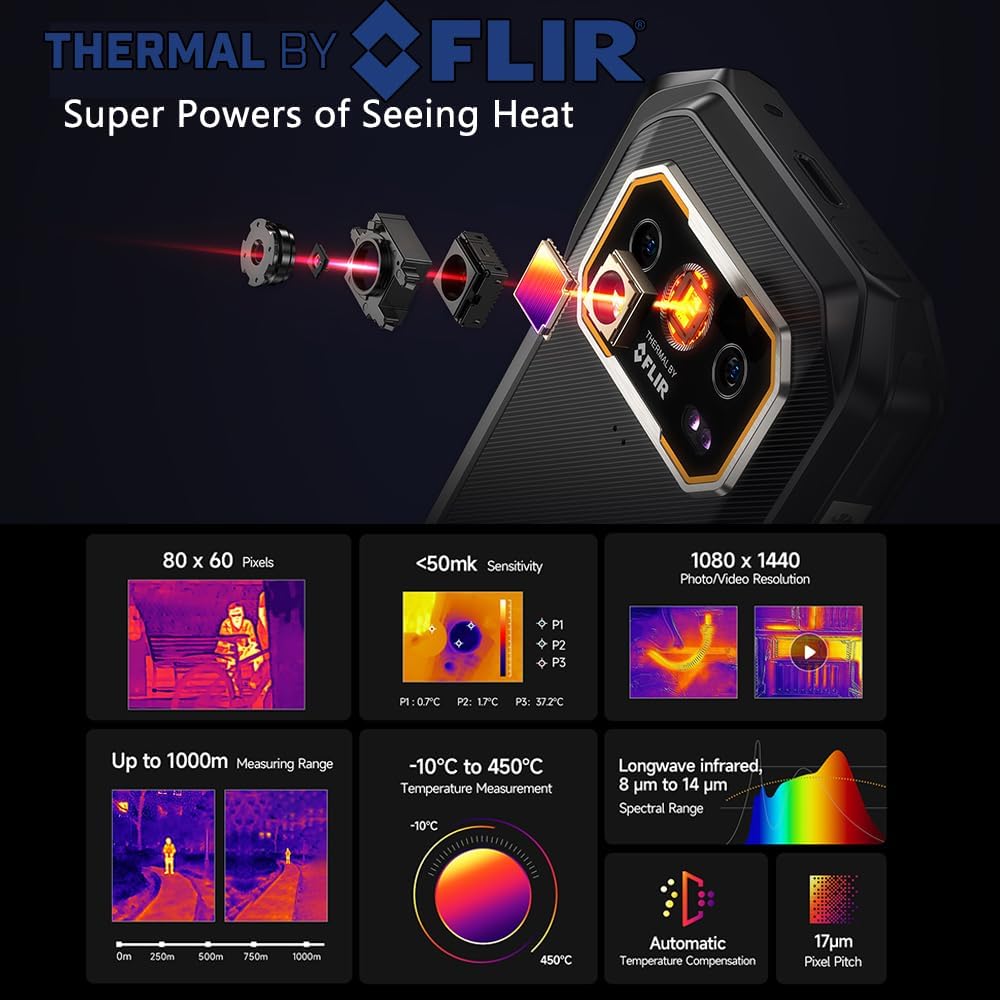
Figure 2: Side view illustrating the volume rocker, power button, and custom key.

Figure 3: Bottom view with the watertight cover for the USB Type-C port.

Figure 4: The SIM and microSD card tray, supporting dual 5G SIMs and up to 2TB expansion.
2.2 SIM Card and Storage Installation
- Locate the SIM/SD card tray on the side of the device.
- Insert the provided SIM ejector tool into the small hole next to the tray and push gently until the tray pops out.
- Place your Nano-SIM cards and/or microSD card into the designated slots on the tray. Ensure correct orientation.
- Carefully push the tray back into the device until it clicks into place.
2.3 Initial Power On
Press and hold the Power Button until the Ulefone logo appears. Follow the on-screen prompts to complete the initial setup, including language selection, Wi-Fi connection, and Google account sign-in.
3. Operating
3.1 Display and Navigation
The Armor 27T PRO features a 6.78-inch FHD+ display with a 120Hz refresh rate, providing a smooth visual experience. The screen is protected by Corning Gorilla Glass Victus for enhanced durability against scratches and drops.

Figure 5: The vibrant 6.78-inch FHD+ display with 120Hz refresh rate.
3.2 Camera System
The device is equipped with a versatile triple professional imaging system:
- 50MP Main Camera: Features a Sony IMX766 oversized sensor (1/1.31") and a 7P lens with OIS/EIS dual stabilization for high-quality photos and videos.
- 64MP Night Vision System: Utilizes a Starlight 2.0 sensor (0.001lux sensitivity) and laser-assisted focus tracking (0.3s lock-on) for clear images in low-light conditions.
- 32MP Front Camera: Equipped with dual-tone flash and gesture-controlled underwater selfie capabilities.

Figure 6: Example of image capture using the 64MP Night Vision Camera.

Figure 7: The 32MP front camera capturing a clear selfie.
3.3 Professional Thermal Imaging System
The integrated industrial-grade thermal camera offers 1440x1080 HD resolution and a temperature recognition range of -10°C to 450°C. It supports dual-spectrum imaging (Visible + Infrared fusion) and AI-enhanced detection. This feature is ideal for:
- Electrical systems inspection
- Pipeline integrity monitoring
- Wildlife observation
- Emergency heat source localization
Figure 8: Detailed specifications and applications of the Thermal by FLIR camera.
Video 1: An overview of the Ulefone Armor 27T PRO 5G Rugged Smartphone, demonstrating its thermal imaging, ruggedness, and other key features.
3.4 Performance
Powered by the MTK Dimensity 6300 6nm Octacore processor clocked at 2.4GHz, the Armor 27T PRO delivers cutting-edge speed and performance. It comes with 12GB of LPDDR4X RAM, expandable up to 24GB with 12GB of virtual RAM, ensuring smooth multitasking. The device offers 256GB of UFS 2.2 internal storage, further expandable up to 2TB via a microSD card.
Figure 9: Illustration of the 24GB RAM (12GB physical + 12GB virtual) and 256GB ROM with 2TB expansion capability.
3.5 Battery and Charging
The Armor 27T PRO is equipped with a large 10600mAh battery, providing extended usage times. It supports 33W fast charging for quick power-ups and 30W wireless charging for convenience. Additionally, the device features OTG (On-The-Go) functionality, allowing it to charge other smart devices.

Figure 10: Battery capacity and charging options, including 33W fast charging and 30W wireless charging.

Figure 11: Visual representation of the 33W fast charging capability.
3.6 Connectivity
The smartphone offers comprehensive connectivity options:
- 5G Network: Provides high-speed mobile data connectivity.
- Wi-Fi 6: Ensures faster and more efficient wireless internet connections.
- Bluetooth 5.2: For reliable and power-efficient wireless peripheral connections.
- NFC: Enables contactless payments and quick pairing with compatible devices.
- GPS: Supports GPS, GLONASS, Beidou, and Galileo for accurate positioning.
Figure 12: Overview of the device's advanced communication and connectivity features.
3.7 Software Features
The Armor 27T PRO runs on Android 14, offering a personalized, secure, and accessible user experience. Key software features include:
- Custom Key: Assign specific actions or app launches to the physical custom button.
- Outdoor Toolbox: A suite of pre-installed tools useful for outdoor activities.
- IR Blaster: Control compatible home appliances.
- Headset-free FM: Listen to FM radio without needing a wired headset as an antenna.
- Face Unlock + Fingerprint ID: Multiple secure unlocking methods.
4. Maintenance
4.1 Ruggedness and Durability
The Ulefone Armor 27T PRO is built to withstand harsh conditions, certified with:
- IP68: Dust and water resistant (submersible up to 1.5 meters for 30 minutes).
- IP69K: Resistant to high-pressure, high-temperature water jets.
- MIL-STD-810H: Military-grade standard for resistance to drops, shocks, extreme temperatures, and more.
Ensure all port covers are securely closed to maintain water and dust resistance.

Figure 13: The Ulefone Armor 27T PRO demonstrating its water resistance.
4.2 Cleaning
To clean your device, use a soft, damp cloth. Avoid using harsh chemicals or abrasive materials that could damage the phone's surface or protective coatings. For stubborn dirt, a mild soap solution can be used, followed by rinsing with clean water and thorough drying.
4.3 Software Updates
Regularly check for and install software updates to ensure optimal performance, security, and access to the latest features. Updates can typically be found in the device's settings under 'System' or 'About phone'.
5. Troubleshooting
If you encounter issues with your Ulefone Armor 27T PRO, consider the following basic troubleshooting steps:
- Device Unresponsive: Press and hold the Power Button for about 10-15 seconds to force a restart.
- Network Issues: Check if your SIM card is properly inserted. Try toggling Airplane Mode on and off. Verify your mobile data settings.
- Charging Problems: Ensure the USB-C cable is securely connected and the port cover is fully open during charging. Try a different charger and cable.
- App Malfunctions: Clear the cache and data of the problematic app in 'Settings > Apps'. If the issue persists, uninstall and reinstall the app.
- Thermal Camera Not Working: Ensure the MyFLIR Pro app is updated and has necessary permissions. Check for any physical obstructions on the thermal sensor.
- Factory Reset: As a last resort, if software issues persist, you may perform a factory reset. Back up all important data before proceeding, as this will erase all data on the device. Navigate to 'Settings > System > Reset options > Erase all data (factory reset)'.
6. Specifications
| Feature | Specification |
|---|---|
| Model Name | Ulefone Armor 27T Pro |
| Operating System | Android 14 |
| Processor | MTK Dimensity 6300 (6nm Octacore 2.4GHz) |
| RAM | 12GB LPDDR4X (Up to 24GB with virtual RAM) |
| Internal Storage | 256GB UFS 2.2 |
| Expandable Storage | Up to 2TB (microSD) |
| Display Size | 6.78 Inches |
| Display Resolution | 1080 x 2408 (FHD+) |
| Refresh Rate | 120 Hz |
| Display Protection | Corning Gorilla Glass Victus |
| Main Camera | 50MP (Sony IMX766) |
| Night Vision Camera | 64MP (Starlight 2.0 sensor) |
| Front Camera | 32MP |
| Thermal Imaging Camera | 1440x1080 HD, -10°C to 450°C range |
| Battery Capacity | 10600mAh |
| Fast Charging | 33W |
| Wireless Charging | 30W |
| Ruggedness | IP68, IP69K, MIL-STD-810H |
| Dimensions | 3.42 x 3.41 x 0.73 inches |
| Item Weight | 1.8 pounds |
| Connectivity | 5G, Wi-Fi 6, Bluetooth 5.2, NFC, GPS |
| Audio Jack | 3.5 mm |
7. Warranty and Support
The Ulefone Armor 27T PRO 5G comes with a 2-Year Global Warranty. For any technical issues or support inquiries, a dedicated support team is available 24/7. Please refer to the contact information provided in your product packaging or visit the official Ulefone support website for assistance.