
Introduction
Thank you for choosing the jioeuinly Phone Case and Tempered Glass Screen Protector for your LOGIC L65A. This manual provides detailed instructions for installation, operation, maintenance, and troubleshooting to ensure optimal protection and functionality for your device.
This product includes a durable phone case designed with a hard PC back and soft silicone frame, featuring shock-absorbing airbags, and a high-transparency tempered glass screen protector.
Setup and Installation
1. Phone Case Installation
- Clean Your Phone: Ensure your LOGIC L65A phone is clean and free of dust or smudges before installation.
- Align the Case: Gently place your phone into the soft silicone frame of the case, ensuring all buttons and ports align correctly.
- Secure the Fit: Press firmly around the edges of the phone to ensure the case is securely fitted. The hard PC back panel will provide rigid protection.

Image: The phone case features reinforced corners with shock airbags for enhanced drop protection.
2. Tempered Glass Screen Protector Installation
- Prepare the Screen: Use the provided cleaning wipes (if included) to thoroughly clean your phone screen. Remove any dust with the dust-absorber sticker.
- Peel the Protective Film: Carefully peel off the protective film from the adhesive side of the tempered glass screen protector. Avoid touching the adhesive surface.
- Align and Apply: Align the screen protector precisely with your phone screen, ensuring the cutouts for the camera and sensors match. Gently lower the protector onto the screen.
- Remove Bubbles: If air bubbles appear, gently push them towards the edges of the screen using a soft cloth or squeegee.

Image: Overview of the tempered glass screen protector's features, including 9H hardness, shatterproof design, and anti-fingerprint coating.
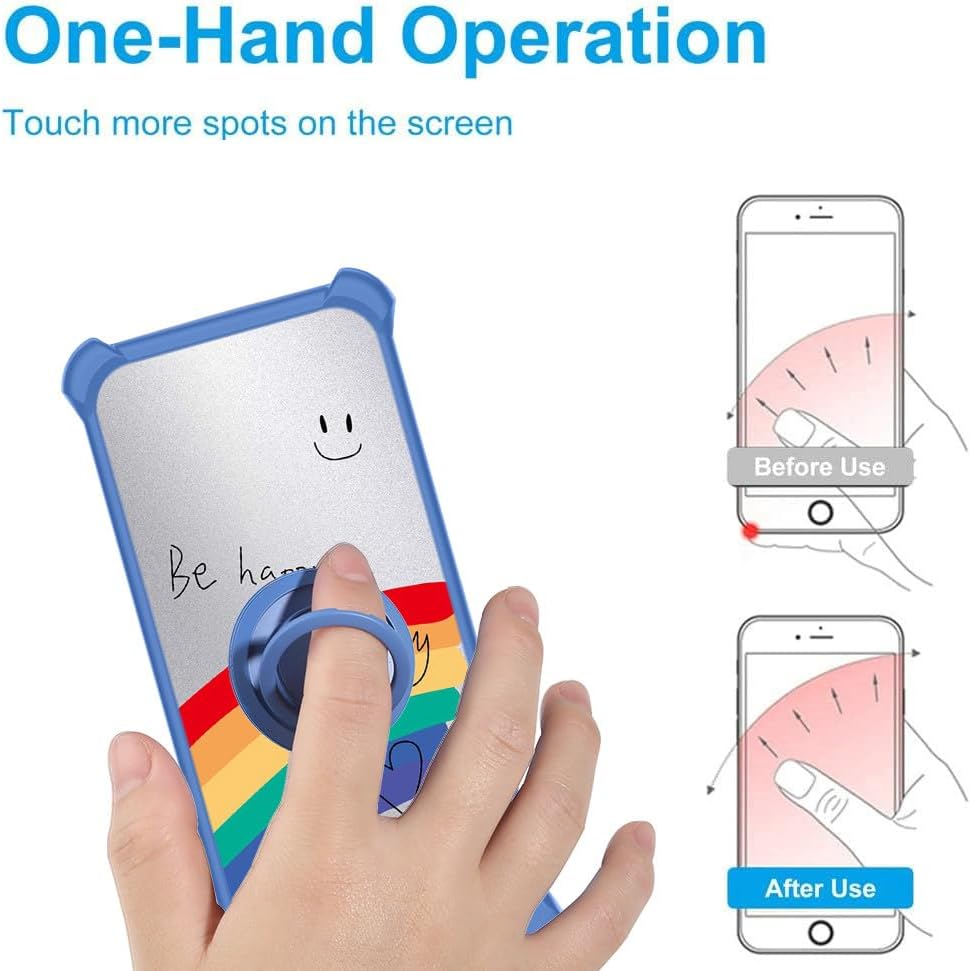
Image: Demonstration of the screen protector's scratch-proof capabilities, showing resistance to sharp objects.
Operating Instructions
1. Ring Stand Usage
- The integrated metal finger ring on the back of the case can be rotated 360 degrees.
- Pull out the ring to use it as a kickstand for hands-free viewing in landscape or portrait orientation.
- Insert your finger through the ring for a secure grip, reducing the risk of accidental drops and enabling easier one-hand operation.

Image: Illustrates how the ring stand facilitates comfortable one-hand operation and extended screen reach.
2. Magnetic Car Mount Compatibility
- The metal ring on the case is designed to be compatible with magnetic car mounts (car mount not included).
- Simply attach the back of the case to a magnetic car mount for secure phone placement while driving.
- Note: This case does not support wireless charging due to the integrated metal ring. Please remove the case for wireless charging or use a wired charger.

Image: Shows the 180-degree and 360-degree rotation capabilities of the ring stand and its compatibility with magnetic car mounts.
Maintenance and Care
- Cleaning the Case: Wipe the phone case with a soft, damp cloth to remove dust and smudges. For tougher stains, a mild soap solution can be used, followed by wiping with a clean, dry cloth.
- Cleaning the Screen Protector: Use a microfiber cloth to gently wipe the screen protector. For fingerprints or smudges, a screen cleaner spray designed for electronics can be used.
- Avoid Harsh Chemicals: Do not use abrasive cleaners, solvents, or harsh chemicals on either the case or the screen protector, as these can damage the materials and finishes.
- Storage: When not in use, store the case and screen protector in a clean, dry environment away from direct sunlight and extreme temperatures.
Troubleshooting
- Case Not Fitting Properly: Ensure you have the correct case model for your LOGIC L65A phone. Remove any other accessories that might interfere with the fit.
- Air Bubbles Under Screen Protector: Small bubbles can often be pushed out to the edges with a soft cloth. If large bubbles persist, it may indicate dust trapped underneath. Carefully lift a corner of the protector, remove dust with a dust-absorber sticker, and reapply.
- Reduced Touch Sensitivity: After applying the screen protector, if you experience reduced touch sensitivity, check your phone's settings for a 'Touch Sensitivity' option and enable it if available.
- Magnetic Ring Not Holding: Ensure the magnetic car mount is clean and free of debris. The strength of the magnetic hold can vary depending on the car mount used.
Specifications
| Feature | Description |
|---|---|
| Compatible Phone Model | LOGIC L65A |
| Case Material | Hard PC (Polycarbonate) + Soft Silicone |
| Screen Protector Material | Tempered Glass |
| Special Features (Case) | 360 Rotating Ring, Car Magnetic Fixing, Shock Airbags, Frosted Surface, Silver Reflect Light |
| Special Features (Screen Protector) | 9H High Hardness, Shatterproof, Perfect Adhesion, Case Friendly, 99.9% Super Transparency, Anti-fingerprint, Scratch Proof |
| Product Dimensions | 0.39 x 0.39 x 0.39 inches (approximate for case) |
| Item Weight | 2.46 ounces |
| Color/Model Identifier | DYL-CHX |
Warranty and Support
For any questions, concerns, or support needs regarding your jioeuinly product, please refer to the seller's return policy or contact the seller directly through the platform where the purchase was made. Please retain your proof of purchase for any warranty claims.
The standard return policy allows for returns or replacements within 30 days of purchase. Specific warranty details may vary; please consult the product listing or contact customer service for further information.