
fuliying V63
Aromatherapy Raindrop Humidifier User Manual
Model: V63
Introduction
Thank you for purchasing the fuliying Aromatherapy Raindrop Humidifier. This multifunctional device combines the benefits of an air humidifier and an aromatherapy diffuser, designed to create a peaceful and relaxing atmosphere in your home or office. Featuring a unique raindrop simulation effect and customizable LED lighting, it helps to relieve dryness and enhance your well-being.
Important Safety Precautions
- Always place the humidifier on a flat, stable surface.
- Do not exceed the maximum water level indicated inside the tank. Overfilling may cause malfunction or leakage.
- Ensure the power cord is securely connected and not damaged.
- Unplug the device before cleaning or refilling the water tank.
- Keep out of reach of children and pets.
- Do not immerse the main unit in water or other liquids.
- Use only clean tap water or distilled water.
- Only use water-soluble essential oils suitable for diffusers.
- If the device is not producing mist or raindrops, check the water level and ensure the cotton swab is properly installed and moist.
- Handle the device with care as it is made of plastic.
Package Contents
- 1 x Aromatherapy Raindrop Humidifier (Model V63)
- 1 x Power Cord (24V)
- 1 x User Manual
- 1 x Cotton Swab (pre-installed or included separately)
Setup Guide
- Unpack the Device: Carefully remove all components from the packaging.

Image: The fuliying Aromatherapy Raindrop Humidifier, showcasing its unique design with mist rising and internal lighting.
- Place on a Stable Surface: Choose a flat, stable, and water-resistant surface for the humidifier, away from direct sunlight or heat sources.
- Remove the Top Cover: Gently lift the top section of the humidifier to access the water tank.

Image: The humidifier's water tank, indicating the "Max line" and a 300ml capacity, designed for easy filling.
- Fill the Water Tank: Fill the water tank with clean tap water or distilled water. DO NOT exceed the "MAX" line to prevent overflow and ensure proper function. The tank has a capacity of approximately 300ML.
- Add Essential Oils (Optional): If using as an aromatherapy diffuser, add a few drops of your preferred water-soluble essential oil directly into the water tank.

Image: The humidifier in use, emitting mist with a purple light, and an essential oil bottle positioned next to it, highlighting its aromatherapy function.
- Replace the Top Cover: Carefully place the top cover back onto the base, ensuring it is properly aligned and seated. Make sure to push down firmly for a secure fit.
- Connect Power: Plug the power cord into the DC24V port on the back of the humidifier, then plug the adapter into a standard electrical outlet.
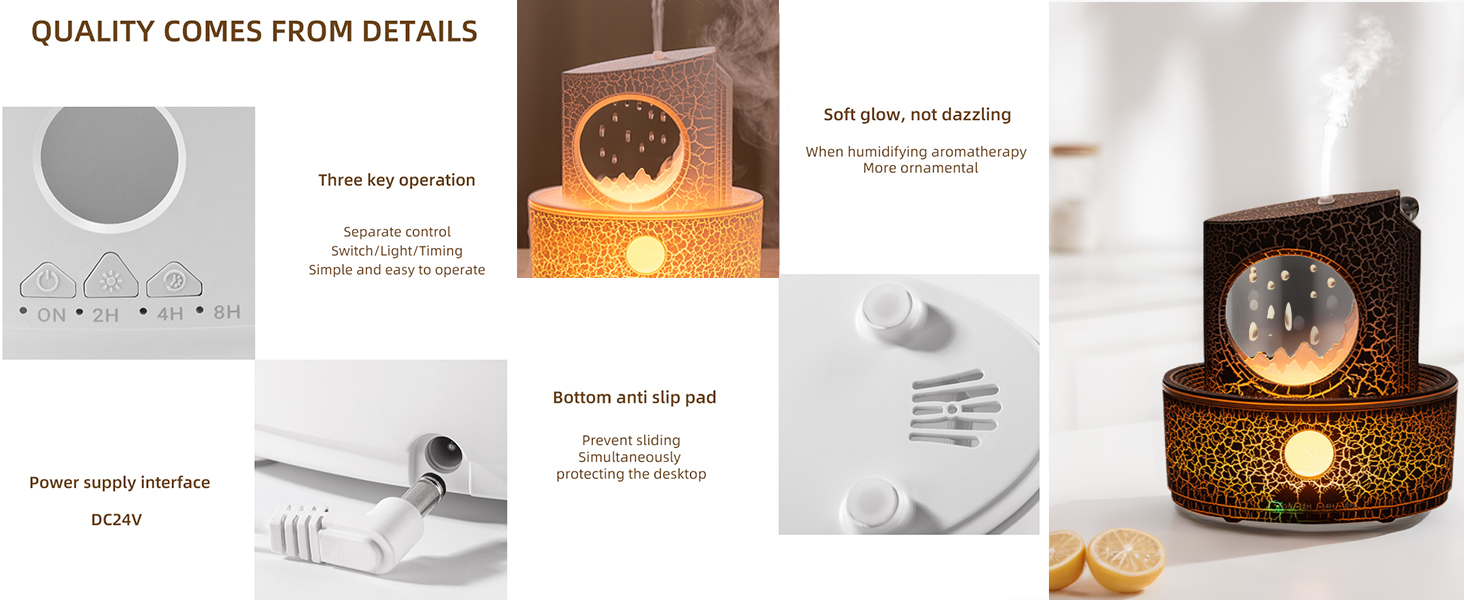
Image: Detailed view of the humidifier's control panel, showing the power supply interface (DC24V) and anti-slip pads on the bottom.
Operating Instructions
The humidifier features intuitive controls for mist, lighting, and timer functions.

Image: Overview of the humidifier's features, including colorful lighting, aromatherapy humidification, simulated raindrops, quiet design, and timing options.
Power On/Off and Mist Control
- Press the "ON" button once to turn on the humidifier and start misting.
- Press the "ON" button again to turn off the humidifier.
- The humidifier uses high-frequency ultrasonic atomization for delicate mist that will not wet your desktop.
Lighting Control
- The humidifier features 3 different ambient lighting colors.
- Press the "Light" button (often indicated by a light bulb icon) to cycle through the available light colors.
- The lights create a calm and relaxing atmosphere, complementing the raindrop effect.

Image: The humidifier displaying its three color ambient light options, creating various atmospheric effects.
Timer Settings
- The humidifier offers four timer settings: 2 hours, 4 hours, 8 hours, and continuous operation.
- Press the "Timer" button (often indicated by a clock icon or "2H/4H/8H") to select your desired runtime.
- The device will automatically shut off when the selected time expires or when the water level is too low.
Raindrop Simulation
- The humidifier simulates the natural raindrop effect, providing a peaceful visual and auditory experience.
- Raindrops will start flowing shortly after the diffuser is turned on.
- The raindrops come out slowly and do not splash, allowing for versatile placement.
Image: The innovative drip design, showing water droplets falling like spring rain, contributing to the moisturizing effect.
Maintenance and Care
Regular cleaning ensures optimal performance and longevity of your humidifier.
- Daily Maintenance:
- Unplug the humidifier and empty any remaining water from the tank.
- Wipe the water tank and exterior with a soft, damp cloth.
- Do not use abrasive cleaners or solvents.
- Weekly Cleaning:
- Unplug the device and disassemble the top cover from the base.
- Clean the water tank thoroughly with a soft brush or cloth to remove any mineral buildup or essential oil residue.
- For stubborn mineral deposits, fill the tank with a mixture of equal parts white vinegar and water, let it sit for 30 minutes, then rinse thoroughly.
- Gently rub the holes where the raindrops emerge with the included cotton swab to ensure proper dripping, especially if the product is not dripping correctly.
- Storage:
- If storing for an extended period, ensure the humidifier is completely dry before packing it away.
- Store in a cool, dry place.
Troubleshooting
| Problem | Possible Cause | Solution |
|---|---|---|
| No mist or weak mist. |
|
|
| No raindrops or slow dripping. |
|
|
| Device not turning on. |
|
|
| Unpleasant odor. |
|
|
Product Specifications
- Brand: fuliying
- Model Name: V63
- Color: Black
- Material: ABS+PP+electronic component
- Capacity: 300 Milliliters
- Runtime: Up to 8 hours (continuous mode)
- Wattage: 15 watts
- Special Features: Night Light, Raindrop humidification, Multiple Light Settings, Aroma Diffuser, Humidistat, Auto Shutoff
- Item Weight: 0.7 Pounds (approx. 11.2 ounces)
- Package Dimensions: 7.99 x 7.13 x 3.9 inches
Warranty and Support
For any questions about our products or for support, please contact us first. We are committed to doing our best to solve any problems you may encounter.
Please refer to your purchase documentation for specific warranty details.
Contact information for support is typically found on the product packaging or the seller's page where the product was purchased.
Ask a question about this manual
Ask about setup, troubleshooting, compatibility, parts, safety, or missing instructions. Manuals+ will review the question and use this page’s manual context to help answer it.