
Desiontal F10 Pro Max
Desiontal 3-Axis Gimbal Stabilizer User Manual
Model: F10 Pro Max
Introduction
This manual provides detailed instructions for setting up, operating, and maintaining your Desiontal 3-Axis Gimbal Stabilizer. Designed for iPhone 16, 15, 14, 13, 12, 11 series, Samsung S23, S22, A54, and other Android smartphones, this foldable and portable gimbal offers advanced features like AI face tracking, innovative focus wheel, zoom slider, and long battery life for smooth and stable video recording and photography. It is suitable for various applications including vlogging, webcasting, sports, pet shooting, and travel.

Image: The Desiontal 3-Axis Gimbal Stabilizer with a smartphone attached, showcasing its compact design and included accessories like a Type-C charging cable and mini tripod.
Setup
What's in the Box
- 1 x Handheld Stabilizer (F10 Pro Max)
- 1 x AI Tracking Module
- 1 x Tripod
- 1 x Type-C Charging Cable
- 1 x Lanyard
- 1 x User Manual
Charging the Gimbal
Before first use, fully charge the gimbal using the provided Type-C charging cable. The gimbal is equipped with a 3600mAh rechargeable lithium battery, providing up to 8-10 hours of continuous use. The controller also features a Type-C reverse charging interface, allowing you to charge your smartphone directly from the gimbal.
Mounting Your Smartphone
- Unfold the gimbal to its operational position.
- Gently pull open the phone clamp and securely place your smartphone in the clamp. Ensure the phone is centered and balanced for optimal performance.
- Attach the AI Tracking Module to the designated slot on the gimbal. This module has a direct insertion design for easy assembly and disassembly.

Image: All components included with the Desiontal 3-Axis Gimbal Stabilizer, including the gimbal unit, AI tracking module, mini tripod, and charging cable.
Operating Your Gimbal
Power On/Off
Press and hold the power on/off button located on the handle to turn the gimbal on or off. The power indicator lights will illuminate when the device is active.
Understanding the Controls

Image: Diagram illustrating the various controls on the Desiontal 3-Axis Gimbal Stabilizer, including the joystick, power indicator, Type-C port, power button, mode switch, and 1/4 nut joint.
- Joystick: Controls the pan and tilt movements of the gimbal.
- Mode Switch: Cycles through different stabilization modes (e.g., All Follow Mode, Half Follow Mode, Lock Mode).
- Power Indicator: Shows the current battery level.
- Bluetooth Indicator: Indicates Bluetooth connection status.
- Type-C Port: For charging the gimbal and reverse charging your phone.
AI Face Tracking
The independent AI tracking module supports gesture control for hands-free operation. With its powerful AI chip and ultra-wide-angle face recognition, the gimbal can track subjects automatically. Simply use specific gestures (e.g., a 'V' sign to start tracking, a flat palm to stop) to control the tracking function without needing an app. This feature is compatible with your smartphone's native camera and beauty software, as well as short video and live streaming applications.
Stabilization Modes
The new 8th generation 3-axis anti-shake system ensures smooth and stable footage, whether you are walking, running, or performing complex movements. The gimbal supports various shooting modes:
- Three Axes Full Lock: Keeps the camera fixed on a single point.
- Three Axes Full Follow: All three axes follow your movements smoothly.
- Panoramic: Captures wide panoramic shots.
- Wide-Angle: Ideal for expansive scenes.
- Close-Up: For detailed shots.
- Short Film: Optimized for short video creation.
- Live Broadcast: Stable footage for live streaming.
- Delay and Dynamic Delay: For time-lapse and hyper-lapse videos.

Image: The gimbal in 'First View Following' mode, demonstrating its ability to track subjects during dynamic activities like skiing, ensuring stable and clear footage.
Fill Light Function
The integrated fill light offers 3 color temperatures and 9 levels of brightness. It can be controlled via gestures, allowing you to adjust lighting conditions easily for optimal photo and video quality.

Image: The intelligent fill light feature of the gimbal, showing different light temperatures (cold, warm, natural) and brightness levels to enhance photo and video quality.
Switching Orientation
Easily switch between horizontal (landscape) and vertical (portrait) shooting orientations as needed for your content.

Image: The gimbal's ability to hold a mobile phone in multiple angles, demonstrating its multi-gear adjustable design for versatile shooting.
Reverse Phone Charging
The gimbal's Type-C interface allows for direct charging of your smartphone, ensuring you don't run out of battery during extended shooting sessions.
Video: Official product video demonstrating key features of the Desiontal F10 Pro Max Handheld Stabilizer, including AI tracking, stabilization, fill light, and reverse charging capabilities.
Maintenance
Cleaning and Storage
- Wipe the gimbal with a soft, dry cloth. Avoid using harsh chemicals or abrasive materials.
- Store the gimbal in a cool, dry place, away from direct sunlight and extreme temperatures.
- When not in use for extended periods, ensure the gimbal is folded for compact storage.
Battery Care
- To prolong battery life, avoid fully discharging the battery frequently.
- Charge the gimbal regularly, even if not in frequent use, to maintain battery health.
- Do not expose the battery to high temperatures or puncture it.

Image: Illustration highlighting the high-capacity battery life of the Desiontal Gimbal, indicating 8-10 hours of continuous operation.
Troubleshooting
- Phone does not fit: Ensure your smartphone's dimensions are within the compatible range (width 5.5-9CM, payload up to 250 grams).
- Gimbal not stabilizing: Ensure the phone is properly balanced in the clamp. Check battery level and recharge if necessary.
- AI tracking not working: Verify the AI tracking module is correctly installed. Ensure sufficient lighting and clear line of sight for gesture recognition.
- Gimbal not powering on: Check if the battery is charged. If not, connect to a power source using the Type-C cable.
Specifications
| Feature | Specification |
|---|---|
| Product Dimensions | 11.38 x 4.41 x 2.8 inches (28.9cm x 11.2cm x 7cm) |
| Item Weight | 1.01 pounds (460g / 16.23 Ounces) |
| Item Model Number | F10 Pro Max |
| Batteries | 1 Lithium Ion battery required (included) |
| Battery Capacity | 3600mAh |
| Working Time | 8-10 hours |
| Charging Time | Approx. 4 hours |
| Maximum Weight Recommendation | 280 Grams |
| Compatible Devices | Cellphones (Width 5.5-9CM) |
| Pitch Axis Action Range | 330° |
| Roll Axis Action Range | 160° |
| Pan Axis Action Range | 360° |
| Main Material | ABS+PC |
| Color | Black |
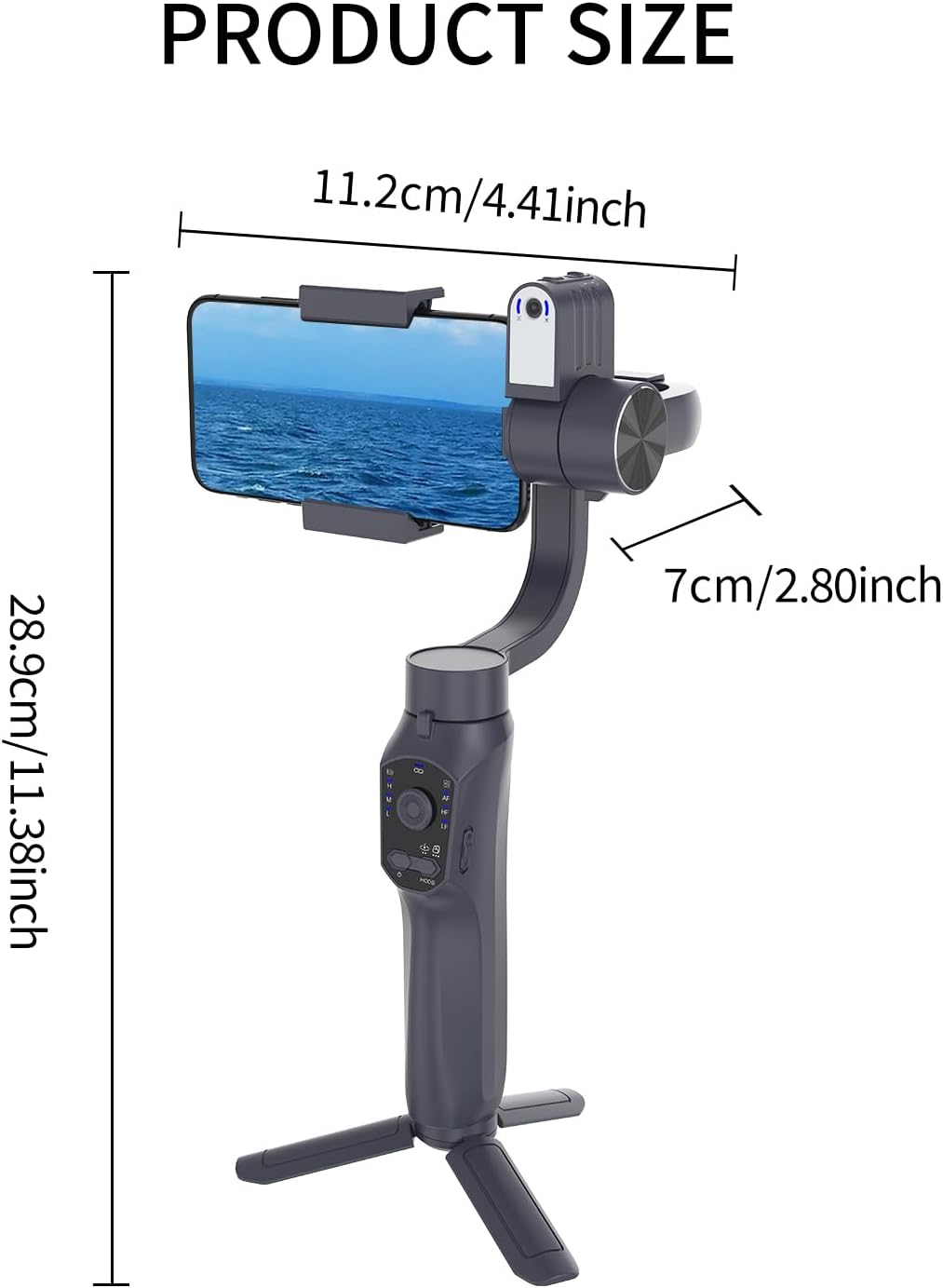
Image: Diagram showing the precise dimensions of the Desiontal 3-Axis Gimbal Stabilizer in both centimeters and inches.
Warranty and Support
Desiontal products are manufactured to high quality standards. For warranty information, technical support, or any inquiries regarding your gimbal, please refer to the contact details provided on the product packaging or visit the official Desiontal website. Keep your purchase receipt as proof of purchase for warranty claims.
Ask a question about this manual
Ask about setup, troubleshooting, compatibility, parts, safety, or missing instructions. Manuals+ will review the question and use this page’s manual context to help answer it.