
1. Introduction
Thank you for purchasing the COOLECH M9 Personal Air Conditioner. This manual provides essential information for the safe and efficient operation, maintenance, and troubleshooting of your device. Please read it thoroughly before use and retain it for future reference.
2. Important Safety Instructions
- Always place the unit on a stable, level surface to prevent water leakage.
- Do not immerse the unit, power cord, or plug in water or other liquids.
- Ensure the power supply voltage matches the specifications indicated on the unit.
- Unplug the unit from the power outlet before cleaning, refilling water, or when not in use.
- Keep the unit out of reach of children and pets.
- Do not block the air inlet or outlet.
- Use only the provided USB cable for power.
- Avoid using abrasive cleaners or solvents on the unit.
- Do not attempt to repair or modify the unit yourself. Contact customer support for assistance.
3. Product Overview
3.1 Package Contents
- COOLECH M9 Personal Air Conditioner Unit
- Remote Control
- USB Power Cable
- Ice Cube Tray (for water tank)
- User Manual
3.2 Component Identification
Familiarize yourself with the various parts of your COOLECH M9 Personal Air Conditioner:
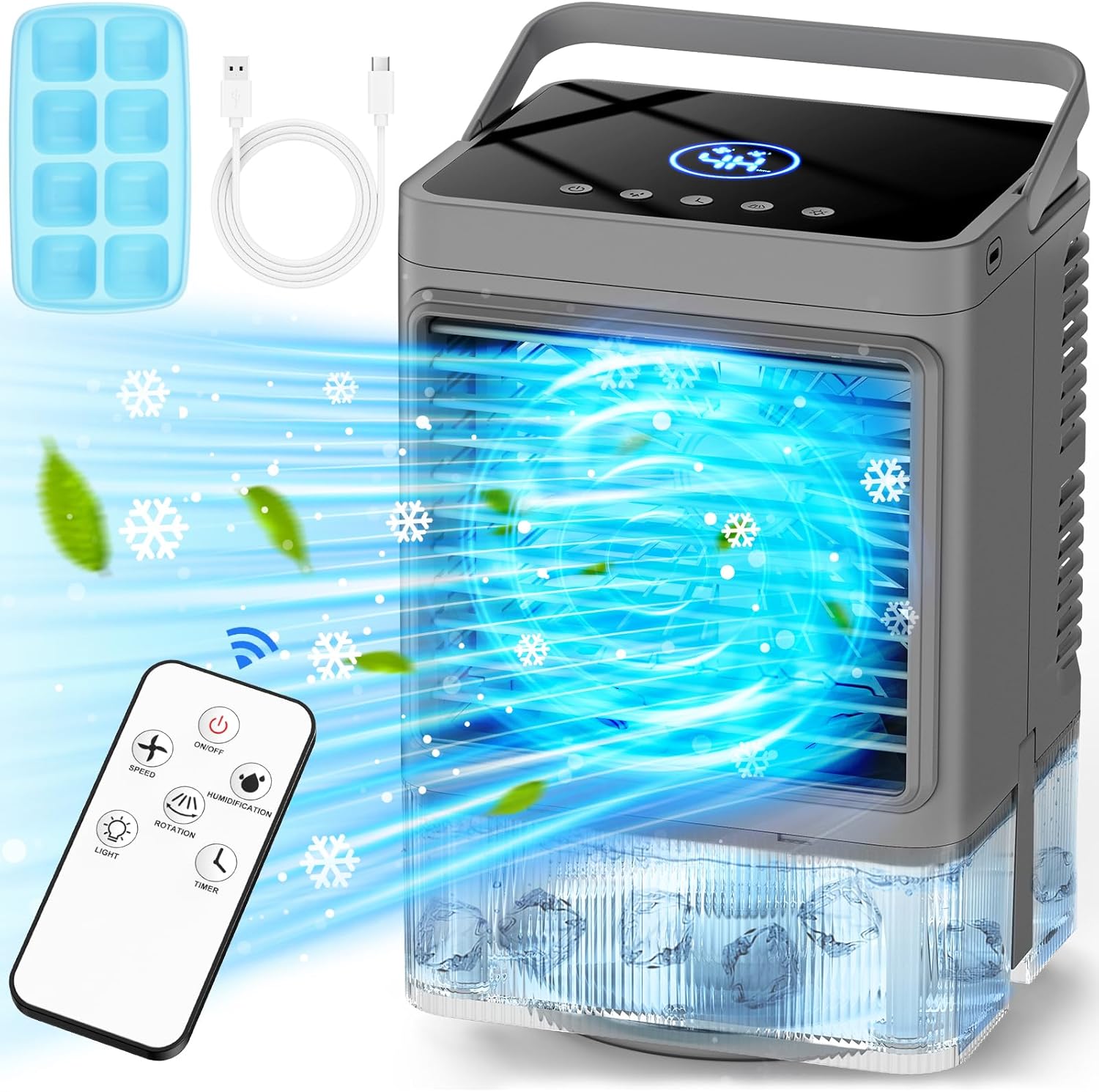
Image 1: Overview of the COOLECH M9 Personal Air Conditioner, including the main unit, remote control, USB power cable, and an ice cube tray. The unit features a top control panel, an air outlet with visible mist and airflow, and a transparent water tank at the bottom.
- Control Panel: Located on the top surface of the unit, featuring touch buttons and an LED display.
- Air Outlet: Front grille where cool air and mist are expelled.
- Water Tank: Transparent reservoir at the bottom for water and ice.
- Handle: Integrated handle for easy portability.
- USB Power Port: Located at the rear for connecting the power cable.
- Remote Control: For convenient operation from a distance.
4. Setup Guide
- Unpack the Unit: Carefully remove all packaging materials and inspect the unit for any damage.
- Placement: Place the air conditioner on a firm, level surface. Ensure there is adequate space around the unit for proper airflow.
- Fill the Water Tank:
- Open the water tank cover.
- Fill the tank with clean tap water. For enhanced cooling, you can add ice cubes using the provided tray. Do not exceed the maximum fill line.
- Close the water tank cover securely.
Image 2: Detailed view of the transparent water tank at the base of the COOLECH M9, showing ice cubes inside for enhanced cooling. This illustrates how to prepare the unit for operation.
- Connect Power: Insert the small end of the USB power cable into the unit's USB port and the larger end into a compatible USB power adapter (not included) or a powered USB port.
5. Operating Instructions
The COOLECH M9 can be operated using either the touch control panel on the unit or the included remote control.
5.1 Control Panel
Image 3: Close-up of the COOLECH M9's top control panel, featuring an illuminated LED display and touch-sensitive buttons for various functions.
- Power Button (⏻): Press to turn the unit On or Off.
- Speed Button (⏚): Press to cycle through 3 fan speeds (Low, Medium, High).
- Humidification/Mist Button (⎈): Press to activate or adjust the cool mist function (2 levels).
- Rotation/Oscillation Button (⟳): Press to activate 90° oscillation. Press again to stop.
- Light Button (💡): Press to turn on the 7-color LED night light. Press again to cycle through colors or turn off.
- Timer Button (◴): Press to set the automatic shut-off timer (up to 4 hours).
5.2 Remote Control
The remote control offers the same functionality as the control panel for convenient operation.
Image 4: The remote control for the COOLECH M9, showing buttons for On/Off, Speed, Humidification, Rotation, Light, and Timer functions.
- ON/OFF: Powers the unit on or off.
- SPEED: Adjusts fan speed (3 levels).
- HUMIDIFICATION: Controls mist output (2 levels).
- ROTATION: Activates or deactivates 90° oscillation.
- LIGHT: Controls the 7-color LED night light.
- TIMER: Sets the auto-off timer (up to 4 hours).
6. Maintenance
Regular maintenance ensures optimal performance and longevity of your air conditioner.
- Cleaning the Water Tank: Empty and clean the water tank regularly, especially if not in use for extended periods. Use a soft cloth and mild detergent if necessary, then rinse thoroughly.
- Cleaning the Exterior: Wipe the exterior of the unit with a soft, damp cloth. Do not use harsh chemicals or abrasive cleaners.
- Storage: When storing the unit, ensure the water tank is empty and dry. Store in a cool, dry place away from direct sunlight.
7. Troubleshooting
If you encounter any issues, please refer to the following table before contacting customer support.
| Problem | Possible Cause | Solution |
|---|---|---|
| Unit does not turn on. | No power supply; USB cable not connected properly. | Ensure the USB cable is securely connected to both the unit and a powered USB port/adapter. Check the power source. |
| No mist is being produced. | Water tank is empty; Humidification function is off. | Refill the water tank. Press the Humidification button to activate the mist function. |
| Weak airflow. | Fan speed is set too low; Air inlet/outlet blocked. | Increase the fan speed. Ensure nothing is obstructing the air inlet or outlet. |
| Remote control not working. | Batteries are dead or incorrectly inserted; Obstruction between remote and unit. | Replace remote control batteries. Ensure a clear line of sight between the remote and the unit. |
8. Specifications
| Feature | Detail |
|---|---|
| Brand | COOLECH |
| Model Name | M9 |
| Product Dimensions | 9.6"D x 8"W x 6.88"H |
| Item Weight | 2.86 pounds |
| Controls Type | Remote |
| Mounting Type | Freestanding |
| Oscillation | 90° |
| Fan Speeds | 3 |
| Mist Levels | 2 |
| Timer | Up to 4 hours |
| Night Light | 7 LED colors |
| UPC | 755139182973 |
9. Warranty and Customer Support
COOLECH products are manufactured to high-quality standards. This product comes with a standard manufacturer's warranty against defects in materials and workmanship under normal use. Please refer to the warranty card included in your package for specific terms and conditions.
For technical support, troubleshooting assistance, or warranty claims, please contact COOLECH customer service through the retailer where the product was purchased or visit the official COOLECH website for contact information.