
1. Introduction
This manual provides essential instructions for the safe and proper assembly, operation, and maintenance of your Yunxioler Prismatic Iridescent LED Christmas Tree. Please read this manual thoroughly before use and retain it for future reference.
The Prismatic Christmas Tree features iridescent LED lights that emit a colorful glow, enhancing festive atmospheres. Its innovative design creates a romantic ambiance, making it suitable for various decorative purposes. The product is energy-efficient, durable, and crafted through hand-folding, pressing, hooking, buckling, and riveting processes.
2. Safety Information
- Electrical Safety: Ensure the USB charging cable is connected to a compatible USB outlet (not included) with the correct voltage. Do not overload electrical outlets.
- Placement: Place the Christmas tree on a stable, flat surface. For outdoor use, ensure it is in a sheltered area to protect it from extreme weather conditions.
- Water Exposure: While designed for outdoor use, avoid direct exposure to heavy rain or standing water to prevent electrical damage.
- Children and Pets: Keep the product out of reach of small children and pets to prevent accidental damage or injury.
- Heat Sources: Keep the tree away from open flames, heaters, or other heat sources.
- Damage Inspection: Regularly inspect the product for any damage to the lights, wiring, or structure. Discontinue use if any damage is found.
3. Package Contents
Verify that all components are present before beginning assembly:
- Prismatic Christmas Tree (XXL)
- USB Charging Cable
Note: A USB outlet is required but not included.
4. Setup Instructions
The Yunxioler Prismatic Christmas Tree is designed for straightforward assembly. Follow these steps to set up your tree:
- Unpack Components: Carefully remove all parts from the packaging.
- Remove Protective Film: If present, gently peel off any protective film from the iridescent PET panels.
- Assemble Tree Sections: The tree consists of multiple sections. Align the sections and connect them using the integrated hooks and loops or cable ties provided. Ensure all connections are secure.
- Secure Connections: For added stability, use cable ties to firmly secure any connecting circles or points on the tree structure. Trim excess cable tie material.
- Connect Internal Wiring: Locate any internal plug connectors for the LED lights and twist them closely to ensure a secure electrical connection.
- Position the Tree: Place the assembled tree on a flat, stable surface. For outdoor use, consider using ground stakes (if available and suitable for your ground) to prevent tipping in windy conditions.
- Connect Power: Plug the USB charging cable into the tree's power input and then into a suitable USB outlet.

Image: Detailed view of the tree's construction, illustrating the folding, pressing, and riveting buckle methods used for assembly, leading to a fixed molded structure.
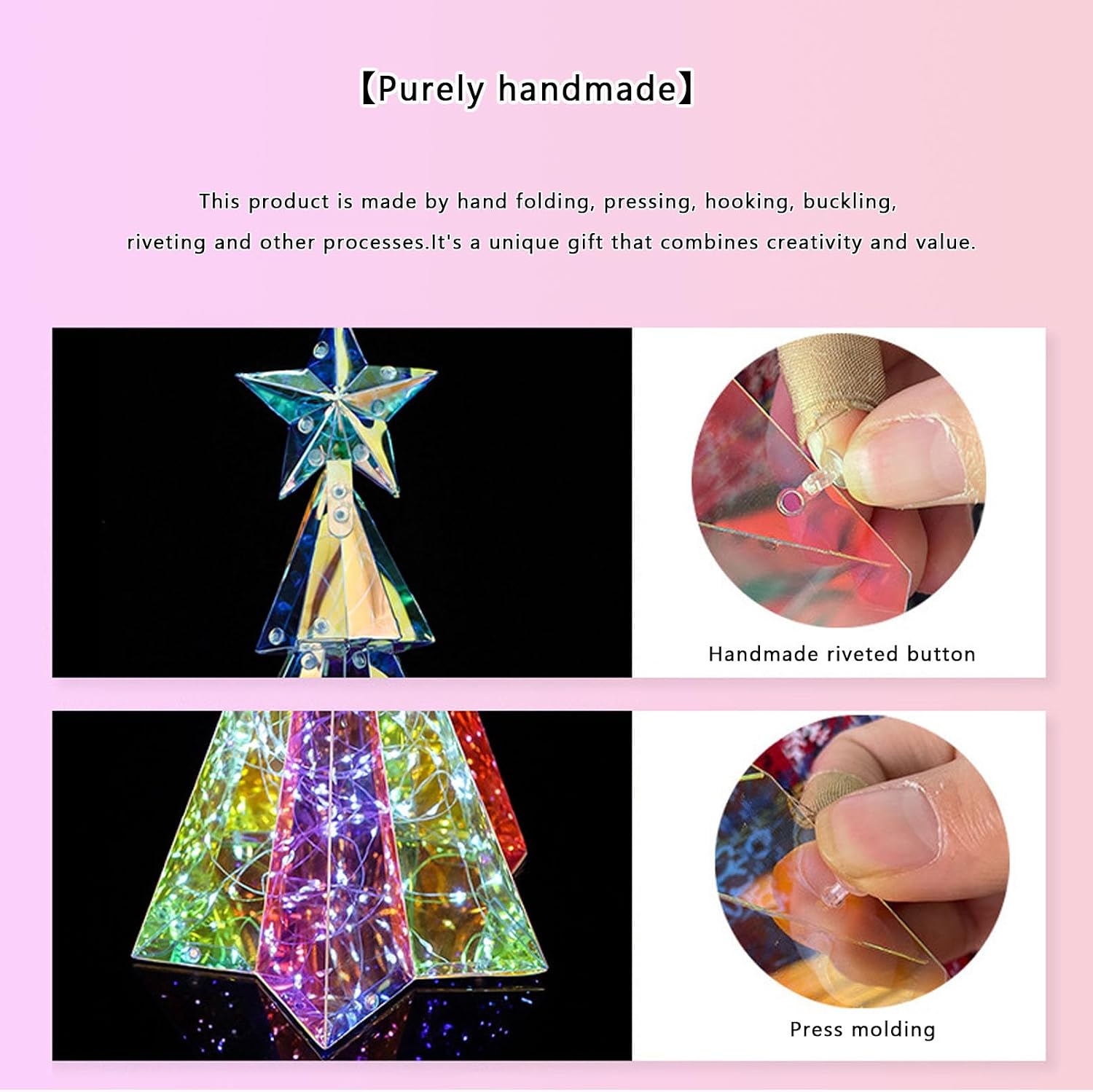
Image: Hands demonstrating the manual assembly process, including the use of a handmade riveted button and press molding techniques for the iridescent panels.
Video: This video demonstrates general assembly principles for similar prismatic holiday decorations, including connecting sections with hooks and cable ties. While it features a snowman, the techniques for joining iridescent panels and securing components are applicable to the Christmas tree.
5. Operating Instructions
Once assembled and connected to a power source:
- Power On/Off: The LED lights will illuminate once the USB cable is connected to a powered USB outlet. Disconnect the USB cable to turn off the lights.
- Light Modes: This model features iridescent LED lights that provide a constant colorful glow. There are no adjustable light modes.
6. Maintenance
- Cleaning: Gently wipe the iridescent panels with a soft, dry cloth. Do not use abrasive cleaners or solvents, as they may damage the finish.
- Storage: When not in use, carefully disassemble the tree (if desired) and store it in its original packaging or a protective container in a cool, dry place away from direct sunlight.
- Cable Care: Ensure the USB cable is not kinked, pinched, or damaged during use or storage.
7. Troubleshooting
- Lights Not Turning On:
- Check if the USB cable is securely connected to both the tree and the USB outlet.
- Ensure the USB outlet is powered and functioning correctly. Try a different USB outlet if necessary.
- Verify that all internal light connectors are properly twisted and secured.
- Flickering Lights:
- Inspect all connections for looseness. Re-secure any loose connections.
- Ensure the USB power source is providing stable power.
- Structural Instability:
- Recheck all assembly points, ensuring hooks, loops, and cable ties are firmly secured.
- Ensure the tree is placed on a completely flat and level surface.
If issues persist, contact customer support for further assistance.
8. Specifications
| Feature | Detail |
|---|---|
| Brand | Yunxioler |
| Model Number | ywxkwsjsds |
| Product Dimensions | 14.3"D x 16.5"W x 31.8"H (approx. 36.3cm D x 41.9cm W x 80.7cm H) |
| Material | PET (Polyethylene Terephthalate) |
| Light Type | Iridescent LED Lights |
| Power Source | USB (USB outlet not included) |
| Item Weight | 4 pounds |
| Included Components | USB charging cable |

Image: The Prismatic Christmas Tree with its approximate dimensions clearly marked for reference.
9. Warranty and Support
For warranty information or customer support, please refer to the product packaging or contact the retailer where the product was purchased. Keep your proof of purchase for any warranty claims.