
Introduction
This manual provides instructions for the ZdalaMit replacement remote control, designed for use with HANNSPREE HL320UPB, HSG1452, and HL 320 UPB LCD Monitors. This remote control requires no programming and is ready for use once batteries are installed.
Setup: Battery Installation
To begin using your remote control, you must first install the batteries.
- Locate the battery compartment on the back of the remote control.
- Slide open the battery compartment cover.
- Insert two (2) 1.5V AAA alkaline batteries, ensuring the positive (+) and negative (-) terminals align correctly with the markings inside the compartment.
- Close the battery compartment cover securely.
Note: Batteries are not included with the remote control. Always use new alkaline batteries for optimal performance.

Image: Rear view of the remote control, highlighting the battery compartment.
Operating Instructions
This remote control is pre-programmed for compatible HANNSPREE monitors. Point the remote directly at the monitor's infrared receiver.
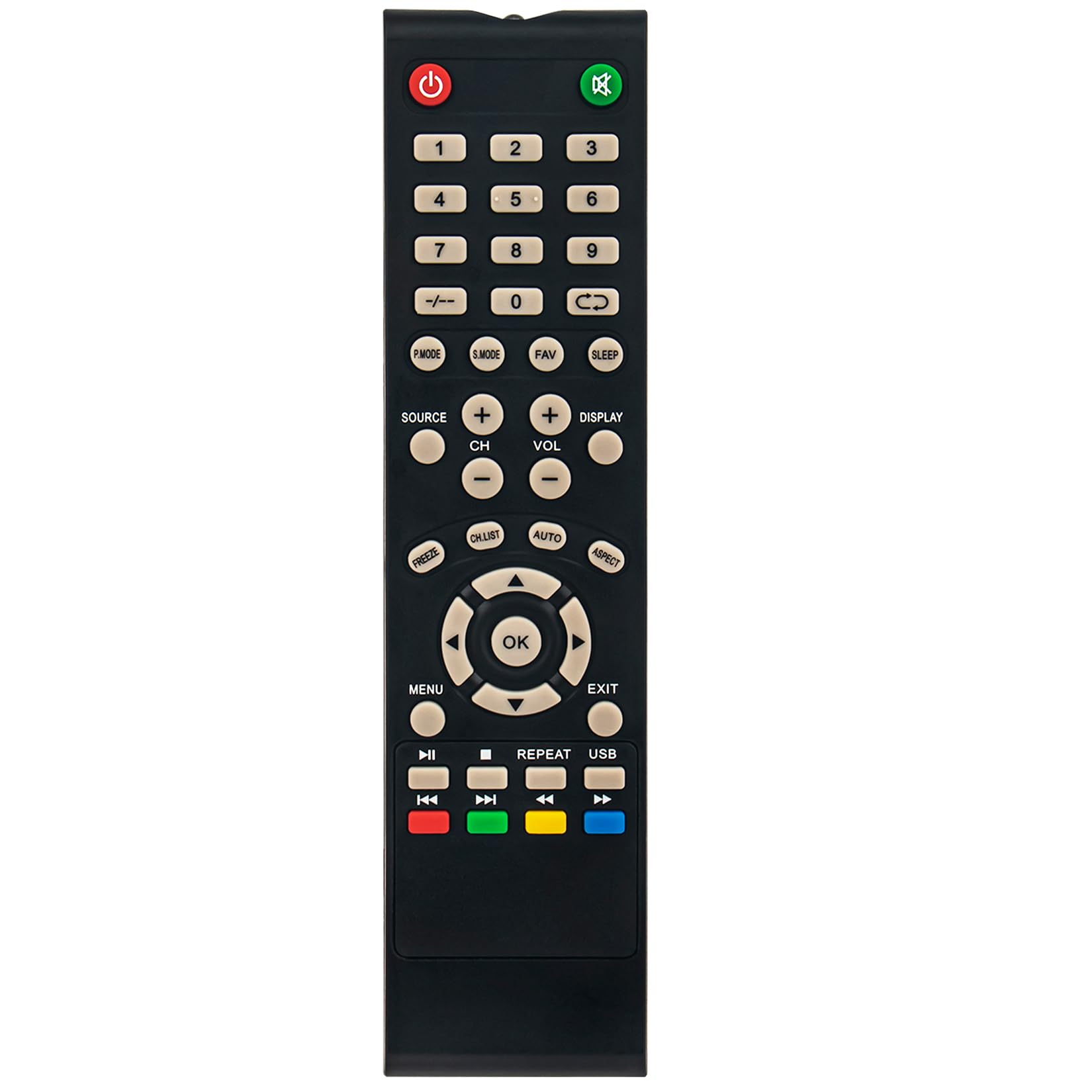
Image: Front view of the remote control, displaying all buttons and their labels.
Key Functions:
- Power (⏻): Turns the monitor on or off.
- Mute (🔇): Mutes or unmutes the audio.
- Number Buttons (0-9): Directly select channels or input numerical values.
- SOURCE: Selects the input source (e.g., HDMI, VGA).
- CH+ / CH-: Changes channels up or down.
- VOL+ / VOL-: Adjusts the volume up or down.
- MENU: Accesses the monitor's on-screen display (OSD) menu.
- OK: Confirms selections within the menu.
- Directional Arrows (▲ ▼ ◄ ►): Navigate through menu options.
- EXIT: Exits the current menu or function.
- DISPLAY: Shows current channel or input information.
- SLEEP: Sets a sleep timer for the monitor.
- P.MODE: Cycles through picture modes.
- S.MODE: Cycles through sound modes.
- FAV: Accesses favorite channels.
- FREEZE: Freezes the current image on screen.
- CH.LIST: Displays the channel list.
- AUTO: Automatic picture adjustment (for analog inputs).
- ASPECT: Changes the aspect ratio of the display.
- Media Playback Controls (⏸, ⏹, ⏮, ⏭): Control media playback if supported by the monitor (e.g., via USB input).
- Color Buttons (Red, Green, Yellow, Blue): Functionality varies depending on the monitor's menu or specific applications.
- USB: Switches to USB input mode.
Maintenance
- Battery Replacement: Replace batteries when the remote's range decreases or it stops responding. Always replace both batteries with new ones of the same type (AAA alkaline).
- Cleaning: Wipe the remote control with a soft, dry cloth. Do not use liquid cleaners or abrasive materials, as they may damage the surface or internal components.
- Storage: If the remote control will not be used for an extended period, remove the batteries to prevent leakage and potential damage.
Troubleshooting
| Problem | Possible Cause | Solution |
|---|---|---|
| Remote control not working. | Dead or incorrectly installed batteries. | Replace batteries with new 1.5V AAA alkaline batteries, ensuring correct polarity. |
| Remote control range is poor. | Weak batteries; Obstruction between remote and monitor; Remote not pointed correctly. | Replace batteries. Remove any objects blocking the line of sight. Ensure the remote is pointed directly at the monitor's IR sensor. |
| Some buttons do not respond. | Monitor does not support the function; Remote control malfunction. | Verify if the monitor model supports the specific function. If other buttons work, the remote may be faulty. |
Specifications
- Brand: ZdalaMit
- Compatible Models: HANNSPREE HL320UPB, HSG1452, HL 320 UPB LCD Monitors
- Connectivity Technology: Infrared (IR)
- Power Supply: 2 x 1.5V AAA Alkaline Batteries (not included)
- Maximum Range: Approximately 33 feet (10 meters)
- Color: Black
- Item Weight: 40 Grams
- Item Dimensions (L x W x H): 7.15" x 1.75" x 0.55"
- Special Feature: Pre-programmed, no setup required

Image: Front view of the remote control with its length and width dimensions indicated.
Warranty Information
This ZdalaMit remote control comes with a 1-year warranty from the date of purchase. This warranty covers manufacturing defects under normal use. It does not cover damage caused by misuse, accidents, unauthorized modifications, or battery leakage. Please retain your proof of purchase for warranty claims.
Support
For further assistance or inquiries regarding your ZdalaMit remote control, please refer to the seller's contact information on your purchase platform. You may also visit the ZdalaMit brand page for additional product information.
Note: For issues related to your HANNSPREE monitor, please consult the monitor's original user manual or contact HANNSPREE support directly.