
Introduction
This manual provides instructions for the VINABTY GCBLTV090DBIR Universal Remote Control. This infrared remote is designed as a direct replacement for various Saba and Changhong TV models, requiring no programming or complex setup. Its ergonomic design ensures comfortable handling and ease of use.
The remote features clear, responsive buttons and is constructed from durable ABS material, with soft rubber buttons designed for longevity. It operates using infrared technology, offering a reliable transmission distance for convenient control of your television.
Compatible TV Models
This remote control is compatible with the following television models:
- LCB32G5SP
- SB32HDS204
- K5132H32H
- K5133H40F
- K5130H43U
- K5182H24H
- ODL24676H-TIB
- ODL43850UC-TIP
- ODL50750UC-TIB
Setup Guide
1. Installing Batteries
To begin using your remote control, you must first install the batteries. The remote requires alkaline batteries (not included).
- Locate the battery compartment cover on the back of the remote control.
- Slide the cover downwards or press the latch and lift to open the compartment.
- Insert the batteries, ensuring the positive (+) and negative (-) terminals align correctly with the markings inside the compartment.
- Replace the battery compartment cover by sliding it back into place until it clicks securely.

Image: Back of the remote control with the battery compartment open, illustrating the correct orientation for battery insertion.
2. Initial Use
The VINABTY GCBLTV090DBIR remote control is designed for immediate use with compatible TV models. No programming, code entry, or synchronization is required. Simply install the batteries, point the remote at your TV, and begin operating it.
Operating Instructions
Basic Functions
The remote control provides a full range of functions for your television. Familiarize yourself with the button layout:
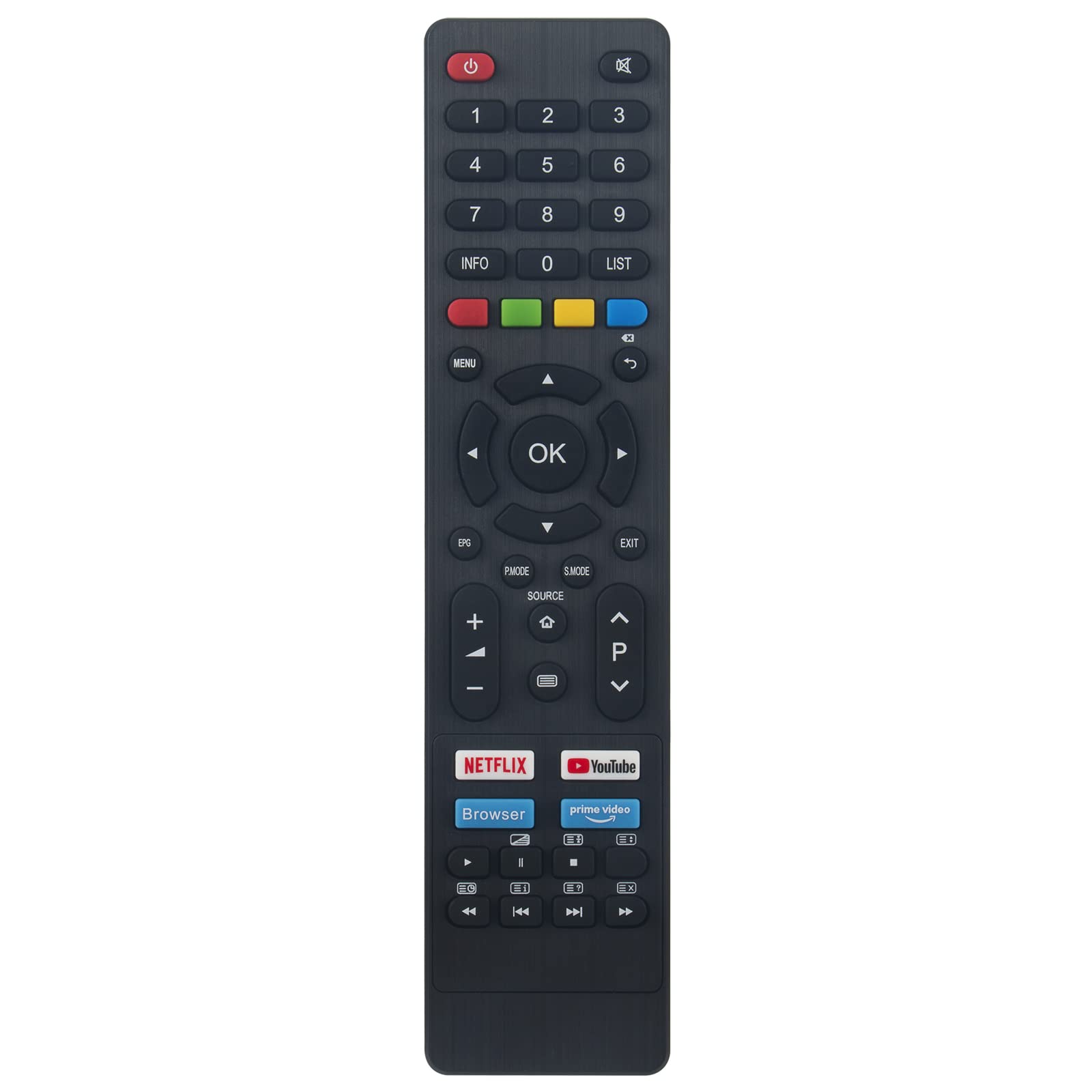
Image: Front view of the remote control, displaying the power button, number pad, navigation controls, volume/channel buttons, and dedicated app buttons.
- Power Button (Red): Turns the TV on or off.
- Number Pad (0-9): Direct channel selection.
- Volume Up/Down (+/-): Adjusts the sound level.
- Channel Up/Down (P+/-): Changes TV channels.
- Mute: Silences the TV audio.
- Menu/Settings: Accesses the TV's main menu or settings.
- Navigation Pad (Up, Down, Left, Right, OK): Navigates through menus and confirms selections.
- Back/Exit: Returns to the previous screen or exits a menu.
- Source/Input: Selects the input source (HDMI, AV, etc.).
- Dedicated App Buttons: Quick access to streaming services like Netflix, YouTube, and Prime Video, and a Browser button.
Optimal Usage
For best performance, ensure a clear line of sight between the remote control's infrared emitter and the TV's infrared receiver. The remote operates effectively at a distance of up to 8 meters, with a maximum range of 10 meters under ideal conditions.
Care and Maintenance
- Cleaning: Wipe the remote control with a soft, dry cloth. Do not use liquid cleaners or abrasive materials.
- Battery Replacement: Replace batteries when the remote's response becomes sluggish or it stops functioning. Always replace all batteries at the same time with new ones of the same type.
- Storage: If the remote will not be used for an extended period, remove the batteries to prevent leakage and damage. Store in a cool, dry place.
- Durability: The remote is made from durable ABS material, resistant to minor drops. However, avoid excessive force or impact.
Troubleshooting
- Remote not responding:
- Check if the batteries are correctly inserted with the correct polarity.
- Replace old batteries with new alkaline batteries.
- Ensure there are no obstructions between the remote and the TV's infrared sensor.
- Confirm the remote is pointed directly at the TV.
- Short transmission distance:
- Replace batteries.
- Ensure no strong light sources (like direct sunlight) are interfering with the TV's IR receiver.
- Specific buttons not working:
- Verify your TV model is listed in the compatible models section.
- Some advanced functions might not be supported if your TV's original remote had unique features not present on this universal remote.
If you encounter persistent issues or are unsure about compatibility, please contact customer support for assistance.
Product Specifications
| Feature | Specification |
|---|---|
| Brand | VINABTY |
| Model Number | GCBLTV090DBIR |
| Connectivity Technology | Infrared (IR) |
| Compatible Devices | Television (Saba, Changhong, and listed models) |
| Special Feature | Ergonomic Design |
| Material | ABS (Acrylonitrile Butadiene Styrene) |
| Battery Type | Alkaline (AAA, not included) |
| Transmission Distance | Up to 8 meters (max 10 meters) |
Warranty and Support
VINABTY products are designed for quality and reliability. If you encounter any issues with your remote control or have questions regarding its compatibility or operation, please contact our customer support. We recommend verifying compatibility before purchase if your specific TV model is not explicitly listed.
For support, please refer to the contact information provided with your purchase or visit the VINABTY official support channels.