
1. Introduction
The Yunseity R6 Smart Ring is a wearable health and fitness tracker designed to monitor various aspects of your well-being. This manual provides essential information on how to set up, operate, and maintain your smart ring to ensure optimal performance and accurate data tracking. The ring features IP68 waterproofing, Bluetooth connectivity, and compatibility with both Android and iOS devices.
2. Package Contents
Please verify that all items listed below are included in your package:
- 1 x Yunseity R6 Smart Ring
- 1 x Charging Case
- 1 x Instruction Manual
- 1 x Charging Cable

Image: The complete package contents, including the smart ring, its charging case, and the USB charging cable.
3. Specifications
| Item Type | Smart Ring |
| Product Material | Aluminum Titanium Alloy, Stainless Steel |
| Ring Battery | 18mAh Lithium Battery (Built-in) |
| Charging Case Battery | 200mAh Lithium Battery (Built-in) |
| Ring Battery Life | Approximately 5 Days |
| Ring Charging Time | 60 Minutes |
| Waterproof Rating | IP68 |
| Compatible APP | For ECTRI |
| Model Number | Yunseitymv39h2ptzn-18 |
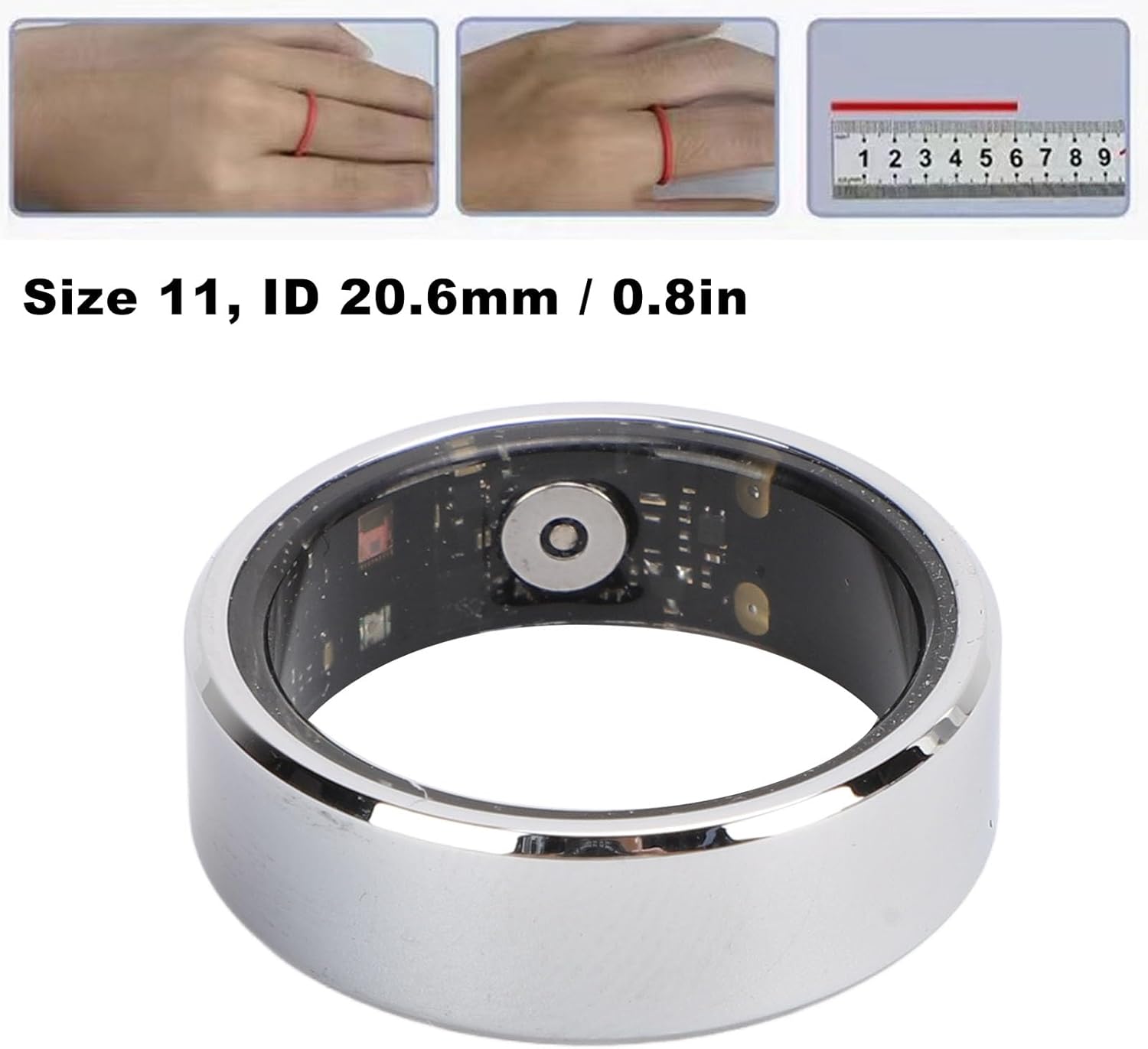
Image: The smart ring displaying its internal components and indicating a size of 11 with an internal diameter of 20.6mm.
4. Setup Guide
4.1. App Download and Installation
- Scan the QR code provided in the physical instruction manual or search for the 'ECTRI' app in your device's app store (Google Play Store for Android, Apple App Store for iOS).
- Download and install the 'ECTRI' application on your smartphone.
- Follow the on-screen prompts to create an account or log in if you already have one.
4.2. Initial Connection and Pairing
- Ensure your smart ring is sufficiently charged (refer to Section 6 for charging instructions).
- Enable Bluetooth on your smartphone.
- Open the 'ECTRI' app. The app will guide you through the pairing process.
- Select your Yunseity R6 Smart Ring from the list of available devices in the app.
- Confirm the pairing request on both your phone and, if prompted, on the ring (though the R6 typically pairs automatically via the app).
- Once paired, the app will display a confirmation message, and your ring will begin syncing data.
5. Operating Instructions
5.1. Wearing the Smart Ring
For accurate data collection, wear the smart ring on the finger that provides the most comfortable and secure fit. Ensure the sensors on the inside of the ring are in contact with your skin. The ring is designed for continuous wear.

Image: The smart ring worn on a finger, with a person exercising in the background, demonstrating active use.
5.2. Health and Fitness Tracking
The Yunseity R6 Smart Ring automatically tracks various health metrics. These may include:
- Activity Tracking: Steps taken, distance covered, and calories burned.
- Sleep Monitoring: Sleep duration, sleep stages (if supported by app), and sleep quality analysis.
- Other Metrics: Depending on app updates, additional metrics like heart rate or blood oxygen may be tracked. Refer to the 'ECTRI' app for detailed insights and data visualization.
Data is synced to the 'ECTRI' app when your ring is connected via Bluetooth. Open the app regularly to view your progress and historical data.
5.3. IP68 Waterproof Functionality
The smart ring has an IP68 waterproof rating, meaning it is protected against dust ingress and can withstand immersion in water up to 1.5 meters for up to 30 minutes. You can wear the ring during daily activities such as:
- Handwashing
- Showering
- Swimming (in fresh water)
Avoid prolonged exposure to hot water, steam, or corrosive liquids, as these can compromise the waterproof seals over time.
6. Charging Instructions
To charge your Yunseity R6 Smart Ring:
- Place the smart ring into its dedicated charging case. Ensure the charging contacts on the ring align with those in the case.
- Connect the charging cable to the charging case and plug the other end into a standard USB power adapter (not included) or a computer's USB port.
- The indicator light on the charging case will show the charging status. Refer to the case's specific indicators for full charge notification.
- A full charge for the ring takes approximately 60 minutes. The charging case itself has a 200mAh battery, allowing for multiple ring charges on the go.

Image: The smart ring securely placed within its charging case, ready for charging.
7. Maintenance
7.1. Cleaning
To maintain hygiene and ensure accurate sensor readings, clean your smart ring regularly:
- Wipe the ring with a soft, damp cloth.
- For stubborn dirt, use a small amount of mild soap and water, then rinse thoroughly with clean water.
- Ensure the ring is completely dry before placing it back in the charging case or wearing it.
- Do not use abrasive cleaners, solvents, or harsh chemicals, as these can damage the ring's finish and internal components.
7.2. Storage
When not in use for extended periods, store the smart ring and charging case in a cool, dry place, away from direct sunlight and extreme temperatures. It is recommended to charge the ring and case periodically to prevent deep discharge of the batteries.
8. Troubleshooting
If you encounter issues with your Yunseity R6 Smart Ring, try the following troubleshooting steps:
- Ring Not Turning On: Ensure the ring is fully charged. Place it in the charging case and connect the case to power for at least 30 minutes.
- Cannot Connect/Pair:
- Make sure Bluetooth is enabled on your smartphone.
- Ensure the ring is within Bluetooth range of your phone.
- Restart your smartphone and reopen the 'ECTRI' app.
- If previously paired, try unpairing the device from your phone's Bluetooth settings and then re-pairing through the app.
- Inaccurate Data:
- Ensure the ring is worn correctly and snugly on your finger, with sensors in contact with your skin.
- Clean the sensors on the inside of the ring.
- Ensure the 'ECTRI' app is up to date.
- App Not Syncing: Check your phone's internet connection. Ensure the ring is connected via Bluetooth to the app. Close and reopen the app.
- Short Battery Life: Ensure the ring is fully charged. Background app usage on your phone can sometimes affect connectivity and battery.
If these steps do not resolve the issue, please refer to the support section of the 'ECTRI' app or contact customer support.
9. Safety Information
- The Yunseity R6 Smart Ring is not a medical device and is not intended to diagnose, treat, cure, or prevent any disease. Consult a healthcare professional for any health-related concerns.
- Keep the device and its accessories out of reach of children and pets.
- Do not attempt to disassemble, repair, or modify the device. This will void the warranty and may result in injury or damage.
- Avoid exposing the device to extreme temperatures (hot or cold), open flames, or direct sunlight for prolonged periods.
- Use only the provided charging cable and a compatible USB power source.
- If you experience skin irritation or discomfort while wearing the ring, discontinue use and consult a doctor.
10. Warranty and Support
For warranty information, please refer to the documentation included with your purchase or visit the official Yunseity website. For technical support or customer service, please contact the seller or refer to the support section within the 'ECTRI' application.