
1. Introduction
The UNI-T UT383S is a compact and precise digital light meter designed for measuring illuminance in various environments. This device provides accurate readings in both Lux and Foot-Candles (FC), making it suitable for a wide range of applications including photography, plant cultivation, office lighting analysis, and general environmental light assessment. Its split-type design allows for flexible measurement in challenging spaces.
Key features include:
- Wide measurement range: 0 to 199,900 Lux / 0 to 18,500 FC.
- High accuracy: ±(4%+8) for 0-9999Lux/0-999Fc, ±(5%+10) for higher ranges.
- Fast sampling rate: 0.5 seconds.
- Split probe design with a 55cm lead for flexible positioning.
- Automatic range selection.
- Data hold function.
- Maximum/Minimum value display.
- LCD backlight for low-light conditions.
- Automatic power-off to conserve battery.
- Low battery indication.
The package includes the UT383S light meter, a packaging box, and a paper manual.

Figure 1: The UNI-T UT383S Digital Light Meter, showing the main display unit connected to the separate light sensor probe via a coiled cable.
2. Setup
2.1 Unpacking and Inspection
Carefully remove the light meter from its packaging. Inspect the device for any signs of damage. Ensure all components listed in the package contents are present.
2.2 Battery Installation
The UT383S requires three 1.5V AAA batteries. To install:
- Locate the battery compartment cover on the back of the main display unit.
- Open the cover by sliding or unscrewing it.
- Insert three AAA batteries, observing the correct polarity (+ and -) as indicated inside the compartment.
- Replace the battery compartment cover securely.
2.3 Connecting the Sensor Probe
The light sensor probe is connected to the main display unit via a coiled cable. Ensure the connector is firmly seated in the port on the main unit. The sensor probe comes with a protective cap; remove this cap before taking measurements.

Figure 2: Close-up view of the detachable light sensor probe, showing the white dome sensor and the protective cap.
3. Operating Instructions
3.1 Power On/Off
Press the Power button (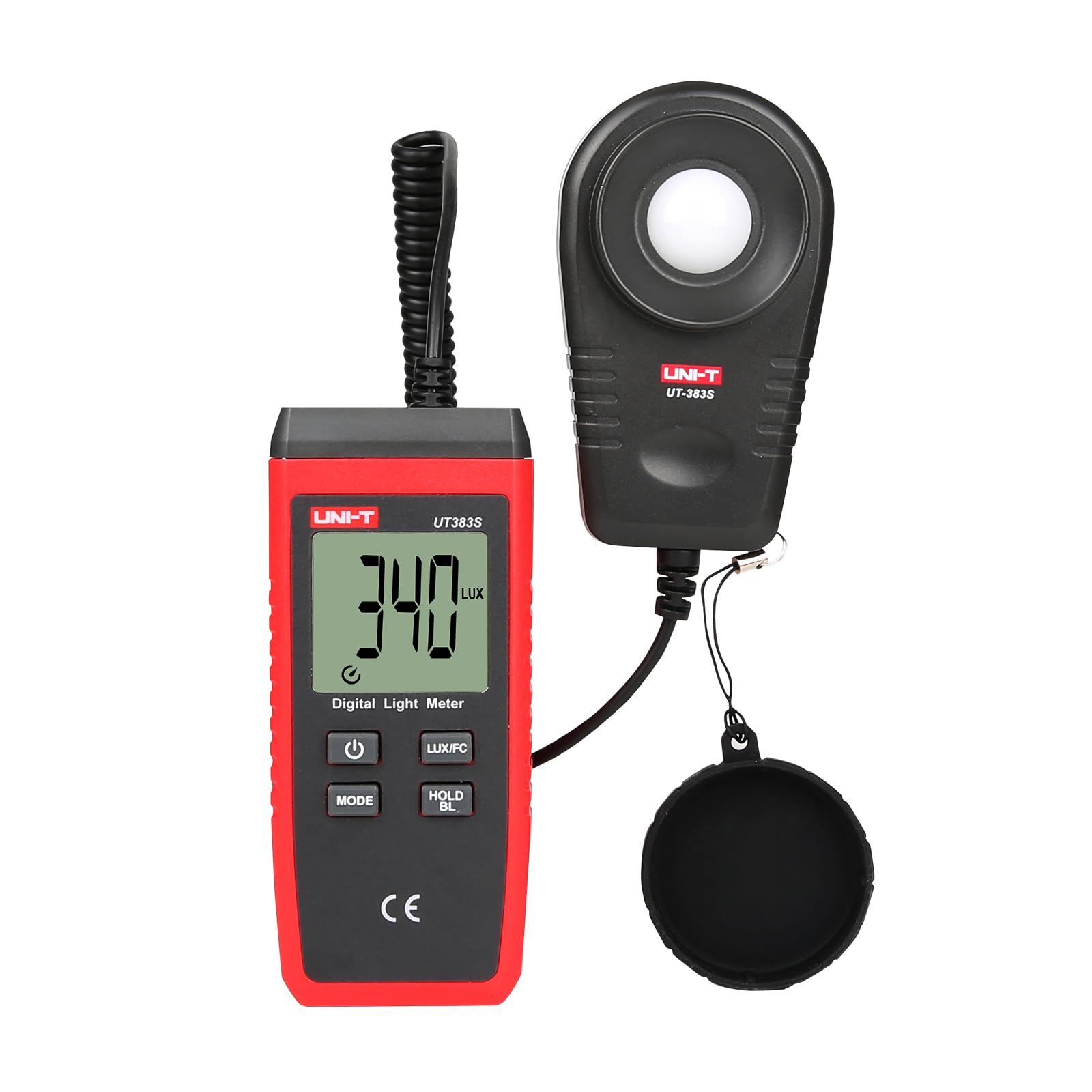 ) to turn the device on. Press and hold the Power button to turn it off. The device features an auto power-off function to save battery life if inactive for a period.
3.2 Unit Selection (Lux/FC)
Press the LUX/FC button to switch between Lux and Foot-Candle measurement units. The selected unit will be displayed on the LCD screen.
3.3 Data Hold
To freeze the current measurement on the display, press the HOLD/BL button. Press it again to release the data hold function and resume live measurements.
3.4 Backlight
To activate the LCD backlight for better visibility in dim conditions, press and hold the HOLD/BL button. Press and hold it again to turn off the backlight.
3.5 MAX/MIN Measurement
To view the maximum or minimum illuminance recorded during a measurement session:
- Press the MODE button once to enter MAX mode. The display will show the maximum value recorded since power-on or reset.
- Press the MODE button again to enter MIN mode. The display will show the minimum value recorded.
- Press the MODE button a third time to return to normal measurement mode.
3.6 Taking Measurements
1. Ensure the protective cap is removed from the sensor probe.
2. Position the sensor probe at the location where you wish to measure light intensity. For accurate readings, ensure the sensor is facing the light source directly.
3. Read the illuminance value displayed on the LCD screen. The device automatically selects the appropriate range.

Figure 3: The UNI-T UT383S in use, demonstrating how the separate sensor probe allows for flexible positioning to measure light in a room.
4. Maintenance
4.1 Cleaning
Wipe the device with a soft, dry cloth. Do not use abrasive cleaners or solvents. Keep the sensor probe clean and free from dust or debris to ensure accurate readings.
4.2 Battery Replacement
When the low battery indicator appears on the display, replace all three AAA batteries promptly to ensure continued accurate operation. Refer to Section 2.2 for battery installation instructions.
4.3 Storage
When not in use for extended periods, remove the batteries to prevent leakage. Store the device in a cool, dry place, away from direct sunlight and extreme temperatures. Always place the protective cap back on the sensor probe during storage.
5. Troubleshooting
- Device does not power on:
- Check if batteries are installed correctly with the right polarity.
- Replace old or depleted batteries with new ones. - Inaccurate or fluctuating readings:
- Ensure the sensor probe is clean and free from obstructions.
- Verify the sensor is positioned correctly towards the light source.
- Avoid taking measurements in rapidly changing light conditions.
- Check for low battery indication and replace batteries if necessary. - "LO" or "HI" displayed:
- "LO" indicates the measured illuminance is below the device's minimum detectable range.
- "HI" indicates the measured illuminance exceeds the device's maximum range (199,900 Lux / 18,500 FC).
6. Specifications
| Measurement Range (Lux) | 0 ~ 199,900 Lux |
| Measurement Range (FC) | 0 ~ 18,500 FC |
| Accuracy (0-9999Lux/0-999Fc) | ±(4% + 8 digits) |
| Accuracy (≥10000Lux/≥1000Fc) | ±(5% + 10 digits) |
| Resolution (Lux) | 1 Lux (0-9999Lux), 10 Lux (≥10,000Lux), 100 Lux (≥100,000Lux) |
| Resolution (FC) | 1 FC (0-9999Fc), 10 FC (≥10,000Fc) (FC = Lux / 10.76) |
| Sampling Time | 0.5 seconds |
| Display | LCD, 35mm x 32mm |
| Power | 3 x 1.5V AAA batteries |
| Auto Power Off | Yes |
| Low Battery Indication | Yes |
| Product Dimensions | 2.5 x 1.5 x 4.5 inches (main unit) |
| Item Weight | 10.4 ounces |
| Manufacturer | UNI-T |

Figure 4: Dimensions of the UNI-T UT383S main display unit.
7. Warranty and Support
UNI-T provides dedicated customer support for its products. If you encounter any issues or have questions regarding the UT383S Digital Light Meter, please contact UNI-T customer service directly. Details for contacting support are typically found in the product packaging or on the official UNI-T website.
For technical assistance or warranty inquiries, refer to the contact information provided with your purchase or visit the UNI-T official support channels. Prompt assistance is available to ensure your satisfaction with the product.


