
Dell Precision 7730
Dell Precision 7730 Mobile Workstation User Manual
Model: Precision 7730 | Brand: Dell
Introduction
This manual provides essential information for the setup, operation, and maintenance of your Dell Precision 7730 mobile workstation. The Dell Precision 7730 is a high-performance laptop designed for demanding professional tasks, featuring a 17.3-inch display, Intel Core i7-8850H processor, 64GB of RAM, and a 2TB NVMe Solid State Drive.
Key features include:
- Powerful Intel Core i7-8850H Hexa Core Processor for efficient multitasking.
- 64GB DDR4 RAM for smooth performance with memory-intensive applications.
- 2TB NVMe SSD for fast data access and ample storage capacity.
- NVIDIA Quadro P3200 6GB dedicated graphics for professional visualization and rendering.
- 17.3-inch Full HD display for clear and detailed visuals.
- Pre-installed Windows 11 Professional 64-bit Operating System.

Figure 1: Front view of the Dell Precision 7730 mobile workstation with the screen displaying the Windows operating system desktop.
Setup
Follow these steps to set up your Dell Precision 7730 mobile workstation for the first time.
- Unboxing: Carefully remove the laptop and all accessories from the packaging. Ensure the AC adapter is present.
- Connect Power: Plug the AC adapter into the power port on the laptop and then into a wall outlet. It is recommended to fully charge the battery before initial use.
- Initial Boot: Open the laptop lid and press the power button, typically located on the top right of the keyboard deck. The system will begin the Windows 11 setup process. Follow the on-screen prompts to configure your operating system, including language, region, network connection, and user account setup.
- Peripheral Connections: Connect any external devices such as a mouse, keyboard, external monitor, or network cable to the available ports. The Dell Precision 7730 includes:
- (3) USB 3.1 ports
- (2) USB Type-C ports
- HDMI port
- RJ-45 (Ethernet) port
- Universal Audio Jack

Figure 2: Side view of the Dell Precision 7730 laptop in a closed position, showing various ports on the left side.
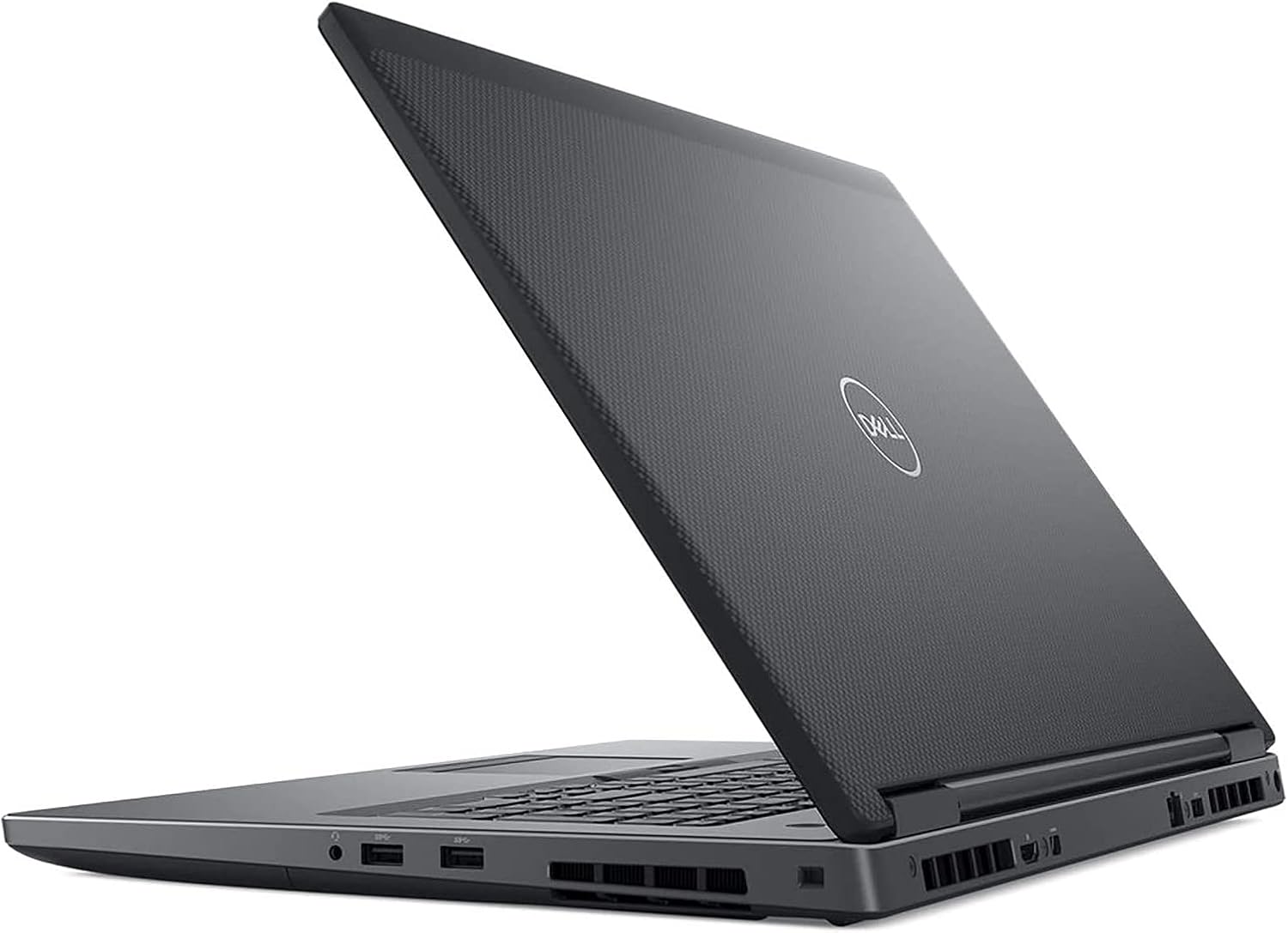
Figure 3: Side view of the Dell Precision 7730 laptop in an open position, highlighting the ports on the right side.
Operating Instructions
This section covers basic operation of your Dell Precision 7730.
Powering On and Off
- To Power On: Press the power button located on the top right of the keyboard.
- To Shut Down: Click the Start button in Windows 11, then select the Power icon, and choose "Shut down."
- To Restart: Click the Start button, select the Power icon, and choose "Restart."
- To Sleep: Close the laptop lid or click the Start button, select the Power icon, and choose "Sleep."
Using the Keyboard and Touchpad
The laptop features a full-sized keyboard and a precision touchpad. Familiarize yourself with the function keys (Fn) for quick access to settings like screen brightness, volume, and wireless connectivity.
Connecting to Networks
Your Dell Precision 7730 supports both wired (Ethernet via RJ-45 port) and wireless (Wi-Fi) network connections. To connect to Wi-Fi, click the network icon in the taskbar, select your desired network, and enter the password if prompted.
Display and Graphics
The 17.3-inch Full HD display provides a large workspace. The integrated NVIDIA Quadro P3200 6GB graphics card is optimized for professional applications requiring high graphical performance. You can connect external monitors via the HDMI port or USB-C ports for extended display setups.

Figure 4: Front view of the Dell Precision 7730 mobile workstation with a vibrant abstract wallpaper displayed on the screen.
Maintenance
Proper maintenance ensures the longevity and optimal performance of your mobile workstation.
- Cleaning: Use a soft, lint-free cloth to clean the screen and exterior. For stubborn marks, dampen the cloth with water or a screen-safe cleaner. Avoid harsh chemicals.
- Ventilation: Ensure the ventilation grilles are clear of dust and obstructions to prevent overheating. Do not operate the laptop on soft surfaces like beds or couches that can block airflow.
- Battery Care: To maximize battery lifespan, avoid extreme temperatures. If storing the laptop for an extended period, ensure the battery is charged to about 50%.
- Software Updates: Regularly update your Windows operating system and Dell drivers to ensure security, stability, and performance.
- Data Backup: Periodically back up important data to an external drive or cloud storage to prevent data loss.
Troubleshooting
This section addresses common issues you might encounter with your Dell Precision 7730.
- No Power:
- Ensure the AC adapter is securely connected to both the laptop and a working power outlet.
- Check if the power outlet is functional by plugging in another device.
- If the battery is completely drained, allow it to charge for a few minutes before attempting to power on.
- No Display:
- Ensure the laptop is powered on.
- Try adjusting the screen brightness using the keyboard function keys.
- If an external monitor is connected, try disconnecting it to see if the internal display activates.
- Wi-Fi Connectivity Issues:
- Verify that Wi-Fi is enabled in Windows settings.
- Restart your wireless router/modem.
- Ensure you are entering the correct Wi-Fi password.
- Update your wireless network drivers.
- System Slowdown:
- Close unnecessary applications running in the background.
- Check Task Manager for processes consuming high CPU or memory.
- Ensure sufficient free space on the 2TB NVMe SSD.
- Run a system scan for malware or viruses.
For persistent issues, refer to Dell's official support resources or contact technical support.
Specifications
Detailed technical specifications for the Dell Precision 7730 mobile workstation.
| Feature | Specification |
|---|---|
| Brand | Dell |
| Model Name | Dell Precision 7730 |
| Screen Size | 17.3 Inches |
| Processor | Intel Core i7-8850H (2.6 GHz Hexa Core) |
| RAM Memory Installed Size | 64 GB DDR4 SDRAM |
| Hard Disk Size | 2 TB NVMe SSD |
| Graphics Coprocessor | NVIDIA Quadro P3200 6GB |
| Operating System | Windows 11 Professional 64-bit |
| Color | Black |
| Product Dimensions (LxWxH) | 10.8 x 16.3 x 1.2 inches |
| Power Source | AC & Battery |
| Ports | (3) USB 3.1, (2) USB Type-C, HDMI, RJ-45, Universal Audio Jack |

Figure 5: An internal view of a computer motherboard, highlighting a WD Black NVMe SSD installed in a slot, representing the storage component.
Warranty and Support
This Dell Precision 7730 is a Certified Refurbished product. It has been tested and certified to look and work like new. The refurbishing process includes functionality testing, basic cleaning, inspection, and repackaging. The product ships with all relevant accessories and includes a minimum 90-day warranty.
For technical support, warranty claims, or further assistance, please contact the seller or refer to Dell's official support website for general product documentation and drivers.
Seller Information: Epower Solutions
Return Policy: This product typically includes a 90-day return/replacement policy from the date of purchase.