1. Introduction
This manual provides comprehensive instructions for the setup, installation, and maintenance of your HAVN HS 420 VGPU Dual-Chamber Mid Tower ATX PC Case. Please read through this guide carefully before beginning assembly to ensure proper installation and optimal performance.
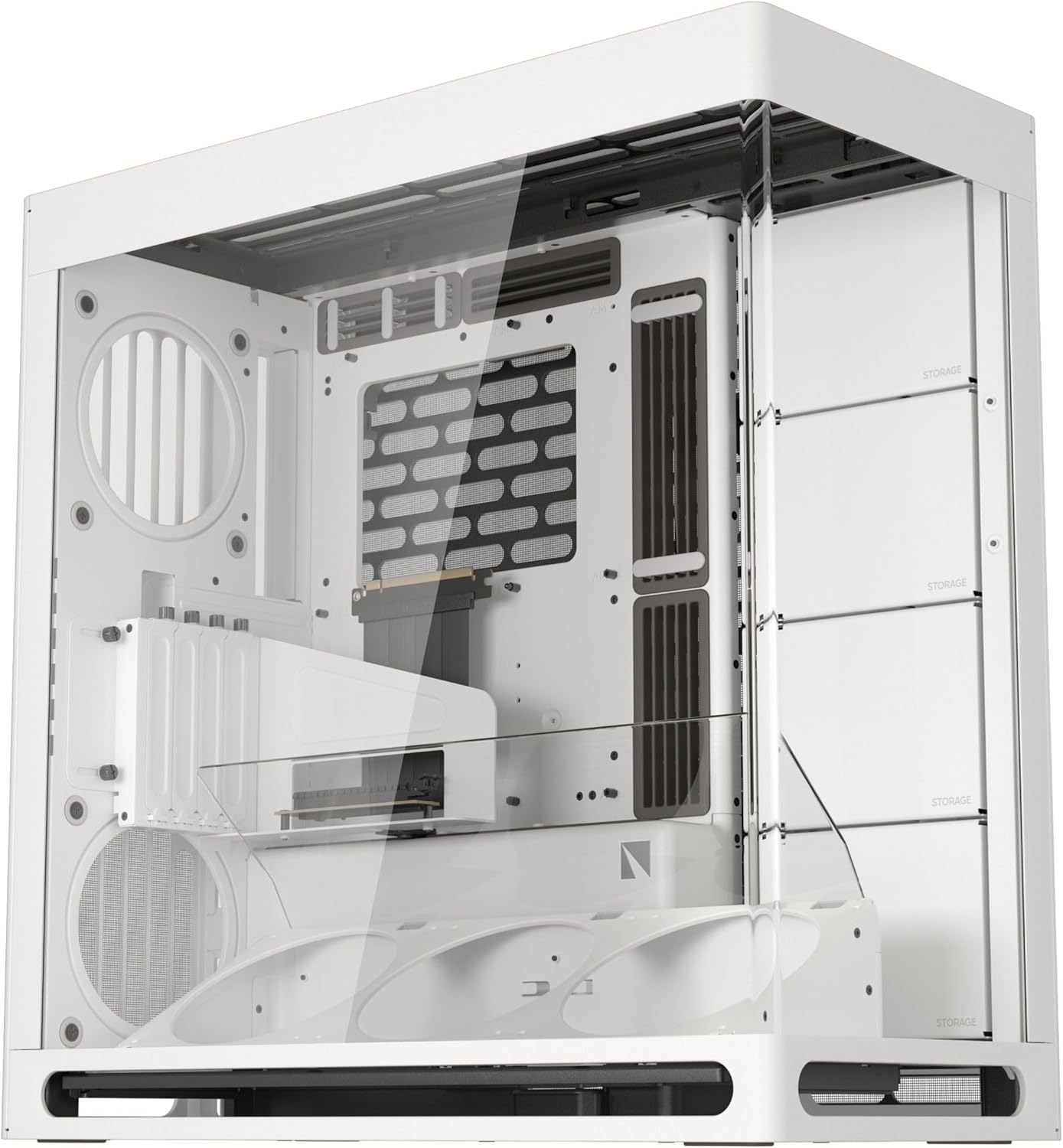
Figure 1: HAVN HS 420 VGPU PC Case (White)
The HAVN HS 420 VGPU is a high-performance PC case designed for optimal cooling and aesthetic appeal, featuring a dual-chamber layout, extensive fan and radiator support, and a unique Heat-Formed UniSheet Glass Panel for a panoramic view of your components.
2. Key Features
- HAVN Hybrid Structure for Optimal GPU Cooling: Dual-chamber design with balanced airflow, directing cool air from the bottom intake onto the centrally positioned GPU.
- Carefully Guided Airflow: Angled bottom fan bracket with a well-placed glass airflow guide ensures cool air reaches the GPU intake effectively.
- Lightning-Fast Riser Cable Included: The VGPU Mount Kit and PCI Express 5.0 X16 riser cable allow for vertical GPU mounting without compromising performance.
- Cooling Power and Compatibility: Supports up to eleven 140mm fans and up to 420mm radiators on both the top and right side.
- Heat-Formed UniSheet Glass Panel: Provides a continuous, clear panoramic view of the case interior with minimal visual distortion.
- Unique SimpliCable Routing System: User-friendly routing system with top-to-bottom grooved guides for clean cable management.
- Customization: Customizable space for combinations of storage, fans, radiators, and portable displays (VESA display mount included).
- Vibration Isolation: All fan brackets feature flexible rubber pads to isolate from the chassis and prevent resonance.

Figure 2: HAVN Hybrid Structure for Optimal GPU Cooling

Figure 3: Optimized Airflow
3. Setup and Component Installation
Before installing any components, ensure the case is placed on a stable, flat surface. Remove the tempered glass panels and the top panel for easier access.
3.1 Removing Panels
The HAVN HS 420 VGPU features tool-less panel removal for convenience. Gently pull the tempered glass panels to detach them. The top panel can also be easily removed by pressing the release mechanism and lifting.
3.2 Motherboard Installation
The case supports ATX motherboards. Install your motherboard onto the pre-installed standoffs. Ensure all necessary power and data cables are routed through the designated cutouts.
3.3 GPU Installation (Vertical)
The case includes a PCIe 5.0 X16 riser cable and VGPU Mount Kit for vertical GPU installation. Secure your graphics card to the vertical mount and connect it via the riser cable. An adjustable anti-sag bracket is provided to support the GPU.

Figure 4: Vertical GPU Kit Installation
3.4 Fan and Radiator Installation
The HAVN HS 420 VGPU offers extensive cooling options. It supports up to eleven 140mm fans and dual 420mm radiators on the top and right side. Utilize the angled bottom fan bracket for targeted GPU cooling. All fan brackets include rubber pads for vibration isolation.

Figure 5: Cooling Power and Compatibility
3.5 Storage Installation
The customizable space allows for various storage configurations. Refer to the case's internal layout for specific mounting points for 2.5-inch SSDs and 3.5-inch HDDs.
4. Cable Management
The SimpliCable Routing System is designed for easy and clean cable organization. Utilize the top-to-bottom grooved guides and included Velcro ties to route your cables neatly, ensuring optimal airflow and a pristine appearance.

Figure 6: SimpliCable Routing System
5. Operating Your PC Case
Once all components are securely installed and cables are managed, reattach all panels. Connect your power supply to a wall outlet and press the power button on the front I/O panel to start your system. Ensure all fans are spinning and RGB lighting is functioning as expected.
5.1 Official Product Videos
Watch these official videos for additional guidance and product overview:
Video 1: HAVN HS 420 - Dual-Chamber ATX Mid-Tower PC Case Overview. This video provides a detailed look at the HAVN HS 420 case, highlighting its dual-chamber design and features.
Video 2: Innovative PC Case Great For Airflow And Cable Management! This video demonstrates the innovative features of the HAVN case, focusing on its airflow and cable management solutions.
Video 3: darkFlash DY470 PC Case White. While showcasing a different model, this video provides insights into general PC case features and aesthetics that may apply to the HAVN HS 420 VGPU.
Video 4: GAMDIAS-NESO-P1 Computer Case. This video presents another full-tower PC case, offering a comparative view of features and design elements relevant to high-performance builds.
6. Maintenance
To ensure longevity and optimal performance, regularly clean your PC case. Use a soft, dry cloth to wipe down exterior surfaces. For dust accumulation inside, use compressed air to gently clear fans and components. Ensure the system is powered off and unplugged before performing any cleaning.
7. Troubleshooting
- System not powering on: Check all power connections, including the power supply unit (PSU) to the wall, the PSU to the motherboard, and the front panel power switch connection to the motherboard.
- Overheating components: Verify fan orientation for proper airflow, ensure radiators are clean, and check thermal paste application on CPU/GPU.
- Excessive noise: Inspect fans for obstructions or loose mounting. The case's vibration isolation pads should minimize chassis resonance.
- RGB lighting issues: Confirm all RGB headers are correctly connected to the motherboard or a dedicated controller. Check software settings for lighting control.
8. Specifications
| Feature | Detail |
|---|---|
| Model Name | HS 420 VGPU |
| Item Model Number | HVN-CA-HS420-07 |
| Item Weight | 41.9 pounds |
| Product Dimensions (LxWxH) | 21.3 x 10.2 x 21.5 inches |
| Color | White |
| Motherboard Compatibility | ATX |
| Case Type | Mid Tower |
| Cooling Method | Air |
| Fan Size Support | 140 Millimeters (up to 11 fans) |
| Radiator Support | Up to 2x 420mm (top and right side) |
| GPU Mounting | Vertical (PCIe 5.0 X16 riser cable included) |
| Front I/O Ports | 2x USB 2.0 Ports (additional ports may vary by model) |
9. Warranty and Support
For warranty information and technical support, please refer to the official HAVN website or contact your retailer. Keep your proof of purchase for warranty claims.


