
Introduction
Thank you for choosing the Camii 2K Webcam. This device is designed to provide high-quality video and audio for your online communications, featuring a built-in ring light, privacy cover, noise-cancelling microphone, and auto-focus capabilities. This manual will guide you through the setup, operation, and maintenance of your webcam to ensure optimal performance.
The webcam comes with a built-in privacy cover. Protect yourself and your family when not using your webcam by preventing unauthorized access to your video feed.
Key Features
- 2K FHD Quality: This conference camera features a 2K FHD camera with a resolution of up to 30 frames per second at 1920 x 1080 HD pixels and a 90-degree wide-angle lens for smooth, high-definition video and images.
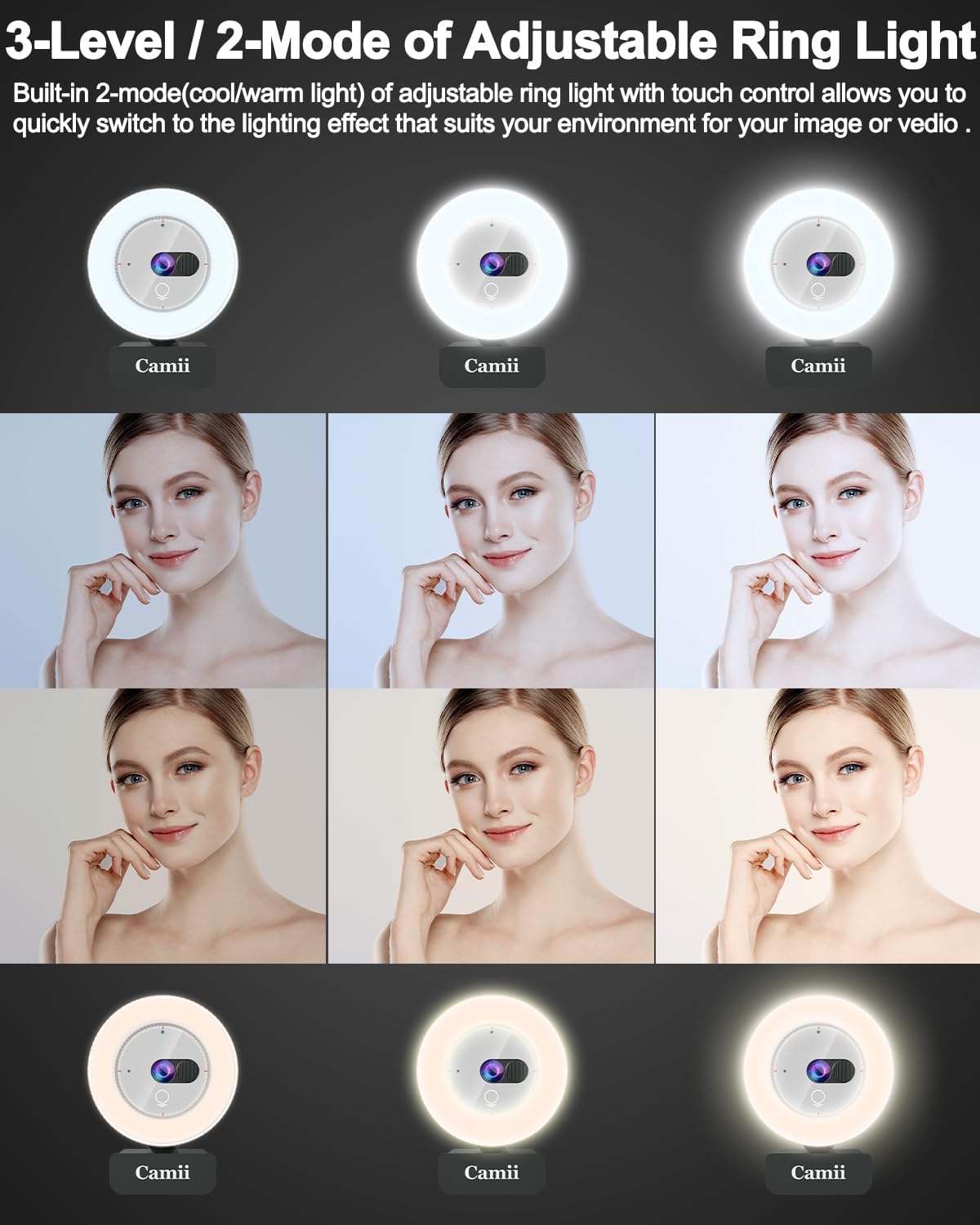
- 3-Level/2-Mode Adjustable Ring Light: The 2K webcam with illumination has a built-in lighting ring that offers 3 different levels of light selection via touch control: low, medium, and high. It provides brighter and softer illumination without glare, offering additional light compensation even in dim environments.
- Auto-Focus and Noise-Cancelling Microphone: The webcam with microphone uses advanced Time-of-Flight (TOF) technology for fast and accurate auto-focus. This ensures the camera always focuses on you, regardless of lighting or environmental conditions. The integrated noise-cancelling microphone reduces ambient noise and improves video sound quality, capturing the audio you want even in noisy environments.
- USB Plug and Play: The streaming webcam connects to your computer/laptop using a USB 2.0 port (no additional driver software needed). The high portability of the computer webcam is suitable for working on the go, and the flexible mounting clip can be placed on any desktop/screen/laptop/Chromebook/computer/tripod for quick connection.
- Highly Compatible with Mainstream Platforms and Systems: The webcam is widely compatible with Zoom, FaceTime, Google Meet, Skype, YouTube, Facebook, and many other programs. It is compatible with Windows 7/10/11, Mac OS 10.10 or later, Linux, and Android TV 7.0 or higher. Ideal for individuals, groups, companies, and for online learning, work, and gaming.
Setup Guide
Follow these steps to set up your Camii 2K Webcam:
- Place your webcam: Designed with your needs in mind. Place your webcam on your computer monitor, your TV, a tripod, or any flat surface. The adjustable clip base allows for secure attachment.
- Connect webcam: Connect the webcam to your device using the USB cable.
- Plug and Play: Driver-free installation. Please ensure you are connected to a network for first-time setup. Just plug the webcam in, then wait approximately a minute, and the webcam is automatically installed.


Operating Instructions
Using the Ring Light
The webcam features a built-in ring light to enhance your video quality, especially in low-light conditions. To adjust the light:
- Power On/Off: Touch the designated area on the webcam to turn the ring light on or off.
- Adjust Brightness: Repeatedly touch the same area to cycle through 3 brightness levels (low, medium, high).
- Color Temperature: The ring light offers two modes (cool/warm light) to suit your environment.
Using the Privacy Cover
The integrated privacy cover provides an easy way to ensure your privacy when the webcam is not in use.
- To Close: Slide the privacy cover over the lens when you are finished with your video call or streaming session.
- To Open: Slide the privacy cover away from the lens to reveal it when you need to use the webcam.

Automatic Focus
The Camii 2K Webcam features automatic focus to keep you sharp and clear during your calls.
- The webcam will automatically adjust its focus to ensure you are always in clear view.
- Movement within the frame will trigger the auto-focus to reset to the ideal focal position.

Field of View
The Camii 2K Webcam offers a 90-degree wide-angle field of view, allowing you to capture more of your surroundings or include multiple participants in a single frame.

Adjustable Rotation
The webcam features 360-degree adjustable rotation, providing flexibility in positioning for optimal viewing angles.
- The adjustable clip base allows you to securely attach the webcam to laptops, monitors, or tripods.
- Rotate the webcam head to achieve the desired angle for your video calls or recordings.

Maintenance
To ensure the longevity and optimal performance of your Camii 2K Webcam, follow these maintenance guidelines:
- Cleaning the Lens: Gently wipe the lens with a soft, lint-free cloth. For stubborn smudges, use a lens cleaning solution specifically designed for optical surfaces. Avoid abrasive materials or harsh chemicals.
- Cleaning the Body: Use a soft, dry cloth to clean the body of the webcam. Do not use liquid cleaners directly on the device.
- Storage: When not in use, store the webcam in a clean, dry place, preferably with the privacy cover closed to protect the lens from dust and scratches.
- Avoid Extreme Conditions: Do not expose the webcam to extreme temperatures, humidity, or direct sunlight for extended periods.
Troubleshooting
If you encounter issues with your Camii 2K Webcam, refer to the following common problems and solutions:
| Problem | Solution |
|---|---|
| Webcam not detected by computer. |
|
| Poor video quality (blurry, dark, grainy). |
|
| No audio or poor audio quality. |
|
| Ring light not working. |
|
Specifications
| Feature | Detail |
|---|---|
| Brand | Camii |
| Model Name | 2K Camii |
| Video Capture Resolution | 2K |
| Image Sensor Technology | CMOS |
| Max Display Resolution | 2K Pixels |
| Connectivity Technology | USB |
| Special Features | Built-in Light |
| Focus Type | Auto Focus |
| Lens Type | Wide Angle |
| View Angle | 90 Degrees |
| Digital Zoom | 3X |
| Image Stabilization | Digital |
| Form Factor | Built-in |
| Color | Silver |
| Compatible Devices | Personal Computer, Tablet, Laptop |
| Included Components | Tripod |
| Video Format | MPEG, MP4 |
| Supported Audio Format | AAC, MP3 |
| Water Resistance Level | Not Water Resistant |
Warranty and Support
For warranty information and technical support, please refer to the documentation included with your purchase or visit the official Camii website. You may also contact customer service through your retailer for assistance.
This product is eligible for a 30-day return period from the date of purchase, as per retailer policy.