
Faninso V5
Faninso V5 Portable 7-inch CarPlay/Android Auto Screen User Manual
Model: V5
Introduction
This manual provides detailed instructions for the installation, operation, and maintenance of your Faninso V5 Portable 7-inch CarPlay/Android Auto Screen. Please read this manual thoroughly before using the device to ensure proper functionality and safety. Keep this manual for future reference.
Safety Information
- Do not operate the device in a manner that distracts you from driving. Always prioritize road safety.
- Ensure the device is securely mounted and does not obstruct your view or interfere with vehicle controls.
- Avoid exposing the device to extreme temperatures, direct sunlight for prolonged periods, or moisture.
- Use only the provided power cord and accessories. Using unauthorized accessories may damage the device or cause safety hazards.
- Do not attempt to disassemble or repair the device yourself. Contact customer support for assistance.
Package Contents
Verify that all items are present in the package:
- 7" HD Touchscreen
- Power Cord
- Suction Cup Mount
- AUX Audio Cable
- User Manual

Image: Package contents of the Faninso V5 Portable CarPlay Screen.
Product Overview
Familiarize yourself with the components and ports of your Faninso V5 device.

Image: Detailed diagram of the Faninso V5 unit and its connections.
- MIC: Integrated microphone for voice commands and calls.
- Speaker: Built-in speaker for audio output.
- Mounting bracket clip: Secures the screen to the suction cup mount.
- Reset button: Used to restart the device if it becomes unresponsive.
- Power button: Turns the device on/off and controls screen standby.
- Suction cup mount: Adjustable mount for securing the device.
- AUX-Out: 3.5mm audio output jack for connecting to vehicle's AUX input.
- Memory Card Slot: Supports MicroSD cards up to 256GB (Class 10 or higher) for media playback.
- Camera AV-IN: Input for an optional rearview camera (not included).
- Power Port: USB Type-C port for power input.
Setup
Follow these steps to install and power on your Faninso V5 screen.
- Install the Bracket: Align the bracket buckle with the display card holder on the back of the screen. Slide the display down until it clicks firmly into place.
- Choose a Location: Select a suitable location on your dashboard or windshield for the suction cup mount. Ensure it does not obstruct your view or interfere with airbags.
- Mount the Device: Clean the chosen surface. Press the suction cup firmly against the surface and then press down on the locking switch to secure it. Remove the protective film from the suction cup before installation.
- Connect the Power Cable: Plug the provided power cord into the device's power port and the other end into your car's cigarette lighter socket.
- Turn On and Adjust: Start your vehicle. The device should power on automatically. Adjust the angle of the monitor using the mount's articulation points to ensure the best viewing experience.

Image: Step-by-step installation guide for the Faninso V5 screen.
Operating Instructions
1. Wireless CarPlay / Android Auto Connection
The Faninso V5 supports wireless Apple CarPlay and Android Auto for seamless smartphone integration.
- Ensure Bluetooth and Wi-Fi are enabled on your smartphone.
- On the Faninso V5 screen, select the 'CarPlay' or 'Android Auto' icon.
- On your phone, search for and connect to the device's Bluetooth name (usually 'CarPlay' or 'Android Auto' followed by a model number).
- Confirm the pairing request on both devices. Once paired via Bluetooth, the device will automatically establish a Wi-Fi connection for CarPlay/Android Auto.
- Your phone's interface will now be displayed on the Faninso V5 screen, allowing access to navigation, music, calls, and other compatible apps.
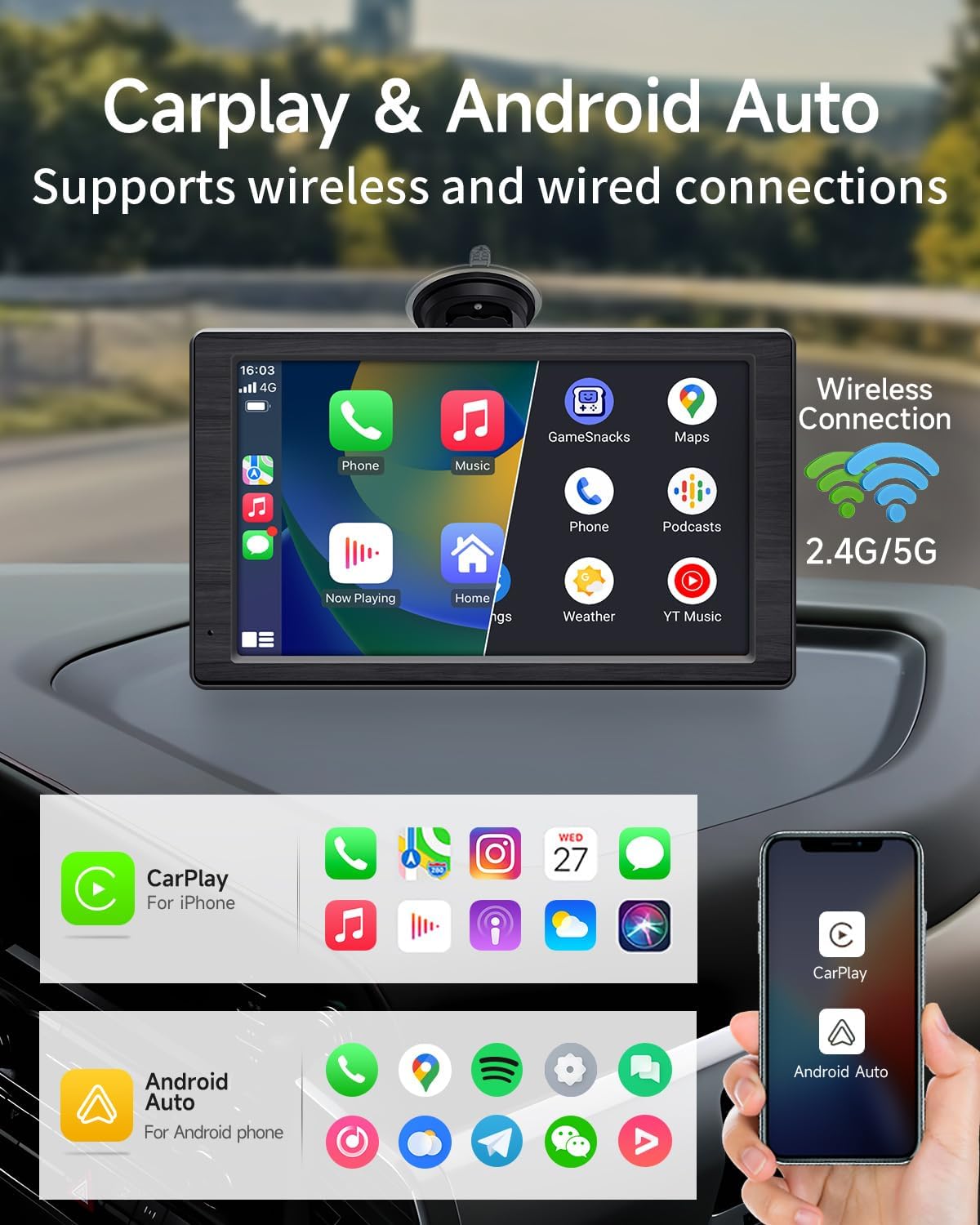
Image: Wireless CarPlay and Android Auto connection interface.
2. Bluetooth Phone Call
Make and receive calls hands-free using the built-in microphone and speaker.
- After initial Bluetooth pairing (as described in CarPlay/Android Auto setup), your phone will automatically connect to the Faninso V5 for calls.
- Use the screen interface to dial numbers, answer incoming calls, or access your phone's contact list.
- The built-in silicon microphone ensures clear call quality.

Image: Hands-free Bluetooth phone call feature.
3. Mirror Link (AirPlay / Miracast)
Mirror your smartphone screen directly to the Faninso V5 display.
- Select the 'AirPlay' (for iOS) or 'Miracast' (for Android) icon on the device.
- Follow the on-screen instructions to connect your phone. This typically involves connecting to the device's Wi-Fi network and enabling screen mirroring on your phone.
- Once connected, your phone's display will be mirrored on the 7-inch screen.

Image: Wireless screen mirroring via Wi-Fi connection.
4. Audio Output Options
The Faninso V5 offers multiple ways to output audio to your car's sound system:
- Bluetooth Audio: Connect your car's Bluetooth to the Faninso V5 to transmit audio wirelessly.
- Local Speaker: Use the built-in speaker for direct audio output.
- FM Radio Transmitter: Select an unused FM frequency on the Faninso V5 and tune your car's radio to the same frequency to transmit audio.
- AUX Connection: Use the provided AUX audio cable to connect the Faninso V5's AUX-Out port to your car's AUX-In port.
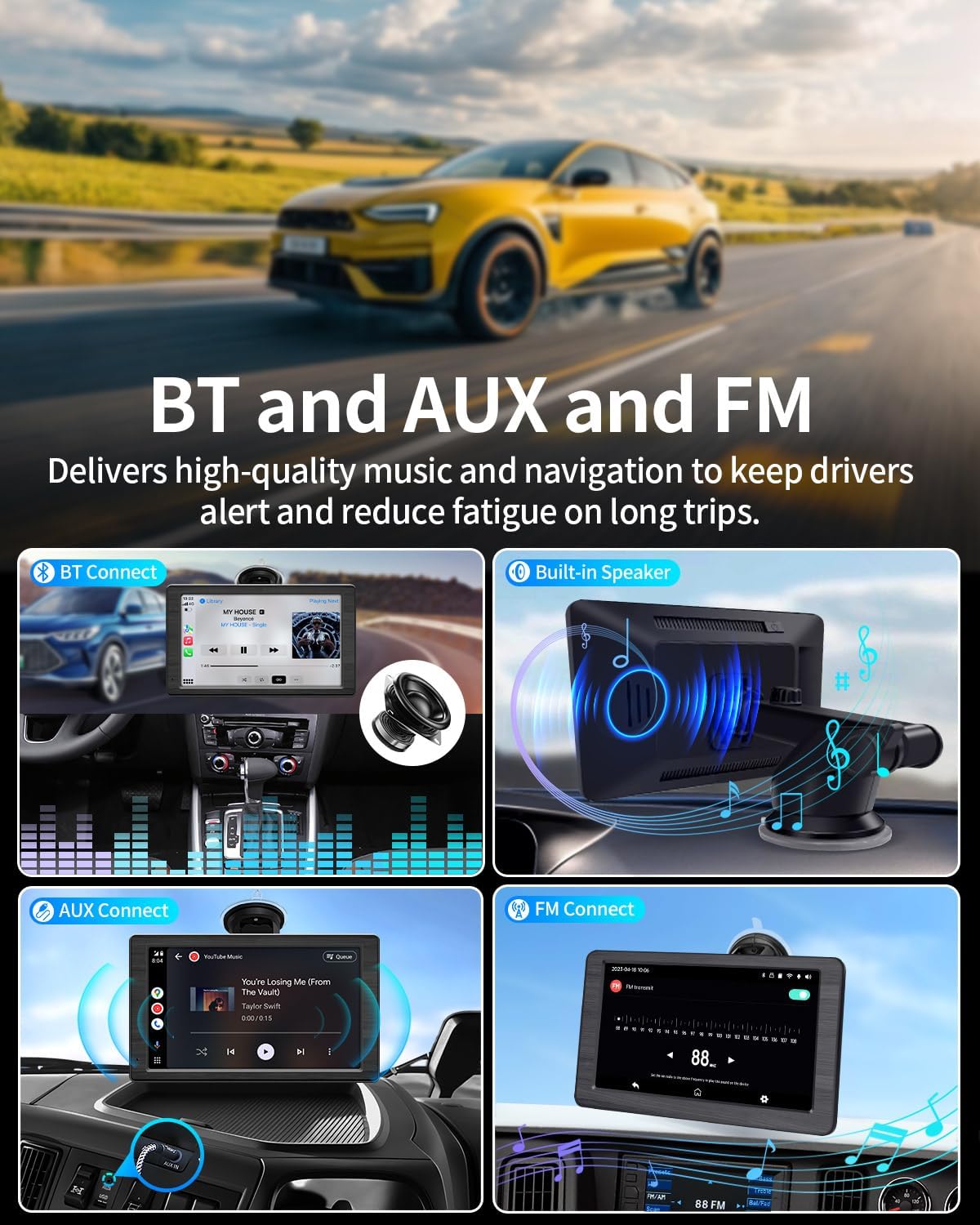
Image: Various audio output methods for the Faninso V5.
5. Voice Control (Siri / Google Assistant)
Utilize voice commands for hands-free operation when connected to CarPlay or Android Auto.
- Activate Siri or Google Assistant by saying "Hey Siri" or "Hi Google," or by tapping the voice control icon on the screen.
- Issue commands for navigation, making calls, sending messages, playing music, and more.

Image: Hands-free voice control functionality.
6. Memory Card Playback
Play media files directly from a MicroSD card.
- Insert a MicroSD card (up to 256GB, Class 10 or higher) into the memory card slot.
- Navigate to the media player application on the device.
- Select and play supported audio (MP3, WAV) or video (MP4, MPEG-TS) formats.
Maintenance
- Cleaning: Use a soft, dry cloth to clean the screen and exterior. For stubborn marks, slightly dampen the cloth with water. Avoid harsh chemicals or abrasive materials.
- Storage: If storing the device for an extended period, disconnect it from power and store it in a cool, dry place away from direct sunlight.
- Software Updates: Periodically check the manufacturer's website for any available software updates to ensure optimal performance and new features.
Troubleshooting
| Problem | Possible Cause | Solution |
|---|---|---|
| Device does not power on. | No power, loose connection, faulty power cord. | Ensure the power cord is securely connected to both the device and the car's cigarette lighter. Check if the car's cigarette lighter is functional. Try a different power source if available. |
| CarPlay/Android Auto not connecting wirelessly. | Bluetooth/Wi-Fi off, incorrect pairing, phone compatibility. | Ensure Bluetooth and Wi-Fi are enabled on your phone. Forget the device in your phone's Bluetooth settings and re-pair. Restart both the phone and the Faninso V5. |
| No audio or poor audio quality. | Incorrect audio output setting, low volume, interference. | Check the selected audio output method (Bluetooth, AUX, FM). Adjust volume on both the device and your car stereo. If using FM, try a different frequency to avoid interference. Ensure AUX cable is fully inserted. |
| Screen is unresponsive or frozen. | Software glitch. | Press the reset button (usually a small pinhole, use a paperclip) or power cycle the device by disconnecting and reconnecting the power. |
| Suction cup mount not holding. | Dirty surface, improper locking, worn suction cup. | Clean the mounting surface thoroughly. Ensure the locking switch is fully engaged. If the suction cup is old or damaged, consider replacing the mount. |
Specifications
- Model: V5
- Screen Size: 7 inches HD Touchscreen
- Product Dimensions: 0.95"D x 7.2"W x 4.26"H
- Item Weight: 1.22 pounds
- Connectivity Technology: Auxiliary, Bluetooth, USB, Wi-Fi
- Controller Type: Android, iOS
- Special Features: Android Auto, Apple CarPlay, Built-In Bluetooth, FM Tuner, Voice Control
- Compatible Devices: Smartphone
- Connector Type: 3.5mm Jack, USB Type-C
- Audio Output Mode: Stereo
- Memory Card Support: Max 256GB (Class 10 or higher)
- Supported Media Formats: MP3, WAV, MP4, MPEG-TS
Warranty and Support
Faninso provides the following support for your product:
- Warranty: Enjoy a 1-year free warranty from the date of purchase.
- Technical Support: Lifetime technical support is available for all installation or operational issues.
- Contact: For assistance, please contact our expert team at service@faninso.com. We are committed to resolving queries within 24 hours.

Image: Faninso customer support details.
Ask a question about this manual
Ask about setup, troubleshooting, compatibility, parts, safety, or missing instructions. Manuals+ will review the question and use this page’s manual context to help answer it.