
CKKNILV G10.212
CKKNILV G10.212 Quartz Watch Movement User Manual
Model: G10.212 | Brand: CKKNILV
Product Overview
The CKKNILV G10.212 is a high-quality quartz watch movement designed for reliable timekeeping and single calendar functionality. It serves as an excellent replacement for old or damaged mechanical movements, offering precision and durability. This movement is suitable for watch repairers, watchmakers, and individuals performing daily watch maintenance.
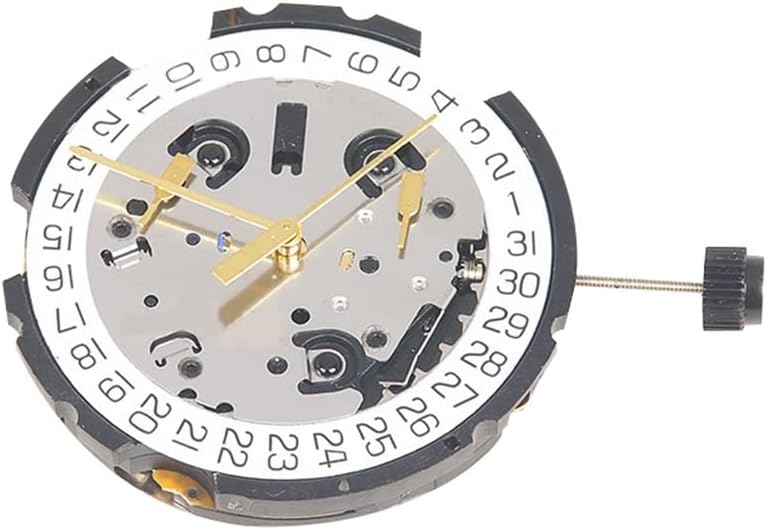
Image: Front view of the G10.212 quartz watch movement, showcasing the date wheel, hour, minute, and second hands, and the overall compact design.
Key Features:
- High Quality Construction: Manufactured from durable metal materials for maximum longevity.
- Precision Timekeeping: Unique quartz movement design ensures high accuracy.
- Single Calendar Function: Features a date display for added utility.
- Universal Compatibility: Designed as a universal replacement for ETA G10.211 and G10.212 movements.
- Ease of Installation: Practical design facilitates straightforward installation and reliable use.
Installation and Setup
Proper installation of the G10.212 movement is crucial for its optimal performance. It is recommended that installation be performed by a qualified watchmaker or experienced individual.
Tools Required:
- Watch case opener
- Movement holder
- Tweezers (non-magnetic)
- Screwdrivers (precision set)
- Hand-setting tools
- Dust blower
- Finger cots or gloves
Installation Steps:
- Prepare Workspace: Ensure a clean, dust-free, and well-lit environment.
- Open Watch Case: Carefully open the watch case back using an appropriate case opener.
- Remove Old Movement: Gently remove the watch stem/crown, then unsecure and lift out the old movement. Note the position of any movement spacers or rings.
- Transfer Components (if necessary): If the new movement does not come with hands or a date wheel, carefully transfer them from the old movement or install new ones.
- Insert New Movement: Place the G10.212 movement into the watch case, ensuring it sits correctly within any movement rings or holders.
- Secure Movement: Secure the movement in place using the appropriate screws or clamps.
- Reinstall Stem/Crown: Carefully reinsert the watch stem and crown.
- Test Functionality: Before closing the case, test the time and date setting functions.
- Close Case: Carefully close and secure the watch case back.

Image: A watch movement being carefully placed into a watch case using specialized tools, illustrating the precision required for installation.
Operation
The G10.212 movement operates similarly to most standard quartz watches with a date function.
Setting Time:
- Pull the crown out to the furthest position (Position 3).
- Rotate the crown clockwise or counter-clockwise to set the hour and minute hands to the desired time.
- Push the crown back to its original position (Position 1) to start the movement.
Setting Date:
- Pull the crown out to the middle position (Position 2).
- Rotate the crown (usually counter-clockwise) to advance the date to the desired number.
- Once the date is set, push the crown back to Position 1.
- Note: Avoid setting the date between 9 PM and 3 AM, as this can interfere with the automatic date change mechanism.
Care and Maintenance
Proper care will extend the life and maintain the accuracy of your G10.212 quartz movement.
- Avoid Shocks: Protect the watch from strong impacts or vibrations, which can damage the delicate internal components.
- Water Resistance: The movement itself is not inherently water-resistant. Its water resistance depends entirely on the watch case it is installed in. Always ensure the watch case is properly sealed.
- Magnetic Fields: Keep the watch away from strong magnetic fields (e.g., speakers, refrigerators, certain electronic devices) as they can affect the accuracy of quartz movements.
- Temperature Extremes: Avoid exposing the watch to extreme temperatures, both hot and cold, as this can impact battery life and movement performance.
- Cleaning: If the movement is exposed during maintenance, use a dust blower to remove any debris. Do not use liquid cleaners directly on the movement.
- Professional Servicing: For complex issues or internal cleaning, consult a professional watchmaker.
Battery Replacement:
The G10.212 movement uses a standard watch battery. When the watch stops or the second hand begins to jump every few seconds (End-of-Life indicator), it's time to replace the battery. It is highly recommended to have the battery replaced by a professional watchmaker to avoid damaging the movement or compromising the watch's water resistance.
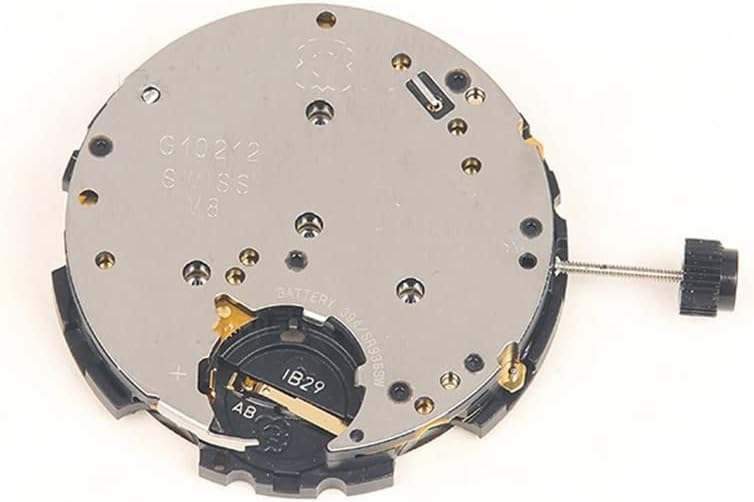
Image: Rear view of the G10.212 quartz watch movement, clearly showing the battery compartment and the movement's internal structure.
Troubleshooting
If you encounter issues with your G10.212 movement, refer to the table below for common problems and potential solutions.
| Problem | Possible Cause | Solution |
|---|---|---|
| Watch stops or runs intermittently | Low or dead battery; Movement obstruction; Damaged circuit. | Replace battery; Check for debris or loose components; Consult a professional. |
| Incorrect time or date display | Crown not fully pushed in; Incorrect setting procedure; Hands loose. | Ensure crown is in Position 1; Re-set time/date correctly; Consult a professional for hand re-attachment. |
| Date not changing at midnight | Date set during restricted hours (9 PM - 3 AM); Date wheel misalignment. | Re-set date outside restricted hours; Consult a professional for alignment. |
| Loud ticking noise | Loose component; Movement not secured properly. | Check movement seating; Consult a professional. |
Technical Specifications
Detailed specifications for the CKKNILV G10.212 Quartz Watch Movement.
| Feature | Detail |
|---|---|
| Model Number | G10.212 |
| Movement Type | Quartz |
| Calendar Type | Single Calendar (Date) |
| Pin Configuration | 4-Point, 6-Pin |
| Manufacturer | CKKNILV |
| ASIN | B0DDCFHNQ9 |
Warranty and Support
Specific warranty information for the CKKNILV G10.212 Quartz Watch Movement is not provided in this manual. For details regarding warranty coverage, returns, or technical support, please refer to the product listing on the retailer's website or contact the seller directly.
For professional repair or servicing, it is recommended to consult a certified watchmaker.
Ask a question about this manual
Ask about setup, troubleshooting, compatibility, parts, safety, or missing instructions. Manuals+ will review the question and use this page’s manual context to help answer it.