Introduction
This manual provides comprehensive instructions for the setup, operation, and maintenance of your YRF Wireless Lavalier Microphone K3. Please read this manual carefully before use to ensure optimal performance and longevity of your device.

Image: The YRF Wireless Lavalier Microphone K3 system, including two microphones, a USB-C receiver, a Lightning receiver, and the product packaging.
Package Contents
- 2 x YRF Wireless Lavalier Microphones
- 1 x USB-C Receiver
- 1 x Lightning Receiver (if applicable, based on product variant)
- 1 x Charging Cable (USB-A to USB-C)
- 1 x User Manual
Setup Instructions
- Charge the Microphones: Before first use, fully charge both microphones using the provided charging cable. The charging indicator light will change once fully charged. A full charge takes approximately 1.5 to 2 hours.
- Select the Correct Receiver: Identify whether your recording device (smartphone, tablet) uses a USB-C port or a Lightning port. Select the corresponding receiver.
- Connect the Receiver: Insert the selected receiver into the charging/data port of your recording device. No additional apps or drivers are required.
- Power On the Microphone: Press and hold the power button on the microphone until the indicator light turns green, indicating it is powered on and ready to pair. The microphone will automatically pair with the receiver.
- Attach the Microphone: Clip the microphone securely to your clothing, ideally within 6-12 inches of your mouth, for optimal audio capture.

Image: A visual guide demonstrating the simple three-step setup: 1. Connect the receiver to the phone, 2. Switch on the microphone, 3. Open the camera or recording app.
Operating Instructions
Recording Audio
- Ensure the microphone and receiver are connected and powered on. The indicator light on the microphone should be green.
- Open your preferred recording application (e.g., camera app, voice recorder, social media app) on your smartphone or tablet.
- Start recording. The microphone will automatically capture audio.
- To stop recording, simply stop the recording in your application.
Battery Life and Charging
- Single Microphone Use: Up to 4 hours of continuous recording.
- Total Playtime (with two microphones, alternating use): Up to 8 hours.
- Charging Time: Approximately 1.5 to 2 hours for a full charge.
- A low battery indicator will alert you when charging is needed.

Image: An illustration detailing the battery performance: 8 hours total playtime, 4 hours single use, and 1.5-2 hours single charge time.
Noise Cancellation
The YRF Wireless Lavalier Microphone K3 features adaptive noise cancellation technology, designed to reduce ambient background noise by up to 64 dB, ensuring clear audio capture in various environments.

Image: A graphic illustrating the 64 dB adaptive noise cancellation capability of the microphone, showing a "Before" and "After" sound wave comparison.
Transmission Range
The microphone supports ultra-long distance transmission, maintaining clear audio up to 65 feet (approximately 20 meters) from the receiver, ideal for outdoor recordings or larger spaces.

Image: An illustration depicting the microphone's 65-foot ultra-long distance transmission range, showing a family on a beach with the microphone and phone recording from a distance.
Maintenance
- Cleaning: Use a soft, dry cloth to clean the microphone and receiver. Avoid using liquids or abrasive cleaners.
- Storage: Store the device in a cool, dry place away from direct sunlight and extreme temperatures.
- Battery Care: To prolong battery life, avoid fully discharging the microphones frequently. Charge them regularly, even if not in use for extended periods.
Troubleshooting
| Problem | Possible Cause | Solution |
|---|---|---|
| No audio recording | Microphone not powered on; Receiver not properly connected; Microphone not paired; Recording app not recognizing external mic. | Ensure microphone is powered on (green light). Re-insert receiver firmly. Power cycle microphone and receiver. Check recording app settings for external microphone input. |
| Poor audio quality / Static | Interference; Microphone too far from source; Low battery; Obstructions between mic and receiver. | Move away from other wireless devices. Ensure microphone is within 6-12 inches of the speaker. Charge microphones. Reduce distance or clear line of sight between mic and receiver. |
| Microphone not charging | Faulty cable or power source; Charging port obstruction. | Try a different charging cable and power adapter. Ensure charging port is clean and free of debris. |
| Receiver not recognized by device | Receiver not fully inserted; Device compatibility issue. | Ensure receiver is fully inserted into the device's port. Verify your device is compatible (iOS or Type-C Android). |
Specifications
| Model Number | K3 |
| Brand | YRF |
| UPC | 780745666135 |
| Battery Composition | Lithium |
| Rechargeable Battery | Yes |
| Compatible Devices | Smartphone, Tablet (iOS and Type-C Android) |
| Components Included | Microphone, Receiver |
| Polar Pattern | Omnidirectional |
| Audio Sensitivity | 64 Decibels |
| Signal-to-Noise Ratio | 64 dB |
| Number of Channels | 1 |
| Microphone Weight | Approximately 10g |
| Transmission Range | Up to 65 feet (20 meters) |

Image: A visual representation of the microphone's light weight, showing it balanced against a coin, indicating it weighs approximately 10 grams.
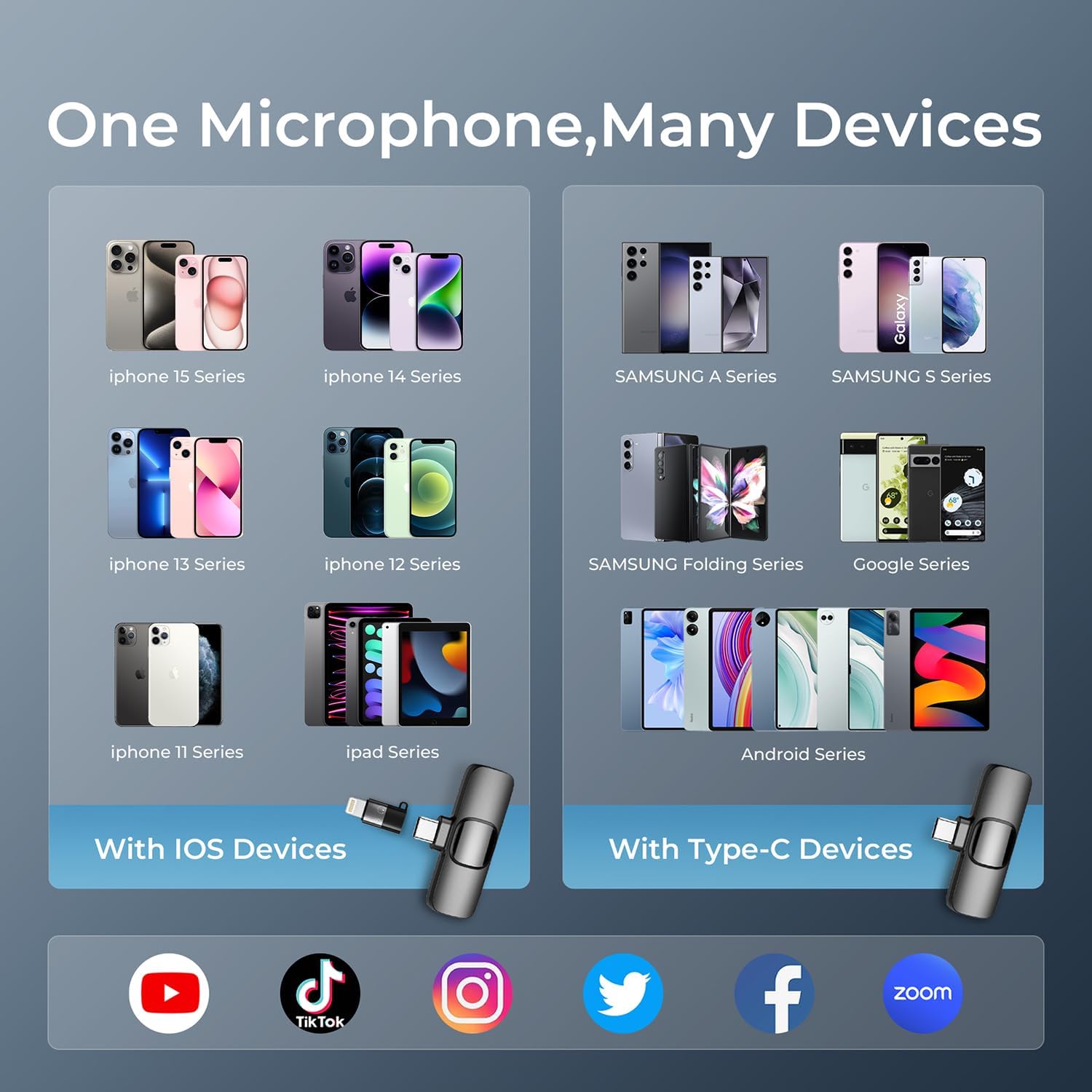
Image: A compatibility chart showing various iOS devices (iPhone 15, 14, 13, 12, 11 series, iPad series) and Type-C devices (Samsung A/S/Folding series, Google series, other Android phones) that are compatible with the microphone, along with supported applications like YouTube, TikTok, Instagram, Twitter, Facebook, and Zoom.
Warranty Information
Specific warranty details are typically provided with your purchase documentation. Please refer to the warranty card or contact the retailer for information regarding your product's warranty period and terms.
Customer Support
For technical assistance, troubleshooting beyond this manual, or warranty claims, please contact YRF customer support through the contact information provided on the product packaging or the official YRF website.