
1. Product Overview
The findtime Model 6157 is a versatile wristwatch featuring both digital and analog time displays. It includes multiple functions such as dual time zone tracking, a countdown timer, a stopwatch, and a night light. Designed for durability, it is 5ATM waterproof, making it suitable for daily wear and various activities.
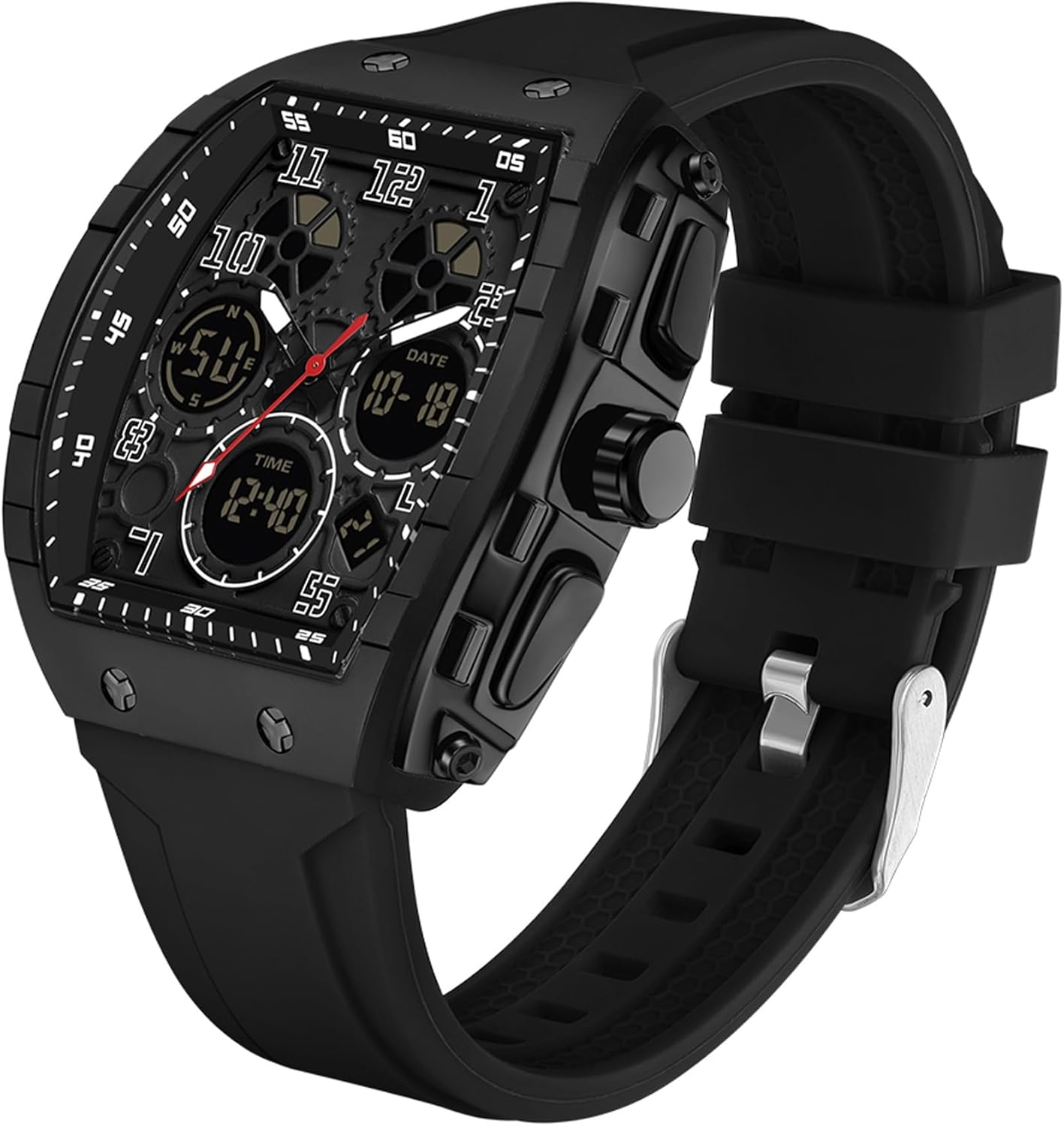
Image 1.1: Front view of the findtime Model 6157 watch, showcasing its rectangular dial with digital and analog displays.
2. Key Features
- Dual Display: Combines digital and analog timekeeping.
- Multi-function Sub-dials: Includes Week, Seconds, Day, and Date displays.
- Chronograph Stopwatch: For precise time measurement.
- Dual Time Zone: Supports tracking two different time zones, useful for travel.
- 12/24 Hour Format: User-selectable time display format.
- 5ATM Waterproof: Water resistant up to 50 meters (165 feet), suitable for swimming and showering. Note: Do not press buttons underwater.
- Night Light Display: LED backlight and luminous pointers for visibility in low light conditions.
- Durable Construction: Features a high acrylic glass mirror and a soft resin strap.

Image 2.1: Visual representation of the watch's key functions, including dual display, dual time, countdown, stopwatch, night light, alarm, 50-meter waterproof, week/date, 12/24 hours, shockproof, and original battery.
3. Setup and Initial Configuration
3.1. Button Functions
Identify the buttons on your watch. Typically, there are four buttons (A, B, C, D) and one crown (E) for setting the analog time.
- Button A (Top Left): Used for Light/Backlight.
- Button B (Bottom Left): Used for Mode selection.
- Button C (Top Right): Used for Start/Stop (e.g., stopwatch) or adjusting values.
- Button D (Bottom Right): Used for Reset/Split (e.g., stopwatch) or confirming settings.
- Crown E (Middle Right): Pull out to the first position to set analog time, push in to start.
3.2. Setting Analog Time
- Pull out the crown (E) to the first position.
- Rotate the crown to adjust the hour and minute hands to the desired time.
- Push the crown back in to start the analog timekeeping.
3.3. Setting Digital Time and Date
- Press Button B repeatedly until the digital time setting mode is displayed (usually indicated by flashing digits).
- Use Button C to increase the flashing digit's value or Button D to move to the next setting (e.g., seconds, minutes, hours, 12/24H format, month, date, day of week).
- Once all settings are adjusted, press Button B to exit the setting mode.
4. Operating Instructions
4.1. Mode Selection
Press Button B to cycle through the different modes:
- Time Display (default)
- Stopwatch
- Alarm
- Countdown Timer
- Dual Time
4.2. Stopwatch Function
- Enter Stopwatch mode by pressing Button B.
- Press Button C to Start/Stop the stopwatch.
- Press Button D to record a Split time while the stopwatch is running, or to Reset the stopwatch when it is stopped.
4.3. Alarm Function
- Enter Alarm mode by pressing Button B.
- Press Button C to adjust the hour, and Button D to adjust the minute.
- Press Button B to activate/deactivate the alarm. An alarm icon will appear/disappear on the display.
4.4. Countdown Timer
- Enter Countdown Timer mode by pressing Button B.
- Use Buttons C and D to set the desired countdown time (hours, minutes, seconds).
- Press Button C to start the countdown. Press again to pause.
- Press Button D to reset the countdown.
4.5. Night Light
Press Button A to activate the LED backlight for a few seconds, illuminating the digital display. The analog hands also feature luminous material for visibility in the dark.

Image 4.1: The watch display with its night light feature activated, showing clear visibility in low light.
5. Maintenance and Care
- Water Resistance: The watch is 5ATM (50 meters/165 feet) water resistant. This means it is suitable for hand washing, rain exposure, and swimming. Do not press any buttons while the watch is submerged in water. Avoid hot water bathing or diving, as extreme temperature changes and high pressure can compromise the seals.
- Cleaning: Wipe the watch case and strap with a soft, damp cloth. Avoid using harsh chemicals or abrasive materials.
- Battery: The watch uses an original battery. When the display dims or functions become erratic, it may be time for a battery replacement. It is recommended to have battery replacement performed by a qualified watch technician to ensure water resistance is maintained.
- Storage: Store your watch in a cool, dry place away from direct sunlight and extreme temperatures.

Image 5.1: Illustration of the watch's 5ATM waterproof capability, showing it can withstand splashes and swimming.
6. Troubleshooting
| Problem | Possible Cause | Solution |
|---|---|---|
| Digital display is blank or dim. | Low battery. | Replace the battery. |
| Analog hands are not moving. | Crown is pulled out; low battery. | Push the crown in completely. If still not moving, replace the battery. |
| Time is inaccurate. | Incorrect setting; low battery. | Re-set the time and date. If the problem persists, replace the battery. |
| Water inside the watch. | Buttons pressed underwater; seals compromised. | Immediately take the watch to a professional for inspection and repair to prevent further damage. |
7. Specifications
- Model Number: 6157
- Product Dimensions: 9.84 x 2.01 x 0.67 inches
- Item Weight: 5.61 ounces
- Water Resistance: 5ATM (50 meters / 165 feet)
- Clasp Type: Buckle
- Movement: Professional Quartz Movement
- Mirror Material: High Acrylic Glass
- Strap Material: Soft Resin
- Battery: 1 Unknown battery (included)
- Manufacturer: findtime
8. Warranty and Support
For warranty information or technical support, please refer to the retailer's return policy or contact findtime customer service through their official channels. Keep your purchase receipt as proof of purchase.