
VECTORCOM AT-505PRO
VECTORCOM AT-505PRO CB Radio User Manual
Model: AT-505PRO | Brand: VECTORCOM
1. Introduction
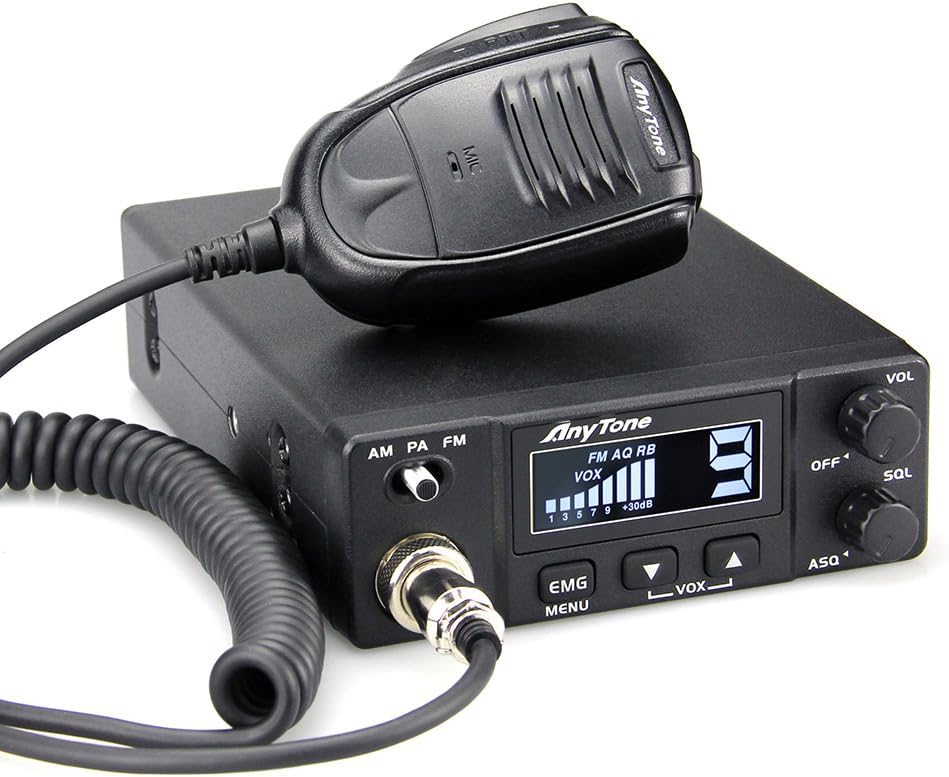
The VECTORCOM AT-505PRO is a compact and affordable CB radio designed for reliable long-range communication in vehicles such as cars and trucks. It operates on 40 channels with both AM and FM modulation, delivering a robust 4 Watts of output power. Equipped with features like dynamic squelch control, a backlit LCD display, and hands-free operation (VOX), this radio ensures clear audio and user-friendly experience for all your communication needs.
2. What's in the Box
Upon opening the package, please ensure all the following components are present:
- CB Radio Unit
- Microphone and Microphone Hanger
- Mobile Mounting Bracket
- Spare Fuses (3A 250V)
- Non-slip Mat
- Adjusting Screws
- User's Manual (this document)

3. Setup and Installation
Follow these steps to set up your AT-505PRO CB Radio:
- Mounting: Use the provided mobile mounting bracket to securely install the CB radio in your vehicle. Ensure it is placed in a location that does not obstruct your view or interfere with driving.
- Power Connection: Connect the radio to a 12V DC power source. The radio is designed for efficient current drain, with a maximum of 3A during transmission. Ensure proper polarity (red to positive, black to negative) to prevent damage.
- Antenna Connection: Connect a suitable CB antenna to the UHF SO239 antenna connector on the rear of the radio. A properly tuned antenna is crucial for optimal performance and to prevent damage to the radio.
- Microphone Connection: Plug the microphone cable into the dedicated microphone jack on the front panel of the radio. Secure the microphone using the provided hanger when not in use.
- External Speaker (Optional): For enhanced audio, an external speaker can be connected to the external speaker jack on the rear of the unit.
- Public Address (PA) Speaker (Optional): If using the PA function, connect an external PA speaker to the PA optional speaker jack on the rear.

4. Operating Instructions
4.1 Basic Operation
- Power On/Off & Volume (VOL): Turn the VOL knob clockwise to power on the radio and adjust the listening volume. Turn counter-clockwise until it clicks to power off.
- Channel Selection: Use the UP (▲) and DOWN (▼) buttons to select your desired operating channel (1-40). The current channel number is displayed on the backlit LCD.
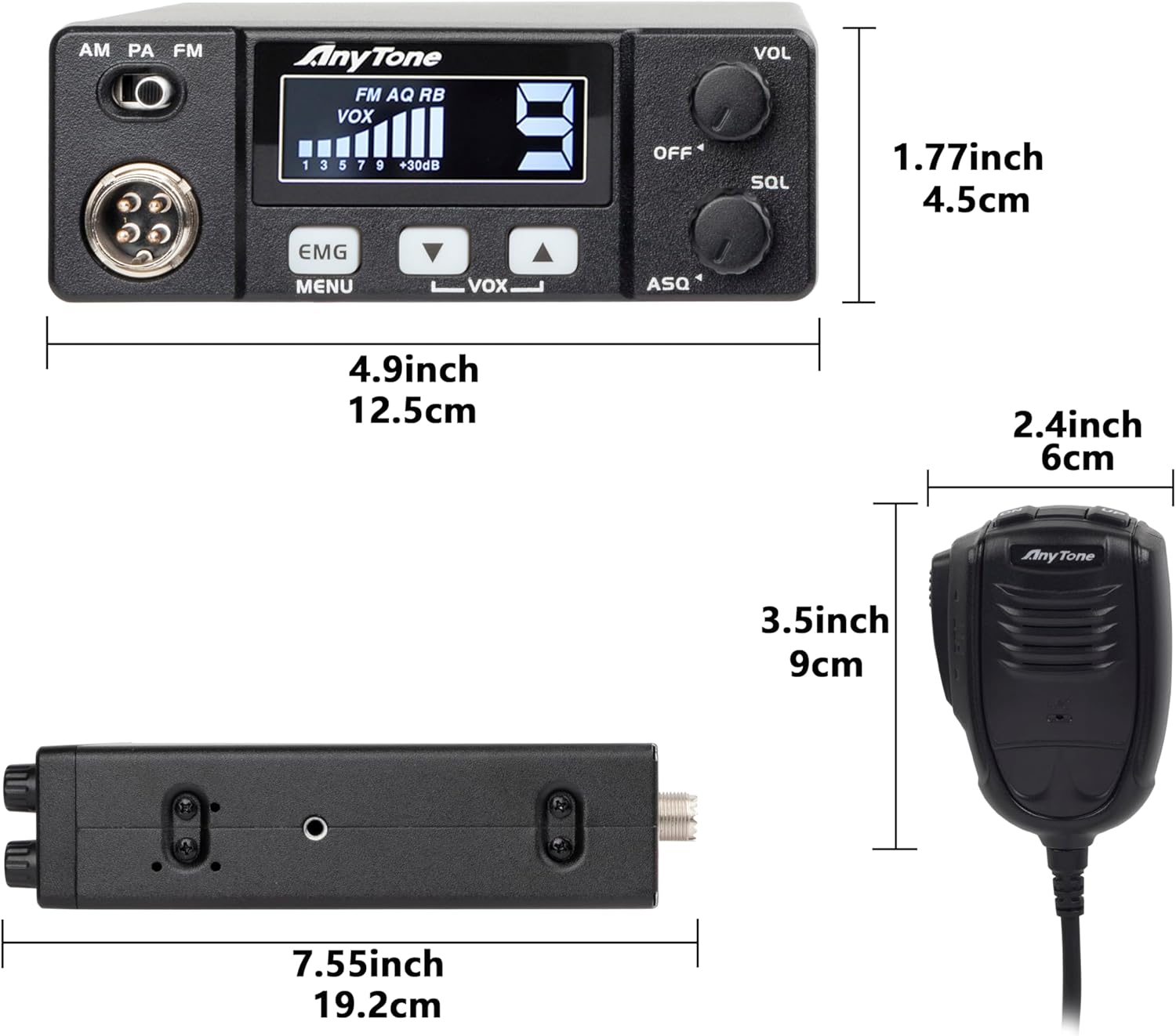
- Modulation Mode (AM/PA/FM): Use the 3-position switch on the front panel to select between AM (Amplitude Modulation), PA (Public Address), and FM (Frequency Modulation) modes.
4.2 Squelch Control
- Manual Squelch (SQL): Turn the SQL knob clockwise to increase the squelch level, which suppresses background noise and weak signals. Adjust it until the background noise disappears, but strong signals can still be heard.
- Automatic Squelch (ASQ): The ASQ function provides automatic squelch control for simplified operation.
4.3 Advanced Features
- Scan Function: The radio features a scan function that allows you to easily search through active channels, keeping you connected to communications within your area.
- VOX (Voice Operated Exchange): This feature enables hands-free operation, allowing you to transmit by speaking into the microphone without pressing the Push-To-Talk (PTT) button.
- Roger Beep: A Roger Beep function signals the end of your transmission, letting other users know you have finished speaking.
- Emergency Channel (CH9): The EMG/MENU button provides instant access to Channel 9 for emergency communications.
4.4 Product Overview Video
For a visual guide on the AT-505PRO CB Radio's features and functionality, please watch the official product video below:
5. Maintenance
- Cleaning: Regularly clean the exterior of the radio with a soft, dry cloth. Avoid using abrasive cleaners or solvents.
- Connections: Periodically check all cable connections (power, antenna, microphone) to ensure they are secure and free from corrosion.
- Storage: When not in use for extended periods, store the radio in a cool, dry place away from direct sunlight and extreme temperatures.
6. Troubleshooting
If you encounter issues with your AT-505PRO CB Radio, consider the following common solutions:
- No Power:
- Check the power cable connection to the radio and the vehicle's power source.
- Verify the vehicle's 12V power source is active.
- Inspect the inline fuse on the power cable; replace if blown (use only 3A 250V spare fuses).
- No Audio / Weak Audio:
- Ensure the volume (VOL) knob is turned up.
- Adjust the squelch (SQL) knob; if set too high, it may block weak signals.
- Check the microphone connection.
- If using an external speaker, ensure it is properly connected and functional.
- Poor Transmission/Reception:
- Check the antenna connection.
- Ensure the antenna is properly tuned for the 27 MHz CB band.
- Verify the radio is set to the correct modulation mode (AM or FM).
- Obstructions or terrain can affect range; try moving to a different location.
7. Technical Specifications
| Feature | Specification |
|---|---|
| Model Number | AT-505PRO |
| Item Weight | 1.37 pounds |
| Product Dimensions | 7.56 x 4.93 x 1.78 inches |
| Number of Channels | 40 |
| Frequency Range | 26.965 MHz to 27.405 MHz |
| Talking Range Maximum | 20 Mile |
| Voltage | 12 Volts |
| Tuner Technology | AM/FM |
| Water Resistance Level | Not Water Resistant |
| Country of Origin | China |
8. Warranty and Support
The VECTORCOM AT-505PRO CB Radio comes with a 1-year warranty from the date of purchase. This warranty covers manufacturing defects and ensures the product meets its specified performance standards.
For technical support, warranty claims, or any questions regarding your AT-505PRO CB Radio, please contact VECTORCOM customer service through their official channels or the retailer where you purchased the product. Please have your model number and purchase date ready when contacting support.
Ask a question about this manual
Ask about setup, troubleshooting, compatibility, parts, safety, or missing instructions. Manuals+ will review the question and use this page’s manual context to help answer it.