
Important Safety Information
Always assemble the desk according to the provided instructions. Ensure the desk is stable and secure before use. Do not overload the desk; it has a maximum weight recommendation of 86 pounds. Keep the desk away from direct heat sources and avoid placing heavy objects on the edges to prevent tipping.
Package Contents
Before beginning assembly, verify that all components are present and undamaged. Refer to the parts list provided in your physical assembly guide. Typically, the package includes:
- Desk panels (top, sides, back)
- Drawer and cabinet components
- Hardware kit (screws, dowels, cam locks, handles, drawer slides)
- Integrated charging station unit
- Assembly tools (e.g., Allen wrench)
- Instruction manual
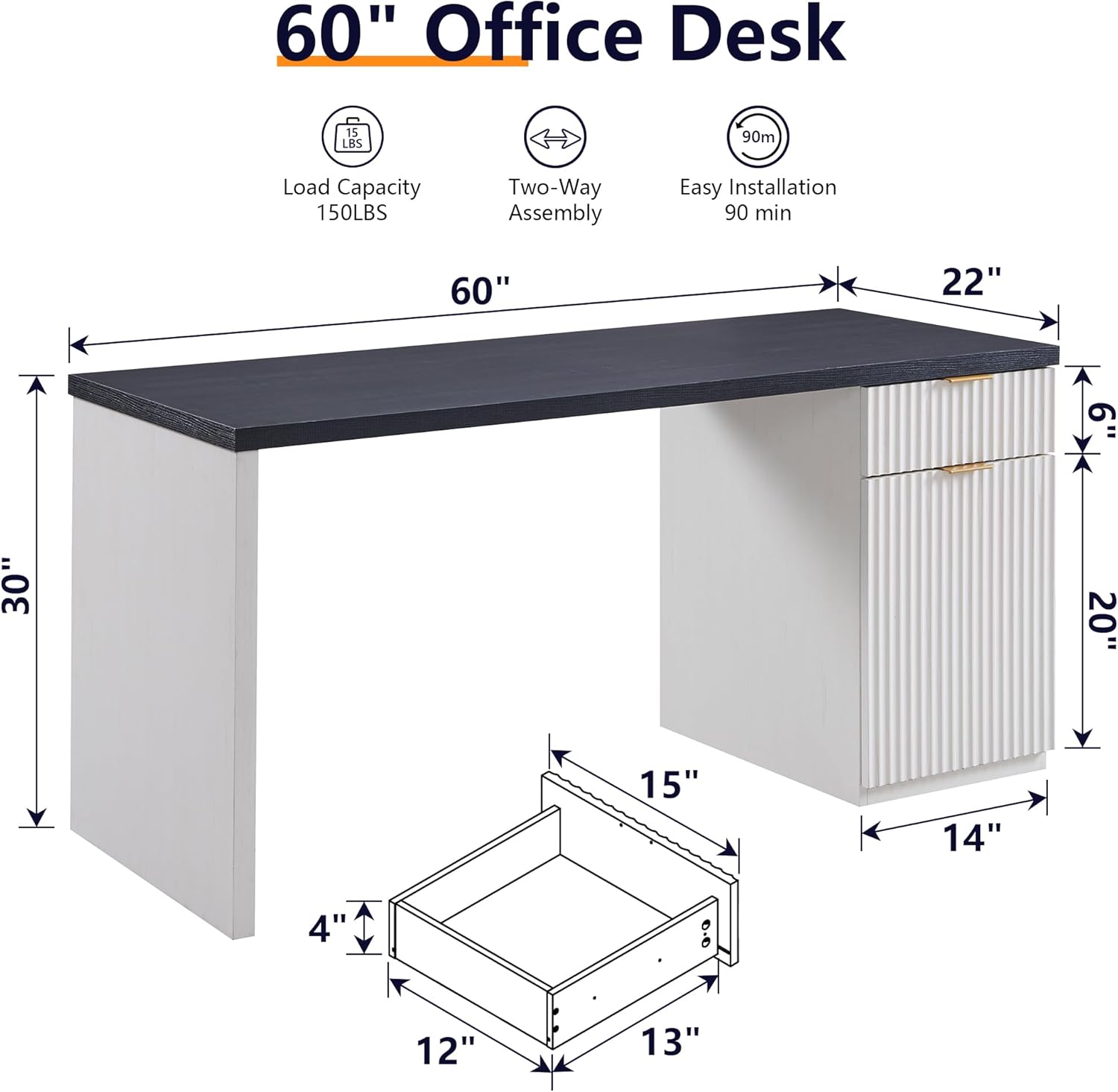
Image Description: This diagram illustrates the key dimensions of the JXQTLINGMU 60-inch Executive Desk. It highlights the 60-inch length, 22-inch depth, and 30-inch height of the main desk structure. An additional inset provides specific measurements for the drawer, showing it to be 15 inches wide, 13 inches deep, and 4 inches high. This visual aid helps users understand the desk's footprint and storage capacity.
Assembly Instructions
Assembly is required for this product. All necessary tools are included. Follow the step-by-step instructions provided in the separate assembly guide for detailed visual aids and part identification.
- Preparation: Clear a spacious area for assembly. Lay out all parts and hardware, comparing them against the parts list to ensure nothing is missing.
- Base Construction: Assemble the main desk frame and support structures. Ensure all connections are secure but do not overtighten screws until the entire section is aligned.
- Cabinet and Drawer Assembly: Construct the drawer and cabinet units. Note that the file cabinet is reversible and can be installed on either the left or right side of the desk, depending on your preference.
- Desktop Attachment: Carefully place the desktop onto the assembled base and secure it using the designated hardware.
- Integrated Charging Station: Install the charging station into its designated slot on the desktop. Connect the power cord.
- Final Adjustments: Tighten all screws and ensure the desk is stable and level.

Image Description: This image demonstrates the reversible design feature of the JXQTLINGMU Executive Desk. It shows two identical desks, one with the storage cabinet positioned on the right side and the other with the cabinet on the left. Arrows between the two desks visually convey that the cabinet can be assembled on either side to suit user preference and room layout.
Operating Instructions
Spacious Work Surface
The 60-inch desktop provides ample space for a laptop, monitor, documents, and other office essentials. Arrange your items to create an organized and efficient workspace.
Integrated Charging Station
The desk is equipped with 2 AC outlets, 2 USB ports, and 1 Type-C port. To use, simply plug the desk's power cord into a wall outlet. You can then connect your electronic devices directly to the integrated ports for convenient charging.

Image Description: This close-up view highlights the spacious desktop of the JXQTLINGMU desk, featuring a laptop, mouse, and a coffee cup, demonstrating its utility as a workspace. Crucially, it showcases the integrated charging station, which includes two AC outlets, two USB ports, and one Type-C port, emphasizing the desk's modern connectivity features.
Storage Cabinet and Drawer
Utilize the drawer for smaller items and the cabinet with adjustable shelves for files, books, or other office supplies. The fluted design on the drawer and cabinet fronts adds an aesthetic element while providing functional storage.

Image Description: This composite image illustrates the storage capabilities of the JXQTLINGMU desk. The upper panel displays the cabinet with its door open, revealing an adjustable shelf and various items stored within, demonstrating its organizational potential. The lower panel shows the desk's drawer pulled open, containing small office supplies, highlighting its utility for keeping smaller items tidy.
Maintenance
- Cleaning: Wipe surfaces with a soft, damp cloth. Avoid harsh chemicals or abrasive cleaners that may damage the finish.
- Spills: Clean spills immediately to prevent staining or damage to the wood finish.
- Hardware: Periodically check all screws and fasteners to ensure they remain tight. Retighten as necessary.
- Weight Distribution: Distribute weight evenly across the desktop and within storage compartments to maintain stability.
Troubleshooting
| Problem | Possible Cause | Solution |
|---|---|---|
| Desk wobbles | Loose fasteners; uneven floor | Check and tighten all screws. Use furniture glides or shims to level the desk on uneven surfaces. |
| Drawer sticks or does not slide smoothly | Misaligned drawer slides; obstruction | Ensure drawer slides are correctly installed and aligned. Check for any objects obstructing the drawer's path. |
| Charging ports not working | Desk power cord not plugged in; faulty wall outlet | Verify the desk's power cord is securely plugged into a functional wall outlet. Test the wall outlet with another device. |
Specifications
- Brand: JXQTLINGMU
- Model: 60-inch Modern Executive Desk with Storage
- Dimensions (Overall): 60"W x 22"D x 30"H
- Color: Antique White
- Material: Wood (Base, Top, Furniture Legs)
- Finish Type: Lacquered
- Special Features: Built-In USB Outlet (2 AC outlets, 2 USB ports, 1 Type-C port)
- Storage: 1 Drawer, 1 Cabinet with 1 adjustable shelf
- Maximum Weight Recommendation: 86 Pounds
- Assembly: Required (Includes all assembly tools)
Warranty and Support
For warranty information or assistance with your JXQTLINGMU product, please refer to the documentation included with your purchase or contact JXQTLINGMU customer support directly. Our dedicated support team is available to provide professional assistance for any issues encountered during assembly or use.
You can typically find contact information on the manufacturer's website or through your retailer's customer service portal.