1. Introduction
This manual provides essential information for the safe and efficient operation, assembly, and maintenance of your COSTWAY Electric Fireplace Corner TV Stand. Please read all instructions carefully before assembly and use, and retain this manual for future reference.
The COSTWAY Electric Fireplace Corner TV Stand combines a functional TV stand with an electric fireplace, offering both storage and heating capabilities. It features 16-color LED lights, adjustable shelves, and can be controlled via remote or a smart application.
2. Safety Information
Important Safety Instructions:
- Read all instructions before using this appliance.
- This appliance is hot when in use. To avoid burns, do not let bare skin touch hot surfaces.
- Extreme caution is necessary when any heater is used by or near children or invalids and whenever the heater is left operating and unattended.
- Do not operate any heater with a damaged cord or plug or after the heater malfunctions, has been dropped or damaged in any manner.
- Do not use outdoors.
- To disconnect the heater, turn controls to off, then remove plug from outlet.
- Do not insert or allow foreign objects to enter any ventilation or exhaust opening as this may cause an electric shock or fire, or damage the heater.
- To prevent a possible fire, do not block air intakes or exhaust in any manner. Do not use on soft surfaces, like a bed, where openings may become blocked.
- Always plug heaters directly into a wall outlet/receptacle. Never use with an extension cord or relocatable power tap (outlet/power strip).
- The electric fireplace is equipped with overheat protection for enhanced safety.
- This product is CSA certified, ensuring it meets applicable safety standards.
3. Package Contents
Please verify that all components are present and undamaged before beginning assembly. If any parts are missing or damaged, do not proceed with assembly and contact customer support.
- 1 x TV Stand
- 1 x Electric Fireplace Insert
- 2 x LED Strip Lights
- 1 x Fireplace Remote Control
- 1 x LED Light Remote Control
- 1 x Instruction Manual (this document)
4. Setup and Assembly
Assembly of the TV stand requires careful attention to the included detailed assembly instructions. It is recommended to have two people for assembly to ensure stability and ease of construction.
4.1 Preparation
- Clear a spacious area for assembly.
- Lay out all components and hardware, checking against the parts list.
- Tools required (not included): Phillips head screwdriver (small and medium sizes).
4.2 Assembly Steps
Follow the step-by-step diagrams and instructions provided in the separate assembly guide included with your package. Ensure all screws and fasteners are securely tightened. Do not overtighten.

Figure 4.1: Spacious storage with adjustable shelves.
4.3 Placement
This TV stand is designed to fit into a corner, optimizing space. Ensure the chosen location is on a flat, stable surface and near a power outlet. Maintain adequate clearance around the fireplace for proper ventilation.

Figure 4.2: Corner placement of the TV stand.
4.4 Anti-Toppling Device Installation
For enhanced safety, especially in households with children or pets, install the included anti-toppling device. Securely fasten the device to the wall and the TV stand according to the separate instructions provided. This prevents accidental tipping of the unit.

Figure 4.3: Anti-toppling device and other features.
5. Operating Instructions
Your electric fireplace TV stand offers multiple control options for both the fireplace and the LED lights.
5.1 Electric Fireplace Operation
The electric fireplace can be operated using the control panel on the unit or the dedicated fireplace remote control.
- Power On/Off: Press the power button to turn the fireplace on or off.
- Heat Control: Adjust the temperature between 62°F and 82°F. The heat output is 4777 BTU, capable of heating up to 400 sq.ft.
- Flame Effect: Choose from 3 levels of flame brightness (L1, L2, L3) to suit your preference. The flame effect can be used independently of the heat function.
- Timer Control: Set a timer for automatic shut-off, ranging from 0.5 to 6 hours.
- Operating Modes: The fireplace offers two modes: "Flame Only" for ambiance without heat, and "Flame & Heat" for warmth during colder periods.
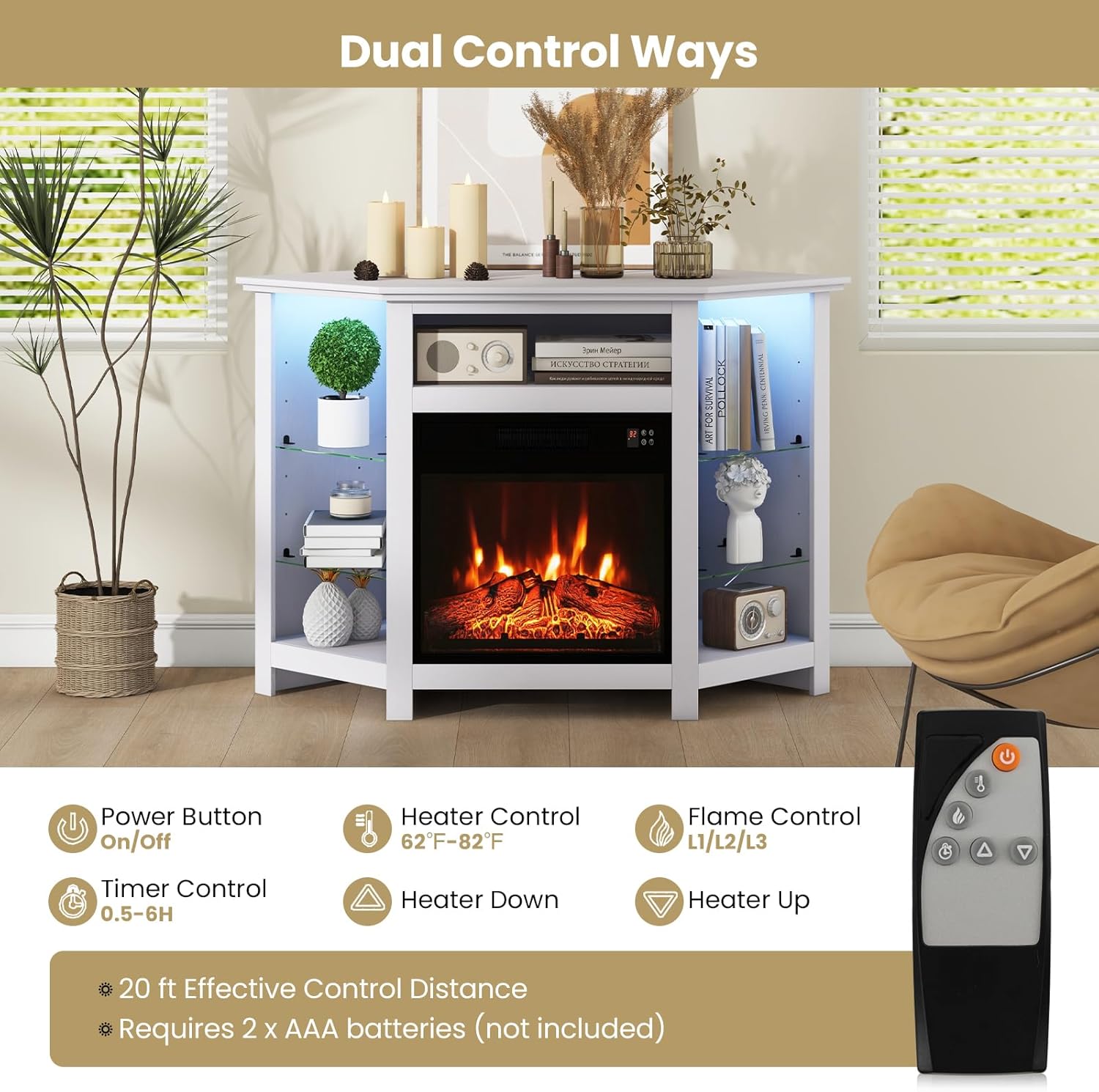
Figure 5.1: Fireplace remote control functions.

Figure 5.2: Fireplace flame brightness levels.

Figure 5.3: Flame Only and Flame & Heat modes.
5.2 LED Light Operation
The integrated LED strip lights can be controlled using the dedicated LED light remote control or a smart application on your smartphone.
- 16-Color Options: Select from 16 vibrant colors to match your mood or decor.
- 4 Selectable Modes: Choose between Flash, Strobe, Fade, and Smooth modes for dynamic lighting effects.
- Remote Control: The LED light remote control has an effective distance of up to 33 ft. (Requires 2 x AAA batteries, not included for fireplace remote).
- Smart APP Control: Download the compatible smart application to control the LED lights from your smartphone. Refer to the separate instructions for app pairing.

Figure 5.4: LED light features and control options.
6. Maintenance
Regular maintenance ensures the longevity and optimal performance of your TV stand and electric fireplace.
- Cleaning: The surface of the TV stand is designed to be easy to clean. Use a soft, damp cloth to wipe down surfaces. Avoid abrasive cleaners or solvents that may damage the finish.
- Dust Removal: Periodically dust the fireplace vents and the interior of the TV stand to prevent dust buildup, which can affect performance and airflow.
- Cord Management: Utilize the integrated cable management holes to keep electrical cords organized and prevent them from being pinched or damaged.
- Remote Batteries: Replace batteries in the remote controls as needed. The fireplace remote requires 2 x AAA batteries.
7. Troubleshooting
If you encounter issues with your COSTWAY Electric Fireplace Corner TV Stand, refer to the following common troubleshooting steps:
- Fireplace Not Turning On:
- Ensure the power cord is securely plugged into a working 120V outlet.
- Check if the circuit breaker has tripped.
- Verify that the power button on the unit or remote is pressed.
- Replace remote control batteries if necessary.
- No Heat Output:
- Confirm that the heat function is activated and the temperature setting is above the ambient room temperature.
- Check for any obstructions blocking the air intake or exhaust vents.
- The overheat protection may have activated. Unplug the unit, wait 10-15 minutes, and plug it back in.
- LED Lights Not Working:
- Ensure the LED strip lights are properly connected to their controller and power source.
- Replace the batteries in the LED light remote control.
- If using the smart app, ensure your device is properly paired and within range.
- Remote Control Not Responding:
- Check and replace batteries in the remote control.
- Ensure there are no obstructions between the remote and the unit's receiver.
- Verify you are within the effective control distance (20 ft for fireplace, 33 ft for LED lights).
If these steps do not resolve the issue, please contact COSTWAY customer support for further assistance.
8. Specifications
| Feature | Specification |
|---|---|
| Model Name | FP10534US |
| Overall Dimension (L x W x H) | 45" x 22" x 30" |
| Fireplace Dimension (W x D x H) | 19.17" x 5.08" x 17.52" |
| Material | Metal, Tempered Glass, MDF |
| Color | White |
| Total Net Weight | 67 lbs |
| Weight Capacity of Countertop | 44 lbs |
| Weight Capacity of Open Compartment | 22 lbs |
| Weight Capacity of Each Glass Shelf | 11 lbs |
| Weight Capacity of Each Bottom Shelf | 18 lbs |
| Power of Fireplace | 1400W |
| Voltage | 120V |
| Frequency | 60Hz |
| Heat Output | 4777 BTU |
| AMP | 11.6A |
| Heating Coverage | 400 sq ft |
| Power of LED Light | 10W |
| Length of Fireplace Cord | 6 ft |
| Length of LED Light Cord | 3.3 ft |

Figure 8.1: Product dimensions.
9. Warranty and Support
This product is backed by COSTWAY's customer support. For any questions, concerns, or assistance with your product, please contact COSTWAY customer service. Information regarding returns and specific warranty details can typically be found on the retailer's website or by contacting customer support directly.
Please have your model number (FP10534US) and purchase information ready when contacting support.


