
GIKPAL 1441-01
GIKPAL Computer Desk User Manual
Model: 1441-01
Brand: GIKPAL
Introduction
Thank you for choosing the GIKPAL 59-inch L Shaped Desk. This manual provides essential information for the safe assembly, operation, and maintenance of your new computer desk. Please read these instructions carefully before beginning assembly and retain them for future reference.

Image: The GIKPAL 59-inch L Shaped Computer Desk, showcasing its spacious design, integrated monitor stand, and various storage options, including a side storage bag and shelves. The desk is set up with a computer monitor, laptop, and other office accessories.
Important Safety Information
For safe assembly, use provided instructions and tools. Ensure the desk is on a stable, level surface. When handling electrical components, follow standard safety guidelines. Properly anchor the desk if necessary, and adhere to weight limits to prevent tipping or instability.
- Always assemble the desk on a clean, soft surface to prevent scratches.
- Ensure all screws and fasteners are tightened securely before use.
- Do not exceed the maximum weight recommendation of 120 pounds (54.4 kg) for the desk surface.
- Keep children and pets away during assembly.
- Periodically check all connections and tighten as needed.
Package Contents and Parts Identification
Before beginning assembly, verify that all components listed below are present and undamaged. If any parts are missing or damaged, please contact GIKPAL customer support.
- Desk Panels (various sizes for L-shape and straight configurations)
- Metal Frame Components (legs, support bars)
- Adjustable Monitor Stand
- Power Outlet Unit (with 3 outlets and 2 USB charging ports)
- Side Storage Bag
- Headphone Hooks (2)
- Adjustable Feet Pads
- Assembly Hardware (screws, bolts, nuts, L-wrench, screwdriver)
- Detailed Assembly Instructions
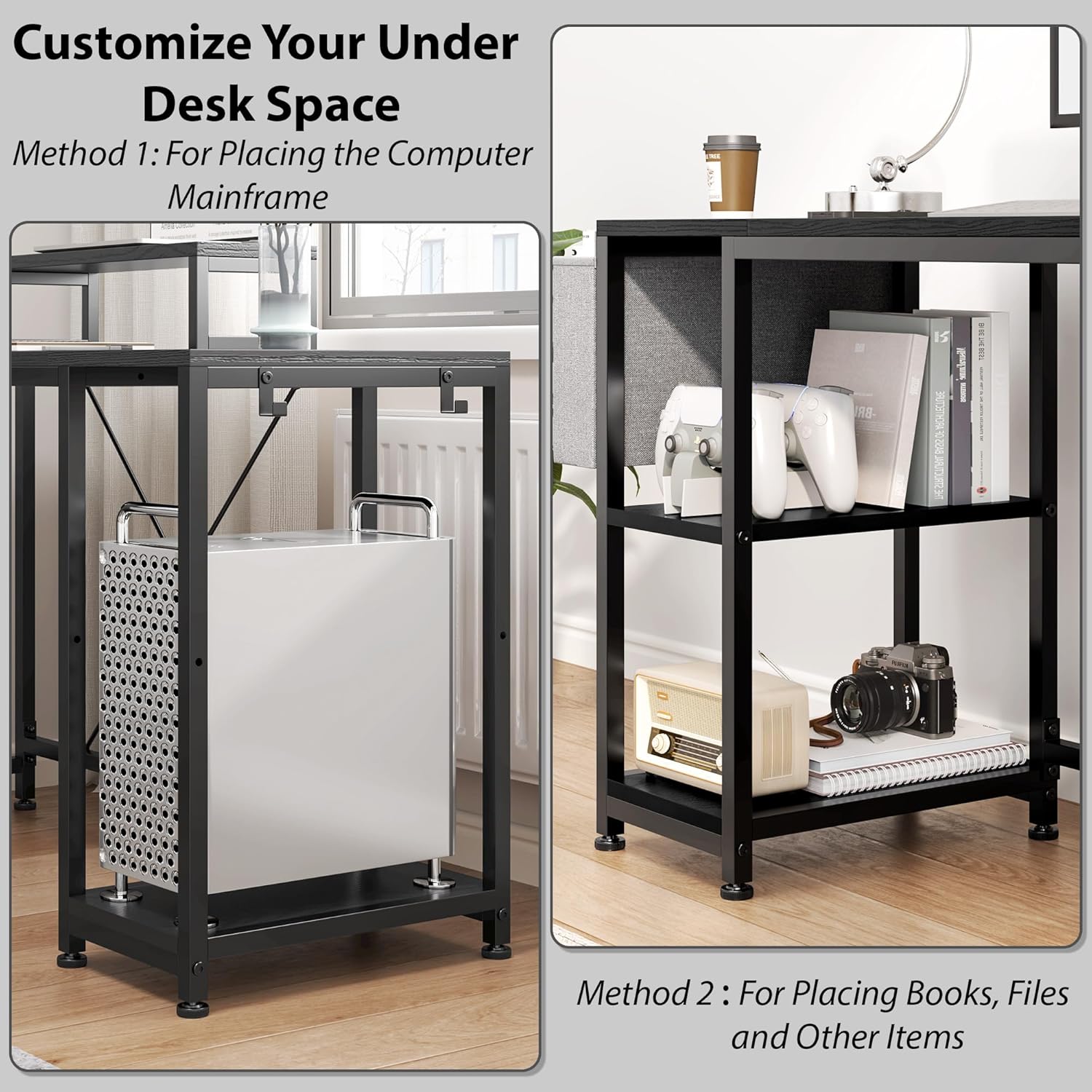
Image: A detailed diagram illustrating the dimensions of the desk components and how they can be configured into a long straight desk or an L-shaped desk (left or right orientation). This helps in identifying the main panels and understanding the overall size.
Assembly Instructions
Your GIKPAL desk is designed for straightforward assembly. Follow the detailed instructions provided in your package. It is recommended to have a second person assist with larger components.
Step-by-Step Assembly Overview:
- Unpack and Organize: Lay out all parts on a soft, clean surface. Group similar hardware components.
- Assemble the Frame: Attach the metal legs and support bars according to the provided diagrams. Ensure all connections are finger-tight before final tightening.
- Attach Desk Panels: Secure the main desk panels to the assembled frame. Pay attention to the orientation for your desired L-shape (left or right) or straight configuration.
- Install Storage and Features:
- Attach the side storage bag to the designated mounting points.
- Install the headphone hooks on the side of the desk.
- Place the adjustable monitor stand on the desktop as desired.
- Integrate the power outlet unit into the pre-drilled slot.
- Adjust and Secure: Once fully assembled, tighten all screws and bolts using the provided tools. Adjust the feet pads to ensure the desk is stable and level on your floor.

Image: This visual guide demonstrates the flexibility of the GIKPAL desk, showing how it can be assembled as a long straight desk or as an L-shaped desk with either a left or right return, emphasizing its reversible design for various room layouts.
Operating Your GIKPAL Desk
Your GIKPAL desk is designed with multiple features to enhance your workspace efficiency and comfort.
Key Features:
- Reversible L-Shaped Design: The desk can be configured as an L-shape with the longer section on either the left or right side, adapting to your room layout. It can also be assembled as a long straight desk.
- Integrated Power Outlets: The built-in power strip includes 3 standard outlets and 2 USB charging ports, providing convenient access to power for your devices directly on your desktop. The 4.9-foot charging cable allows for flexible placement.
- Multi-functional Monitor Stand: The removable monitor stand can be positioned anywhere on the desktop. It elevates your monitor to an ergonomic height, reducing neck strain and freeing up desk space underneath.
- Ample Storage:
- Under-Desk Shelves: Three spacious shelves under the desk can be adjusted to accommodate various items, including a computer mainframe, books, or storage bins.
- Side Storage Bag: A fabric storage bag attached to the side provides easy access for documents, notebooks, or small accessories.
- Headphone Hooks: Two small hooks are included for hanging headphones or other items, keeping your desk tidy.
- Cable Management: Integrated grommets or channels help route and organize cables, keeping your workspace neat and free from clutter.
- Adjustable Feet Pads: The desk features adjustable feet pads to ensure stability on uneven floors and protect your flooring from scratches.

Image: A visual representation of the versatile under-desk storage, demonstrating how the shelves can be utilized to house a computer mainframe or adjusted to store books, files, and other personal items, optimizing your workspace.

Image: Detailed views of the desk's practical features, including a cable management grommet for organized wiring, sturdy iron hooks for hanging headphones or bags, and adjustable feet pads for stability on various floor surfaces.

Image: A closer look at the movable monitor stand, which can be repositioned as needed, and the practical side storage bag, offering convenient access to frequently used items.
Maintenance and Care
Proper care will extend the life and appearance of your GIKPAL desk.
- Cleaning Wood Surfaces: Wipe wood surfaces with a damp cloth. For stubborn marks, use a mild wood cleaner. Avoid abrasive cleaners or harsh chemicals.
- Cleaning Steel Components: Wipe steel components with a dry cloth. If necessary, a slightly damp cloth can be used, followed by immediate drying to prevent rust.
- Regular Checks: Periodically inspect all screws and connections to ensure they remain tight. Re-tighten as needed to maintain stability.
- Avoid Direct Sunlight: Prolonged exposure to direct sunlight can cause fading or damage to the desk's finish.
- Protect from Liquids: Immediately wipe up any spills to prevent water damage or staining.
Troubleshooting
If you encounter any issues with your GIKPAL desk, refer to the following common solutions.
| Problem | Possible Cause | Solution |
|---|---|---|
| Desk is wobbly or unstable. | Uneven floor; loose connections; incorrect assembly. | Adjust the feet pads to level the desk. Check and tighten all screws and bolts. Review assembly instructions to ensure all parts are correctly installed. |
| Power outlets not working. | Power cable not plugged in; outlet unit not properly seated; circuit breaker tripped. | Ensure the desk's power cable is securely plugged into a working wall outlet. Check if the power outlet unit is fully inserted into its slot. Reset your home's circuit breaker if necessary. |
| Difficulty with assembly steps. | Instructions unclear; parts misidentified. | Carefully re-read the assembly instructions, paying close attention to diagrams. Double-check part labels. If still stuck, contact GIKPAL customer support for assistance. |
Product Specifications
| Feature | Detail |
|---|---|
| Brand | GIKPAL |
| Model Number | 1441-01 |
| Product Dimensions (D x W x H) | 59"D x 40.06"W x 29.5"H |
| Item Weight | 45.3 Pounds (20.55 kg) |
| Color | Black |
| Style | Modern |
| Base Material | Alloy Steel |
| Top Material Type | Wood |
| Maximum Weight Recommendation | 120 Pounds (54.4 kg) |
| Special Features | Adjustable, Adjustable Height, Built-In Monitor Stand, Built-In USB Outlet, Reversible |
| Included Components | Built-in Outlet, Built-in USB Port, Headphone Hook |
| Required Assembly | Yes |
| Includes All Assembly Tools | Yes |
| Storage Options | Adjustable under-desk shelves, side storage bag, 2 hooks |
Warranty and Support
GIKPAL is committed to providing quality products and customer satisfaction. For any questions, concerns, or assistance with your product, please contact GIKPAL customer support.
You can find more information and contact details on the official GIKPAL store page:
Related Documents - 1441-01
 |
VEVOR L Shaped Desk Assembly Instructions and Product Information Comprehensive assembly guide and product details for the VEVOR L Shaped Desk (Model: DX0202-C250335D-01), including safety precautions, parts list, and assembly steps for both Program A and Program B configurations. |
 |
VEVOR L Shaped Desk Assembly Instructions and User Manual (Model DX0202-C250338D-01) Comprehensive assembly guide and user manual for the VEVOR L Shaped Desk, model DX0202-C250338D-01. Features detailed step-by-step instructions, safety precautions, parts list, product parameters, and assembly variations for optimal home and office setup. |
 |
Inbox Zero Larrie Computer Desk User Manual and Assembly Guide Comprehensive user manual and assembly instructions for the Inbox Zero Larrie computer desk, detailing package contents, precautions, and step-by-step assembly guidance for various configurations. |
 |
VEVOR L Shaped Desk Assembly Instructions and Product Information Comprehensive assembly guide and product details for the VEVOR L Shaped Desk (Model: DX0202-C250341D-01), including safety precautions, parts list, and step-by-step instructions for both Program A and Program B configurations. |
 |
VEVOR L Shaped Desk Assembly Instructions and Safety Guide Comprehensive assembly instructions and safety guidelines for the VEVOR L Shaped Desk (Model: DX0202-C250336D-01). Ensure proper setup and safe use of your new desk. |
 |
VEVOR Height Adjustable L-Shaped Desk ZWE-01 Assembly and Operating Manual Comprehensive assembly instructions, operating guide, and troubleshooting for the VEVOR Height Adjustable L-Shaped Desk (Model ZWE-01). Learn how to assemble, use memory functions, and resolve common errors. |