
GIKPAL 1441-32
GIKPAL Computer Desk User Manual
Model: 1441-32
Introduction
Thank you for choosing the GIKPAL 59-inch L Shaped Computer Desk. This manual provides essential information for the safe assembly, operation, and maintenance of your new desk. Please read it thoroughly before beginning assembly and keep it for future reference.
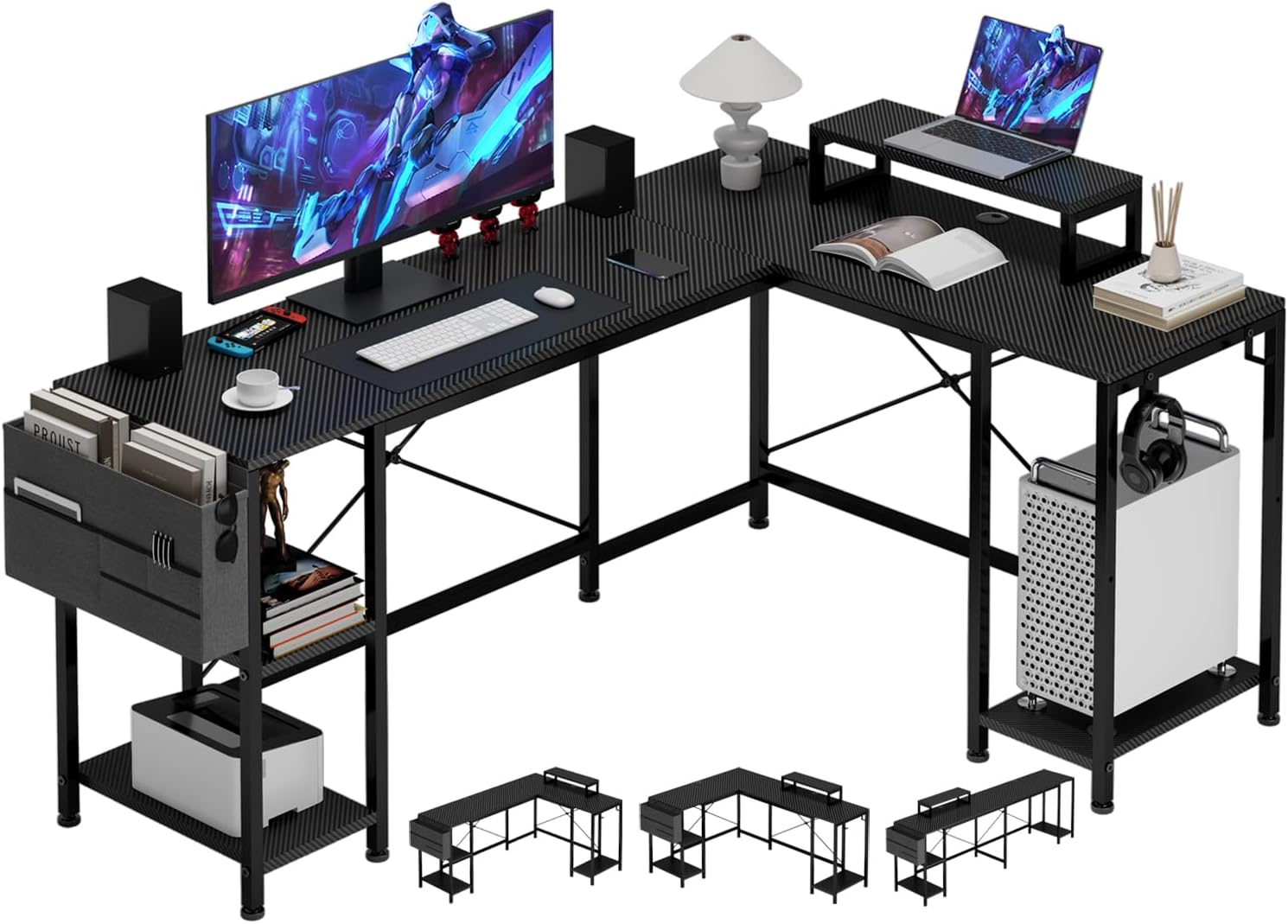
Image: The GIKPAL 59-inch L Shaped Computer Desk, showcasing its spacious design with a monitor, laptop, and various accessories, highlighting its functionality for a modern workspace.
Safety Information
Please adhere to the following safety guidelines to ensure safe use and longevity of your GIKPAL Computer Desk:
- Always assemble the desk according to the provided instructions.
- Ensure the desk is stable and secure before use.
- Do not exceed the maximum weight recommendation of 120 pounds to maintain stability and safety.
- Always supervise children when they are near the desk.
- Keep all small parts and packaging materials away from children to prevent choking hazards.
- Avoid placing hot items directly on the desk surface without protective padding.
- Do not stand or sit on the desk.
Package Contents
Before assembly, please verify that all components are present and undamaged. Refer to the assembly instructions for a detailed list of parts and hardware. Typical components include:
- Desk panels (main desktop, side panels, shelves)
- Metal frame components (legs, support bars)
- Built-in power outlet unit with USB ports
- Adjustable monitor stand
- Side storage bag
- Headphone hooks
- Assembly hardware (screws, bolts, nuts, Allen wrench)
- Instruction manual
Setup and Assembly
The GIKPAL Computer Desk requires assembly. Detailed instructions and all necessary accessories and tools are included in the package. It is recommended that two people assemble the desk for ease and safety.
- Unpack all components and lay them out on a clean, soft surface to prevent scratches.
- Identify all parts by referring to the parts list in the assembly manual.
- Follow the step-by-step instructions provided in the assembly manual. Pay close attention to the orientation of parts, especially for the reversible L-shaped configuration.
- Secure all screws and bolts firmly, but do not overtighten until the entire structure is aligned.
- Once assembled, ensure the desk is stable and all connections are secure.

Image: Illustration showing the reversible L-shaped design, allowing the desk to be configured for left or right-hand orientation, or as a long straight desk.
The desk is designed with a reversible L-shape, allowing you to install the longer section on either the left or right side to best suit your space. It can also be configured as a long computer desk.
Operating Instructions
Your GIKPAL Computer Desk is designed for versatile use in home and office environments. Here's how to utilize its key features:
Power Outlets and USB Charging Ports
The desk includes a built-in power strip with 3 standard outlets and 2 USB charging ports. The 4.9-foot charging cable provides flexibility for placement. Simply plug the desk's power cable into a wall outlet to activate the integrated power strip. Use the outlets and USB ports to conveniently power and charge your computer, phone, headphones, and other electronic devices directly from your workspace.

Image: A GIKPAL desk setup featuring two monitors, highlighting the integrated power outlets and USB charging ports for convenient device connectivity.
Multi-functional Monitor Stand
The removable monitor stand can be positioned anywhere on your desktop. This stand elevates your monitor, aligning it with your eye level to improve viewing comfort and reduce neck strain. It also creates additional storage space underneath for keyboards, mice, or other small items.

Image: Close-up view of the movable monitor stand and the side storage bag, demonstrating their practical design for organizing desk accessories.
Storage Shelves and Accessories
The desk features multiple storage options:
- Under-desk Shelves: The shelves under the desk can be adjusted to accommodate various items, including computer mainframes, books, and other office supplies.
- Side Storage Bag: A fabric storage bag is included for easy access to documents, notebooks, or other frequently used items.
- Headphone Hooks: Two small hooks are provided on the side of the desk, perfect for hanging headphones or other accessories, keeping your desktop tidy.

Image: Visual guide demonstrating two methods for customizing under-desk space: one for placing a computer mainframe and another for organizing books, files, and other items on adjustable shelves.
Adjustable Feet Pads
The desk is equipped with adjustable feet pads. These allow you to fine-tune the desk's height and ensure stability on uneven floors, preventing wobbling.

Image: Detailed view of the desk's features including integrated cable management grommets, convenient iron hooks for accessories, and adjustable feet pads for stability on uneven surfaces.
Maintenance
To keep your GIKPAL Computer Desk in optimal condition, follow these simple maintenance guidelines:
- Cleaning: Wipe the desk surface with a dry cloth to remove dust and light spills. For stubborn marks, use a slightly damp cloth with mild soap, then dry immediately. Avoid harsh chemicals or abrasive cleaners.
- Inspection: Periodically check all screws and connections to ensure they remain tight. Retighten if necessary.
- Avoid Moisture: Do not expose the desk to excessive moisture or direct sunlight for prolonged periods, as this may cause warping or discoloration.
- Weight Distribution: Distribute weight evenly across the desk surface to prevent stress on any single point.
Troubleshooting
If you encounter any issues with your GIKPAL Computer Desk, consider the following common solutions:
| Problem | Possible Cause | Solution |
|---|---|---|
| Desk is wobbly. | Uneven floor; loose screws. | Adjust the feet pads until stable. Check and tighten all assembly screws. |
| Power outlets not working. | Desk not plugged in; power strip switch off; circuit breaker tripped. | Ensure the desk's power cable is securely plugged into a working wall outlet. Check if the power strip has an on/off switch and ensure it's on. Reset your home's circuit breaker if necessary. |
| Parts do not align during assembly. | Incorrect orientation of parts; screws overtightened prematurely. | Review the assembly instructions carefully, paying attention to part orientation. Loosen screws slightly, adjust alignment, then retighten. |
If you continue to experience issues, please contact GIKPAL customer support for assistance.
Specifications
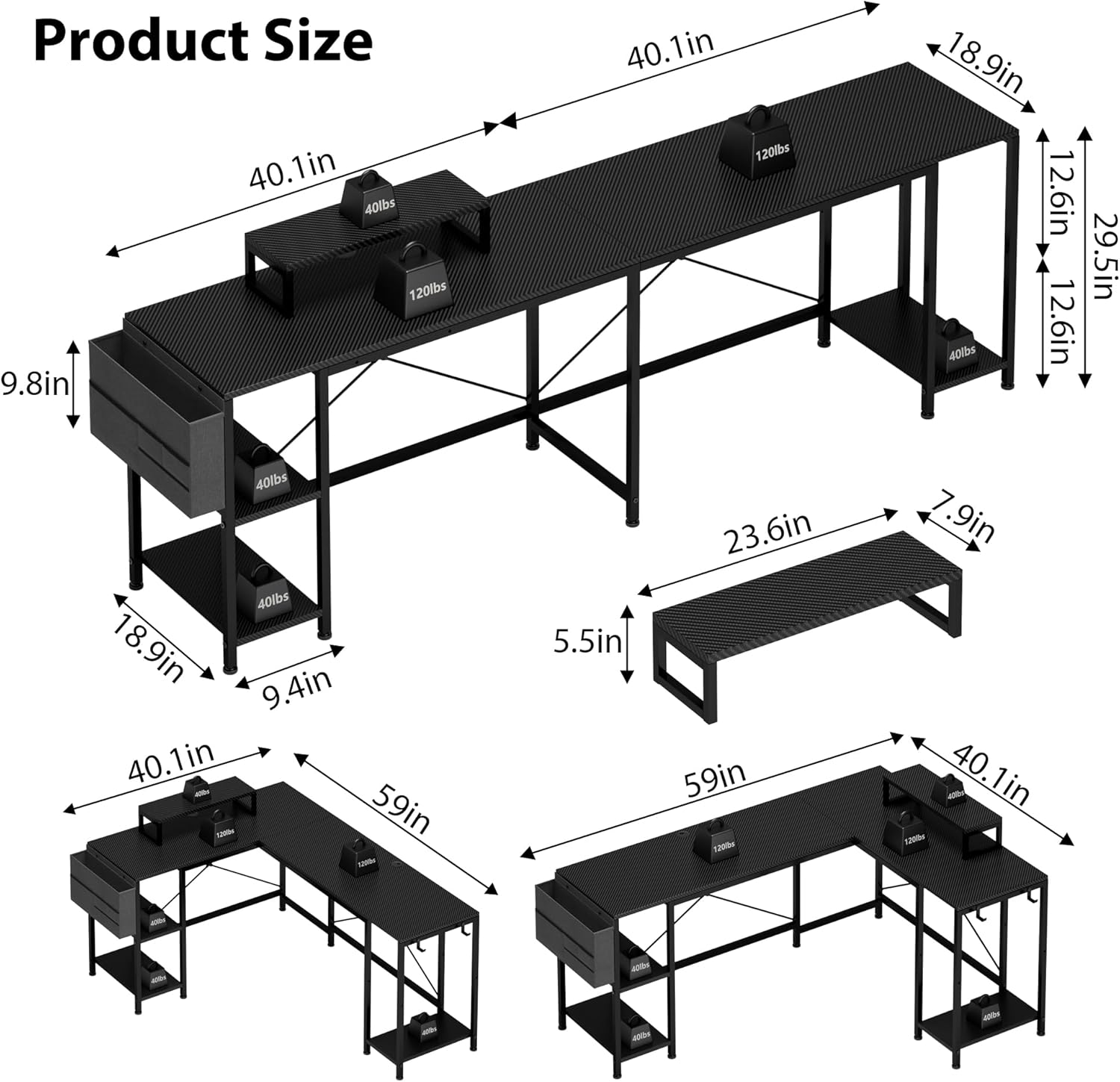
Image: Detailed diagram illustrating the dimensions of the GIKPAL L-shaped computer desk, including overall length, width, height, and shelf measurements.
| Brand | GIKPAL |
| Model Number | 1441-32 |
| Product Dimensions (D x W x H) | 59"D x 40.1"W x 29.5"H |
| Color | Carbon Black |
| Style | Modern |
| Base Material | Alloy Steel |
| Top Material Type | Wood |
| Maximum Weight Recommendation | 120 Pounds |
| Required Assembly | Yes |
| Recommended Number of People for Assembly | 2 |
| Special Features | Adjustable, Built-In Monitor Stand, Built-In USB Outlet, Reversible |
| Included Components | Built-in Outlet, Built-in USB Port, Headphone Hook |
| Storage Options | 3 shelves, 2 pockets, 2 hooks, 1 adjustable shelf |
Warranty and Support
The GIKPAL Computer Desk comes with a limited warranty. For specific details regarding warranty coverage, terms, and conditions, please refer to the warranty information included with your product packaging or contact GIKPAL customer support.
For any questions, concerns, or assistance with your product, please contact GIKPAL customer support through the retailer where you purchased the desk or visit the official GIKPAL website.
Ask a question about this manual
Ask about setup, troubleshooting, compatibility, parts, safety, or missing instructions. Manuals+ will review the question and use this page’s manual context to help answer it.