
Introduction
This manual provides comprehensive instructions for the assembly, operation, and maintenance of your RELAX4LIFE Corner Fireplace TV Stand. Please read all instructions carefully before assembly and use to ensure safe and efficient operation. Keep this manual for future reference.

Image: The RELAX4LIFE Corner Fireplace TV Stand, featuring a central electric fireplace and illuminated side shelves, designed to fit into a room corner.
Safety Information
Your safety is paramount. Please observe the following safety guidelines:
- Overheat Protection: The electric fireplace insert is equipped with an overheat protection system that automatically shuts off the unit if it becomes too hot.
- CSA Certification: The fireplace insert is CSA certified, ensuring it meets recognized safety standards.
- Anti-Tipping Device: Always install the provided anti-tipping kits to securely anchor the TV stand to the wall. This is crucial for stability, especially in households with children or pets.
- Do not block the air vents of the fireplace insert. Maintain adequate clearance around the unit for proper ventilation.
- Ensure the power cord is not pinched or routed under the unit.
- Unplug the unit from the power outlet before performing any maintenance or cleaning.

Image: Illustration of the anti-tipping device installation, highlighting the overheat protection and CSA certification for safety.
Setup and Assembly
Assembly of the RELAX4LIFE Corner Fireplace TV Stand is required. Please follow the included instruction manual for detailed step-by-step guidance. Basic tools such as a screwdriver are necessary; a drill may facilitate certain steps.
1. Unpacking and Component Check
- Carefully unpack all components and verify against the parts list in the separate assembly instructions.
- Ensure all hardware and parts are present and undamaged.
2. Assembly Steps
- Follow the numerical sequence in the assembly manual.
- Assemble the main frame of the TV stand first.
- Install the adjustable tempered glass shelves into the side compartments.
- Insert the electric fireplace unit into its designated opening. Secure it with the provided screws.
- Attach the LED strip lights and connect the LED strip lights controller.
3. Placement and Stability
- Position the TV stand in a corner to maximize space utilization.
- The tabletop is designed to support TVs up to 50 inches. Ensure your television's base fits securely within the stand's dimensions.
- Install the double anti-tipping kits by securely anchoring the media console table to the wall.
4. Cable Management
- Utilize the cable management hole in the underneath compartment to route power cords and media cables, keeping them organized and out of sight.

Image: Close-up details showing the LED strip lights controller, the smooth surface finish, a cable management hole, and a tempered glass shelf.
Operating Instructions
1. Electric Fireplace Insert Operation
The fireplace insert can be controlled via the control panel on the unit or the included remote control.
- Power: Press the power button to turn the unit on or off.
- Heater Control: Adjust the heating temperature between 62°F (17°C) and 82°F (27°C). The maximum heat output is 4800 BTU, capable of heating up to 400 sq. ft.
- Flame Control: Select from 3 levels of flame brightness (L1, L2, L3) to suit your preference.
- Timer Setting: Set a timer for automatic shut-off, ranging from 0.5 hours to 6 hours.
- Flame Only Mode: The heater can be turned off while the flame effect remains active, allowing for ambiance without heat.

Image: The fireplace control panel and remote control, detailing functions like power, heater control, 3-level flame control, and timer settings. Three distinct flame levels (L1, L2, L3) are also shown.

Image: A visual comparison illustrating the two operating modes: 'Flame Only' for decorative purposes and 'Flame & Heat' for providing warmth.
2. LED Lighting with APP Control
The built-in 16-color LED lights enhance the aesthetic of your media entertainment center. Control them using the included remote or a dedicated smartphone application.
- Color Selection: Choose from 16 distinct colors.
- Modes: Select from four dynamic lighting modes: Flash, Strobe, Fade, and Smooth.
- Brightness Adjustment: Adjust the intensity of the LED lights.
- APP Control: Download the specified application to control the LED lights from your smartphone. The remote control has an effective range of 33 feet.
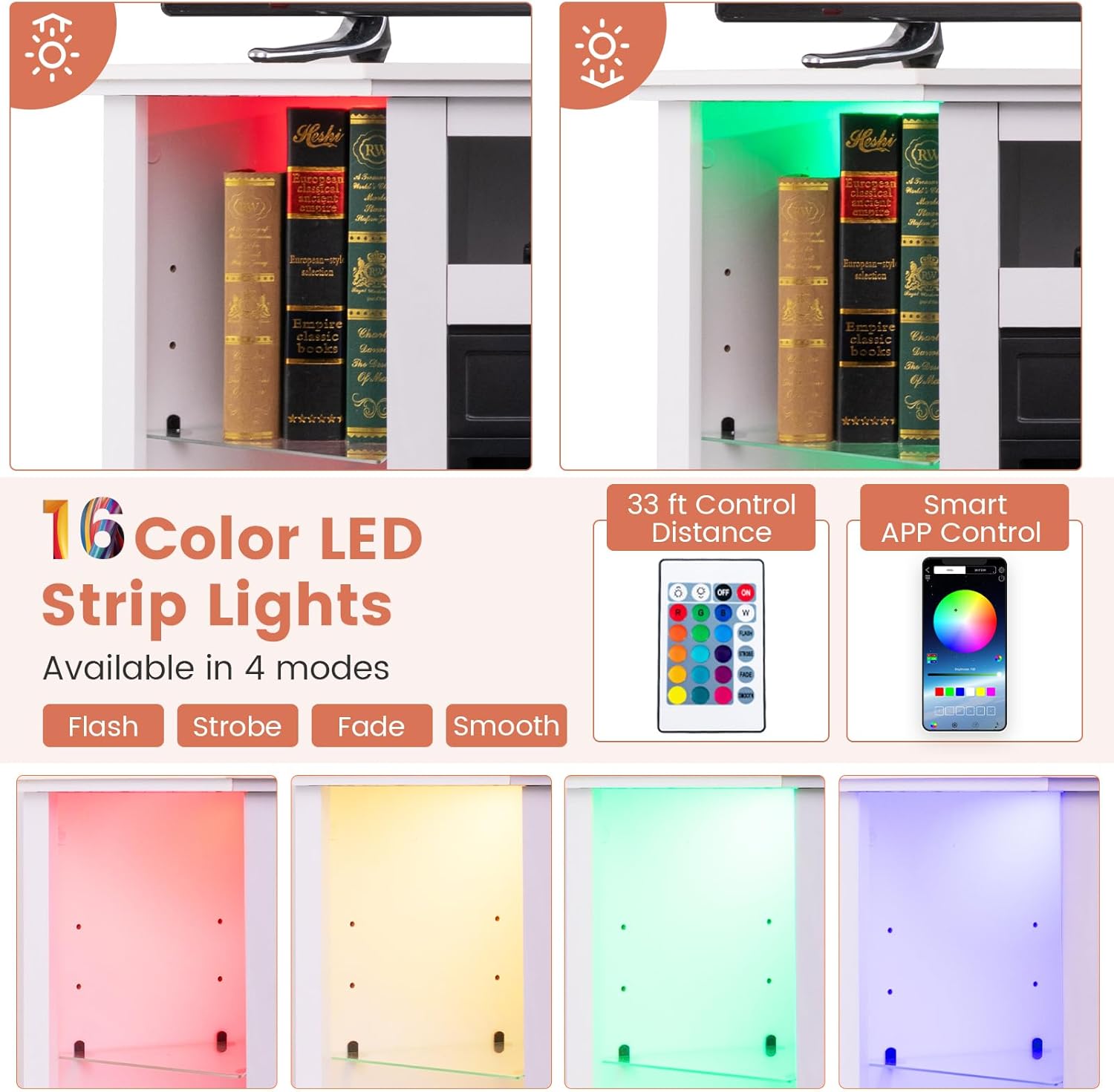
Image: The 16-color LED strip lights feature, illustrating the four available modes (Flash, Strobe, Fade, Smooth) and control options via remote or smartphone application. Examples of colored lighting in the shelves are provided.
Maintenance
Regular maintenance ensures the longevity and optimal performance of your TV stand and fireplace insert.
- Cleaning: Wipe the smooth surfaces of the TV stand with a soft, damp cloth. Avoid abrasive cleaners that may damage the finish.
- Fireplace Insert: Ensure the fireplace is unplugged and cool before cleaning. Gently wipe the glass and exterior surfaces with a soft cloth. Do not spray water directly onto the unit.
- Ventilation: Periodically check that the air intake and exhaust vents of the fireplace insert are free from dust and obstructions.
- LED Lights: If the LED lights become dusty, gently wipe them with a dry, soft cloth.
Troubleshooting
If you encounter issues with your RELAX4LIFE Corner Fireplace TV Stand, refer to the following common solutions:
- Fireplace not turning on: Ensure the unit is properly plugged into a functional power outlet. Check the power switch on the unit and the remote control batteries.
- No heat output: Verify that the heater function is activated and the temperature setting is above the ambient room temperature. Check for any obstructions around the air vents.
- LED lights not responding: Check the remote control batteries or ensure your smartphone app is correctly paired and within range. Verify the LED strip lights controller is properly connected.
- Unusual noises: If the fireplace makes unusual noises, turn it off immediately and unplug it. Contact customer support for assistance.
For issues not covered here, please contact RELAX4LIFE customer support.
Specifications
| Feature | Specification |
|---|---|
| Brand | RELAX4LIFE |
| Model Name | Electric Fireplace TV Stand |
| Model Number | RXE-10534 |
| Product Dimensions | 45"L x 22"W x 30"H |
| Fireplace Dimensions | 19.17"W x 5.08"D x 17.52"H |
| Item Weight | 66.9 pounds (30.39 Kilograms) |
| Material | Metal, Tempered Glass, MDF |
| Color | White |
| Power Source | Corded Electric |
| Voltage | 120V |
| Frequency | 60Hz |
| Power of Fireplace | 1400W |
| Heat Output | 4777 BTU |
| Heating Coverage | 400 sq ft |
| Temperature Range | 62°F - 82°F (17°C - 27°C) |
| Timer Settings | 0.5H - 6H |
| Flame Levels | 3-level adjustable flame |
| LED Lights | 16-Color LED Lights with 4 modes (Flash, Strobe, Fade, Smooth) |
| Control Methods | Remote Control, APP Control |
| Max TV Size Supported | Up to 50 inches |
| Load Capacity (Countertop) | 44 lbs |
| Load Capacity (Open Compartment) | 22 lbs |
| Load Capacity (Each Glass Shelf) | 11 lbs |
| Included Components | Remote Control, LED Strip Lights, Instruction Manual |

Image: Dimensional drawing of the TV stand and the electric fireplace insert, indicating overall width, depth, height, and specific insert measurements.

Image: Key features of the TV stand, including heating capacity (400 sq ft, 4777 BTU), thermostat range (62-82°F), and compatibility with TVs up to 50 inches.
Warranty and Support
The RELAX4LIFE Corner Fireplace TV Stand comes with a limited warranty. Please refer to the warranty documentation included with your purchase for specific terms and conditions.
For technical support, replacement parts, or warranty claims, please contact RELAX4LIFE customer service through the retailer where the product was purchased or visit the official RELAX4LIFE website for contact information.