
1. Introduction
This manual provides essential information for the safe and efficient operation, maintenance, and troubleshooting of your Bucktool 558mm Variable Speed Scroll Saw, Model SSA22V. Please read this manual thoroughly before operating the saw to ensure proper usage and to prevent injury or damage.
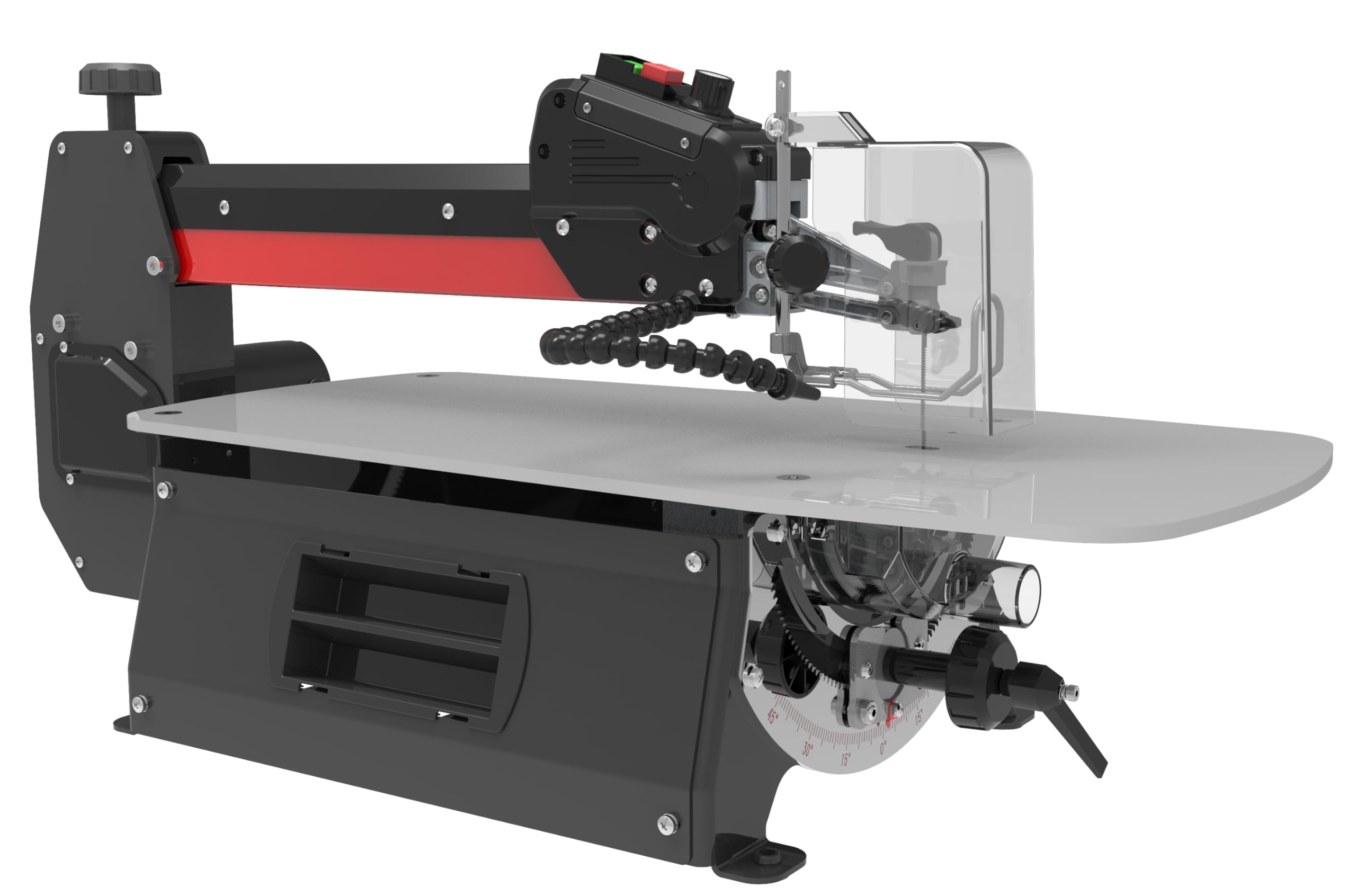
Image 1.1: The Bucktool 558mm Variable Speed Scroll Saw. This image shows the overall design of the scroll saw, including the work table, blade area, and motor housing.
Product Overview
The Bucktool 558mm Variable Speed Scroll Saw is designed for intricate curved cuts in wood, suitable for decorative scroll work, puzzles, inlays, and various craft items. It features a powerful 120W motor, variable speed control, and a tilting arm for angled cuts.
- Versatile Tool: Designed for intricate curved cuts in wood.
- Powerful Motor: 120W motor with a maximum cutting depth of 50mm at 0° and 20mm at 45°.
- Adjustable Speed: Variable speed control from 550 to 1550 strokes per minute.
- Tool-free Blade Replacement: Upper arm raises for quick blade changes.
- Convenient Features: Flexible dust blower, large steel table, adjustable blade tension, tool storage box, and safety cover.
2. Safety Information
Always follow basic safety precautions when using electrical tools to reduce the risk of fire, electric shock, and personal injury. Keep this manual for future reference.
General Safety Rules
- Work Area Safety: Keep the work area clean and well-lit. Cluttered or dark areas invite accidents. Do not operate power tools in explosive atmospheres, such as in the presence of flammable liquids, gases, or dust.
- Electrical Safety: Power tool plugs must match the outlet. Never modify the plug in any way. Avoid body contact with earthed or grounded surfaces.
- Personal Safety: Always wear eye protection. Use hearing protection when operating noisy tools. Dress properly; avoid loose clothing or jewelry. Do not overreach. Maintain proper footing and balance at all times.
- Tool Use and Care: Do not force the power tool. Use the correct power tool for your application. Disconnect the plug from the power source before making any adjustments, changing accessories, or storing power tools.
- Specific Scroll Saw Safety: Ensure the blade is properly installed and tensioned before operation. Keep hands clear of the blade path. Use the dust blower to maintain visibility of the cutting line.
3. Components and Features
Familiarize yourself with the main components of your Bucktool Scroll Saw:
- Work Table: Large steel table for material support.
- Blade Tension Handle: For adjusting blade tension.
- Variable Speed Knob: Controls strokes per minute.
- Flexible Dust Blower: Directs air to clear sawdust from the cutting line.
- Dust Port: For connecting to a dust extraction system.
- Tilting Arm: Allows for angled cuts up to 45° left and 30° right.
- Safety Cover: Provides protection during operation.
- Tool Storage Box: Convenient storage for accessories.
4. Setup
Unpacking and Assembly
- Carefully remove all components from the packaging.
- Inspect the saw for any damage that may have occurred during shipping. Do not operate if damaged.
- Mount the scroll saw securely to a stable workbench using appropriate fasteners (not included).
Blade Installation and Tensioning
The Bucktool Scroll Saw features a tool-free blade replacement system.
- Ensure the saw is unplugged from the power source.
- Raise the upper arm to access the blade clamps.
- Loosen the blade clamps and remove any existing blade.
- Insert the new 133mm scroll saw blade, ensuring the teeth are pointing downwards towards the table.
- Securely tighten both upper and lower blade clamps.
- Lower the upper arm.
- Adjust the blade tension using the blade tension handle until the blade is taut but not overly stressed. A properly tensioned blade will produce a clear "ping" sound when plucked.
5. Operating Instructions
Powering On and Speed Adjustment
- Plug the saw into a suitable 230V power outlet.
- Turn the saw on using the power switch.
- Adjust the cutting speed by turning the variable speed knob. Speeds range from 550 to 1550 strokes per minute. Slower speeds are generally used for thicker or harder materials, while faster speeds are for thinner or softer materials.
Making Cuts
- Ensure your workpiece is securely positioned on the work table.
- Turn on the flexible dust blower to keep the cutting line clear.
- Slowly feed the workpiece into the blade, allowing the blade to do the cutting. Do not force the material.
- For intricate curves, rotate the workpiece slowly around the blade.
Angled Cuts (Tilting Arm)
The arm can be tilted to achieve angled cuts.
- Loosen the arm tilt locking knob (location typically on the side or rear of the arm).
- Adjust the arm to the desired angle (up to 45° left or 30° right). Refer to the angle scale for precision.
- Securely tighten the arm tilt locking knob before operating.
- Note that the maximum cutting depth changes with the angle: 50mm at 0° and 20mm at 45°.
6. Maintenance
Regular maintenance ensures the longevity and optimal performance of your scroll saw.
- Cleaning: After each use, unplug the saw and use a brush or vacuum to remove sawdust from the work table, blade area, and motor vents. Ensure the dust blower nozzle is clear.
- Blade Replacement: Replace dull or broken blades promptly. Always use 133mm carbon steel scroll saw blades.
- Lubrication: Periodically apply a small amount of light machine oil to moving parts as indicated in the detailed product diagram (if available, otherwise general moving parts).
- Inspection: Regularly check all fasteners for tightness. Inspect the power cord for damage.
7. Troubleshooting
This section addresses common issues you might encounter.
| Problem | Possible Cause | Solution |
|---|---|---|
| Saw does not start | No power supply; Faulty power switch | Check power cord and outlet; Contact service center if switch is faulty. |
| Blade breaks frequently | Incorrect blade tension; Forcing workpiece; Dull blade | Adjust blade tension; Reduce feeding pressure; Replace blade. |
| Inaccurate cuts | Loose blade; Worn blade; Incorrect blade type for material | Ensure blade is properly tensioned; Replace blade; Use appropriate blade. |
| Excessive vibration | Saw not securely mounted; Loose components | Check mounting bolts; Inspect for loose parts and tighten. |
8. Specifications
| Feature | Detail |
|---|---|
| Model Number | SSA22V |
| Brand | Bucktool |
| Power Source | Corded Electric |
| Voltage | 230 Volts |
| Wattage | 120 Watts |
| Stroke Speed | 550 - 1550 SPM (Strokes Per Minute) |
| Max Cutting Depth (0°) | 50 mm |
| Max Cutting Depth (45°) | 20 mm |
| Blade Length | 133 mm |
| Blade Material | Carbon Steel |
| Product Dimensions | 98L x 41W x 45H Centimeters |
| Item Weight | 30 Kilograms |
| Included Components | Attachments |
9. Warranty and Support
Warranty Information
This Bucktool Scroll Saw comes with a Limited Warranty. Please refer to the warranty card included with your product for specific terms, conditions, and duration. Keep your purchase receipt as proof of purchase for warranty claims.
Customer Support
For technical assistance, spare parts, or warranty service, please contact Bucktool customer support. Contact details can typically be found on the product packaging or the official Bucktool website.
Manufacturer: RAINBOW INDIA POWER TOOLS AND ACCESSORIES
Address: 13/1D MAHENDRA ROY LANE, KOLKATA 700046


