Introduction
The AIYIMA DP02 is a versatile mini digital audio player and preamplifier designed to deliver high-fidelity sound. Featuring advanced decoding chips, multiple input and output options, and Bluetooth 5.1 connectivity, the DP02 serves as a central hub for your home audio system, allowing you to enjoy a wide range of digital music formats with exceptional clarity and detail.
Important Safety Information
- Do not expose this device to rain or moisture.
- Do not disassemble the unit. Refer all servicing to qualified personnel.
- Ensure proper ventilation around the unit to prevent overheating.
- Use only the provided power adapter.
- Keep the device away from heat sources, direct sunlight, and strong magnetic fields.
- Clean only with a dry cloth.
Package Contents
Please check the package for the following items:

Image: Contents of the AIYIMA DP02 package, including the DP02 unit, Bluetooth antenna, 32GB SD card, user manual, optical cable, remote control, and DC12V power adapter.
- AIYIMA DP02 Bluetooth 5.1 Digital Player x 1
- Bluetooth Antenna x 1
- 32GB SD Card x 1
- User Manual x 1
- Optical Cable x 1
- Remote Control x 1
- DC12V Power Adapter x 1
Product Overview
Front Panel

Image: Front view of the AIYIMA DP02 unit, showing the VU meter, power button, menu button, return button, display screen, infrared receiver, and navigation/playback buttons.

Image: Labeled diagram of the AIYIMA DP02 front panel, indicating the VU level meter, ON/OFF button, Menu keys, Return button, Display screen, Infrared receiving window, Previous song button, and Next song button.
- VU Level Meter: Displays audio signal levels.
- ON/OFF Button: Powers the unit on or off.
- Menu Keys: Navigates through the device's menu options.
- Return Button: Goes back to the previous menu or screen.
- Display Screen: Shows current status, track information, and menu.
- Infrared Receiving Window: Receives signals from the remote control.
- Previous Song / Play/Pause / Next Song Buttons: Controls media playback.
Rear Panel
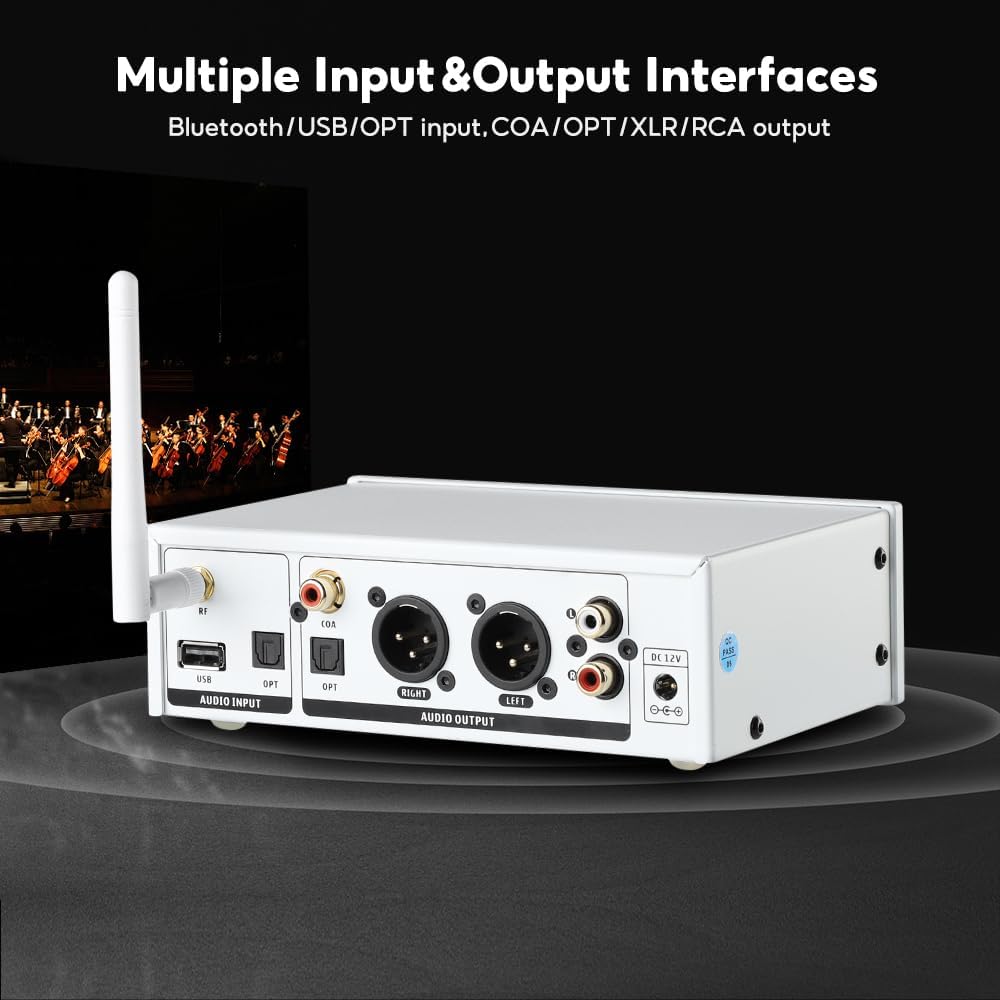
Image: Rear view of the AIYIMA DP02 unit, showing the antenna connector, USB audio input, optical input, coaxial input, XLR balanced outputs, RCA unbalanced outputs, and DC 12V power input.
Image: Labeled diagram of the AIYIMA DP02 rear panel, indicating the RF antenna connector, USB Audio Input, Optical Input, Coaxial Input, XLR Audio Output, RCA Audio Output, and DC12V Power Input.
- RF Antenna Connector: For connecting the Bluetooth antenna.
- USB Audio Input: Connects to USB flash drives for music playback.
- Optical Input (OPT): Digital audio input from devices like TVs or CD players.
- Coaxial Input (COA): Digital audio input from compatible devices.
- XLR Audio Output: Balanced analog audio output for connecting to amplifiers with XLR inputs.
- RCA Audio Output: Unbalanced analog audio output for connecting to amplifiers with RCA inputs.
- DC 12V Power Input: Connects to the provided power adapter.
Key Features
High-Quality Audio Output
The DP02 utilizes an AKM4493 decoding chip, along with NE552*2 and OPA1615*2 components, to deliver exceptional audio performance. It boasts a low distortion rate of 0.0006% and a signal-to-noise ratio of ≥116dB (RCA), ensuring a clean and accurate sound reproduction. It supports DSD512 and various high-resolution audio formats, providing a superior listening experience compared to traditional CD players.
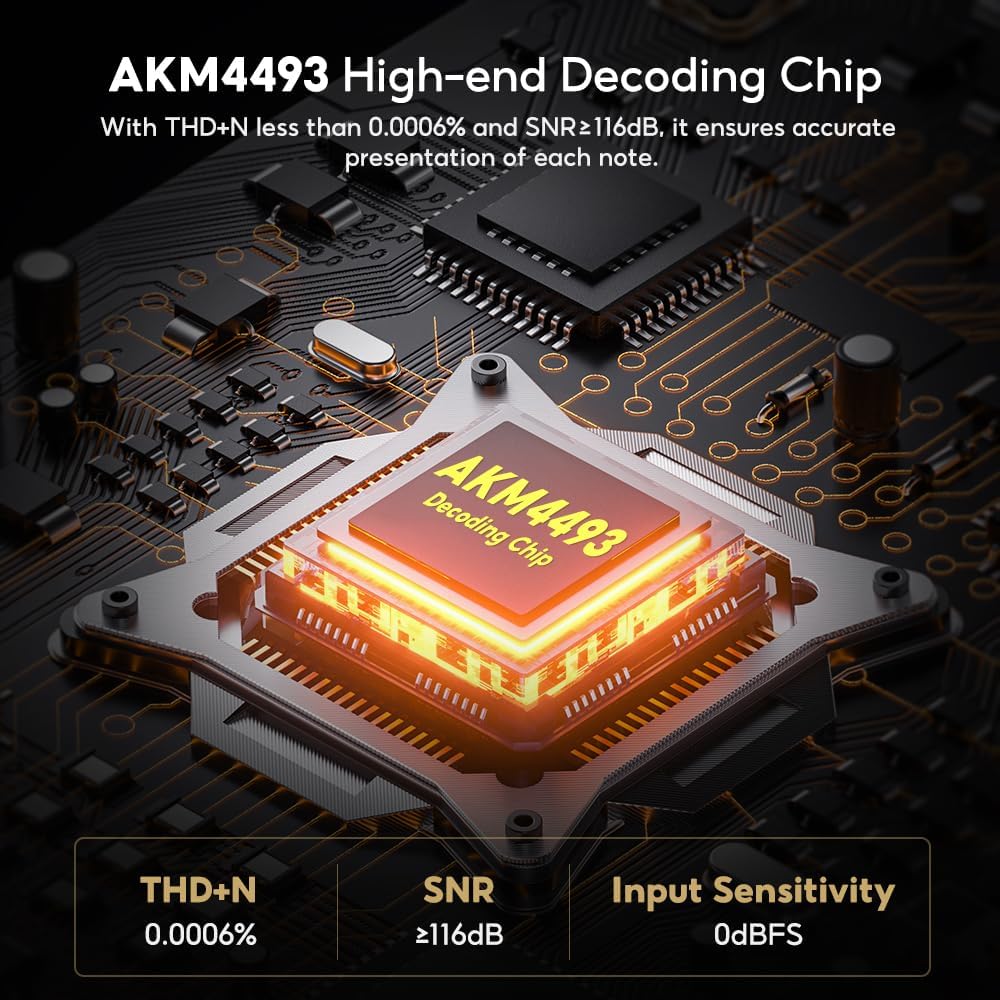
Image: Close-up of the AKM4493 high-end decoding chip, highlighting its low THD+N, high SNR, and input sensitivity.
Bluetooth 5.1 Connectivity
Equipped with the QCC5125 Bluetooth chip, the DP02 supports Bluetooth 5.1, offering stable and high-quality wireless audio streaming. It is compatible with a wide range of codecs including SBC, AAC, APTX, APTX-LL, APTX-HD, and LDAC, ensuring low latency and high-definition sound transmission from your Bluetooth-enabled devices.

Image: Close-up of the QCC5125 Bluetooth 5.1 chip, illustrating its support for various audio codecs like AAC, SBC, aptX, aptX HD, and LDAC.
Multiple Input and Output Interfaces
The DP02 offers versatile connectivity options to integrate seamlessly into your audio setup. Inputs include Optical, USB Disk, SD Card, and Bluetooth. Outputs include Optical, Coaxial, RCA, and XLR, allowing connection to various amplifiers, active speakers, or digital amplifiers.
- Supported Audio Formats: WAV (up to 768 KHz/32 bit), FLAC (up to 192 KHz/24 bit), APE/MP3 (up to 48 kHz/16 bit), DFF/ISO/DSF (DSD512), DTS (front left and right channels).
- File System Support: FAT32, exFAT (for USB disk and SD card). Multi-partition not supported.
- Storage Capacity: USB disk up to 2TB, USB flash disk and SD card up to 512GB.
Setup Guide
1. Power Connection
Connect the provided DC 12V power adapter to the "DC 12V Power Input" port on the rear panel of the DP02, then plug the adapter into a wall outlet.
2. Connecting to an Amplifier or Active Speakers
Choose the appropriate output based on your amplifier or active speaker's input type:
- RCA Output: Use RCA cables to connect the "RCA Audio Output" ports on the DP02 to the RCA input ports on your amplifier or active speakers.
- XLR Output: Use XLR cables to connect the "XLR Audio Output" ports on the DP02 to the XLR input ports on your amplifier or active speakers for balanced audio transmission.
- Optical/Coaxial Output: For connecting to a separate DAC or digital amplifier, use an optical or coaxial cable from the respective output ports on the DP02.

Image: The AIYIMA DP02 connected to an AIYIMA A07 MAX amplifier via RCA output, demonstrating a typical home stereo system setup.
3. Input Source Connection
Connect your desired audio source to the DP02:
- USB Disk/SD Card: Insert a USB flash drive into the "USB Audio Input" port or an SD card into the SD card slot on the side of the unit. Ensure the drive/card is formatted to FAT32 or exFAT.
- Bluetooth: Ensure the Bluetooth antenna is securely connected to the RF connector on the rear panel.
- Optical/Coaxial: Connect your digital audio source (e.g., TV, game console, CD player) to the "Optical Input" or "Coaxial Input" ports.
Operating Instructions
Basic Operation
- Power On/Off: Press the ON/OFF button on the front panel to turn the unit on or off.
- Input Selection: Use the Menu button to navigate to the input selection menu on the display screen. Use the navigation buttons (Previous/Next Song) to select your desired input source (USB, SD, Bluetooth, Optical, Coaxial).
- Music Playback (USB/SD): Once a USB disk or SD card is inserted and selected as the input, the device will automatically scan for playable audio files. Use the Play/Pause, Previous Song, and Next Song buttons to control playback. Long press the Previous/Next Song buttons for fast rewind/forward.
- Bluetooth Pairing: Select Bluetooth as the input. The DP02 will enter pairing mode. On your mobile device, search for "AIYIMA DP02" (or similar) in the Bluetooth settings and connect.
- Menu Navigation: Use the Menu button to enter the main menu. Use the Previous/Next Song buttons to scroll through options and Play/Pause to confirm. Use the Return button to go back.
Remote Control
The DP02 comes with a fully functional remote control for convenient operation from a distance. Ensure there are no obstructions between the remote and the infrared receiving window on the front panel of the DP02.

Image: A hand holding the AIYIMA DP02 remote control, with the DP02 unit and a TV in the background, illustrating remote operation.
The remote control allows you to:
- Power on/off the unit.
- Select input sources.
- Control music playback (play, pause, skip tracks, fast forward/rewind).
- Navigate through menus and adjust settings.
- Adjust VU meter display mode (internal signal or external sound via microphone).
VU Meter Display
The retro-style VU meter on the front panel provides a visual representation of the audio signal level. You can configure its display mode via the menu to show either internal signal levels or respond to external sound picked up by a built-in microphone, offering a dynamic visual element to your listening experience.
Maintenance
- Cleaning: Use a soft, dry cloth to clean the exterior of the unit. Do not use liquid cleaners or aerosols.
- Storage: If storing the unit for an extended period, disconnect it from power and store it in a cool, dry place.
- Ventilation: Ensure the ventilation openings are not blocked to prevent overheating.
Troubleshooting
| Problem | Possible Cause / Solution |
|---|---|
| No power |
|
| No sound output |
|
| USB disk/SD card not recognized |
|
| Bluetooth connection issues |
|
| Remote control not working |
|
Specifications
| Feature | Detail |
|---|---|
| Decoding Chip | AKM4493 |
| Bluetooth Chip | QCC5125 |
| Bluetooth Version | 5.1 |
| Bluetooth Codecs | SBC, AAC, APTX, APTX-LL, APTX-HD, LDAC |
| Supported WAV | 768 KHz/32 bit |
| Supported FLAC | 192 KHz/24 bit |
| Supported APE/MP3 | 48 kHz/16 bit |
| Supported DFF/ISO/DSF | DSD512 |
| Supported DTS | Front left and right channels output |
| File System | FAT32, exFAT (multi-partition not supported) |
| Max HDD Capacity | 2 TB |
| Max USB Flash/SD Card Capacity | 512 GB |
| Optical Sampling Rate | Max 192 kHz/24 bit |
| Distortion | 0.0006% |
| Signal-to-Noise Ratio (RCA) | ≥ 116 dB |
| Frequency Response | 20 Hz - 20 kHz (± 0.5 dB) |
| Measured Output Level (RCA) | 1.9 V |
| Measured Output Level (XLR) | 3.8 V |
| Input Modes | Optical, USB Disk, SD Card, Bluetooth |
| Output Modes | Optical, Coaxial, RCA, XLR |
| Power Supply | DC 12 V / ≥ 1.5 A |
Warranty and Support
AIYIMA products are designed for reliability and performance. For warranty information and technical support, please refer to the warranty card included in your package or visit the official AIYIMA website. If you encounter any issues not covered in this manual, please contact AIYIMA customer service for assistance.
You can also visit the AIYIMA Brand Store for more information and product updates.


