
1. Product Overview
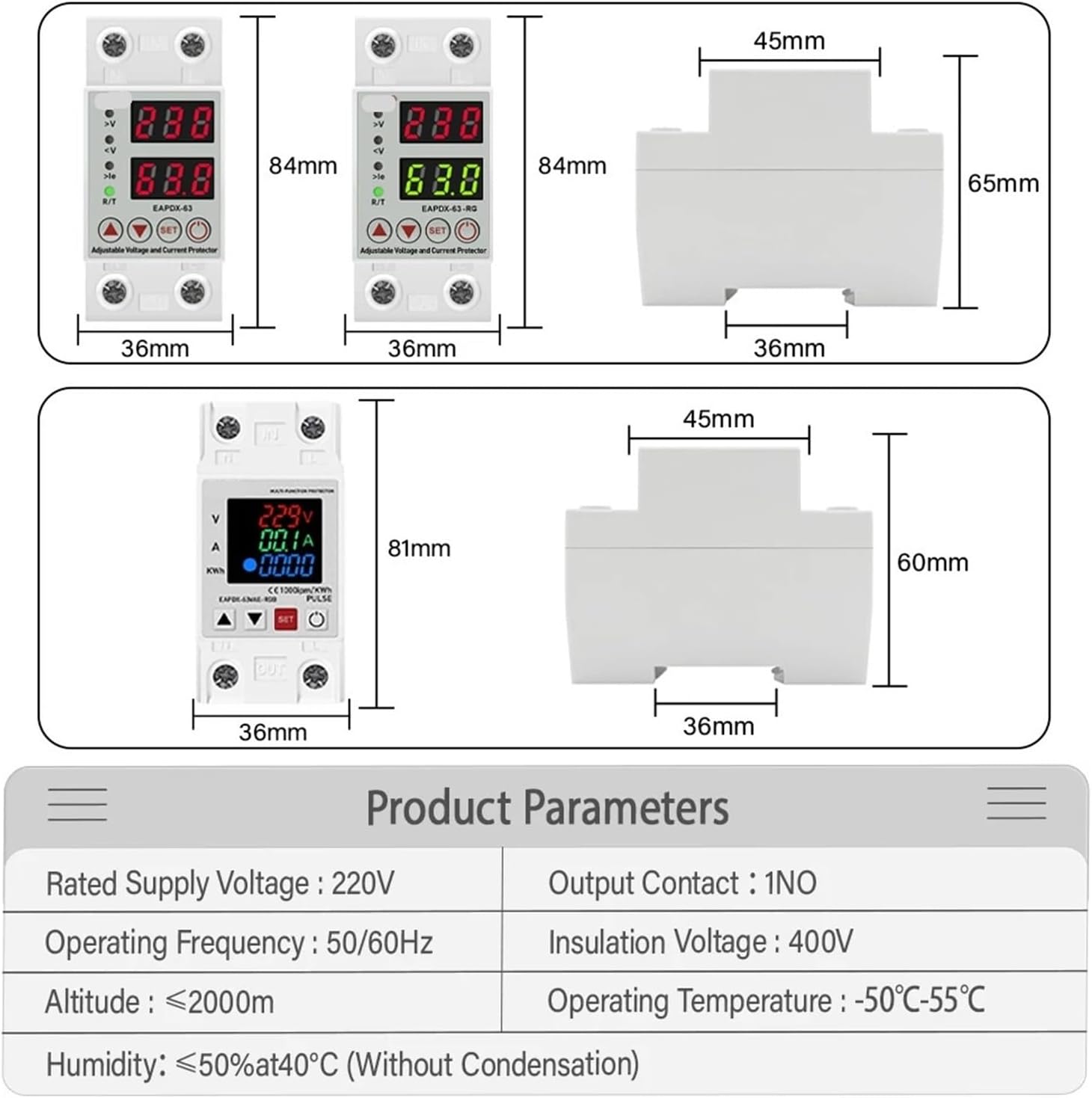
The SHIHUANI EAPDX-63 is an adjustable voltage protector relay designed for AC 230V systems. It provides comprehensive protection against over-voltage, under-voltage, and over-current conditions, ensuring the safety and longevity of connected electrical equipment. This device features a digital display for real-time voltage and current monitoring, along with adjustable protection parameters and an automatic recovery function.
Key Functions:
- Over-voltage protection
- Under-voltage protection
- Over-current protection
- Automatic recovery
- Real-time voltage display (voltage measurement)
- Real-time current display (current measurement)

2. Technical Specifications
The following table outlines the primary technical specifications for the EAPDX-63 model:
| Parameter | Value |
|---|---|
| Rated Voltage | 220V AC |
| Frequency | 50Hz/60Hz |
| Under Voltage Protection Range | 140V-200V (Adjustable) |
| Over Voltage Protection Range | 240V-300V (Adjustable) |
| Over Current Protection Range | 1A-63A (Adjustable) |
| Reconnect Time (Delay On Time) | 1s-300s (Adjustable) |
| Error in Real-time Current/Voltage | ±5% |
| Operating Temperature | -50°C to 55°C |
| Package Dimensions | 1.18 x 0.79 x 0.39 inches |
| Item Weight | 10.6 ounces |


3. Installation Guide
The EAPDX-63 is designed for Din Rail mounting. Ensure all power is disconnected before proceeding with installation.
3.1 Mounting
- Attach the device securely to a standard 35mm Din Rail in an electrical enclosure.
- Ensure adequate ventilation around the device.
3.2 Wiring
Connect the input and output wires as indicated on the device. The input terminals are marked 'IN' (N for Neutral, L for Live) and output terminals are marked 'OUT'.
- Connect the incoming AC 230V power supply to the 'IN' terminals.
- Connect the load (equipment to be protected) to the 'OUT' terminals.
- Ensure all connections are tight and secure to prevent loose contacts and overheating.

4. Operating Instructions
After proper installation and power-up, the device will display real-time voltage and current. Use the control buttons to adjust protection parameters.
4.1 Display Indicators
- >V: Indicates over-voltage condition.
- <V: Indicates under-voltage condition.
- >Ie: Indicates over-current condition.
- R/T: Indicates relay status (e.g., green for normal operation, red for fault/trip).
4.2 Function Settings (EAPDX-63)
To enter the setting mode, press and hold the SET button for more than 3 seconds. Use the UP (▲) and DOWN (▼) buttons to navigate through parameters and adjust values. Press SET again to confirm a value and move to the next parameter, or to exit the setting mode.
- P-1: Overvoltage Setting (240V-300V) - Adjust the upper voltage limit. If the voltage exceeds this value, the device will trip.
- P-2: Undervoltage Setting (140V-200V) - Adjust the lower voltage limit. If the voltage drops below this value, the device will trip.
- P-3: Overcurrent Setting (1A-63A) - Adjust the maximum current limit. If the current exceeds this value, the device will trip.
- P-4: Reset/Start Delay (1s-300s) - Sets the delay time before the device attempts to reconnect after a protection trip.
- P-5: Relay Recovery Delay (1s-300s) - Sets the delay for the relay to recover after a fault condition is cleared.
- P-6: Overcurrent Recovery Delay (1s-300s) - Specific delay for recovery after an overcurrent event.
After adjusting all desired parameters, press SET until the device exits the setting mode and returns to normal operation.
5. Maintenance
The SHIHUANI EAPDX-63 is designed for minimal maintenance. However, regular checks can help ensure its optimal performance and longevity.
- Cleaning: Periodically clean the device's exterior with a dry, soft cloth. Do not use abrasive cleaners or solvents.
- Connection Check: Annually, or as needed, verify that all wiring connections are secure and free from corrosion.
- Environmental Conditions: Ensure the device operates within its specified temperature range (-50°C to 55°C) and humidity levels.
6. Troubleshooting
If you encounter issues with your EAPDX-63, refer to the following common problems and solutions:
| Problem | Possible Cause | Solution |
|---|---|---|
| Device does not power on. | No input power; incorrect wiring. | Check power supply to 'IN' terminals; verify wiring connections. |
| Device trips frequently. | Protection parameters set too low/high; unstable power supply; load issues. | Adjust protection parameters (P-1, P-2, P-3); check power quality; inspect load for faults. |
| Display shows incorrect voltage/current. | Measurement error; calibration needed. | The device has a ±5% error margin. If readings are significantly off, contact support. |
| Device does not recover automatically. | Recovery delay (P-4, P-5, P-6) set too long; persistent fault. | Wait for the set recovery delay; check if the fault condition has truly cleared. |
If the problem persists after attempting these solutions, please contact customer support.
7. Warranty and Support
For warranty information and technical support, please refer to the purchase documentation or contact SHIHUANI customer service directly. Ensure you have your product model number (EAPDX-63) and purchase details available when seeking support.
For further assistance, please visit the official SHIHUANI website or contact your local distributor.