
1. Introduction and Overview
The Philips Facial Hair Remover 5000 Series is a personal groomer specifically designed for women to gently remove the finest hairs on the upper lip, chin, cheeks, and jawline. Its 360° hypoallergenic head ensures a skin-friendly experience, providing a smooth finish without pain. This device features self-sharpening blades that cut hair close to the skin, preparing your face for flawless make-up application. Its compact and lightweight design makes it ideal for quick touch-ups anywhere, anytime.
- Smooth Results: Designed for gentle removal of fine facial hairs.
- Gentle and Fast: 360° hypoallergenic head for efficient, pain-free hair removal.
- Spot-On Precision: Built-in mirror and full-circle LED light ensure maximum visibility to catch every hair.
- Flawless Make-up Application: Self-sharpening blades provide a smooth skin surface.
- Convenient and Portable: Compact, lightweight, cordless design, ready for use with an included AA battery.
2. What's in the Box
Your Philips Facial Hair Remover 5000 Series package includes the following items:
- 1x Philips Facial Hair Remover (Model BRR454/00)
- 1x Protective Cap with Built-in Mirror
- 1x Cleaning Brush
- 1x AA Battery

Image: The Philips Facial Hair Remover with its protective cap, which features a convenient built-in mirror for on-the-go use.
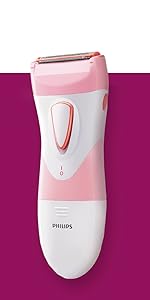
Image: The compact Philips Facial Hair Remover with its cap securely in place, ready for storage or travel.
3. Setup
3.1 Battery Installation
- Twist the bottom part of the device counter-clockwise to open the battery compartment.
- Insert the included AA battery, ensuring the positive (+) and negative (-) terminals align correctly with the indicators inside the compartment.
- Twist the bottom part clockwise to securely close the battery compartment.
Video: This video demonstrates how to install the battery and operate the Philips Facial Hair Remover, including how to turn it on and off.
4. Operating Instructions
4.1 Turning On/Off
- To turn on the device, twist the bottom part of the unit until the LED light illuminates and the shaver head begins to operate.
- To turn off the device, twist the bottom part back to its original position until the LED light turns off and the shaver head stops.
4.2 Facial Hair Removal
For optimal results, ensure your skin is clean and dry before use. The built-in full-circle LED light will help illuminate even the finest hairs for precise removal.
- Remove the protective cap.
- Turn on the device.
- Gently press the hypoallergenic head against your skin and move it in small circular motions over the desired areas (upper lip, chin, cheeks, jawline).
- Continue until all unwanted hairs are removed and your skin feels smooth.
- Turn off the device and replace the protective cap.

Image: A woman demonstrating the gentle use of the Philips Facial Hair Remover on her upper lip area.

Image: The Philips Facial Hair Remover being used on a woman's cheek, highlighting the full-circle LED light for visibility.
Video: This video illustrates the effortless hair removal process using the Philips 5000 Series, showing its application on various facial areas.
5. Maintenance and Cleaning
Regular cleaning ensures optimal performance and hygiene of your facial hair remover.
- Ensure the device is turned off before cleaning.
- Remove the protective cap.
- Gently twist and pull off the shaver head from the main body.
- Use the included cleaning brush to remove any accumulated hairs from the shaver head and the internal mechanism of the device.
- Rinse the shaver head under running water if necessary, ensuring it is completely dry before reattaching.
- Reattach the shaver head by aligning it with the body and twisting it clockwise until secure.
- Replace the protective cap.

Image: A close-up view of the Philips Facial Hair Remover's head, showing the self-sharpening blades and the full-circle LED light.
6. Safety Information
Please read and adhere to the following safety guidelines:
- Always use the facial hair remover on dry skin.
- Avoid contact with water during operation.
- Do not use the device while charging.
- Clean the head after each use and allow it to dry completely before storing.
- If you experience any skin irritation or discomfort, discontinue use immediately.
- Keep out of reach of children and pets.
7. Troubleshooting
If you encounter any issues with your Philips Facial Hair Remover, please consider the following:
- Device not turning on: Ensure the AA battery is correctly inserted with the proper polarity and is not depleted. Replace the battery if necessary.
- Reduced performance: The shaver head may be clogged with hair. Clean the head thoroughly using the provided brush as described in the Maintenance section.
- Skin irritation: Ensure your skin is clean and dry before use. If irritation persists, discontinue use.
For further assistance, please refer to the Warranty and Support section.
8. Specifications
| Model Name | Philips Series 5000 Facial Hair Removal |
| Model Number | BRR454/00 |
| Brand Name | Philips |
| Product Dimensions | 5.91 x 3.94 x 1.57 inches |
| Item Weight | 5.93 ounces |
| Power Source | Battery Powered (1 AA battery required, included) |
| Head Type | Rotary, 360° Hypoallergenic |
| Blade Material | Stainless Steel (Self-sharpening) |
| Color | Pink |
| Recommended Uses | Face: Upper Lip, Chin, Cheeks, Under Arm |
| Additional Features | Ergonomic Handle, Built-in Mirror in Cap, Full-Circle LED Light, Portable |
9. Warranty and Support
The Philips Facial Hair Remover 5000 Series comes with a 2-year warranty.
For warranty claims, product support, or any questions regarding your device, please contact Philips customer service through their official website or the contact information provided in your product packaging.


