
Xiaomi C305HW
Xiaomi Truclean W20 Cordless 3-in-1 Wet and Dry Vacuum User Manual
Model: C305HW
1. Introduction
The Xiaomi Truclean W20 is a versatile 3-in-1 wet and dry vacuum cleaner designed for efficient floor cleaning. It combines vacuuming, mopping, and self-cleaning functions, offering a comprehensive solution for various floor types. This manual provides detailed instructions for safe operation, maintenance, and troubleshooting to ensure optimal performance and longevity of your device.
2. Safety Information
Please read all safety warnings and instructions before using this appliance to avoid electric shock, fire, or serious injury. Keep this manual for future reference.
- Do not immerse the appliance in water or other liquids.
- Use only the provided charging base and power adapter.
- Keep hair, loose clothing, fingers, and all parts of the body away from openings and moving parts.
- Do not pick up flammable or combustible liquids, such as gasoline, or use in areas where they may be present.
- Do not pick up anything that is burning or smoking, such as cigarettes, matches, or hot ashes.
- Ensure the clean water tank is filled with water (up to 75°C for hot water mode) and the dirty water tank is properly installed before operation.
- This appliance is for household use only.
3. Product Overview
Familiarize yourself with the components of your Xiaomi Truclean W20 vacuum cleaner.
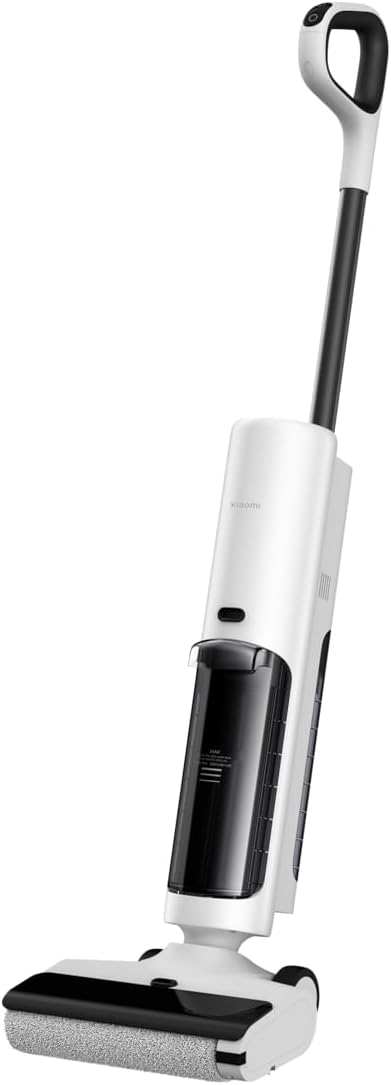
Figure 3.1: Front view of the Xiaomi Truclean W20 vacuum cleaner, showing the main body, handle, and floor brush.

Figure 3.2: Detailed front view, highlighting the clean and dirty water tanks.

Figure 3.3: Side view of the vacuum, showing the ergonomic handle and overall profile.

Figure 3.4: Rear view of the vacuum, illustrating the placement of the dirty water tank and charging contacts.
Components:
- Main Unit: Houses the motor, battery, and control panel.
- Handle: Ergonomically designed for comfortable grip and control.
- Clean Water Tank: For fresh water and cleaning solution. Capacity: 780 ml.
- Dirty Water Tank: Collects dirty water and debris.
- Floor Brush: Roller brush for scrubbing and vacuuming.
- Charging Base: For charging and self-cleaning.
- LED Display: 3.2-inch digital display for operational status and alerts.
4. Setup
4.1 Unpacking and Assembly
- Carefully remove all components from the packaging.
- Insert the handle into the main unit until it clicks into place.
- Place the charging base on a flat, stable surface near a power outlet.
- Connect the power adapter to the charging base and plug it into the wall outlet.
4.2 Initial Charging
Before first use, fully charge the vacuum cleaner. Place the assembled unit onto the charging base. The LED display will indicate charging status. A full charge takes approximately 5 hours. The battery provides up to 35 minutes of runtime.
4.3 Filling the Clean Water Tank
- Remove the clean water tank from the main unit.
- Open the tank cap.
- Fill the tank with clean tap water. For enhanced cleaning and bacteria elimination, you can use water heated up to 75°C. Do not exceed the MAX fill line.
- Close the cap securely and reinsert the tank into the main unit.
5. Operating Instructions
5.1 Powering On/Off
- To power on, press the power button on the handle.
- To power off, press and hold the power button until the display turns off.
5.2 Cleaning Modes
The Xiaomi Truclean W20 features intelligent stain detection and adjusts cleaning plans in real-time for efficient wet and dry vacuuming.

Figure 5.1: The vacuum cleaner positioned in a living room, ready for use.

Figure 5.2: A user demonstrating the vacuum's ability to clean up spilled debris on a hard floor.

Figure 5.3: The vacuum cleaner effectively cleaning a wet spill on a tiled bathroom floor.

Figure 5.4: The vacuum cleaner docked on its charging base in a home environment.
- Auto Mode: The vacuum automatically detects the level of dirt and adjusts suction power and water flow accordingly. This is the recommended mode for general cleaning.
- Hot Water Mode: Utilizes water up to 75°C for stronger cleaning power and bacterial elimination. Activate this mode for stubborn stains or for a deeper clean.
- Suction Only Mode: For dry vacuuming without water dispensing.
5.3 Using the Vacuum
- Ensure the clean water tank is filled and the dirty water tank is empty and properly installed.
- Press the power button to start. The vacuum will begin in Auto Mode by default.
- Tilt the handle back to engage the floor brush and begin cleaning.
- Move the vacuum slowly forward and backward over the area to be cleaned.
- The 3.2-inch LED display provides real-time information on battery level, cleaning mode, and alerts.
- The intelligent voice announcement system will provide helpful prompts and status updates.
6. Maintenance
Regular maintenance ensures the longevity and optimal performance of your Xiaomi Truclean W20.
6.1 Self-Cleaning and Drying
After each use, it is highly recommended to initiate the self-cleaning cycle.
- Place the vacuum cleaner on its charging base.
- Ensure there is sufficient water in the clean water tank and the dirty water tank is empty.
- Press the self-clean button on the handle or base (refer to the specific button on your model).
- The vacuum will perform a self-cleaning cycle for the roller brush and internal pipes.
- After cleaning, the base will initiate a 55°C hot air drying process to prevent odors and bacterial growth.
6.2 Emptying the Dirty Water Tank
Empty the dirty water tank after each cleaning session.
- Remove the dirty water tank from the main unit.
- Open the tank lid and dispose of the dirty water.
- Rinse the tank and the filter components thoroughly with clean water.
- Allow all parts to air dry completely before reassembling and reinserting the tank.
6.3 Cleaning the Roller Brush
While the self-cleaning function is effective, occasional manual cleaning of the roller brush may be necessary, especially if hair or debris is tangled.
- Turn off the vacuum and remove it from the charging base.
- Press the release button to detach the floor brush cover.
- Remove the roller brush.
- Use the provided cleaning tool to remove any tangled hair or debris from the brush.
- Rinse the roller brush under running water.
- Allow the brush to air dry completely before reinserting it.
7. Troubleshooting
Refer to the table below for common issues and their solutions.
| Problem | Possible Cause | Solution |
|---|---|---|
| Vacuum does not turn on | Low battery; Not properly charged | Place on charging base and ensure it is fully charged. |
| Poor suction or cleaning performance | Dirty water tank full; Clean water tank empty; Roller brush tangled/dirty; Filter clogged | Empty dirty water tank; Refill clean water tank; Clean roller brush; Clean or replace filter. |
| Water leakage | Tanks not properly installed; Tank caps not sealed | Ensure both clean and dirty water tanks are securely in place and their caps are tightly closed. |
| Unpleasant odor | Dirty water tank not emptied/cleaned; Roller brush not dried properly | Empty and thoroughly clean the dirty water tank. Ensure the roller brush is completely dry after cleaning, utilize the self-drying function. |
8. Specifications
| Feature | Detail |
|---|---|
| Model Number | C305HW (BHR8833EU) |
| Brand | Xiaomi |
| Type | Cordless 3-in-1 Wet and Dry Vacuum |
| Suction Power | 15000Pa |
| Clean Water Tank Capacity | 780 Milliliters |
| Battery Capacity | 3680 mAh |
| Runtime | Up to 35 minutes |
| Charging Time | Approx. 5 hours |
| Hot Water Mode Temperature | Up to 75°C |
| Self-Drying Temperature | 55°C |
| LED Display Size | 3.2 inches |
| Dimensions (L x W x H) | 23 x 27.1 x 109.3 cm |
| Weight | 4.22 Kilograms |
9. Warranty and Support
For warranty information and technical support, please refer to the warranty card included with your product or visit the official Xiaomi website. Keep your purchase receipt as proof of purchase.
Ask a question about this manual
Ask about setup, troubleshooting, compatibility, parts, safety, or missing instructions. Manuals+ will review the question and use this page’s manual context to help answer it.